
https://www.datanumen.com/blogs/4-methods-to-extract-tables-from-one-word-document-to-another/
原文地址如上
我这里主要是为了记录下来,怕以后忘了出处。
Batch Extract All Tables from Multiple Documents
批量处理表格数据
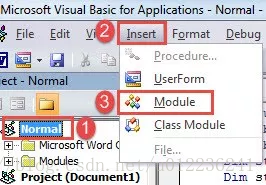
开启宏命令
在normal下面添加模块
Sub ExtractTablesFromMultiDocs()
  Dim objTable As Table
  Dim objDoc As Document, objNewDoc As Document
  Dim objRange As Range
  Dim strFile As String, strFolder As String

  '  Initialization
  strFolder = InputBox("Enter folder address here: ")
  strFile = Dir(strFolder & "\" & "*.docx", vbNormal)    '注意这里的docx可以替换成doc

  Set objNewDoc = Documents.Add

  '  Process each file in the folder.
  While strFile <> ""
    Set objDoc = Documents.Open(FileName:=strFolder & "\" & strFile)
    Set objDoc = ActiveDocument

    For Each objTable In objDoc.Tables
      objTable.Range.Select
      Selection.Copy

      Set objRange = objNewDoc.Range
      objRange.Collapse Direction:=wdCollapseEnd
      objRange.PasteSpecial DataType:=wdPasteRTF
      objRange.Collapse Direction:=wdCollapseEnd
      objRange.Text = vbCr
    Next objTable

    objDoc.Save
    objDoc.Close
    strFile = Dir()
  Wend

End Sub
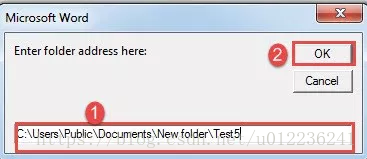
以上VBA程序

 浙公网安备 33010602011771号