
文本文件读写
最近在阅读Qt 5.9 C++开发指南,为了加深对书本上内容的理解,参照书上的讲解尝试写了一些demo,用于以后工作中查阅,如果涉及侵权请告知,实例程序samp7_1
mymainwindow.h
#ifndef MYMAINWINDOW_H
#define MYMAINWINDOW_H

#include <QMainWindow>
#include <QPlainTextEdit>
#include <QAction>

class MyMainWindow : public QMainWindow
{
    Q_OBJECT

private:
    QAction *_openByIODeviceAction;
    QAction *_saveByIODeviceAction;
    QAction *_openByTextStreamAction;
    QAction *_saveByTextStreamAction;
    QAction *_closeAction;

    QPlainTextEdit *_texteditByIODevice;
    QPlainTextEdit *_texteditByTextStream;
    QTabWidget *_tabwidget;

public:
    MyMainWindow(QWidget *parent = nullptr);
    ~MyMainWindow();
    void iniUI();
    void iniSignalSlots();

public slots:
    void openByIODevice();
    void saveByIODevice();
    void openByTextStream();
    void saveByTextStream();
};

#endif // MYMAINWINDOW_H
mymainwindow.cpp
#include "mymainwindow.h"
#include <QHBoxLayout>
#include <QVBoxLayout>
#include <QDir>
#include <QFileDialog>
#include <QFile>
#include <QToolBar>
#include <QIcon>
#include <QByteArray>
#include <QTextStream>

MyMainWindow::MyMainWindow(QWidget *parent) : QMainWindow(parent)
{
    iniUI();
    iniSignalSlots();
}

MyMainWindow::~MyMainWindow()
{

}

// 初始化界面
void MyMainWindow::iniUI()
{
    // action
    _openByIODeviceAction = new QAction(QIcon(":/images/openfile.bmp"), tr("QFile打开"));
    _saveByIODeviceAction = new QAction(QIcon(":/images/savefile.bmp"), tr("QFile另存为"));
    _openByTextStreamAction = new QAction(QIcon(":/images/openstream.bmp"), tr("QTextStream打开"));
    _saveByTextStreamAction = new QAction(QIcon(":/images/savestream.GIF"), tr("QTextStream另存为")); // 图片的文件名区分大小写,也就是说写小写不行
    _closeAction = new QAction(QIcon(":/images/exit.bmp"), tr("退出"));

    // toolbar
    QToolBar *toolbar = new QToolBar();
    toolbar->addAction(_openByIODeviceAction);
    toolbar->addAction(_saveByIODeviceAction);
    toolbar->addSeparator(); // 添加分割线
    toolbar->addAction(_openByTextStreamAction);
    toolbar->addAction(_saveByTextStreamAction);
    toolbar->addSeparator();
    toolbar->addAction(_closeAction);
    toolbar->setToolButtonStyle(Qt::ToolButtonTextUnderIcon);
    addToolBar(toolbar);

    // tabwidget 可以来回切换的窗口
    _texteditByIODevice = new QPlainTextEdit();
    _texteditByTextStream = new QPlainTextEdit();
    _tabwidget = new QTabWidget();
    _tabwidget->addTab(_texteditByIODevice, tr("QFile操作"));
    _tabwidget->addTab(_texteditByTextStream, tr("QTextStream操作"));
    setCentralWidget(_tabwidget);

}

// 初始化信号与槽
void MyMainWindow::iniSignalSlots()
{
    connect(_openByIODeviceAction, SIGNAL(triggered()), this, SLOT(openByIODevice()));
    connect(_saveByIODeviceAction, SIGNAL(triggered()), this, SLOT(saveByIODevice()));
    connect(_openByTextStreamAction, SIGNAL(triggered()), this, SLOT(openByTextStream()));
    connect(_saveByTextStreamAction, SIGNAL(triggered()), this, SLOT(saveByTextStream()));
    connect(_closeAction, SIGNAL(triggered()), this, SLOT(close()));
}

// IODevice读取文本内容
void MyMainWindow::openByIODevice()
{
    // 获取文件名
    QString currentPath = QDir::currentPath();
    QString caption = "QFile直接打开";
    QString filter = "程序文件(*.h *.cpp);;文本文件(*.txt);;所有文件(*.*)"; // 固定格式
    QString fileName = QFileDialog::getOpenFileName(this, caption, currentPath, filter); // 通过这个静态方法获取要读取的文件名

    // 使用IODevice读取文本内容
    QFile file(fileName);
    if(!file.exists())
    {
        return;
    }
    if(!file.open(QIODevice::ReadOnly | QIODevice::Text)) // 以只读方式和文本方式读取
    {
        return;
    }
    _texteditByIODevice->setPlainText(file.readAll()); // 用IODevice的方式读取文本内容
    file.close();

    // 设置标签界面
    _tabwidget->setCurrentIndex(0);
}

// 使用IODevice保存文本内容
void MyMainWindow::saveByIODevice()
{
    // 获取文件名
    QString currentPath = QDir::currentPath();
    QString caption = "QFile另存为";
    QString filter = "程序文件(*.h *.cpp);;文本文件(*.txt);;所有文件(*.*)";
    QString fileName = QFileDialog::getOpenFileName(this, caption, currentPath, filter);

    // 使用IODevice保存文本内容
    QFile file(fileName);
    if(!file.open(QIODevice::WriteOnly | QIODevice::Text)) // 以只写方式和文本方式保存,会覆盖
    {
        return;
    }
    QString text = _texteditByIODevice->toPlainText();
    QByteArray ba = text.toUtf8(); // qstring转字节数组,write只能写字节数组和const char *
    file.write(ba); // 写入文件
    file.close();

    // 设置标签界面
    _tabwidget->setCurrentIndex(0);
}

// 使用TextStream读取文本内容
void MyMainWindow::openByTextStream()
{
    // 获取文件名
    QString currentPath = QDir::currentPath();
    QString caption = "QTextStream打开";
    QString filter = "程序文件(*.h *.cpp);;文本文件(*.txt);;所有文件(*.*)";
    QString fileName = QFileDialog::getOpenFileName(this, caption, currentPath, filter);

    // 使用TextStream读取文本内容
    QFile file(fileName);
    if(!file.exists())
    {
        return;
    }
    if(!file.open(QIODevice::ReadOnly | QIODevice::Text))
    {
        return;
    }
    QTextStream stream(&file);
    stream.setCodec("UTF-8"); // 这样就行了,那我的文档编码应该是utf8的
//    stream.setAutoDetectUnicode(true); // 这句话不起作用,根据帮助手册的意思,只自动检测utf16,utf32,不知道理解的错不错
    _texteditByTextStream->setPlainText(stream.readAll()); // 和IODevice的区别???
    file.close();

    // 设置标签界面
    _tabwidget->setCurrentIndex(1);
}

// 使用TextStream保存文本内容
void MyMainWindow::saveByTextStream()
{
    // 获取文件名
    QString currentPath = QDir::currentPath();
    QString caption = "QTextStream另存为";
    QString filter = "程序文件(*.h *.cpp);;文本文件(*.txt);;所有文件(*.*)";
    QString fileName = QFileDialog::getOpenFileName(this, caption, currentPath, filter);

    // 使用TextStream保存文本内容
    QFile file(fileName);
    if(!file.open(QIODevice::WriteOnly | QIODevice::Text))
    {
        return;
    }
    QTextStream stream(&file); // 保存出去也需要设置编码格式,这样统一读取和写出的格式一致,不然下次读进来又乱码了
    stream.setCodec("UTF-8"); // 默认情况下,stream保存出去的方式是ansi
    QString text = _texteditByTextStream->toPlainText();
    stream << text; // 可以直接写入qstring类型
    file.close();

    // 设置标签界面
    _tabwidget->setCurrentIndex(1);
}
main.cpp
#include "mymainwindow.h"
#include <QApplication>
#include <QTextCodec>

int main(int argc, char *argv[])
{
    // 解决汉字乱码问题
//    QTextCodec *codec = QTextCodec::codecForName("UTF-8");
//    QTextCodec::setCodecForLocale(codec);

    QApplication a(argc, argv);
    MyMainWindow w;
    w.show();

    return a.exec();
}
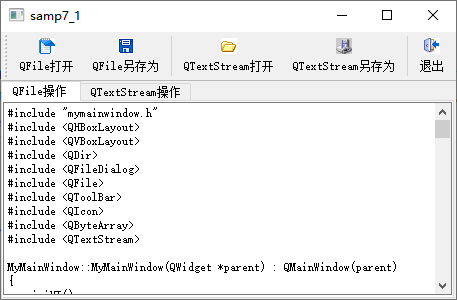
效果展示

 浙公网安备 33010602011771号