
IO流 字节流 字符流
| # day09【字节流、字符流】 |
|---|
主要内容 |
|
- IO流 |
- 字节流 |
- 字符流 |
- 异常处理 |
- Properties
![image]()
![image]()
![image]()
![image]()
|
| ## 教学目标 |
| |
| - [ ] 能够说出IO流的分类和功能 |
| - [ ] 能够使用字节输出流写出数据到文件 |
| - [ ] 能够使用字节输入流读取数据到程序 |
| - [ ] 能够理解读取数据read(byte[])方法的原理 |
| - [ ] 能够使用字节流完成文件的复制 |
| - [ ] 能够使用FileWirter写数据到文件 |
| - [ ] 能够说出FileWriter中关闭和刷新方法的区别 |
| - [ ] 能够使用FileWriter写数据的5个方法 |
| - [ ] 能够使用FileWriter写数据实现换行和追加写 |
| - [ ] 能够使用FileReader读数据 |
| - [ ] 能够使用FileReader读数据一次一个字符数组 |
| - [ ] 能够使用Properties的load方法加载文件中配置信息 |
| |
| # 第一章 IO概述 |
| |
| ## 1.1 什么是IO |
| |
| 生活中,你肯定经历过这样的场景。当你编辑一个文本文件,忘记了ctrl+s,可能文件就白白编辑了。当你电脑上插入一个U盘,可以把一个视频,拷贝到你的电脑硬盘里。那么数据都是在哪些设备上的呢?键盘、内存、硬盘、外接设备等等。 |
| |
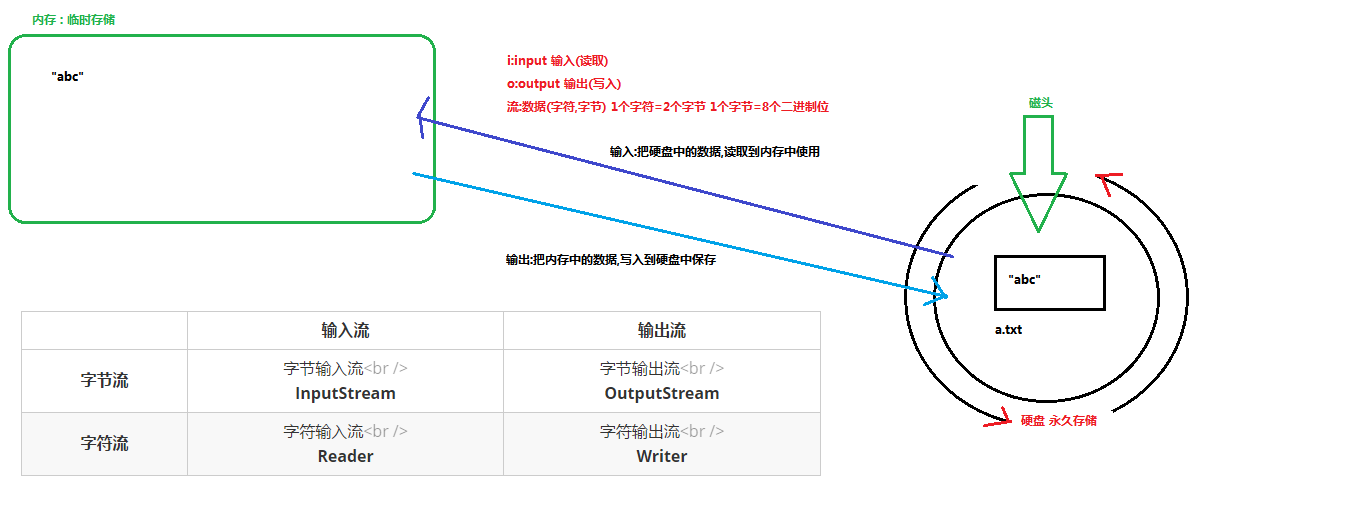
| 我们把这种数据的传输,可以看做是一种数据的流动,按照流动的方向,以内存为基准,分为输入input和输出output,即流向内存是输入流,流出内存的输出流。 |
| |
| Java中I/O操作主要是指使用java.io包下的内容,进行输入、输出操作。输入也叫做读取数据,输出也叫做作写出数据。 |
| |
| ## 1.2 IO的分类 |
| |
| 根据数据的流向分为:输入流和输出流。 |
| |
| * 输入流 :把数据从其他设备上读取到内存中的流。 |
| * 输出流 :把数据从内存中写出到其他设备上的流。 |
| |
| 格局数据的类型分为:字节流和字符流。 |
| |
| * 字节流 :以字节为单位,读写数据的流。 |
| * 字符流 :以字符为单位,读写数据的流。 |
| |
| ## 1.3 IO的流向说明图解 |
| |
|![]() |
|
| |
| ## 1.4 顶级父类们 |
| |
| | | 输入流 | 输出流 | |
| | :--------: | :-----------------------------: | :------------------------------: | |
| | 字节流 | 字节输入流
InputStream | 字节输出流
OutputStream | |
| | 字符流 | 字符输入流
Reader | 字符输出流
Writer | |
| |
| # 第二章 字节流 |
| |
| ## 2.1 一切皆为字节 |
| |
| 一切文件数据(文本、图片、视频等)在存储时,都是以二进制数字的形式保存,都一个一个的字节,那么传输时一样如此。所以,字节流可以传输任意文件数据。在操作流的时候,我们要时刻明确,无论使用什么样的流对象,底层传输的始终为二进制数据。 |
| |
| ## 2.2 字节输出流【OutputStream】 |
| |
|java.io.OutputStream抽象类是表示字节输出流的所有类的超类,将指定的字节信息写出到目的地。它定义了字节输出流的基本共性功能方法。 |
| |
| *public void close():关闭此输出流并释放与此流相关联的任何系统资源。 |
| *public void flush():刷新此输出流并强制任何缓冲的输出字节被写出。 |
| *public void write(byte[] b):将 b.length字节从指定的字节数组写入此输出流。 |
| *public void write(byte[] b, int off, int len):从指定的字节数组写入 len字节,从偏移量 off开始输出到此输出流。 |
| *public abstract void write(int b):将指定的字节输出流。 |
| |
| > 小贴士: |
| > |
| > close方法,当完成流的操作时,必须调用此方法,释放系统资源。 |
| |
| ## 2.3 FileOutputStream类 |
| |
|OutputStream有很多子类,我们从最简单的一个子类开始。 |
| |
|java.io.FileOutputStream类是文件输出流,用于将数据写出到文件。 |
| |
| ### 构造方法 |
| |
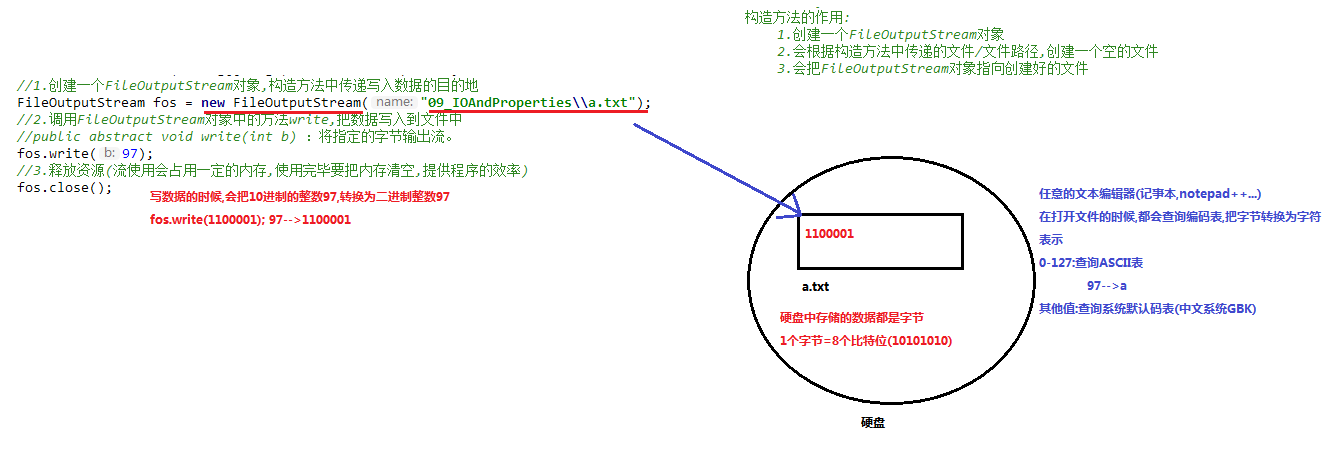
| *public FileOutputStream(File file):创建文件输出流以写入由指定的 File对象表示的文件。 |
| *public FileOutputStream(String name): 创建文件输出流以指定的名称写入文件。 |
| |
| 当你创建一个流对象时,必须传入一个文件路径。该路径下,如果没有这个文件,会创建该文件。如果有这个文件,会清空这个文件的数据。 |
| |
| * 构造举例,代码如下: |
| |
|java | | public class FileOutputStreamConstructor throws IOException { | | public static void main(String[] args) { | | | | File file = new File("a.txt"); | | FileOutputStream fos = new FileOutputStream(file); | | | | // 使用文件名称创建流对象 | | FileOutputStream fos = new FileOutputStream("b.txt"); | | } | | } | ||
| |
| ### 写出字节数据 |
| |
| 1. 写出字节:write(int b)方法,每次可以写出一个字节数据,代码使用演示: |
| |
|java | | public class FOSWrite { | | public static void main(String[] args) throws IOException { | | // 使用文件名称创建流对象 | | FileOutputStream fos = new FileOutputStream("fos.txt"); | | | | | | | | | | | | fos.close(); | | } | | } | | 输出结果: | | abc | ||
| |
| > 小贴士: |
| > |
| > 1. 虽然参数为int类型四个字节,但是只会保留一个字节的信息写出。 |
| > 2. 流操作完毕后,必须释放系统资源,调用close方法,千万记得。 |
| |
| 2. 写出字节数组:write(byte[] b),每次可以写出数组中的数据,代码使用演示: |
| |
|java | | public class FOSWrite { | | public static void main(String[] args) throws IOException { | | // 使用文件名称创建流对象 | | FileOutputStream fos = new FileOutputStream("fos.txt"); | | | | | | | | | | | | fos.close(); | | } | | } | | 输出结果: | | 黑马程序员 | ||
| |
| 3. 写出指定长度字节数组:write(byte[] b, int off, int len),每次写出从off索引开始,len个字节,代码使用演示: |
| |
|java | | public class FOSWrite { | | public static void main(String[] args) throws IOException { | | // 使用文件名称创建流对象 | | FileOutputStream fos = new FileOutputStream("fos.txt"); | | | | | | | | fos.write(b,2,2); | | | | fos.close(); | | } | | } | | 输出结果: | | cd | ||
| |
| ### 数据追加续写 |
| |
| 经过以上的演示,每次程序运行,创建输出流对象,都会清空目标文件中的数据。如何保留目标文件中数据,还能继续添加新数据呢? |
| |
| -public FileOutputStream(File file, boolean append): 创建文件输出流以写入由指定的 File对象表示的文件。 |
| -public FileOutputStream(String name, boolean append): 创建文件输出流以指定的名称写入文件。 |
| |
| 这两个构造方法,参数中都需要传入一个boolean类型的值,true表示追加数据,false表示清空原有数据。这样创建的输出流对象,就可以指定是否追加续写了,代码使用演示: |
|java | public class FOSWrite { | public static void main(String[] args) throws IOException { | | // 使用文件名称创建流对象 | | FileOutputStream fos = new FileOutputStream("fos.txt",true); | | | | | | | | fos.write(b); | | | | fos.close(); | | } | | } | | 文件操作前:cd | | 文件操作后:cdabcde | ||
| |
| ### 写出换行 |
| |
| Windows系统里,换行符号是\r\n。把 |
| |
| 以指定是否追加续写了,代码使用演示: |
| |
|java | | public class FOSWrite { | | public static void main(String[] args) throws IOException { | | // 使用文件名称创建流对象 | | FileOutputStream fos = new FileOutputStream("fos.txt"); | | | | | | | | for (int i = 0; i < words.length; i++) { | | | | fos.write(words[i]); | | | | fos.write("\r\n".getBytes()); | | } | | | | fos.close(); | | } | | } | | | | 输出结果: | | a | | b | | c | | d | | e | ||
| |
| > * 回车符\r和换行符\n: |
| > * 回车符:回到一行的开头(return)。 |
| > * 换行符:下一行(newline)。 |
| > * 系统中的换行: |
| > * Windows系统里,每行结尾是回车+换行,即\r\n; |
| > * Unix系统里,每行结尾只有换行,即\n; |
| > * Mac系统里,每行结尾是回车,即\r。从 Mac OS X开始与Linux统一。 |
| |
| ## 2.4 字节输入流【InputStream】 |
| |
|java.io.InputStream抽象类是表示字节输入流的所有类的超类,可以读取字节信息到内存中。它定义了字节输入流的基本共性功能方法。 |
| |
| -public void close():关闭此输入流并释放与此流相关联的任何系统资源。 |
| -public abstract int read(): 从输入流读取数据的下一个字节。 |
| -public int read(byte[] b): 从输入流中读取一些字节数,并将它们存储到字节数组 b中 。 |
| |
| > 小贴士: |
| > |
| > close方法,当完成流的操作时,必须调用此方法,释放系统资源。 |
| |
| ## 2.5 FileInputStream类 |
|
java.io.FileInputStream类是文件输入流,从文件中读取字节。 |
|
 |
|构造方FA
| * FileInputStream(File file): 通过打开与实际文件的连接来创建一个 FileInputStream ,该文件由文件系统中的 File对象 file命名。 |
| * FileInputStream(String name): 通过打开与实际文件的连接来创建一个 FileInputStream ,该文件由文件系统中的路径名 name命名。 |
| |
| 当你创建一个流对象时,必须传入一个文件路径。该路径下,如果没有该文件,会抛出FileNotFoundException 。 |
| |
| - 构造举例,代码如下: |
| |
| java | | public class FileInputStreamConstructor throws IOException{ | | public static void main(String[] args) { | | | | File file = new File("a.txt"); | | FileInputStream fos = new FileInputStream(file); | | | | // 使用文件名称创建流对象 | | FileInputStream fos = new FileInputStream("b.txt"); | | } | | } | | |
| |
| ### 读取字节数据 |
| |
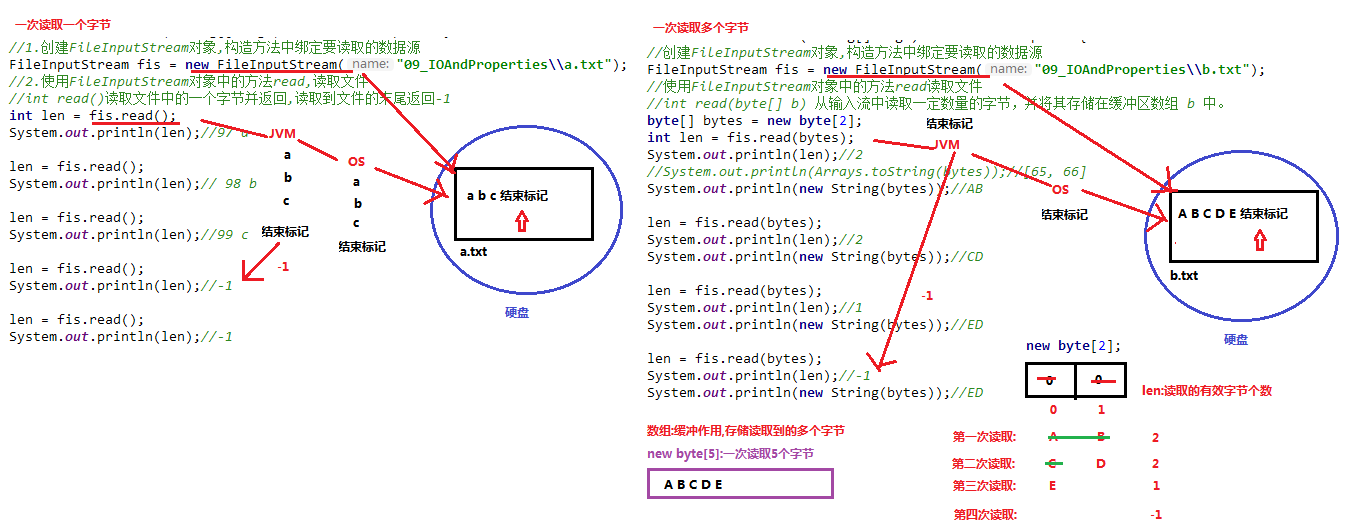
| 1. 读取字节:read方法,每次可以读取一个字节的数据,提升为int类型,读取到文件末尾,返回-1,代码使用演示: |
| |
| java | | public class FISRead { | | public static void main(String[] args) throws IOException{ | | | | | | | | int read = fis.read(); | | System.out.println((char) read); | | read = fis.read(); | | System.out.println((char) read); | | read = fis.read(); | | System.out.println((char) read); | | read = fis.read(); | | System.out.println((char) read); | | read = fis.read(); | | System.out.println((char) read); | | | | | | System.out.println( read); | | | | fis.close(); | | } | | } | | 输出结果: | | a | | b | | c | | d | | e | | -1 | | |
| |
| 循环改进读取方式,代码使用演示: |
| |
| java | | public class FISRead { | | public static void main(String[] args) throws IOException{ | | | | | | | | int b ; | | // 循环读取 | | while ((b = fis.read())!=-1) { | | System.out.println((char)b); | | } | | | | fis.close(); | | } | | } | | 输出结果: | | a | | b | | c | | d | | e | | |
| |
| > 小贴士: |
| > |
| > 1. 虽然读取了一个字节,但是会自动提升为int类型。 |
| > 2. 流操作完毕后,必须释放系统资源,调用close方法,千万记得。 |
| |
| 2. 使用字节数组读取:read(byte[] b),每次读取b的长度个字节到数组中,返回读取到的有效字节个数,读取到末尾时,返回-1 ,代码使用演示: |
| |
| java | | public class FISRead { | | public static void main(String[] args) throws IOException{ | | | | | | | | int len ; | | // 定义字节数组,作为装字节数据的容器 | | byte[] b = new byte[2]; | | // 循环读取 | | while (( len= fis.read(b))!=-1) { | | | | System.out.println(new String(b)); | | } | | | | fis.close(); | | } | | } | | | | 输出结果: | | ab | | cd | | ed | | |
| |
| 错误数据d,是由于最后一次读取时,只读取一个字节e,数组中,上次读取的数据没有被完全替换,所以要通过len ,获取有效的字节,代码使用演示: |
| |
| java | | public class FISRead { | | public static void main(String[] args) throws IOException{ | | | | | | | | int len ; | | // 定义字节数组,作为装字节数据的容器 | | byte[] b = new byte[2]; | | // 循环读取 | | while (( len= fis.read(b))!=-1) { | | | | System.out.println(new String(b,0,len));// len 每次读取的有效字节个数 | | } | | | | fis.close(); | | } | | } | | | | 输出结果: | | ab | | cd | | e | | |
| |
| > 小贴士: |
| > |
| > 使用数组读取,每次读取多个字节,减少了系统间的IO操作次数,从而提高了读写的效率,建议开发中使用。 |
| |
| ## 2.6 字节流练习:图片复制 |
| |
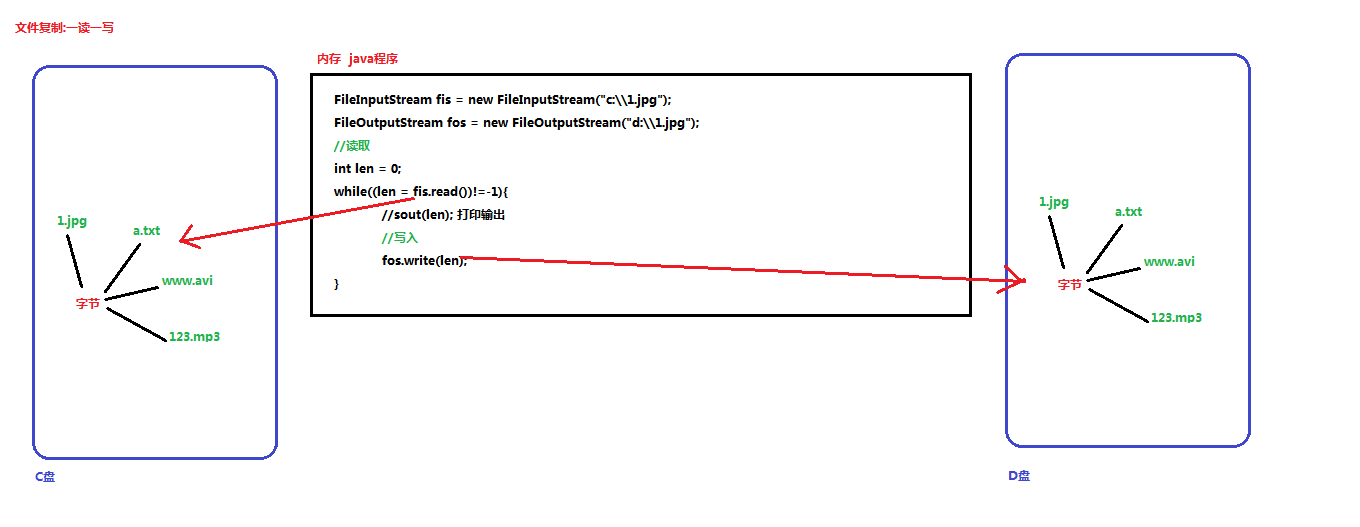
| ### 复制原理图解 |
| |
|  |
|
| |
| ### 案例实现 |
| |
| 复制图片文件,代码使用演示: |
| |
| java | | public class Copy { | | public static void main(String[] args) throws IOException { | | // 1.创建流对象 | | // 1.1 指定数据源 | | FileInputStream fis = new FileInputStream("D:\\test.jpg"); | | // 1.2 指定目的地 | | FileOutputStream fos = new FileOutputStream("test_copy.jpg"); | | | | // 2.读写数据 | | // 2.1 定义数组 | | byte[] b = new byte[1024]; | | // 2.2 定义长度 | | int len; | | // 2.3 循环读取 | | while ((len = fis.read(b))!=-1) { | | // 2.4 写出数据 | | fos.write(b, 0 , len); | | } | | | | // 3.关闭资源 | | fos.close(); | | fis.close(); | | } | | } | | |
| |
| > 小贴士: |
| > |
| > 流的关闭原则:先开后关,后开先关。 |
| |
| # 第三章 字符流 |
| |
| 当使用字节流读取文本文件时,可能会有一个小问题。就是遇到中文字符时,可能不会显示完整的字符,那是因为一个中文字符可能占用多个字节存储。所以Java提供一些字符流类,以字符为单位读写数据,专门用于处理文本文件。 |
| |
| ## 3.1 字符输入流【Reader】 |
| |
| java.io.Reader抽象类是表示用于读取字符流的所有类的超类,可以读取字符信息到内存中。它定义了字符输入流的基本共性功能方法。 |
| |
| - public void close() :关闭此流并释放与此流相关联的任何系统资源。 |
| - public int read(): 从输入流读取一个字符。 |
| - public int read(char[] cbuf): 从输入流中读取一些字符,并将它们存储到字符数组 cbuf中 。 |
| |
| ## 3.2 FileReader类 |
| |
| java.io.FileReader 类是读取字符文件的便利类。构造时使用系统默认的字符编码和默认字节缓冲区。 |
| |
| > 小贴士: |
| > |
| > 1. 字符编码:字节与字符的对应规则。Windows系统的中文编码默认是GBK编码表。 |
| > |
| > idea中UTF-8 |
| > |
| > 2. 字节缓冲区:一个字节数组,用来临时存储字节数据。 |
| |
| ### 构造方法 |
| |
| - FileReader(File file): 创建一个新的 FileReader ,给定要读取的File对象。 |
| - FileReader(String fileName): 创建一个新的 FileReader ,给定要读取的文件的名称。 |
| |
| 当你创建一个流对象时,必须传入一个文件路径。类似于FileInputStream 。 |
| |
| - 构造举例,代码如下: |
| |
| java | | public class FileReaderConstructor throws IOException{ | | public static void main(String[] args) { | | | | File file = new File("a.txt"); | | FileReader fr = new FileReader(file); | | | | // 使用文件名称创建流对象 | | FileReader fr = new FileReader("b.txt"); | | } | | } | | |
| |
| ### 读取字符数据 |
| |
| 1. 读取字符:read方法,每次可以读取一个字符的数据,提升为int类型,读取到文件末尾,返回-1,循环读取,代码使用演示: |
| |
| java | | public class FRRead { | | public static void main(String[] args) throws IOException { | | | | | | | | int b ; | | // 循环读取 | | while ((b = fr.read())!=-1) { | | System.out.println((char)b); | | } | | | | fr.close(); | | } | | } | | 输出结果: | | 黑 | | 马 | | 程 | | 序 | | 员 | | |
| |
| > 小贴士:虽然读取了一个字符,但是会自动提升为int类型。 |
| |
| 2. 使用字符数组读取:read(char[] cbuf),每次读取b的长度个字符到数组中,返回读取到的有效字符个数,读取到末尾时,返回-1 ,代码使用演示: |
| |
| java | | public class FRRead { | | public static void main(String[] args) throws IOException { | | | | | | | | int len ; | | // 定义字符数组,作为装字符数据的容器 | | char[] cbuf = new char[2]; | | // 循环读取 | | while ((len = fr.read(cbuf))!=-1) { | | System.out.println(new String(cbuf)); | | } | | | | fr.close(); | | } | | } | | 输出结果: | | 黑马 | | 程序 | | 员序 | | |
| |
| 获取有效的字符改进,代码使用演示: |
| |
| java | | public class FISRead { | | public static void main(String[] args) throws IOException { | | | | | | | | int len ; | | // 定义字符数组,作为装字符数据的容器 | | char[] cbuf = new char[2]; | | // 循环读取 | | while ((len = fr.read(cbuf))!=-1) { | | System.out.println(new String(cbuf,0,len)); | | } | | | | fr.close(); | | } | | } | | | | 输出结果: | | 黑马 | | 程序 | | 员 | | |
| |
| ## 3.3 字符输出流【Writer】 |
| |
| java.io.Writer 抽象类是表示用于写出字符流的所有类的超类,将指定的字符信息写出到目的地。它定义了字节输出流的基本共性功能方法。 |
| |
| - void write(int c) 写入单个字符。 |
| - void write(char[] cbuf) 写入字符数组。 |
| - abstract void write(char[] cbuf, int off, int len) 写入字符数组的某一部分,off数组的开始索引,len写的字符个数。 |
| - void write(String str) 写入字符串。 |
| - void write(String str, int off, int len) 写入字符串的某一部分,off字符串的开始索引,len写的字符个数。 |
| - void flush() 刷新该流的缓冲。 |
| - void close() 关闭此流,但要先刷新它。 |
| |
| ## 3.4 FileWriter类 |
| |
| java.io.FileWriter 类是写出字符到文件的便利类。构造时使用系统默认的字符编码和默认字节缓冲区。 |
| |
| ### 构造方法 |
| |
| - FileWriter(File file): 创建一个新的 FileWriter,给定要读取的File对象。 |
| - FileWriter(String fileName): 创建一个新的 FileWriter,给定要读取的文件的名称。 |
| |
| 当你创建一个流对象时,必须传入一个文件路径,类似于FileOutputStream。 |
| |
| - 构造举例,代码如下: |
| |
| java | | public class FileWriterConstructor { | | public static void main(String[] args) throws IOException { | | | | File file = new File("a.txt"); | | FileWriter fw = new FileWriter(file); | | | | // 使用文件名称创建流对象 | | FileWriter fw = new FileWriter("b.txt"); | | } | | } | | |
| |
| ### 基本写出数据 |
| |
| 写出字符:write(int b) 方法,每次可以写出一个字符数据,代码使用演示: |
| |
| java | | public class FWWrite { | | public static void main(String[] args) throws IOException { | | // 使用文件名称创建流对象 | | FileWriter fw = new FileWriter("fw.txt"); | | | | | | | | | | | | | | | | 【注意】关闭资源时,与FileOutputStream不同。 | | | | */ | | // fw.close(); | | } | | } | | 输出结果: | | abC田 | | |
| |
| > 小贴士: |
| > |
| > 1. 虽然参数为int类型四个字节,但是只会保留一个字符的信息写出。 |
| > 2. 未调用close方法,数据只是保存到了缓冲区,并未写出到文件中。 |
| |
| ### 关闭和刷新 |
| |
| 因为内置缓冲区的原因,如果不关闭输出流,无法写出字符到文件中。但是关闭的流对象,是无法继续写出数据的。如果我们既想写出数据,又想继续使用流,就需要flush 方法了。 |
| |
| * flush :刷新缓冲区,流对象可以继续使用。 |
| * close :先刷新缓冲区,然后通知系统释放资源。流对象不可以再被使用了。 |
| |
| 代码使用演示: |
| |
| java | | public class FWWrite { | | public static void main(String[] args) throws IOException { | | // 使用文件名称创建流对象 | | FileWriter fw = new FileWriter("fw.txt"); | | // 写出数据,通过flush | | fw.write('刷'); // 写出第1个字符 | | fw.flush(); | | fw.write('新'); // 继续写出第2个字符,写出成功 | | fw.flush(); | | | | | | fw.write('关'); // 写出第1个字符 | | fw.close(); | | fw.write('闭'); // 继续写出第2个字符,【报错】java.io.IOException: Stream closed | | fw.close(); | | } | | } | | |
| |
| > 小贴士:即便是flush方法写出了数据,操作的最后还是要调用close方法,释放系统资源。 |
| |
| ### 写出其他数据 |
| |
| 1. 写出字符数组 :write(char[] cbuf) 和 write(char[] cbuf, int off, int len) ,每次可以写出字符数组中的数据,用法类似FileOutputStream,代码使用演示: |
| |
| java | | public class FWWrite { | | public static void main(String[] args) throws IOException { | | // 使用文件名称创建流对象 | | FileWriter fw = new FileWriter("fw.txt"); | | | | | | | | | | | | | | | | fw.write(b,2,2); // 程序 | | | | | | fos.close(); | | } | | } | | |
| |
| 2. 写出字符串:write(String str) 和 write(String str, int off, int len) ,每次可以写出字符串中的数据,更为方便,代码使用演示: |
| |
| java | | public class FWWrite { | | public static void main(String[] args) throws IOException { | | // 使用文件名称创建流对象 | | FileWriter fw = new FileWriter("fw.txt"); | | | | | | | | | | | | | | | | fw.write(msg,2,2); | | | | // 关闭资源 | | fos.close(); | | } | | } | | |
| |
| 3. 续写和换行:操作类似于FileOutputStream。 |
| |
| java | | public class FWWrite { | | public static void main(String[] args) throws IOException { | | // 使用文件名称创建流对象,可以续写数据 | | FileWriter fw = new FileWriter("fw.txt",true); | | | | fw.write("黑马"); | | | | | | | | | | | | fw.close(); | | } | | } | | 输出结果: | | 黑马 | | 程序员 | | |
| |
| > 小贴士:字符流,只能操作文本文件,不能操作图片,视频等非文本文件。 |
| > |
| > 当我们单纯读或者写文本文件时 使用字符流 其他情况使用字节流 |
| |
| # 第四章 IO异常的处理 |
| |
| ### JDK7前处理 |
| |
| 之前的入门练习,我们一直把异常抛出,而实际开发中并不能这样处理,建议使用try...catch...finally 代码块,处理异常部分,代码使用演示: |
| |
| java | | public class HandleException1 { | | public static void main(String[] args) { | | | | FileWriter fw = null; | | try { | | //创建流对象 | | fw = new FileWriter("fw.txt"); | | // 写出数据 | | fw.write("黑马程序员"); //黑马程序员 | | } catch (IOException e) { | | e.printStackTrace(); | | } finally { | | try { | | if (fw != null) { | | fw.close(); | | } | | } catch (IOException e) { | | e.printStackTrace(); | | } | | } | | } | | } | | |
| |
| ### JDK7的处理(扩展知识点了解内容) |
| |
| 还可以使用JDK7优化后的try-with-resource 语句,该语句确保了每个资源在语句结束时关闭。所谓的资源(resource)是指在程序完成后,必须关闭的对象。 |
| |
| 格式: |
| |
| java | | try (创建流对象语句,如果多个,使用';'隔开) { | | | | } catch (IOException e) { | | | | } | | |
| |
| 代码使用演示: |
| |
| java | | public class HandleException2 { | | public static void main(String[] args) { | | | | try ( FileWriter fw = new FileWriter("fw.txt"); ) { | | // 写出数据 | | fw.write("黑马程序员"); //黑马程序员 | | } catch (IOException e) { | | e.printStackTrace(); | | } | | } | | } | | |
| |
| ### JDK9的改进(扩展知识点了解内容) |
| |
| JDK9中try-with-resource 的改进,对于引入对象的方式,支持的更加简洁。被引入的对象,同样可以自动关闭,无需手动close,我们来了解一下格式。 |
| |
| 改进前格式: |
| |
| java | | // 被final修饰的对象 | | final Resource resource1 = new Resource("resource1"); | | // 普通对象 | | Resource resource2 = new Resource("resource2"); | | // 引入方式:创建新的变量保存 | | try (Resource r1 = resource1; | | Resource r2 = resource2) { | | // 使用对象 | | } | | |
| |
| 改进后格式: |
| |
| java | | // 被final修饰的对象 | | final Resource resource1 = new Resource("resource1"); | | // 普通对象 | | Resource resource2 = new Resource("resource2"); | | | | // 引入方式:直接引入 | | try (resource1; resource2) { | | // 使用对象 | | } | | |
| |
| 改进后,代码使用演示: |
| |
| java | | public class TryDemo { | | public static void main(String[] args) throws IOException { | | | | final FileReader fr = new FileReader("in.txt"); | | FileWriter fw = new FileWriter("out.txt"); | | | | try (fr; fw) { | | | | int b; | | | | | | | | | | | | } catch (IOException e) { | | e.printStackTrace(); | | } | | } | | } | | |
| |
| # 第五章 属性集 |
| |
| ## 5.1 概述 |
| |
| java.util.Properties 继承于 Hashtable ,来表示一个持久的属性集。它使用键值结构存储数据,每个键及其对应值都是一个字符串。该类也被许多Java类使用,比如获取系统属性时,System.getProperties 方法就是返回一个Properties对象。 |
| |
| ## 5.2 Properties类 |
| |
| ### 构造方法 |
| |
| - public Properties() :创建一个空的属性列表。 |
| |
| ### 基本的存储方法 |
| |
| - public Object setProperty(String key, String value) : 保存一对属性。 |
| - public String getProperty(String key) :使用此属性列表中指定的键搜索属性值。 |
| - public Set<String> stringPropertyNames() :所有键的名称的集合。 |
| |
| java | | public class ProDemo { | | public static void main(String[] args) throws FileNotFoundException { | | // 创建属性集对象 | | Properties properties = new Properties(); | | // 添加键值对元素 | | properties.setProperty("filename", "a.txt"); | | properties.setProperty("length", "209385038"); | | properties.setProperty("location", "D:\\a.txt"); | | // 打印属性集对象 | | System.out.println(properties); | | // 通过键,获取属性值 | | System.out.println(properties.getProperty("filename")); | | System.out.println(properties.getProperty("length")); | | System.out.println(properties.getProperty("location")); | | | | // 遍历属性集,获取所有键的集合 | | Set<String> strings = properties.stringPropertyNames(); | | // 打印键值对 | | for (String key : strings ) { | | | | } | | } | | } | | 输出结果: | | {filename=a.txt, length=209385038, location=D:\a.txt} | | a.txt | | 209385038 | | D:\a.txt | | filename -- a.txt | | length -- 209385038 | | location -- D:\a.txt | | |
| |
| ### 与流相关的方法 |
| |
| - public void load(InputStream inStream): 从字节输入流中读取键值对。 |
| |
| 参数中使用了字节输入流,通过流对象,可以关联到某文件上,这样就能够加载文本中的数据了。文本数据格式: |
| |
| | | filename=a.txt | | length=209385038 | | location=D:\a.txt | | |
| |
| 加载代码演示: |
| |
| java | | public class ProDemo2 { | | public static void main(String[] args) throws FileNotFoundException { | | // 创建属性集对象 | | Properties pro = new Properties(); | | // 加载文本中信息到属性集 | | pro.load(new FileInputStream("read.txt")); | | // 遍历集合并打印 | | Set<String> strings = pro.stringPropertyNames(); | | for (String key : strings ) { | | | | } | | } | | } | | 输出结果: | | filename -- a.txt | | length -- 209385038 | | location -- D:\a.txt | | |
| |
| > 小贴士:文本中的数据,必须是键值对形式,可以使用空格、等号、冒号等符号分隔。 |

 浙公网安备 33010602011771号