
实验7:基于REST API的SDN北向应用实践
实验7:基于REST API的SDN北向应用实践
一、实验目的
能够编写程序调用OpenDaylight REST API实现特定网络功能;
能够编写程序调用Ryu REST API实现特定网络功能。
二、实验环境
下载虚拟机软件Oracle VisualBox或VMware;
在虚拟机中安装Ubuntu 20.04 Desktop amd64,并完整安装Mininet、OpenDaylight(Carbon版本)、Postman和Ryu;
三、实验要求
(一)基本要求
编写Python程序,调用OpenDaylight的北向接口实现以下功能
(1) 利用Mininet平台搭建下图所示网络拓扑,并连接OpenDaylight;
(2) 下发指令删除s1上的流表数据。
(3) 下发硬超时流表,实现拓扑内主机h1和h3网络中断20s。
(4) 获取s1上活动的流表数。
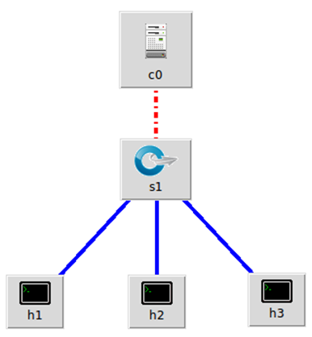
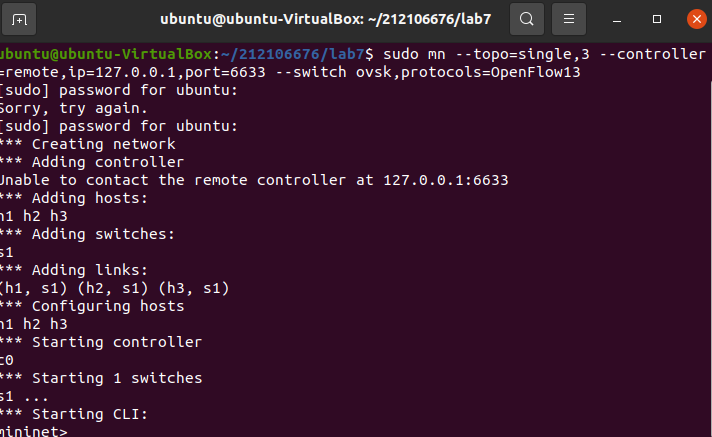
搭建拓扑 命令行输入sudo mn --topo=single,3 --controller=remote,ip=127.0.0.1,port=6633 --switch ovsk,protocols=OpenFlow13
Beryllium 版本 连接OpenDaylight ./distribution-karaf-0.4.4-Beryllium-SR4/bin/karaf feature:install odl-restconf odl-l2switch-switch-ui odl-openflowplugin-all odl-mdsal-apidocs odl-dlux-core odl-dlux-node odl-dlux-yangui
(2) 下发指令删除s1上的流表数据。
创建并编写delete.py文件
delete.py
import requests
from requests.auth import HTTPBasicAuth
if name == "main":
url = 'http://127.0.0.1:8181/restconf/config/opendaylight-inventory:nodes/node/openflow:1/'
headers = {'Content-Type': 'application/json'}
res = requests.delete(url, headers=headers, auth=HTTPBasicAuth('admin', 'admin'))
print (res.content)
命令行输入python delete.py

编写Python程序,调用Ryu的北向接口实现以下功能
(1) 实现上述OpenDaylight实验拓扑上相同的硬超时流表下发。
创建并编写 ryu_timeout.py 文件
ryu_timeout.py
import requests
if name == "main":
url = 'http://127.0.0.1:8080/stats/flowentry/add'
with open("./ryu_timeout.json") as file:
str = file.read()
headers = {'Content-Type': 'application/json'}
res = requests.post(url, str, headers=headers)
print (res.content)
创建并编写 ryu_timeout.json 文件
ryu_timeout.json
{
"dpid": 1,
"cookie": 1,
"cookie_mask": 1,
"table_id": 0,
"hard_timeout": 20,
"priority": 65535,
"flags": 1,
"match":{
"in_port":1
},
"actions":[
]
}
关闭ODL控制器,关闭上次的拓扑并清除拓扑sudo mn -c
启动ryu控制器ryu-manager ryu.app.simple_switch_13 ryu.app.ofctl_rest
创建拓扑sudo mn --topo=single,3 --mac --controller=remote,ip=127.0.0.1,port=6633 --switch ovsk,protocols=OpenFlow13
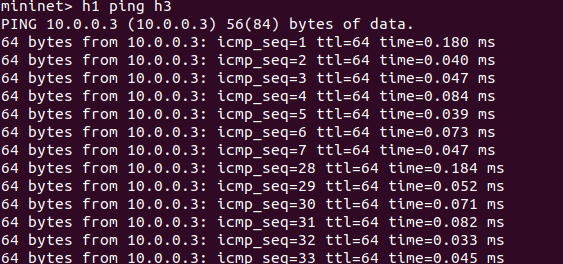
h1 ping h3
(2) 参考Ryu REST API的文档,基于VLAN实验的网络拓扑,编程实现相同的VLAN配置。
代码topo.py
topo.py
from mininet.topo import Topo
class MyTopo(Topo):
def init(self):
initilaize topology
Topo.init(self)
self.addSwitch("s1")
self.addSwitch("s2")
self.addHost("h1")
self.addHost("h2")
self.addHost("h3")
self.addHost("h4")
self.addLink("s1", "h1")
self.addLink("s1", "h2")
self.addLink("s2", "h3")
self.addLink("s2", "h4")
self.addLink("s1", "s2")
topos = {'mytopo': (lambda: MyTopo())}
代码Ryuvlan.py
import json
import requests
if name == "main":
url = 'http://127.0.0.1:8080/stats/flowentry/add'
headers = {'Content-Type': 'application/json'}
flow1 = {
"dpid": 1,
"priority": 1,
"match":{
"in_port": 1
},
"actions":[
{
"type": "PUSH_VLAN",
"ethertype": 33024
},
{
"type": "SET_FIELD",
"field": "vlan_vid",
"value": 4096
},
{
"type": "OUTPUT",
"port": 3
}
]
}
flow2 = {
"dpid": 1,
"priority": 1,
"match":{
"in_port": 2
},
"actions":[
{
"type": "PUSH_VLAN",
"ethertype": 33024
},
{
"type": "SET_FIELD",
"field": "vlan_vid",
"value": 4097
},
{
"type": "OUTPUT",
"port": 3
}
]
}
flow3 = {
"dpid": 1,
"priority": 1,
"match":{
"vlan_vid": 0
},
"actions":[
{
"type": "POP_VLAN",
"ethertype": 33024
},
{
"type": "OUTPUT",
"port": 1
}
]
}
flow4 = {
"dpid": 1,
"priority": 1,
"match": {
"vlan_vid": 1
},
"actions": [
{
"type": "POP_VLAN",
"ethertype": 33024
},
{
"type": "OUTPUT",
"port": 2
}
]
}
flow5 = {
"dpid": 2,
"priority": 1,
"match": {
"in_port": 1
},
"actions": [
{
"type": "PUSH_VLAN",
"ethertype": 33024
},
{
"type": "SET_FIELD",
"field": "vlan_vid",
"value": 4096
},
{
"type": "OUTPUT",
"port": 3
}
]
}
flow6 = {
"dpid": 2,
"priority": 1,
"match": {
"in_port": 2
},
"actions": [
{
"type": "PUSH_VLAN",
"ethertype": 33024
},
{
"type": "SET_FIELD",
"field": "vlan_vid",
"value": 4097
},
{
"type": "OUTPUT",
"port": 3
}
]
}
flow7 = {
"dpid": 2,
"priority": 1,
"match": {
"vlan_vid": 0
},
"actions": [
{
"type": "POP_VLAN",
"ethertype": 33024
},
{
"type": "OUTPUT",
"port": 1
}
]
}
flow8 = {
"dpid": 2,
"priority": 1,
"match": {
"vlan_vid": 1
},
"actions": [
{
"type": "POP_VLAN",
"ethertype": 33024
},
{
"type": "OUTPUT",
"port": 2
}
]
}
res1 = requests.post(url, json.dumps(flow1), headers=headers)
res2 = requests.post(url, json.dumps(flow2), headers=headers)
res3 = requests.post(url, json.dumps(flow3), headers=headers)
res4 = requests.post(url, json.dumps(flow4), headers=headers)
res5 = requests.post(url, json.dumps(flow5), headers=headers)
res6 = requests.post(url, json.dumps(flow6), headers=headers)
res7 = requests.post(url, json.dumps(flow7), headers=headers)
res8 = requests.post(url, json.dumps(flow8), headers=headers)
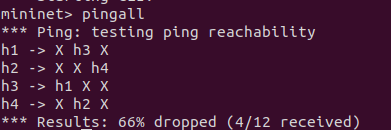
VLAN_ID Hosts
0 h1 h3
1 h2 h4
(二)进阶要求
OpenDaylight或Ryu任选其一,编程实现查看前序VLAN实验拓扑中所有节点(含交换机、主机)的名称,以及显示每台交换机的所有流表项。
(三)实验报告
请用Markdown排版;
将所有本实验相关文件保存在目录/home/用户名/学号/lab7/中;
(一)只需要提交实现相应Python代码和执行结果截图,其余文字请勿赘述;
(二)不做必须要求,有完成的同学请提交Python代码和运行结果,文件保存目录参照要求2。
个人总结,包括但不限于实验难度、实验过程遇到的困难及解决办法,个人感想,不少于200字。
实验较难。需要编写较多的代码,虽然有前几次实验的经验,但许多知识没经常使用又忘记了,一开始做起来没有头绪。,因此浏览了一下其他同学的代码,并理解代码各部分的功能,还需要借助文档,过程较为费时。这次实验是建立在前两次控制器实验的基础上进行的,由于过去一些时间,因此对之前的内容有点生疏,还总是犯曾经犯过的错误,所以就又复习了之前的博客,这之后思路才比较清晰。通过这次实验,我学习到了怎么利用python编程调用OpenDaylight REST API和Ryu REST API来实现特定网络功能。

 浙公网安备 33010602011771号