
将 NoSQL 数据库用作持久化基础设施
When you use NoSQL databases for your infrastructure data tier, you typically do not use an ORM like Entity Framework Core. Instead you use the API provided by the NoSQL engine, such as Azure Cosmos DB, MongoDB, Cassandra, RavenDB, CouchDB, or Azure Storage Tables.
当你在基础设施数据层使用 NoSQL 数据库时,通常不会使用像 Entity Framework Core 这样的 ORM 框架。取而代之的是,你会直接使用 NoSQL 引擎提供的 API,例如 Azure Cosmos DB、MongoDB、Cassandra、RavenDB、CouchDB 或 Azure Storage Tables。
However, when you use a NoSQL database, especially a document-oriented database like Azure Cosmos DB, CouchDB, or RavenDB, the way you design your model with DDD aggregates is partially similar to how you can do it in EF Core, in regards to the identification of aggregate roots, child entity classes, and value object classes. But, ultimately, the database selection will impact in your design.
然而,当你使用 NoSQL 数据库(尤其是像 Azure Cosmos DB、CouchDB 或 RavenDB 这样的面向文档的数据库)时,你使用 DDD 聚合(Aggregates)来设计模型的方式,在识别聚合根、子实体类和值对象类方面,与使用 EF Core 有部分相似之处。但最终,数据库的选型将会影响你的设计。
When you use a document-oriented database, you implement an aggregate as a single document, serialized in JSON or another format. However, the use of the database is transparent from a domain model code point of view. When using a NoSQL database, you still are using entity classes and aggregate root classes, but with more flexibility than when using EF Core because the persistence is not relational.
当你使用面向文档的数据库时,你会将一个聚合实现为单个文档,并以 JSON 或其他格式进行序列化。不过,从领域模型代码的角度来看,数据库的使用是透明的。在使用 NoSQL 数据库时,你依然在使用实体类和聚合根类,但比使用 EF Core 时拥有更大的灵活性,因为其持久化方式不再是关系型的。
The difference is in how you persist that model. If you implemented your domain model based on POCO entity classes, agnostic to the infrastructure persistence, it might look like you could move to a different persistence infrastructure, even from relational to NoSQL. However, that should not be your goal. There are always constraints and trade-offs in the different database technologies, so you will not be able to have the same model for relational or NoSQL databases. Changing persistence models is not a trivial task, because transactions and persistence operations will be very different.
区别在于你如何持久化该模型。如果你基于与基础设施持久化无关的 POCO 实体类来实现领域模型,看起来你似乎可以迁移到不同的持久化基础设施,甚至是从关系型数据库迁移到 NoSQL。然而,这不应该成为你的目标。不同的数据库技术总是存在各自的限制和权衡,因此你无法在关系型数据库和 NoSQL 数据库之间使用完全相同的模型。更改持久化模型并不是一项简单的任务,因为事务处理和持久化操作将会有非常大的差异。
For example, in a document-oriented database, it is okay for an aggregate root to have multiple child collection properties. In a relational database, querying multiple child collection properties is not easily optimized, because you get a UNION ALL SQL statement back from EF. Having the same domain model for relational databases or NoSQL databases is not simple, and you should not try to do it. You really have to design your model with an understanding of how the data is going to be used in each particular database.
例如,在面向文档的数据库中,一个聚合根拥有多个子集合属性是完全可以的。而在关系型数据库中,查询多个子集合属性并不容易进行优化,因为 EF 会返回一个 UNION ALL 的 SQL 语句。为关系型数据库或 NoSQL 数据库使用相同的领域模型并不简单,你也不应该尝试这样做。你真的必须基于对数据在每种特定数据库中如何被使用的理解,来设计你的模型。
A benefit when using NoSQL databases is that the entities are more denormalized, so you do not set a table mapping. Your domain model can be more flexible than when using a relational database.
使用 NoSQL 数据库的一个好处是,实体更加去规范化(denormalized),因此你不需要设置表映射。与使用关系型数据库相比,你的领域模型可以更加灵活。
When you design your domain model based on aggregates, moving to NoSQL and document-oriented databases might be even easier than using a relational database, because the aggregates you design are similar to serialized documents in a document-oriented database. Then you can include in those "bags" all the information you might need for that aggregate.
当你基于聚合来设计领域模型时,迁移到 NoSQL 和面向文档的数据库可能甚至比使用关系型数据库更容易,因为你设计的聚合类似于面向文档数据库中的序列化文档。然后,你就可以在这些“包(bags)”中包含该聚合可能需要的全部信息。
For instance, the following JSON code is a sample implementation of an order aggregate when using a document-oriented database. It is similar to the order aggregate we implemented in the eShopOnContainers sample, but without using EF Core underneath.
例如,以下 JSON 代码展示了在使用面向文档的数据库时,订单聚合的一个示例实现。它类似于我们在 eShopOnContainers 示例中实现的订单聚合,但底层并没有使用 EF Core。
{
    "id": "2024001",
    "orderDate": "2/25/2024",
    "buyerId": "1234567",
    "address": [
        {
        "street": "100 One Microsoft Way",
        "city": "Redmond",
        "state": "WA",
        "zip": "98052",
        "country": "U.S."
        }
    ],
    "orderItems": [
        {"id": 20240011, "productId": "123456", "productName": ".NET T-Shirt",
        "unitPrice": 25, "units": 2, "discount": 0},
        {"id": 20240012, "productId": "123457", "productName": ".NET Mug",
        "unitPrice": 15, "units": 1, "discount": 0}
    ]
}
Introduction to Azure Cosmos DB and the native Cosmos DB API Azure Cosmos DB 简介及其原生 API
Azure Cosmos DB is Microsoft's globally distributed database service for mission-critical applications. Azure Cosmos DB provides turn-key global distribution, elastic scaling of throughput and storage worldwide, single-digit millisecond latencies at the 99th percentile, five well-defined consistency levels, and guaranteed high availability, all backed by industry-leading SLAs. Azure Cosmos DB automatically indexes data without requiring you to deal with schema and index management. It is multi-model and supports document, key-value, graph, and columnar data models.
Azure Cosmos DB 是微软面向关键任务应用程序推出的全球分布式数据库服务。Azure Cosmos DB 提供了开箱即用的全球分布能力、全球范围内的弹性吞吐量与存储扩展、第 99 百分位数的个位数毫秒级延迟、五种明确定义的一致性级别,以及有保障的高可用性,所有这些都有行业领先的 SLA(服务级别协议)作为后盾。Azure Cosmos DB 会自动对数据进行索引,你无需处理架构和索引管理。它是多模型的,支持文档、键值对、图和列族数据模型。
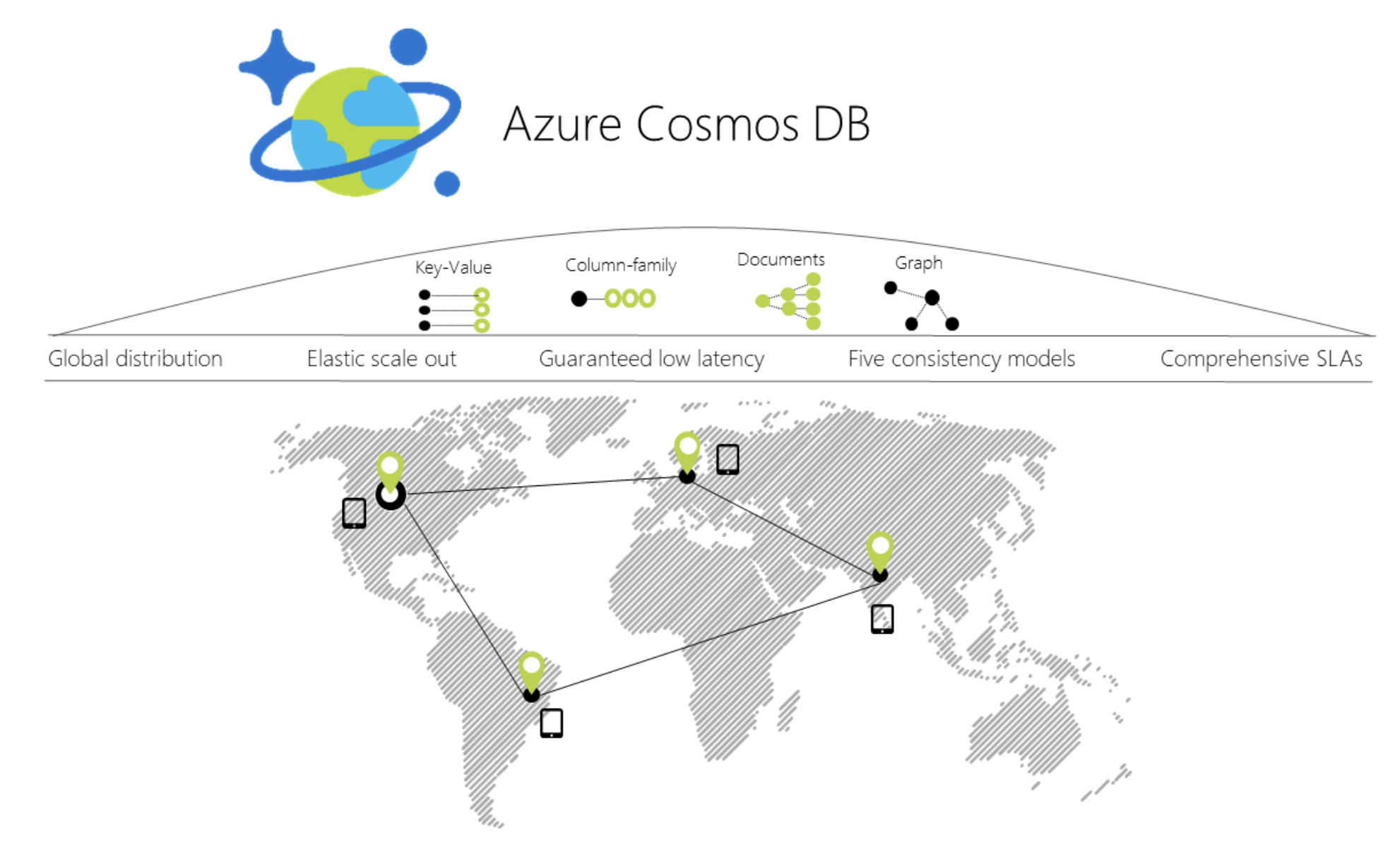
Figure 7-19. Azure Cosmos DB global distribution
图 7-19. Azure Cosmos DB 全球分布
When you use a C# model to implement the aggregate to be used by the Azure Cosmos DB API, the aggregate can be similar to the C# POCO classes used with EF Core. The difference is in the way to use them from the application and infrastructure layers, as in the following code:
当你使用 C# 模型来实现供 Azure Cosmos DB API 使用的聚合时,该聚合可以类似于与 EF Core 一起使用的 C# POCO 类。区别在于在应用程序层和基础设施层使用它们的方式,如下面的代码所示:
// C# EXAMPLE OF AN ORDER AGGREGATE BEING PERSISTED WITH AZURE COSMOS DB API
// *** Domain Model Code ***
// Aggregate: Create an Order object with its child entities and/or value objects.
// Then, use AggregateRoot's methods to add the nested objects so invariants and
// logic is consistent across the nested properties (value objects and entities).

Order orderAggregate = new Order
{
    Id = "2024001",
    OrderDate = new DateTime(2005, 7, 1),
    BuyerId = "1234567",
    PurchaseOrderNumber = "PO18009186470"
}

Address address = new Address
{
    Street = "100 One Microsoft Way",
    City = "Redmond",
    State = "WA",
    Zip = "98052",
    Country = "U.S."
}

orderAggregate.UpdateAddress(address);

OrderItem orderItem1 = new OrderItem
{
    Id = 20240011,
    ProductId = "123456",
    ProductName = ".NET T-Shirt",
    UnitPrice = 25,
    Units = 2,
    Discount = 0;
};

//Using methods with domain logic within the entity. No anemic-domain model
orderAggregate.AddOrderItem(orderItem1);
// *** End of Domain Model Code ***

// *** Infrastructure Code using Cosmos DB Client API ***
Uri collectionUri = UriFactory.CreateDocumentCollectionUri(databaseName,
    collectionName);

await client.CreateDocumentAsync(collectionUri, orderAggregate);

// As your app evolves, let's say your object has a new schema. You can insert
// OrderV2 objects without any changes to the database tier.
Order2 newOrder = GetOrderV2Sample("IdForSalesOrder2");
await client.CreateDocumentAsync(collectionUri, newOrder);
You can see that the way you work with your domain model can be similar to the way you use it in your domain model layer when the infrastructure is EF. You still use the same aggregate root methods to ensure consistency, invariants, and validations within the aggregate.
你可以看到,使用领域模型的方式,与基础设施层采用 EF 时在领域模型层中的使用方式非常相似。你依然使用相同的聚合根方法来确保聚合内部的一致性、不变量和验证。
However, when you persist your model into the NoSQL database, the code and API change dramatically compared to EF Core code or any other code related to relational databases.
然而,当你将模型持久化到 NoSQL 数据库时,与 EF Core 代码或任何与关系型数据库相关的代码相比,其代码和 API 会发生巨大的变化。
Implement .NET code targeting MongoDB and Azure Cosmos DB 实现面向 MongoDB 和 Azure Cosmos DB 的 .NET 代码
Use Azure Cosmos DB from .NET containers 从 .NET 容器中访问 Azure Cosmos DB
You can access Azure Cosmos DB databases from .NET code running in containers, like from any other .NET application. For instance, the Locations.API and Marketing.API microservices in eShopOnContainers are implemented so they can consume Azure Cosmos DB databases.
However, there’s a limitation in Azure Cosmos DB from a Docker development environment point of view. Even though there’s an on-premises Azure Cosmos DB Emulator that can run in a local development machine, it only supports Windows. Linux and macOS aren't supported.
然而,从 Docker 开发环境的角度来看,Azure Cosmos DB 存在一个限制。尽管有一个可以在本地开发机器上运行的本地 Azure Cosmos DB 模拟器,但它仅支持 Windows,并不支持 Linux 和 macOS。
There's also the possibility to run this emulator on Docker, but just on Windows Containers, not with Linux Containers. That's an initial handicap for the development environment if your application is deployed as Linux containers, since, currently, you can't deploy Linux and Windows Containers on Docker for Windows at the same time. Either all containers being deployed have to be for Linux or for Windows.
虽然也可以在 Docker 上运行该模拟器,但仅限于 Windows 容器,不支持 Linux 容器。如果你的应用程序是作为 Linux 容器部署的,这对开发环境来说是一个初始的不利因素,因为目前你无法在 Windows 版 Docker 上同时部署 Linux 和 Windows 容器。所有被部署的容器要么必须全是 Linux 的,要么必须全是 Windows 的。
The ideal and more straightforward deployment for a dev/test solution is to be able to deploy your database systems as containers along with your custom containers so your dev/test environments are always consistent.
对于开发/测试解决方案而言,最理想且更直接的部署方式是能够将你的数据库系统与你的自定义容器一起作为容器进行部署,这样你的开发/测试环境就能始终保持一致。
Use MongoDB API for local dev/test Linux/Windows containers plus Azure Cosmos DB 将 MongoDB API 用于本地开发/测试的 Linux/Windows 容器以及 Azure Cosmos DB
Cosmos DB databases support MongoDB API for .NET as well as the native MongoDB wire protocol. This means that by using existing drivers, your application written for MongoDB can now communicate with Cosmos DB and use Cosmos DB databases instead of MongoDB databases, as shown in Figure 7-20.
Cosmos DB 数据库不仅支持 .NET 的 MongoDB API,也支持原生的 MongoDB 线路协议。这意味着,通过使用现有的驱动程序,你为 MongoDB 编写的应用程序现在可以与 Cosmos DB 通信,并使用 Cosmos DB 数据库来代替 MongoDB 数据库,如图 7-20 所示。

Figure 7-20. Using MongoDB API and protocol to access Azure Cosmos DB
图 7-20. 使用 MongoDB API 和协议访问 Azure Cosmos DB
This is a very convenient approach for proof of concepts in Docker environments with Linux containers because the MongoDB Docker image is a multi-arch image that supports Docker Linux containers and Docker Windows containers.
对于在 Linux 容器 Docker 环境中进行的 PoC(概念验证)来说,这是一种非常方便的做法,因为 MongoDB 的 Docker 镜像是一个多架构镜像,同时支持 Docker Linux 容器和 Docker Windows 容器。
As shown in the following image, by using the MongoDB API, eShopOnContainers supports MongoDB Linux and Windows containers for the local development environment but then, you can move to a scalable, PaaS cloud solution as Azure Cosmos DB by simply changing the MongoDB connection string to point to Azure Cosmos DB.
如下图所示,通过使用 MongoDB API,eShopOnContainers 在本地开发环境中支持 MongoDB 的 Linux 和 Windows 容器。而当你想要转向像 Azure Cosmos DB 这样可扩展的 PaaS 云解决方案时,只需要简单地修改 MongoDB 连接字符串,将其指向 Azure Cosmos DB 即可。

Figure 7-21. eShopOnContainers using MongoDB containers for dev-env or Azure Cosmos DB for production
图 7-21. eShopOnContainers 在开发环境使用 MongoDB 容器,或在生产环境使用 Azure Cosmos DB
The production Azure Cosmos DB would be running in Azure's cloud as a PaaS and scalable service.
生产环境中的 Azure Cosmos DB 将以 PaaS(平台即服务)和可扩展服务的形式运行在 Azure 云端。
Your custom .NET containers can run on a local development Docker host (that is using Docker for Windows in a Windows 10 machine) or be deployed into a production environment, like Kubernetes in Azure AKS or Azure Service Fabric. In this second environment, you would deploy only the .NET custom containers but not the MongoDB container since you'd be using Azure Cosmos DB in the cloud for handling the data in production.
你自定义的 .NET 容器既可以运行在本地开发 Docker 主机上(即 Windows 10 机器上使用 Windows 版 Docker),也可以部署到生产环境中,比如 Azure AKS 中的 Kubernetes 或 Azure Service Fabric。在第二种(生产)环境中,你只需要部署 .NET 自定义容器,而无需部署 MongoDB 容器,因为你会在云端使用 Azure Cosmos DB 来处理生产数据。
A clear benefit of using the MongoDB API is that your solution could run in both database engines, MongoDB or Azure Cosmos DB, so migrations to different environments should be easy. However, sometimes it is worthwhile to use a native API (that is the native Cosmos DB API) in order to take full advantage of the capabilities of a specific database engine.
使用 MongoDB API 的一个明显好处是,你的解决方案可以在 MongoDB 和 Azure Cosmos DB 这两种数据库引擎上运行,因此迁移到不同的环境应该会很轻松。不过,有时为了充分利用特定数据库引擎的功能,使用原生 API(即 Cosmos DB 的原生 API)也是值得的。
For further comparison between simply using MongoDB versus Cosmos DB in the cloud, see the Benefits of using Azure Cosmos DB in this page.
如果想进一步了解在云端单纯使用 MongoDB 与使用 Cosmos DB 的更多对比,可以查看该页面中的“使用 Azure Cosmos DB 的优势”部分。
Analyze your approach for production applications: MongoDB API vs. Cosmos DB API 分析生产级应用的选型方案:MongoDB API 与 Cosmos DB API
eShopOnContainers uses MongoDB API because the priority was fundamentally to have a consistent dev/test environment using a NoSQL database that could also work with Azure Cosmos DB.
eShopOnContainers 之所以选用 MongoDB API,主要是为了优先考虑拥有一个连贯的开发/测试环境,使用一种既能满足需求又能兼容 Azure Cosmos DB 的 NoSQL 数据库。
However, if you're planning to use MongoDB API to access Azure Cosmos DB in Azure for production applications, you should analyze the differences in capabilities and performance when using MongoDB API to access Azure Cosmos DB databases compared to using the native Azure Cosmos DB API. If it's similar, you can use MongoDB API and get the benefit of supporting two NoSQL database engines at the same time.
然而,如果你计划在生产级应用中,通过 MongoDB API 来访问 Azure 上的 Azure Cosmos DB,那么你应该仔细分析对比一下:使用 MongoDB API 访问 Azure Cosmos DB 与使用 Azure Cosmos DB 原生 API,两者在功能和性能上究竟有何差异。如果两者表现相近,那你当然可以使用 MongoDB API,从而获得同时支持两种 NoSQL 数据库引擎的便利。
You could also use MongoDB clusters as the production database in Azure's cloud, too, with MongoDB Atlas on Microsoft Azure. But that is not a PaaS service provided by Microsoft. In this case, Azure is just hosting that solution coming from MongoDB.
其实,你也可以在 Azure 云端使用 MongoDB Atlas(托管在微软 Azure 上)将 MongoDB 集群作为生产数据库。但这并不是微软提供的 PaaS 服务,在这种情况下,Azure 仅仅是托管了来自 MongoDB 官方的解决方案而已。
Basically, this is just a disclaimer to say that you shouldn't always use MongoDB API against Azure Cosmos DB. eShopOnContainers uses it because it was a convenient choice for Linux containers. The decision should be based on the specific needs and tests you need to do for your production application.
简单来说,这里只是想做个免责声明,提醒大家不要总是习惯性地针对 Azure Cosmos DB 使用 MongoDB API。eShopOnContainers 之所以这么用,是因为它对 Linux 容器来说是个方便的选择。而你的最终决策,应该基于你生产应用的具体需求和实际测试来做。
The code: Use MongoDB API in .NET applications 代码部分:在 .NET 应用中使用 MongoDB API
MongoDB API for .NET is based on NuGet packages that you need to add to your projects, like in the Locations.API project shown in the following figure.
.NET 的 MongoDB API 是基于 NuGet 包的,你需要将其添加到你的项目中,就像下图中展示的 Locations.API 项目一样。

Figure 7-22. MongoDB API NuGet packages references in a .NET project
图 7-22. .NET 项目中的 MongoDB API NuGet 包引用
Let's investigate the code in the following sections.
让我们在接下来的章节中深入了解一下相关代码。
A Model used by MongoDB API MongoDB API 所使用的模型
First, you need to define a model that will hold the data coming from the database in your application's memory space. Here's an example of the model used for Locations at eShopOnContainers.
首先,你需要定义一个模型(Model),用来在你的应用程序内存空间中存放从数据库获取的数据。以下就是 eShopOnContainers 中用于“位置(Locations)”信息的模型示例。
using MongoDB.Bson;
using MongoDB.Bson.Serialization.Attributes;
using MongoDB.Driver.GeoJsonObjectModel;
using System.Collections.Generic;

public class Locations
{
    [BsonId]
    [BsonRepresentation(BsonType.ObjectId)]
    public string Id { get; set; }
    public int LocationId { get; set; }
    public string Code { get; set; }
    [BsonRepresentation(BsonType.ObjectId)]
    public string Parent_Id { get; set; }
    public string Description { get; set; }
    public double Latitude { get; set; }
    public double Longitude { get; set; }
    public GeoJsonPoint<GeoJson2DGeographicCoordinates> Location
                                                             { get; private set; }
    public GeoJsonPolygon<GeoJson2DGeographicCoordinates> Polygon
                                                             { get; private set; }
    public void SetLocation(double lon, double lat) => SetPosition(lon, lat);
    public void SetArea(List<GeoJson2DGeographicCoordinates> coordinatesList)
                                                    => SetPolygon(coordinatesList);

    private void SetPosition(double lon, double lat)
    {
        Latitude = lat;
        Longitude = lon;
        Location = new GeoJsonPoint<GeoJson2DGeographicCoordinates>(
            new GeoJson2DGeographicCoordinates(lon, lat));
    }

    private void SetPolygon(List<GeoJson2DGeographicCoordinates> coordinatesList)
    {
        Polygon = new GeoJsonPolygon<GeoJson2DGeographicCoordinates>(
                  new GeoJsonPolygonCoordinates<GeoJson2DGeographicCoordinates>(
                  new GeoJsonLinearRingCoordinates<GeoJson2DGeographicCoordinates>(
                                                                 coordinatesList)));
    }
}
You can see there are a few attributes and types coming from the MongoDB NuGet packages.
你可以看到,其中有几个属性和类型是来自 MongoDB 的 NuGet 包的。
NoSQL databases are usually very well suited for working with non-relational hierarchical data. In this example, we are using MongoDB types especially made for geo-locations, like GeoJson2DGeographicCoordinates.
NoSQL 数据库通常非常适合处理非关系型的层级数据。在这个例子中,我们使用了 MongoDB 专门为地理位置(geo-locations)提供的类型,比如 GeoJson2DGeographicCoordinates。
Retrieve the database and the collection 获取数据库和集合
In eShopOnContainers, we have created a custom database context where we implement the code to retrieve the database and the MongoCollections, as in the following code.
在 eShopOnContainers 中,我们创建了一个自定义的数据库上下文(database context),在其中实现了获取数据库和 MongoCollections 的代码,如下所示。
public class LocationsContext
{
    private readonly IMongoDatabase _database = null;

    public LocationsContext(IOptions<LocationSettings> settings)
    {
        var client = new MongoClient(settings.Value.ConnectionString);
        if (client != null)
            _database = client.GetDatabase(settings.Value.Database);
    }

    public IMongoCollection<Locations> Locations
    {
        get
        {
            return _database.GetCollection<Locations>("Locations");
        }
    }
}
Retrieve the data 获取数据
In C# code, like Web API controllers or custom Repositories implementation, you can write similar code to the following when querying through the MongoDB API. Note that the _context object is an instance of the previous LocationsContext class.
在 C# 代码中(比如在 Web API 控制器或者自定义的仓储(Repository)实现里),当你通过 MongoDB API 进行查询时,可以编写类似下面的代码。请注意,这里的 _context 对象就是前面提到的 LocationsContext 类的一个实例。
public async Task<Locations> GetAsync(int locationId)
{
    var filter = Builders<Locations>.Filter.Eq("LocationId", locationId);
    return await _context.Locations
                            .Find(filter)
                            .FirstOrDefaultAsync();
}
Use an env-var in the docker-compose.override.yml file for the MongoDB connection string 在 docker-compose.override.yml 文件中使用环境变量来配置 MongoDB 连接字符串
When creating a MongoClient object, it needs a fundamental parameter which is precisely the ConnectionString parameter pointing to the right database. In the case of eShopOnContainers, the connection string can point to a local MongoDB Docker container or to a "production" Azure Cosmos DB database. That connection string comes from the environment variables defined in the docker-compose.override.yml files used when deploying with docker-compose or Visual Studio, as in the following yml code.
MongoClient 对象时,它需要一个最基础的参数,也就是指向正确数据库的 ConnectionString(连接字符串)参数。在 eShopOnContainers 这个项目中,这个连接字符串既可以指向本地的 MongoDB Docker 容器,也可以指向“生产环境”的 Azure Cosmos DB 数据库。当使用 docker-compose 或 Visual Studio 进行部署时,该连接字符串来源于 docker-compose.override.yml 文件中定义的环境变量,就像下面这段 yml 代码所示。# docker-compose.override.yml
version: '3.4'
services:
# Other services
locations-api:
environment:
# Other settings
- ConnectionString=${ESHOP_AZURE_COSMOSDB:-mongodb://nosqldata}Important 重要提示
Microsoft recommends that you use the most secure authentication flow available. If you're connecting to Azure SQL, Managed Identities for Azure resources is the recommended authentication method.
微软建议你使用目前可用的最安全的身份验证流程。如果你正在连接 Azure SQL,推荐使用“Azure 资源的托管标识(Managed Identities)”作为身份验证方法。
The ConnectionString environment variable is resolved this way: If the ESHOP_AZURE_COSMOSDB global variable is defined in the .env file with the Azure Cosmos DB connection string, it will use it to access the Azure Cosmos DB database in the cloud. If it’s not defined, it will take the mongodb://nosqldata value and use the development MongoDB container.
ConnectionString(连接字符串)环境变量的解析逻辑如下:如果在 .env 文件中定义了带有 Azure Cosmos DB 连接字符串的 ESHOP_AZURE_COSMOSDB 全局变量,系统就会使用它来访问云端的 Azure Cosmos DB 数据库。如果该变量没有被定义,系统就会采用 mongodb://nosqldata 这个值,并使用开发环境下的 MongoDB 容器。
The following code shows the .env file with the Azure Cosmos DB connection string global environment variable, as implemented in eShopOnContainers:
以下代码展示了 .env 文件中包含 Azure Cosmos DB 连接字符串全局环境变量的样子,正如在 eShopOnContainers 中所实现的那样:
# .env file, in eShopOnContainers root folder
# Other Docker environment variables

ESHOP_EXTERNAL_DNS_NAME_OR_IP=host.docker.internal
ESHOP_PROD_EXTERNAL_DNS_NAME_OR_IP=<YourDockerHostIP>

#ESHOP_AZURE_COSMOSDB=<YourAzureCosmosDBConnData>

#Other environment variables for additional Azure infrastructure assets
#ESHOP_AZURE_REDIS_BASKET_DB=<YourAzureRedisBasketInfo>
#ESHOP_AZURE_STORAGE_CATALOG_URL=<YourAzureStorage_Catalog_BLOB_URL>
#ESHOP_AZURE_SERVICE_BUS=<YourAzureServiceBusInfo>
Uncomment the ESHOP_AZURE_COSMOSDB line and update it with your Azure Cosmos DB connection string obtained from the Azure portal as explained in Connect a MongoDB application to Azure Cosmos DB.
请取消 ESHOP_AZURE_COSMOSDB 这一行的注释,并参考“将 MongoDB 应用程序连接到 Azure Cosmos DB”中的说明,用你从 Azure 门户获取的 Azure Cosmos DB 连接字符串来更新它。
If the ESHOP_AZURE_COSMOSDB global variable is empty, meaning it's commented out in the .env file, then the container uses a default MongoDB connection string. This connection string points to the local MongoDB container deployed in eShopOnContainers that is named nosqldata and was defined at the docker-compose file, as shown in the following .yml code:
如果 ESHOP_AZURE_COSMOSDB 全局变量为空(也就是说它在 .env 文件中被注释掉了),那么容器就会使用一个默认的 MongoDB 连接字符串。这个连接字符串会指向 eShopOnContainers 中部署的本地 MongoDB 容器,该容器名为 nosqldata,并且已经在 docker-compose 文件中定义好了,如下面的 .yml 代码所示:
# docker-compose.yml
version: '3.4'
services:
  # ...Other services...
  nosqldata:
    image: mongo


 浙公网安备 33010602011771号