
Firebase —— a ready-made backend system
1. Firebase synax
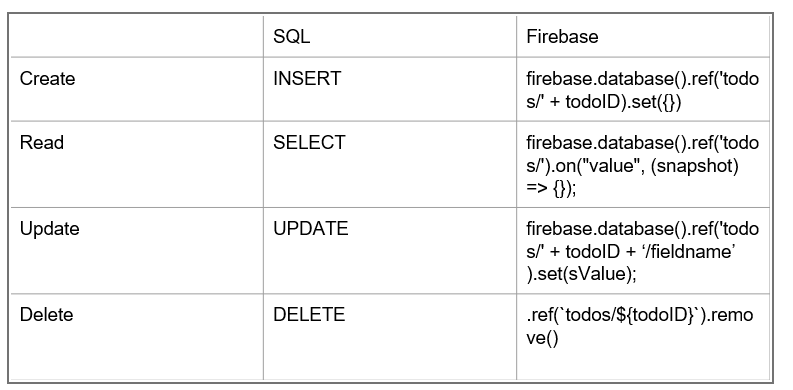
2. Firebase usage
DEMO:git clone https://github.com/rhildred/firebasetodo.git
open firebase:https://console.firebase.google.com/
- create new project
- realtime database: change its rule to public
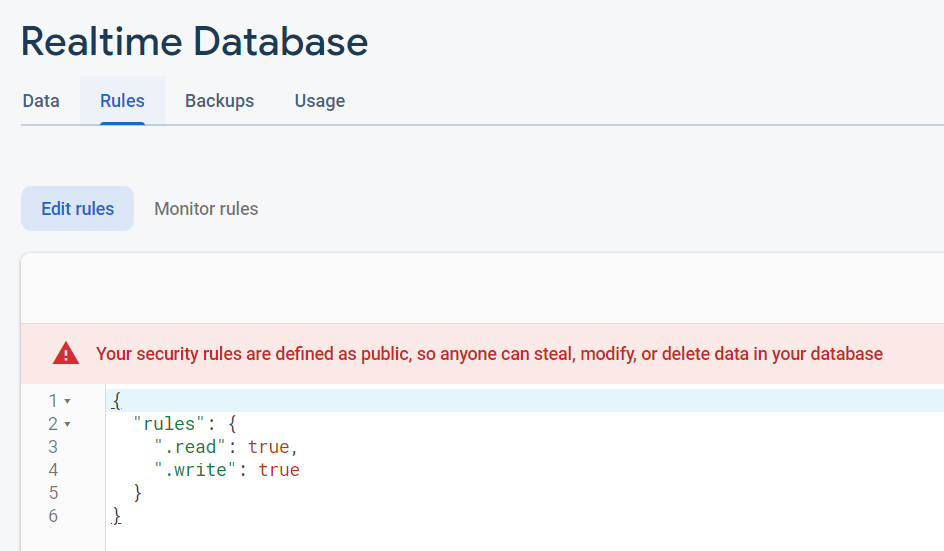
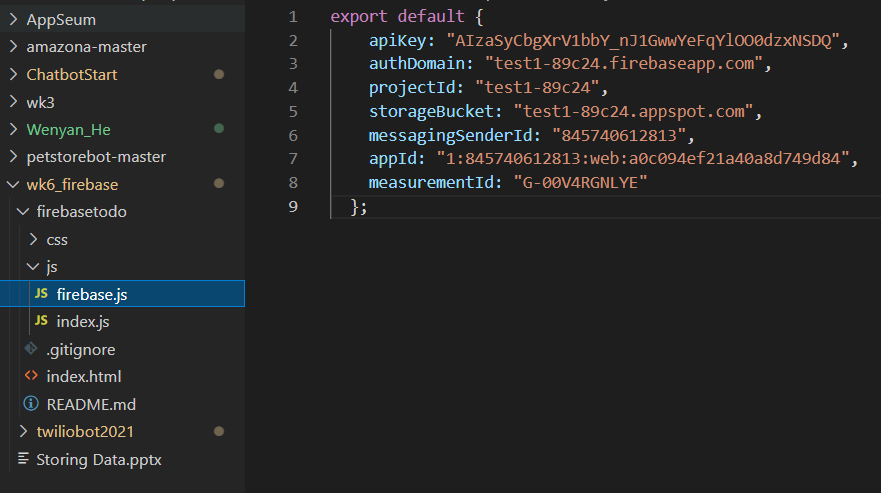
- project setting: find the config, and then paste to firebase.js
  apiKey: "AIzaSyCbgXrV1bbY_nJ1GwwYeFqYlOO0dzxNSDQ",
  authDomain: "test1-89c24.firebaseapp.com",
  projectId: "test1-89c24",
  storageBucket: "test1-89c24.appspot.com",
  messagingSenderId: "845740612813",
  appId: "1:845740612813:web:a0c094ef21a40a8d749d84",
  measurementId: "G-00V4RGNLYE"
- Linux command: npx http-server
(node js app ( npx http-server ) is an HTTP server itself and it serves your static files to the browser.)
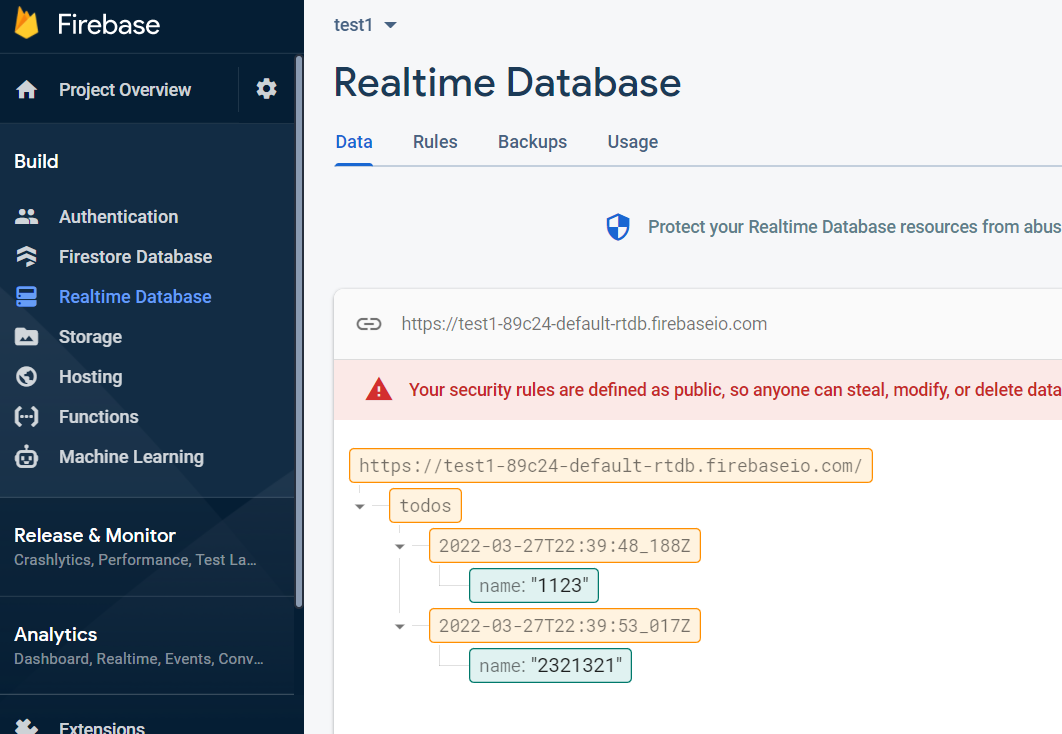
- Effect:
port 8080 is like:

at the same time, in firebase realtime database:
3.1 Firebase Application: save payal details to realtime database
DEMO: git clone https://github.com/rhildred/twiliobot2021.git
3.1 add files under static folder
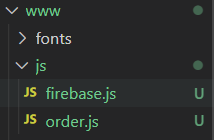
firebase.js
export default {
    apiKey: "AIzaSyCbgXrV1bbY_nJ1GwwYeFqYlOO0dzxNSDQ",
    authDomain: "test1-89c24.firebaseapp.com",
    projectId: "test1-89c24",
    storageBucket: "test1-89c24.appspot.com",
    messagingSenderId: "845740612813",
    appId: "1:845740612813:web:a0c094ef21a40a8d749d84",
    measurementId: "G-00V4RGNLYE"
  };
order.js
import "https://cdnjs.cloudflare.com/ajax/libs/firebase/7.24.0/firebase-app.js";
import "https://cdnjs.cloudflare.com/ajax/libs/firebase/7.24.0/firebase-database.js"
// Your web app's Firebase configuration
import firebaseConfig from "./firebase.js";

// Initialize Firebase
firebase.initializeApp(firebaseConfig);

window.fireorder = (order)=>{
    const todoID = new Date().toISOString().replace(".", "_");
    firebase.database().ref('orders/' + todoID).set(order).then(() => {
        alert('Order saved.');
        window.open("", "_self");
        window.close();
    }).catch(e => {
        console.log(e.toString());
    });

}
3.2 ShawarmaOrder.js
add <script src="/js/order.js" type="module"></script> at line 87, so it will affect payal website
line 104 when transaction succeed, invoke firebase function to save details.
 $.post(".", details, ()=>{
                    window.fireorder(details);
                  });
3.2 Firebase Application: read payal details from realtime database
1. 目录增加如下文件:index.html可以用URL访问(虽然不知道为什么,怎么配置的):http://localhost:3002/admin/
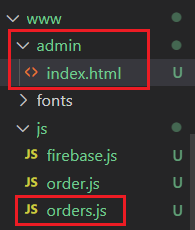
<!DOCTYPE html>
<html>
<head>
    <meta name="viewport" content="width = device-width, initial-scale = 1,
         maximum-scale = 1, minimum-scale = 1, user-scalable = no, minimal-ui" />
    <meta name="apple-mobile-web-app-capable" content="yes" />
    <meta name="apple-mobile-web-app-status-bar-style" content="black" />
    <title>Pending Order</title>
    <!--link rel="stylesheet"
        href="https://cdnjs.cloudflare.com/ajax/libs/framework7/5.7.12/css/framework7.bundle.min.css" / -->
    <link rel="stylesheet" href="css/index.css" />
</head>
<body>
    <div class="page-content view-main">
        <div class="appbar">
            <div class="appbar-inner">
                <!-- ... Appbar content -->
                <h1>Pending Order</h1>
            </div>
        </div>
        <div id="order_list"></div>
    </div>
    <script src="/js/orders.js" type="module"></script>
</body>
orders.js: 增加 read from firebase 的内容
import "https://cdnjs.cloudflare.com/ajax/libs/framework7/5.7.12/js/framework7.bundle.min.js";
import "https://cdnjs.cloudflare.com/ajax/libs/firebase/7.24.0/firebase-app.js";
import "https://cdnjs.cloudflare.com/ajax/libs/firebase/7.24.0/firebase-database.js"
// Your web app's Firebase configuration
import firebaseConfig from "./firebase.js";

//initialize framework 7
var myApp = new Framework7();

// If your using custom DOM library, then save it to $$ variable
var $$ = Dom7;

// Add the view
myApp.view.create('.view-main', {

    // enable the dynamic navbar for this view:
    dynamicNavbar: true
});

// Initialize Firebase
firebase.initializeApp(firebaseConfig);

firebase.database().ref('orders/').on("value", snapshot => {
    $$("#order_list").html("");
    let oTodos = snapshot.val();
    console.log(oTodos);
    Object.keys(oTodos).map((key) => {
        const oTodo = oTodos[key];
        console.log(oTodo);
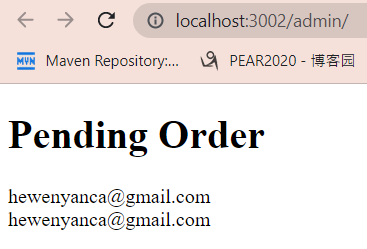
        $$("#order_list").prepend(`<div>${oTodo.payer.email_address}</div>`);
    });
});
Final Effect:

 浙公网安备 33010602011771号