

前端常见编程题(三):轮播图
不多说了,上硬货
html代码:
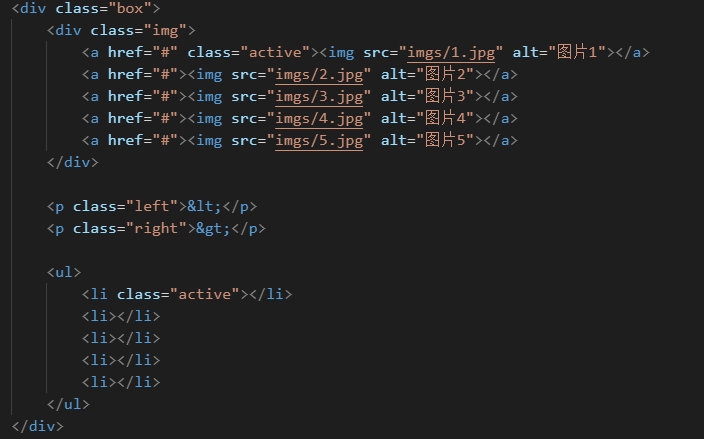
css代码:
* {
margin: 0;
padding: 0;
}
.box {
width: 602px;
height: 402px;
border: 1px solid red;
position: relative;
margin: 100px auto;
}
.box .img a {
width: 600px;
height: 400px;
position: absolute;
display: none;
}
.box a.active {
display: block;
/* opacity: 1; */
}
.box .img a img {
width: 100%;
height: 100%;
}
/* 上一张 下一张 */
p {
font-size: 60px;
position: absolute;
top: 40%;
border: 1px solid rgb(255, 6, 6, 0.5);
background: rgb(255, 6, 6, 0.5);
color: blue;
user-select: none;
cursor: pointer;
}
.left {
left: 10px;
}
.right {
right: 10px;
}
/*分页 点点 */
ul {
list-style: none;
/* border: 1px solid red; */
width: 122px;
height: 20px;
position: absolute;
bottom: 10px;
right: 35%;
}
li {
display: inline-block;
width: 15px;
height: 15px;
border-radius: 50%;
background-color: blue;
cursor: pointer;
}
.active {
background-color: red;
}`
js代码:
var left = document.getElementsByTagName("p")[0];
var right = document.getElementsByTagName("p")[1];
var imgs = document.querySelectorAll(".box .img a");
var index = 0;
var li = document.querySelectorAll("li");
function sss(idx, e) {
var isLeft = e.target.classList.contains("left");
var isRight = e.target.classList.contains("right");
// console.log(isLeft)
if (isLeft) {
if (index === 0) {
index = imgs.length - 1;
} else {
index = index - 1;
}
} else if (isRight) {
if (index === imgs.length - 1) {
index = 0;
} else {
index = index + 1;
}
} else {
index = idx;
}
for (var i = 0; i < imgs.length; i++) {
const img = imgs[i];
if (i === index) {
li[i].classList.add("active");
img.classList.add("active");
} else {
li[i].classList.remove("active");
img.classList.remove("active");
}
}
}
left.onclick = function (e) {
sss(index, e)
}
right.onclick = function (e) {
sss(index, e);
}
for (let i = 0; i < li.length; i++) {
const ll = li[i];
ll.onclick = function (e) {
sss(i, e)
}
}
var box = document.querySelector(".box");
var time = setInterval(function () {
right.click();
}, 1000);
box.onmouseover = function () {
clearInterval(time);
}
box.onmouseout = function () {
time = setInterval(function () {
right.click();
}, 1000);
}
未完待续...

 浙公网安备 33010602011771号