PHP GD库基础图形绘制与填充
先上函数 再上实例说明
一、图形
1.椭圆
imageellipse ( resource $image , int $cx , int $cy , int $width , int $height , int $color ) : bool
以cx,cy为中心,在
image所代表的图像中画一个椭圆弧;$w为椭圆的宽,$h为椭圆的高,$color颜色圆弧
$w==$h 则画的是一个圆
2.椭圆弧
imagearc ( resource
$image, int$cx, int$cy, int$w, int$h, int$s, int$e, int$color) : boolimagearc() 以
cx,cy(图像左上角为 0, 0)为中心在image所代表的图像中画一个椭圆弧;
w和h分别指定了椭圆的宽度和高度,起始和结束点以s和e参数以角度指定。0°位于三点钟位置,以顺时针方向绘画。
$s=0,$e=360则画的是一个椭圆; 且$w==$h 则画的是一个圆
3.矩形
imagerectangle ( resource $image , int $x1 , int $y1 , int $x2 , int $y2 , int $col ) : bool
用 col 颜色在 image 图像中画一个矩形,其左上角坐标为 x1, y1,右下角坐标为 x2, y2。图像的左上角坐标为 0, 0。
4.多边形
imagefilledpolygon ( resource $image , array $points , int $num_points , int $color ) : bool
创建一个多边形。points 是一个 PHP 数组,包含了多边形的各个顶点坐标,即 points[0] = x0,points[1] = y0,points[2] = x1,points[3] = y1,以此类推。num_points 是顶点的总数。
$points包含四个特定规律的点画出的就是一个矩形
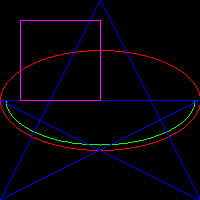
    $im = imagecreatetruecolor(200, 200);
    $black = imagecolorallocate($im,  0, 0, 0);
    $red = imagecolorallocate($im,  0xff, 0, 0);//红色 用于绘制椭圆
    $green = imagecolorallocate($im, 0, 0xff, 0);//绿色 用于绘制椭圆弧
    $blue = imagecolorallocate($im, 0, 0, 0xff);//蓝色 用于绘制多边形
    $purple = imagecolorallocate($im, 0xff, 0, 0xff); //紫色 用于绘制矩形
    imagefill($im, 150, 150, $black);//填充黑色底色
    imageellipse($im, 100, 100, 200, 100, $red);//以100,100为中心 画一个长200宽100 的红色椭圆
        imagearc($im, 100, 100, 190, 90, 0, 180,$green);//以100,100为中心 画一个长100宽90 从0度到180度的绿色椭圆弧
    $points = [
        0,100,//左点
        200,100,//右点
        0,200,//左下点
        100,0,//顶点
        200,200,//右下点
    ];//五角星
    imagepolygon($im , $points, 5,$blue);//画一个蓝色多边形 函数会自动将首位两个点连线
    imagerectangle($im, 20,20,100,100,$purple);//左上角坐标20,20 右下角坐标100,100的矩形
    header("content-type: image/png");
    imagepng($im);
一、填充
1.imagefill
imagefill ( resource $image , int $x , int $y , int $color ) : bool
以$x,$y为中心向四周用$color填充
2.imagefilltoborder
imagefilltoborder ( resource $image , int $x , int $y , int $border , int $color ) : bool
以$x,$y为中心向四周用$color填充 直到碰到$border颜色的为止
$border应当是一个密封的盒子边框颜色, 如果有缺口 会导致颜色从盒子益处,然后外面所有的颜色都被填充,此时相当于iamgefill
使用此函数结合图形函数可以对图形进行填充;当然php已经提供了图形填充函数
$im = imagecreatetruecolor(200, 200);
    $black = imagecolorallocate($im,  0, 0, 0);
    $red = imagecolorallocate($im,  0xff, 0, 0);//红色 用于绘制椭圆
    $green = imagecolorallocate($im, 0, 0xff, 0);//绿色 用于绘制椭圆弧
    $blue = imagecolorallocate($im, 0, 0, 0xff);//蓝色 用于绘制多边形
    $purple = imagecolorallocate($im, 0xff, 0, 0xff); //紫色 用于绘制矩形
    imagefill($im, 150, 150, $black);//填充黑色底色
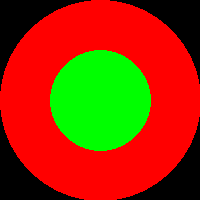
    imagefilledellipse($im, 100, 100, 200, 200, $red);//以100,100为中心 画一个长200宽200 的红色椭圆
    imageellipse($im, 100, 100, 100, 100, $green);//以100,100为中心 画一个长100宽100 的红色椭圆
    imagefilltoborder($im, 100, 100, $green, $green);//以100,100为中心 以$green扩散 一直扩散到遇到$green为止 结合imageellipse使用 相当于imagefilledellipse函数
    header("content-type: image/png");
    imagepng($im);
3.imagefilledarc
imagefilledarc(resource $image , int $cx , int $cy , int $w, int $h, int $s, int $e , int $color , int $style ) : bool
画椭圆弧且填充圆弧
$style四个参数解读:
圆弧有中心点($cx,$cy) 起始点($s所在弧度的点) 结束点($e所在弧度的点)
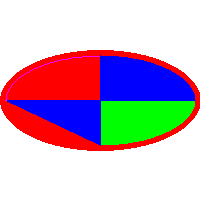
3.1 IMG_ARC_PIE 用弧线连接了起始点和结束点
3.2 IMG_ARC_CHORD 用直线连接了起始点和结束点
3.3 IMG_ARC_NOFILL 不填充 相当于只画了弧线 相当于imagearc函数
3.4 IMG_ARC_EDGED 用直线将起始点与中心点相连,用直线将结束点与中心点相连 起始点与结束点用弧线相连
IMG_ARC_PIE与IMG_ARC_EDGED的区别是 IMG_ARC_EDGED起始点分别和中心点相连而IMG_ARC_PIE却没有 只通过画图很难看出区别,
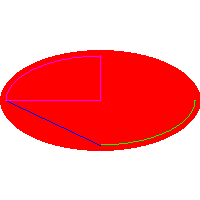
如果让他俩结合IMG_ARC_NOFILL使用 区别非常明显 IMG_ARC_PIE | IMG_ARC_NOFILL 显示一个圆弧;IMG_ARC_EDGED | IMG_ARC_NOFILL 显示的是一个饼状图
    $im = imagecreatetruecolor(200, 200);
    $white = imagecolorallocate($im,  0xff, 0xff, 0xff);
    $red = imagecolorallocate($im,  0xff, 0, 0);//红色 用于绘制椭圆
    $green = imagecolorallocate($im, 0, 0xff, 0);//绿色 用于绘制椭圆弧
    $blue = imagecolorallocate($im, 0, 0, 0xff);//蓝色 用于绘制多边形
    $purple = imagecolorallocate($im, 0xff, 0, 0xff); //紫色 用于绘制矩形
    imagefill($im, 150, 150, $white);//填充白色底色
    imagefilledellipse($im, 100, 100, 200, 100, $red);//以100,100为中心 画一个长200宽100 的红色椭圆
    imagefilledarc($im, 100, 100, 190, 90, 0, 90,$green,IMG_ARC_PIE);//以100,100为中心 画一个长100宽90 从0度到180度的绿色椭圆弧
    imagefilledarc($im, 100, 100, 190, 90, 90, 180,$blue,IMG_ARC_CHORD);//以100,100为中心 画一个长100宽90 从0度到180度的绿色椭圆弧
    imagefilledarc($im, 100, 100, 190, 90, 180, 270,$purple,IMG_ARC_NOFILL);//以100,100为中心 画一个长100宽90 从0度到180度的绿色椭圆弧
    imagefilledarc($im, 100, 100, 190, 90, 270, 3600,$blue,IMG_ARC_EDGED);//以100,100为中心 画一个长100宽90 从0度到180度的绿色椭圆弧
    header("content-type: image/png");
    imagepng($im);
下面结合IMG_ARC_NOFILL
    $im = imagecreatetruecolor(200, 200);
    $white = imagecolorallocate($im,  0xff, 0xff, 0xff);
    $red = imagecolorallocate($im,  0xff, 0, 0);//红色 用于绘制椭圆
    $green = imagecolorallocate($im, 0, 0xff, 0);//绿色 用于绘制椭圆弧
    $blue = imagecolorallocate($im, 0, 0, 0xff);//蓝色 用于绘制多边形
    $purple = imagecolorallocate($im, 0xff, 0, 0xff); //紫色 用于绘制矩形
    imagefill($im, 150, 150, $white);//填充白色底色
    imagefilledellipse($im, 100, 100, 200, 100, $red);//以100,100为中心 画一个长200宽100 的红色椭圆
    imagefilledarc($im, 100, 100, 190, 90, 0, 90,$green, IMG_ARC_PIE|IMG_ARC_NOFILL);
    imagefilledarc($im, 100, 100, 190, 90, 90, 180,$blue, IMG_ARC_CHORD|IMG_ARC_NOFILL);
    imagefilledarc($im, 100, 100, 190, 90, 180, 270,$purple, IMG_ARC_EDGED|IMG_ARC_NOFILL);
    header("content-type: image/png");
    imagepng($im);
4.imagefilledellipse
imagefilledellipse( resource $image , int $cx , int $cy , int $width , int $height , int $color ) : bool
画椭圆且填充
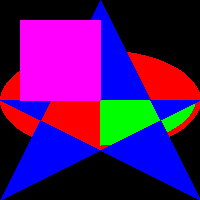
5.imagefilledpolygon
imagefilledpolygon ( resource $image , array $points , int $num_points , int $color ) : bool
在 image 图像中画一个填充了的多边形。
6.imagefilledrectangle
imagefilledrectangle ( resource $image , int $x1 , int $y1 , int $x2 , int $y2 , int $color ) : bool
在 image 图像中画一个用 color 颜色填充了的矩形
$im = imagecreatetruecolor(200, 200);
    $black = imagecolorallocate($im,  0, 0, 0);
    $red = imagecolorallocate($im,  0xff, 0, 0);//红色 用于绘制椭圆
    $green = imagecolorallocate($im, 0, 0xff, 0);//绿色 用于绘制椭圆弧
    $blue = imagecolorallocate($im, 0, 0, 0xff);//蓝色 用于绘制多边形
    $purple = imagecolorallocate($im, 0xff, 0, 0xff); //紫色 用于绘制矩形
    imagefill($im, 150, 150, $black);//填充黑色底色
    imagefilledellipse($im, 100, 100, 200, 100, $red);//以100,100为中心 画一个长200宽100 的红色椭圆
    imagefilledarc($im, 100, 100, 190, 90, 0, 90,$green,IMG_ARC_EDGED);//以100,100为中心 画一个长100宽90 从0度到180度的绿色椭圆弧
    $points = [
        0,100,//左点
        200,100,//右点
        0,200,//左下点
        100,0,//顶点
        200,200,//右下点
    ];//五角星
    imagefilledpolygon($im , $points, 5,$blue);//画一个蓝色多边形 函数会自动将首位两个点连线
    imagefilledrectangle($im, 20,20,100,100,$purple);//左上角坐标20,20 右下角坐标100,100的矩形
    header("content-type: image/png");
    imagepng($im);

 浙公网安备 33010602011771号