
Python_加上日志的封装(Logger.conf )
加上日志的封装(Logger.conf )
一、准备
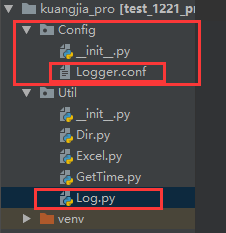
1、需要创建配置文件
2、程序和配置文件分离
二、配置文件内容
Logger.conf内容:
################################################
#propagate 是否继承父类的log信息,0否
[loggers]
keys=root,example01,example02
[logger_root]
level=DEBUG
handlers=hand01,hand02
[logger_example01]
handlers=hand01,hand02
qualname=example01
propagate=0
[logger_example02]
handlers=hand01,hand03
qualname=example02
propagate=0
###############################################
[handlers]
keys=hand01,hand02,hand03
[handler_hand01]
class=StreamHandler
level=DEBUG
formatter=form01
args=(sys.stderr,)
[handler_hand02]
class=FileHandler
level=DEBUG
formatter=form01
args=('AutomationTestLog.log', 'a')
[handler_hand03]
class=handlers.RotatingFileHandler
level=INFO
formatter=form01
args=('AutomationTestLog.log', 'a', 10*1024*1024, 5)
###############################################
[formatters]
keys=form01,form02
[formatter_form01]
format=%(asctime)s %(filename)s[line:%(lineno)d] %(levelname)s %(message)s
datefmt=%Y-%m-%d %H:%M:%S
[formatter_form02]
format=%(name)-12s: %(levelname)-8s %(message)s
datefmt=%Y-%m-%d %H:%M:%S
三、ProjVar内容(工程文件的路径文件):
import os

proj_path = os.path.dirname(os.path.dirname(os.path.abspath(__file__)))
conf_path = os.path.join(proj_path,"config","Logger.conf")
路径的拼接:
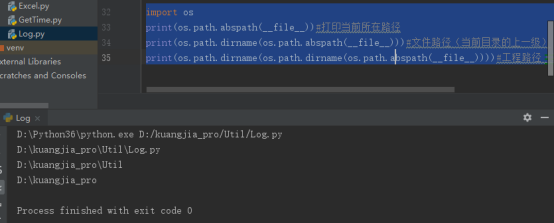
import os
print(os.path.abspath(__file__))#打印当前所在路径
print(os.path.dirname(os.path.abspath(__file__)))#文件路径(当前目录的上一级)
print(os.path.dirname(os.path.dirname(os.path.abspath(__file__))))#工程路径(当前目录的上一级)
运行结果:
四、程序文件内容(Log.py):
#encoding=utf-8
import logging.config
import logging
from Config.ProjVar import *

logging.config.fileConfig(conf_path)
logger = logging.getLogger("example01")

#日志配置文件:多个logger,每个logger,指定不同的handler
#handler:设定了日志输出行的格式
#handler:以及设定写日志到文件(是否回滚)?还是到屏幕
#handler:还定了打印日志的级别。

def debug(message):
    # 打印debug级别的日志方法
   print ("debug")
   logger.debug(message)

def warning(message):
    # 打印warning级别的日志方法
    logger.warning(message)

def info(message):
    # 打印info级别的日志方法
    logger.info(message)

if __name__=="__main__":
    debug("hi")
    info("gloryroad")
    warning("hello")
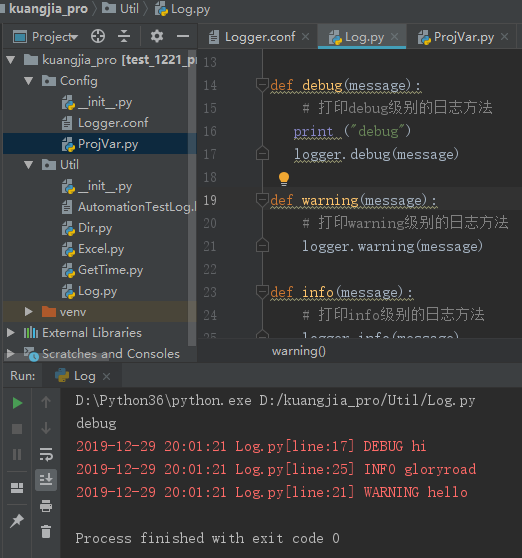
五、运行结果
1、打印结果
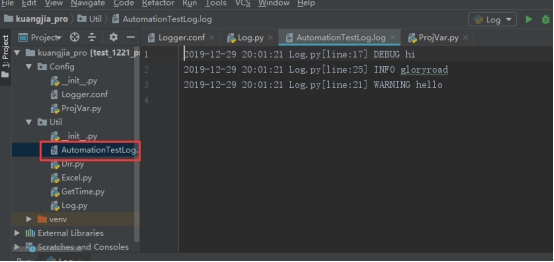
2、自动生成的日志文件:

 浙公网安备 33010602011771号