


2003031125—阮星宇—Python数据分析第七周作业—MySQL的安装以及使用
| 项目 | 内容 |
| 课程班级博客链接 | 20级数据班 |
| 这个作业要求链接 | python数据分析与应用第七周作业 |
| 博客名称 | 2003031125—阮星宇—Python数据分析第七周作业—MySQL的安装以及使用 |
| 要求 |
每道题要有题目,代码(使用插入代码,不会插入代码的自己查资料解决,不要直接截图代码!!),截图(只截运行结果)。 |
作业:
- 1.安装好MySQL,连接上Navicat。
- 2.完成课本练习(代码4-1~3/4-9~31)
代码4-1 SQLAlchemy连接MySQL数据库的代码
from sqlalchemy import create_engine
engine=create_engine("mysql+pymysql://root:rxy0108@127.0.0.1:3306/test?charset=utf8")
print(engine)
运行结果:

代码4-2~4-3
from sqlalchemy import create_engine
import pandas as pd
#代码4-2    使用read_sql_table、read_sql_query、read_sql函数读取数据库数据代码
engine=create_engine("mysql+pymysql://root:rxy0108@127.0.0.1:3306/text?charset=utf8")
detail = pd.read_sql_table('meal_order_detail1', con=engine)
detail1=pd.read_sql_table('meal_order_detail1',con=engine)
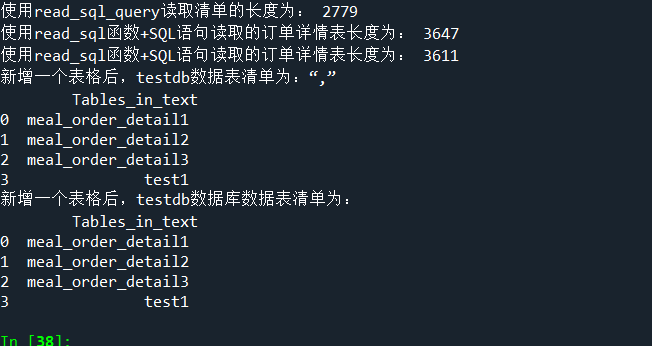
print("使用read_sql_query读取清单的长度为:",len(detail1))

detail2=pd.read_sql('select*from meal_order_detail2',con=engine)
print("使用read_sql函数+SQL语句读取的订单详情表长度为:",len(detail2))

detail3=pd.read_sql('meal_order_detail3',con=engine)
print('使用read_sql函数+SQL语句读取的订单详情表长度为:',len(detail3))

detail1.to_sql('test1',con=engine,index=False,if_exists='replace')
formlist1=pd.read_sql_query('show tables',con=engine)
print('新增一个表格后,testdb数据表清单为:“,”\n',formlist1)
#代码4-3   使用to_sql方法写入数据代码
detail1.to_sql('test1',con=engine,index=False,if_exists='replace')
formlist=pd.read_sql_query('show tables',con=engine)
print('新增一个表格后,testdb数据库数据表清单为:','\n',formlist)
运行结果:
代码4-9 ~4-12
from sqlalchemy import create_engine
import pandas as pd
engine=create_engine("mysql+pymysql://root:rxy0108@127.0.0.1:3306/text?charset=utf8")
order1 = pd.read_sql_table('meal_order_detail1', con=engine)
#代码4-9  读取订单详情表代码
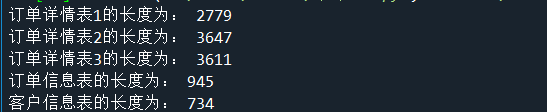
print('订单详情表一的长度为:', len(order1))
order2 = pd.read_sql_table('meal_order_detail2', con=engine)
print('订单详情表二的长度为:', len(order2))
order3 = pd.read_sql_table('meal_order_detail3', con=engine)
print('订单详情表三的长度为:', len(order3))
#代码4-10   读取订单信息表代码
orderInfo = pd.read_table('C:/Users/Administrator/Desktop/meal_order_detail.xlsx', sep=',', encoding='utf-8')
print('订单信息表长度为:', len(orderInfo))
#代码4-11   读取客户信息表代码
userInfo = pd.read_excel('C:/Users/Administrator/Desktop/meal_order_detail.xlsx',sheet_name = 'users1')
print('客户信息表的长度为:',len(userInfo))
#代码4-12     订单详情表的4个基本属性代码
detail = pd.read_sql_table('meal_order_detail1',con = engine)
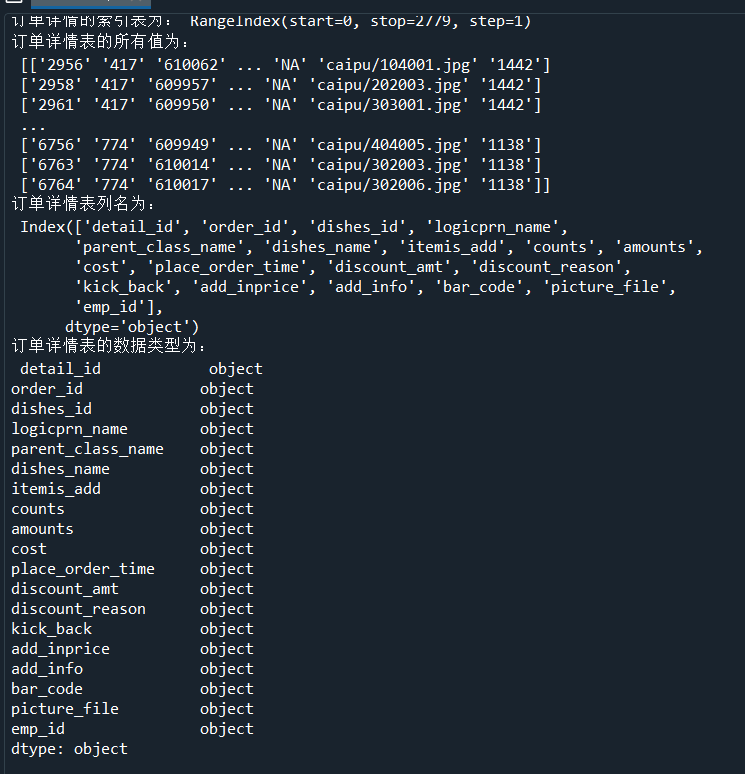
print('订单详情的索引表为:',detail.index)
print('订单详情表的所有值为:','\n',detail.values)
print('订单详情表列名为:','\n',detail.columns)
print('订单详情表的数据类型为:','\n',detail.dtypes)
运行结果:
代码4-13~4-31代码
代码4-13~4-31
from sqlalchemy import create_engine
import pandas as pd
engine=create_engine("mysql+pymysql://root:rxy0108@127.0.0.1:3306/text?charset=utf8")
detail = pd.read_sql_table('meal_order_detail1', con=engine)
# 代码4-13 size ndim 和shape的用法
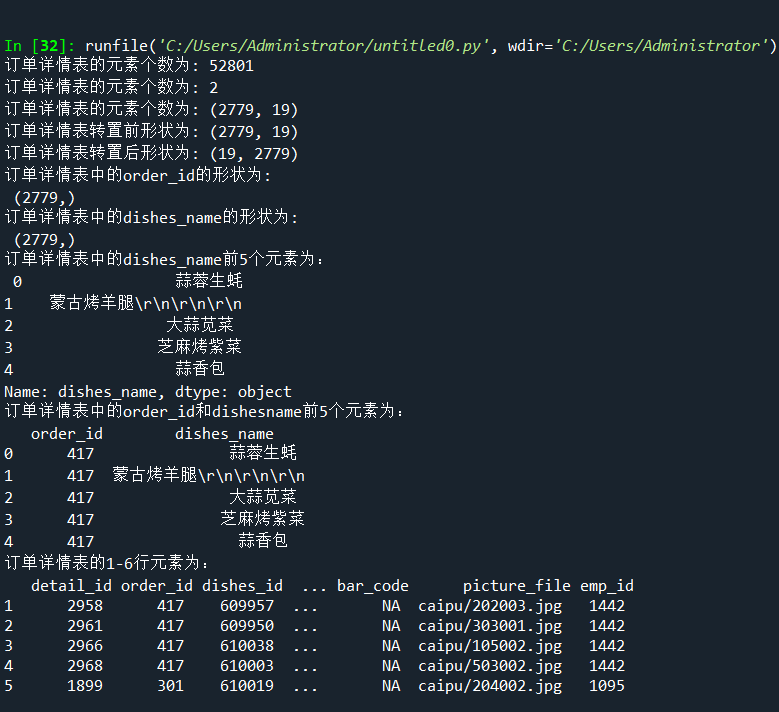
print('订单详情表的元素个数为:', detail.size)
print('订单详情表的元素个数为:', detail.ndim)
print('订单详情表的元素个数为:', detail.shape)
# 代码4-14 使用T属性进行转置
print('订单详情表转置前形状为:', detail.shape)
print('订单详情表转置后形状为:', detail.T.shape)
# 代码4-15使用字典访问内部数据的方式访问DataFrame单列数据
order_id = detail['order_id']
print('订单详情表中的order_id的形状为:', '\n', order_id.shape)

# 代码4-16 使用访问属性的方式访问orderInfo中的菜品名称列
dishes_name = detail.dishes_name
print('订单详情表中的dishes_name的形状为:', '\n', dishes_name.shape)

# 代码4-17 dataframe单列多行数据获取
dishes_name5 = detail['dishes_name'][:5]
print('订单详情表中的dishes_name前5个元素为:', '\n', dishes_name5)

# 代码4-18 访问dataframe多列的多行数据
orderDish = detail[['order_id', 'dishes_name']][:5]
print('订单详情表中的order_id和dishesname前5个元素为:', '\n', orderDish)

# 代码4-19 访问dataframe多行数据
order5 = detail[:][1:6]
print('订单详情表的1-6行元素为:', '\n', order5)

# 代码4-20 使用dataframe的head和tail方法获取多行数据
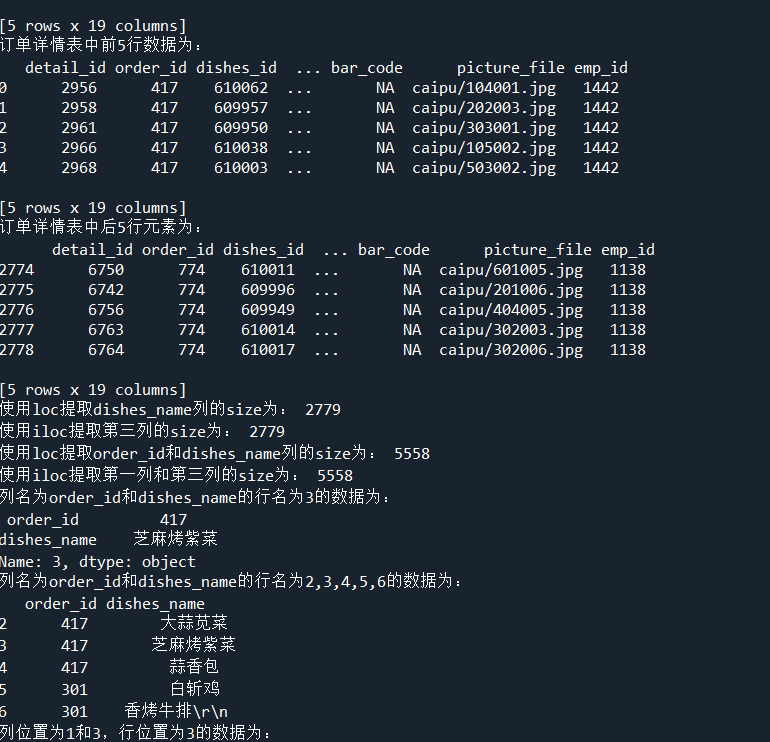
print('订单详情表中前5行数据为:', '\n', detail.head())
print('订单详情表中后5行元素为:', '\n', detail.tail())

# 代码4-21 使用loc和iloc实现单列切片
dishes_name1 = detail.loc[:, 'dishes_name']
print('使用loc提取dishes_name列的size为:', dishes_name1.size)
dishes_name2 = detail.iloc[:, 3]
print('使用iloc提取第三列的size为:', dishes_name2.size)

# 代码4-22 使用loc和iloc实现多列切片
orderDish1 = detail.loc[:, ['order_id', 'dishes_name']]
print('使用loc提取order_id和dishes_name列的size为:', orderDish1.size)
orderDish2 = detail.iloc[:, [1, 3]]
print('使用iloc提取第一列和第三列的size为:', orderDish2.size)

# 代码4-23 使用loc和iloc实现花式切片
print('列名为order_id和dishes_name的行名为3的数据为:', '\n', detail.loc[3, ['order_id', 'dishes_name']])
print('列名为order_id和dishes_name的行名为2,3,4,5,6的数据为:', '\n', detail.loc[2:6, ['order_id', 'dishes_name']])
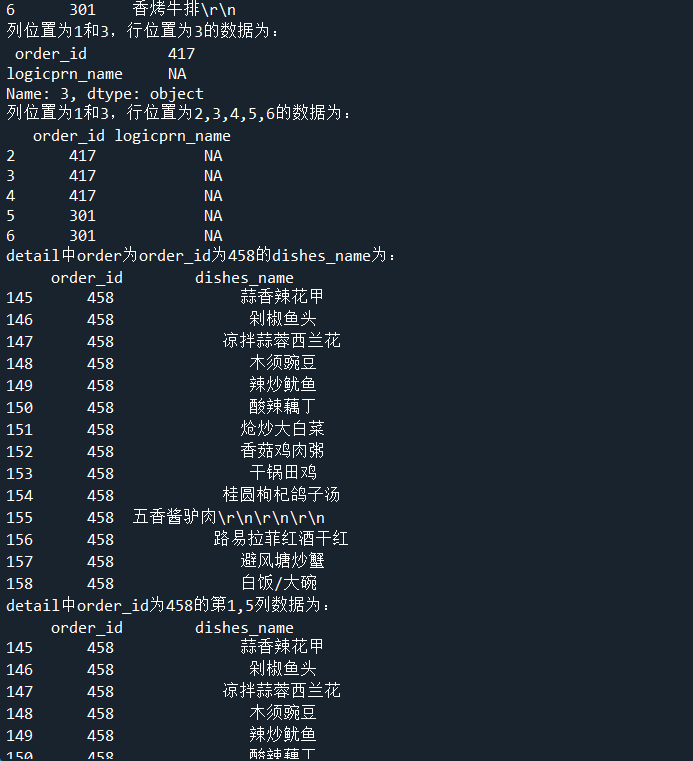
print('列位置为1和3,行位置为3的数据为:\n', detail.iloc[3, [1, 3]])
print('列位置为1和3,行位置为2,3,4,5,6的数据为:\n', detail.iloc[2:7, [1, 3]])

# 代码4-24 使用loc和和iloc实现条件切片
print('detail中order为order_id为458的dishes_name为:\n', detail.loc[detail['order_id'] == '458', ['order_id', 'dishes_name']])
# print('detail中order为order_id为458的第1、5列数据为:\n',detail.iloc[detail['order_id']=='458',[1,5]])
# NotImplementedError: iLocation based boolean indexing on an integer type is not available

# 代码4-25 使用iloc实现条件切片
print('detail中order_id为458的第1,5列数据为:\n', detail.iloc[(detail['order_id'] == '458').values, [1, 5]])
# 代码4-26 使用loc、iloc、ix实现切片比较
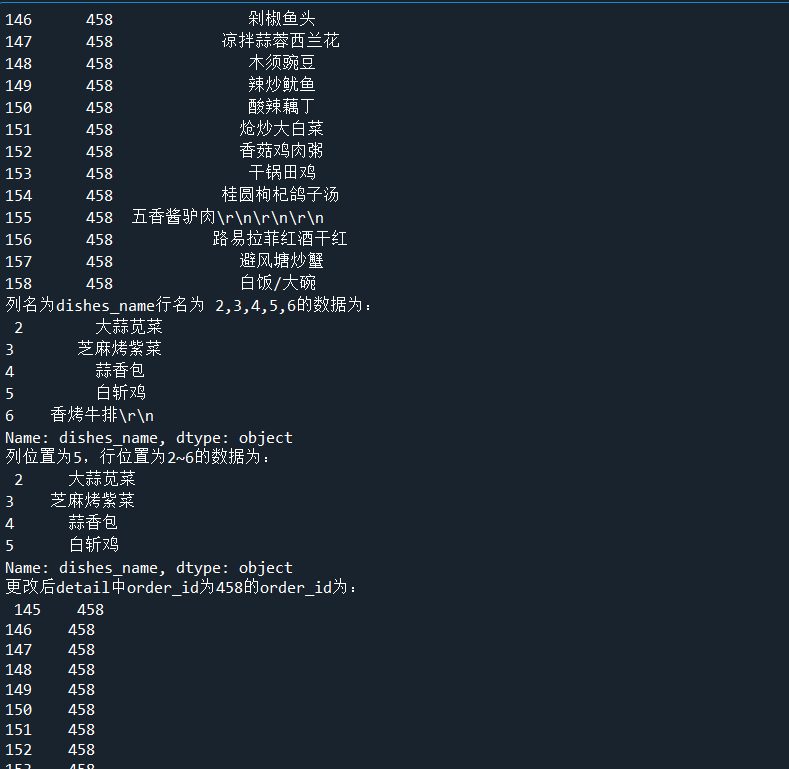
print('列名为dishes_name行名为 2,3,4,5,6的数据为:\n', detail.loc[2:6, 'dishes_name'])
print('列位置为5,行位置为2~6的数据为:\n', detail.iloc[2:6, 5])

# 代码4-27 更改dataframe中的数据
detail.loc[detail['order_id'] == '458', 'ordeer_id'] = '45800'
print('更改后detail中order_id为458的order_id为:\n', detail.loc[detail['order_id'] == '458', 'order_id'])
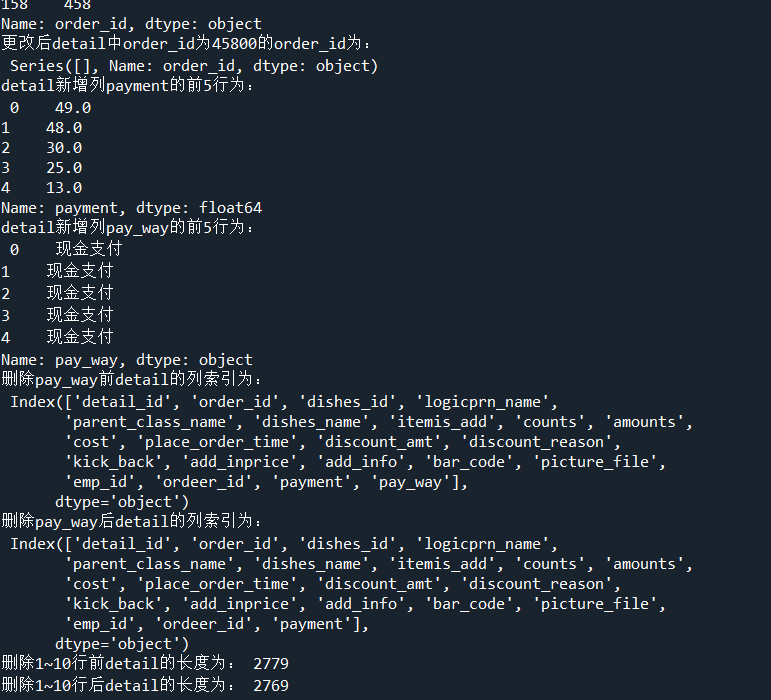
print('更改后detail中order_id为45800的order_id为:\n', detail.loc[detail['order_id'] == '45800', 'order_id'])

# 代码4-28 为dataframe新增一列非定值
detail['payment'] = detail['counts'] * detail['amounts']
print('detail新增列payment的前5行为:', '\n', detail['payment'].head())

# 代码4-29 dataframe新增一列定值
detail['pay_way'] = '现金支付'
print('detail新增列pay_way的前5行为:', '\n', detail['pay_way'].head())
print('删除pay_way前detail的列索引为:', '\n', detail.columns)

# 代码4-30 删除dataframe某列
detail.drop(labels='pay_way', axis=1, inplace=True)
print('删除pay_way后detail的列索引为:', '\n', detail.columns)

# 代码4-31 删除dataframe某几行
print('删除1~10行前detail的长度为:', len(detail))
detail.drop(labels=range(1, 11), axis=0, inplace=True)
print('删除1~10行后detail的长度为:', len(detail))
运行结果:

 浙公网安备 33010602011771号