
mybatis解析模块
mybatis读取配置文件时都是通过xml来解析对应的配置。这里mybatis内部使用的是sax的解析方式,采用xpath的方式来查询xml中的数据。
xpath解析方式
关于xpath的解析方式这里自己手动来测试一个xml文件,对应的使用方法在mybatis源码中也有对应的实现
 DocumentBuilderFactory documentBuilderFactory = DocumentBuilderFactory.newInstance();

        //开启验证
        documentBuilderFactory.setValidating(true);
        documentBuilderFactory.setNamespaceAware(false);
        documentBuilderFactory.setIgnoringComments(true);
        documentBuilderFactory.setIgnoringElementContentWhitespace(false);
        documentBuilderFactory.setCoalescing(false);
        documentBuilderFactory.setExpandEntityReferences(true);


        //创建DocumentBuilder
        DocumentBuilder builder = documentBuilderFactory.newDocumentBuilder();

        //设置异常处理对象
        builder.setErrorHandler(new ErrorHandler() {
            @Override
            public void error(SAXParseException exception) throws SAXException {
                throw exception;
            }

            @Override
            public void fatalError(SAXParseException exception) throws SAXException {
                throw exception;
            }

            @Override
            public void warning(SAXParseException exception) throws SAXException {
            }
        });

        //将文档加载到Document对象中
        Document doc = builder.parse("src/main/resources/mybatis-config.xml");
        XPathFactory xPathFactory = XPathFactory.newInstance();
        XPath xpath = xPathFactory.newXPath();

        NodeList result = (NodeList)xpath.evaluate("//property",doc, XPathConstants.NODESET);
        System.out.println(result.item(1).getAttributes().getNamedItem("value"));
这是一个main方法中的代码片段,主要作用是读取mybatis-config.xml中的对应的数据库地址
<property name="url" value="jdbc:mysql://119.23.25.22:3306/fzan?characterEncoding=UTF-8"/>
mybatis中的解析模块
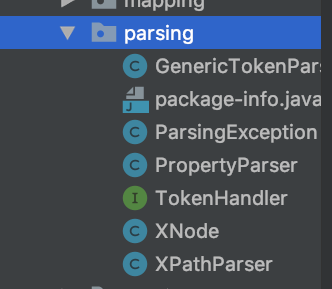
这些类后面会说到。
先来看下XPathParser类,改类中的各个字段如下
  private final Document document; //Document 对象

  private boolean validation; //是否开启验证
  private EntityResolver entityResolver;  //用于加载本地DTD文件
  private Properties variables;//mybatis-config.xml中<propteries>边间键值对集合
  private XPath xpath;//xpath对象
document是xml解析后原始的一个Document对象,所以是一个final类型的。
然后是validation是一个bool类型的属性表示是否开启验证,默认情况下mybatis读取xml会联网加载dtd文件来校验mybatis的配置文件是否正确。但也不排除没有网络的情况,这样可以通过entityResolver来加载mybatis包中的离线dtd文档来校验。
EntityResolver是一个接口,其中XMLMApperEntityResolver就继承自该接口。
EntityResolver接口具体方法如下
    public abstract InputSource resolveEntity (String publicId,
                                               String systemId)
        throws SAXException, IOException;
该方法主要用户验证dtd并返回InputSource
XMLMapperEntityResolver类主要用于离线的dtd验证
该类字段如下
  //指定dtd的systemid
  private static final String IBATIS_CONFIG_SYSTEM = "ibatis-3-config.dtd";
  private static final String IBATIS_MAPPER_SYSTEM = "ibatis-3-mapper.dtd";
  private static final String MYBATIS_CONFIG_SYSTEM = "mybatis-3-config.dtd";
  private static final String MYBATIS_MAPPER_SYSTEM = "mybatis-3-mapper.dtd";

  //指定dtd具体路径
  private static final String MYBATIS_CONFIG_DTD = "org/apache/ibatis/builder/xml/mybatis-3-config.dtd";
  private static final String MYBATIS_MAPPER_DTD = "org/apache/ibatis/builder/xml/mybatis-3-mapper.dtd";
该类继承接口实现如下
  @Override
  public InputSource resolveEntity(String publicId, String systemId) throws SAXException {
    try {
      if (systemId != null) {
        String lowerCaseSystemId = systemId.toLowerCase(Locale.ENGLISH);//小写的systemid
        //查找systemid指定的DTD文档,并调用getInputSource()读取
        if (lowerCaseSystemId.contains(MYBATIS_CONFIG_SYSTEM) || lowerCaseSystemId.contains(IBATIS_CONFIG_SYSTEM)) {
          return getInputSource(MYBATIS_CONFIG_DTD, publicId, systemId);
        } else if (lowerCaseSystemId.contains(MYBATIS_MAPPER_SYSTEM) || lowerCaseSystemId.contains(IBATIS_MAPPER_SYSTEM)) {
          return getInputSource(MYBATIS_MAPPER_DTD, publicId, systemId);
        }
      }
      return null;
    } catch (Exception e) {
      throw new SAXException(e.toString());
    }
  }

  private InputSource getInputSource(String path, String publicId, String systemId) {
    InputSource source = null;
    if (path != null) {
      try {
        InputStream in = Resources.getResourceAsStream(path);//读取文件
        source = new InputSource(in);
        source.setPublicId(publicId);
        source.setSystemId(systemId);
      } catch (IOException e) {
        // ignore, null is ok
      }
    }
    return source;
  }
InputSource这个类是通过XML实例产生的输入源
说完XMLMapperEntityResolver接着来看XPathParser
private Document createDocument(InputSource inputSource)
这个方法主要用来创建Document的对象,代码实现可以参考前面的读取xml案例,几乎没什么区别,只不过在调用该方法前必须调用commonConstructor方法来给字段赋值。
 //通用构造器
  private void commonConstructor(boolean validation, Properties variables, EntityResolver entityResolver) {
    this.validation = validation;
    this.entityResolver = entityResolver;
    this.variables = variables;
    XPathFactory factory = XPathFactory.newInstance();
    this.xpath = factory.newXPath();
  }
然后就是XPathParser中的各种eval方法了,用于解析boolean,long等类型的信息,具体实现都是通过一个通用的解析方法来完成的,通过returnType来指定需要返回的类型
 //通用解析方法  expression root   returnType
  private Object evaluate(String expression, Object root, QName returnType) {
    try {
      return xpath.evaluate(expression, root, returnType);
    } catch (Exception e) {
      throw new BuilderException("Error evaluating XPath.  Cause: " + e, e);
    }
  }
重点来介绍下string类型的解析情况,按道理string类型的解析应该是最简单的,但这里涉及到一个默认值的问题
举个例子
<!-- 允许占位符 -->
   *   <property name="org.apache.ibatis.parsing.PropertyParser.enable-default-value" value="true"/>
   *   <!-- 设置占位符分隔符 -->
   *   <property name="org.apache.ibatis.parsing.PropertyParser.default-value-separator" value=":?"/>
   *     <property name="driver" value="${driver:?com.mysql.jdbc.Driver}"/>
property中的name为driver的value可以通过占位符来指定,但如果这个driver值不存在就必须使用占位符了,但前提是必须开启占位符才能使用,enable-default-value值为true即可。mybatis中默认的分隔符是:,当然也可以改成别的
在解析string是用到了这样一个方法
  public static String parse(String string, Properties variables) {//mybatis-config.xml中<propteries>边间键值对集合
    VariableTokenHandler handler = new VariableTokenHandler(variables);
    GenericTokenParser parser = new GenericTokenParser("${", "}", handler);
    return parser.parse(string);
  }
这个方法是PropertyParser中的一个静态方法,PropertyParser类中的具体字段如下
 private static final String KEY_PREFIX = "org.apache.ibatis.parsing.PropertyParser.";
 //mybatis-config中是否开启默认值的配置
  public static final String KEY_ENABLE_DEFAULT_VALUE = KEY_PREFIX + "enable-default-value";
 //配置占位符与默认分隔符之间的配置
  public static final String KEY_DEFAULT_VALUE_SEPARATOR = KEY_PREFIX + "default-value-separator";
  //默认关闭默认值功能
  private static final String ENABLE_DEFAULT_VALUE = "false";
  //默认分隔符为:号
  private static final String DEFAULT_VALUE_SEPARATOR = ":";
看到这些就应该知道mybatis-config.xml中配置文件为什么样这样写了
可以看到,这个方法是通过GenericTokenParser这个通用的字占位符解析器来完成解析并返回的
该类字段如下
private final String openToken; //${
  private final String closeToken;//}
  private final TokenHandler handler;//处理实例
它会按顺序查找openToken和closeToken解析得到的占位符字面值,并交给handler处理,将解析结果返回,解析主要代码如下
// search open token
    int start = text.indexOf(openToken, 0);//查找开始位置
    if (start == -1) {
      return text;
    }
    char[] src = text.toCharArray();
    int offset = 0;
    final StringBuilder builder = new StringBuilder();
    StringBuilder expression = null;
    while (start > -1) {
      if (start > 0 && src[start - 1] == '\\') {
        // this open token is escaped. remove the backslash and continue.
        builder.append(src, offset, start - offset - 1).append(openToken);
        offset = start + openToken.length();//
      } else {
        // found open token. let's search close token. //找到了open token 继续找close token
        if (expression == null) {
          expression = new StringBuilder();
        } else {
          expression.setLength(0);
        }
        builder.append(src, offset, start - offset);
        offset = start + openToken.length();
        int end = text.indexOf(closeToken, offset);//获取closetoken位置
        while (end > -1) {
          if (end > offset && src[end - 1] == '\\') {
            // this close token is escaped. remove the backslash and continue.//判断结束符前面是否有转义符号
            expression.append(src, offset, end - offset - 1).append(closeToken);
            offset = end + closeToken.length();//从offset后面开始查找
            end = text.indexOf(closeToken, offset);
          } else {
            expression.append(src, offset, end - offset);
            offset = end + closeToken.length();
            break;
          }
        }
        if (end == -1) {
          // close token was not found. //如果没有closetoken
          builder.append(src, start, src.length - start);//没有占位符,相当于普通字符串
          offset = src.length;
        } else {
          builder.append(handler.handleToken(expression.toString()));
          offset = end + closeToken.length();
        }
      }
      start = text.indexOf(openToken, offset);
    }
    if (offset < src.length) {
      builder.append(src, offset, src.length - offset);
    }
    return builder.toString();
  }
可以看到这两个while循环的主要作用都是为了避开opentoken和closetoken被转义的情况,直到查找完成后会去调用 builder.append(handler.handleToken(expression.toString()));来得到最后的字符串
现在回到PropertyParser这个类,这个类中包含了一个静态的内部类
//校验处理的方法  一个处理用的静态类
  private static class VariableTokenHandler implements TokenHandler {
    private final Properties variables;
    private final boolean enableDefaultValue;
    private final String defaultValueSeparator;

    private VariableTokenHandler(Properties variables) { //构建对象
      this.variables = variables;
      this.enableDefaultValue = Boolean.parseBoolean(getPropertyValue(KEY_ENABLE_DEFAULT_VALUE, ENABLE_DEFAULT_VALUE));
      this.defaultValueSeparator = getPropertyValue(KEY_DEFAULT_VALUE_SEPARATOR, DEFAULT_VALUE_SEPARATOR);
    }

    private String getPropertyValue(String key, String defaultValue) {
      return (variables == null) ? defaultValue : variables.getProperty(key, defaultValue);
    }

    @Override
    public String handleToken(String content) {//返回内容
      if (variables != null) {
        String key = content;
        if (enableDefaultValue) {
          final int separatorIndex = content.indexOf(defaultValueSeparator);//获取分隔符的位置
          String defaultValue = null;
          if (separatorIndex >= 0) {//如果有:
            key = content.substring(0, separatorIndex);
            defaultValue = content.substring(separatorIndex + defaultValueSeparator.length());
          }
          if (defaultValue != null) {//没有分隔符,直接返回值
            return variables.getProperty(key, defaultValue);
          }
        }
        if (variables.containsKey(key)) {
          return variables.getProperty(key);
        }
      }
      return "${" + content + "}";
    }
  }
最终又handleToken方法来返回最后的字符串,这个方法是来自于TokenHandler接口的,该接口就这一个方法
GenericTokenParser不仅仅用于这里的默认解析,后面来可以用于sql语句的解析,GenericTokenParser只是查找指定的占位符,而具体的解析由持有的TokenHandler的实现不同而有所不同,这里有点策略模式的意思
接下来回到XPathParser,除了evalString方法外还有一个evalNode也需要注意下,它返回的类型是XNode,对org.w3c.dom.Node对象做了封装和解析
 private final Node node;
  private final String name;
  private final String body;
  private final Properties attributes;
  private final Properties variables;
  private final XPathParser xpathParser;

 浙公网安备 33010602011771号