MVVM
The Model Layer
The model layer is a cross-platform layer that represents your data, your business logic,and your access to external resources such as databases or web services. T
public class SquareRootCalculator
{
public double Number {get; set;}
public double Result {get; private set;}
public void Sqrt()
{
Result = Math.Sqrt(Number);
}
}
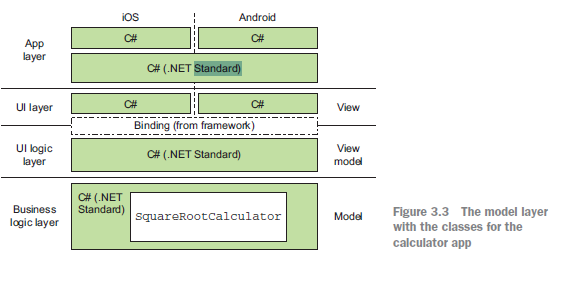
The model layer is a layer—it contains one or more classes working together.
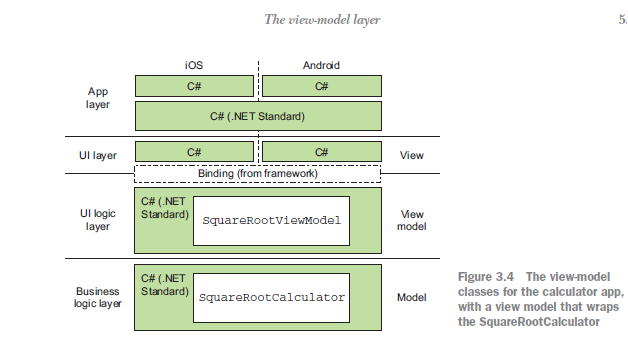
It’s normal to assume that there should be a corresponding Model class providing the data and business logic for that view model, but this doesn’t have to be the case. If you want to write your code that way, go ahead, but don’t feel you have to.There are many ways to build the model layer following many different patterns and practices (such as domain-oriented or data-centric approaches). How you build this layer is up to you, but there are a few main principles you should stick to to make this layer the first M of MVVM:
The code should be cross-platform.
The code should be testable.
--- This way you can ensure your model works without having to always build and run your app.
The model should represent data and business logic at the domain level, not the UI level
--- This is an important principle of the model layer—it should represent your data and logic at a level that makes sense to your domain.Any value conversion
of the data in business terms to UI terms shouldn’t be performed at this layer.
The View-Model layer is the UI Logic Layer.This layer is responsible for two things:
Value conversion---From data in the model layer represented in a way that makes sense to your domain to the way data is represented in a way in the UI.
UI Logic---Such as logic that determines when to show data and when and how to navigate between different views.
Basic princibles behind a good view model:
it should be Cross-platform
It should be easily testable using unit tests.
(You want to have as hign-quality an app as possible,so being able to test the UI logic quickly and thoroughtly using unit tests will help you achieve the goal.
It must be bindable.
Binding is the glue that connects the view model to the view,and the view model will need to implement features such as property changed notifications that allow the binding layer to be aware of chagnes to
so that it can keep the UI and view model in sync.
It should be sateless.
The view model is a value conversion and logic layer. It's not a data store,so its state should always come from the model layer.When the UI changes the state (such as when a text box is updated) the binding tells the view model that something as changed and that the view model is responsible for updating the state in the model.
The view model is the meat of the MVVM pattern,and it will usually map one-to-one against the different screen or to different sections of each view.
It probably sounds a bit contradictory to say that the view model represents state and behavior after saying that one of the basic principles is that
it should be stateless. Let's examime what's meant by both things.
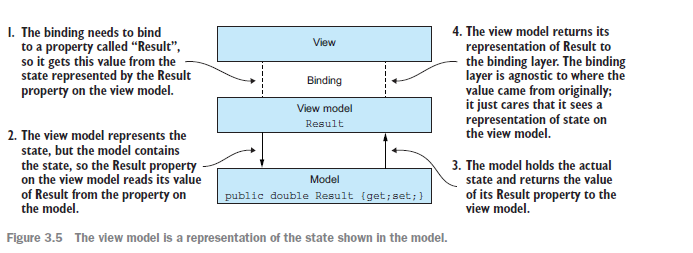
The view model represents the state of the UI in that all the values and logic that define the data shown in the UI come from the state of the view model
as exposed to the view layer. The values in text box and label come from properties on the view model.The setting that defines wheather a control is visible
or hidden comes from the properties of the view model.In this sense, the view model providers a representation of the state of the model layers to the UI.
As a class,though,the view model should be stateless,in that it gets its state from the model layer and shouldn't hold on this state itself.The values in the
text box and label are read from the view model,but the original source is the model layer.At any time your should be able to recreate the view model from the
date in the model layer,because it will not store any state itself.
The real state is the model layer,and the view model converts that stae into state that's appropriate for the view layer.The view model represents the state ,but
model constains the state.By having the view model as a representation,you can return the state directly or perform state converstions on the state before
returning it to the binding layer.
State and behavior
When considering a UI, there are really two things to think about—state and behavior.
State is the information you see on the screen, be it actual data, like text and numbers, or a representation of the app’s state, such as buttons being disabled
or validation errors being shown around text boxes. State is a representation of the data in the model in a way that maps to the UI, using properties, just like the
properties you’d put on a class.
Behavior is the actions that happen when a user interacts with the UI. The view model is the implementation of this. Behavior is represented using commands,
objects that encapsulate some kind of logic, which is fired by interacting withthe UI in a way that executes the command.

 浙公网安备 33010602011771号