

在修改老项目时,在调用el-table选中过程中,组成一个新的数组后出现了无法选中左边栏的checked,但是这个新的数据和老数据表面是相同的。
组成新数组方法:
let newArray = filterArrays.concat(changeData.map(item=>{
  return {
    ...item,
    productId: item.productId == 0 ? "" : item.productId,
    shareId: item.shareId == 0 ? "" : item.shareId,
    orderId: item.orderId == 0 ? "" : item.orderId,
    originalOrderId: item.orderId
  }
}));
changeData.forEach(res=>{
	this.cellClick(res);
})
调用table选中方法:
cellClick() {
	let refsElTable = this.$refs.multipleTable; // 获取表格对象
	var rowArray = [{row, selected: true}]
	refsElTable.toggleRowSelection(rowArray);
}
出现了无法选中的情况
/****************************************/
旧数据样式:
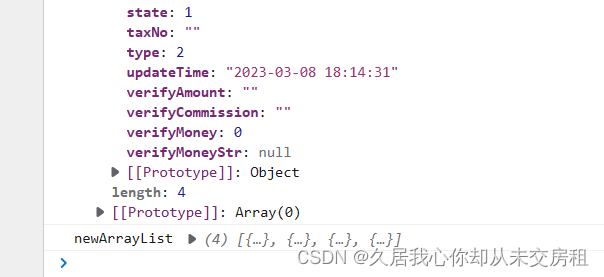
新数据样式
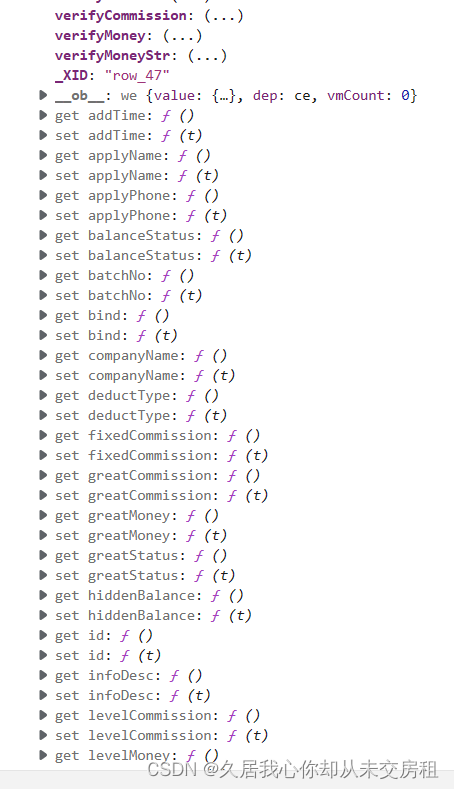
所以是因为新组成数据,vue对新数据数组内容每个数据进行监视,所以新数组比旧数组多了监控,所以需要使用新数组数据来做选中处理。
新的处理方式
//取出新数据内插入旧数据内容
let newArrayList = newArray.slice( newArray.length-changeData.length);
newArrayList.forEach(res=>{
	this.cellClick(res);
})
以上就是处理该问题的方式

 浙公网安备 33010602011771号