1.Prototype原型模式

代码示例:
package Prototype05;

/**
 * 原型模式:
 * 意图:用原型实例指定创建对象的种类,并且通过复制这些原型创建新的对象
 * 适用于:
 *      当一个系统应该独立于它的产品创建、构成和表示时
 *      当要实例化的类是在运行时刻指定时例如通过动态装载
 *      为了避免创建一个与产品类层次平行的过程类层次时
 *      当一个类的实例只能有几个不同状态组合的一种时,建立响应的数目的原型并且克隆他
 */
public class Main {
    public static void main(String[] args) {
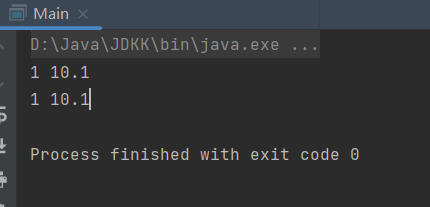
        Product product=new Product(1,10.10);
        System.out.println(product.getId()+" "+product.getPrice());
        Product clone = (Product) product.Clone();
        System.out.println(clone.getId()+" "+clone.getPrice());
    }
}
interface Prototype {
    public Object Clone();
}
class Product implements Prototype{
    private int id;
    private double price;

    public Product(){}

    public Product(int id,double price){
        this.id = id;
        this.price=price;
    }

    public int getId(){
        return id;
    }
    public double getPrice(){
        return price;
    }

    @Override
    public Object Clone() {
        Product product = new Product();
        product.id=this.id;
        product.price=this.price;
        return product;
    }
}
2.Adapt适配器模式

示例代码:
package Adapt06;

/**
 * 适配器模式
 * 意图:
 *      将一个类的接口转换成客户希望的另一个接口。
 *      Adapt模式使得原本由于接口不兼容而不能一起工作的那些类可以一起工作。
 * 适用于:
 */
public class Adapt {
    public static void main(String[] args) {
        //将待适配的接口转换为目标接口
        //实例化目标接口
        Target target = new Adapter();
        target.Request();
    }
}
//将Type—C转换为USB接口
//目标接口:例如USB
class Target {
    public void Request(){
        System.out.println("普通请求:USB数据线");
    }
}
//适配接口:例如Type-C
class Adaptee {
    public void SpecificRequest(){
        System.out.println("特殊请求:Type-C数据线");
    }
}
//适配器
class Adapter extends Target{
    private Adaptee adaptee = new Adaptee();
    @Override
    public void Request(){
        adaptee.SpecificRequest();
    }
}
3.Bridge桥接模式

示例代码:
package Bridge07;

/**
 * 桥接模式
 * 意图:将抽象部分与实现部分分离,使他们都可以独立地变化
 *
 */
public class Bridge {
    public static void main(String[] args) {
        Product product = new ProductA();
        Color red =new Red();
        product.setName("产品A");
        product.setColor(red);
        product.Operation();

    }
}

abstract class Product{
    //产品的名字
    private String name;
    protected Color color;
    public void setColor(Color color){
        this.color=color;
    }
    public abstract void Operation();

    public void setName(String name){
        this.name=name;
    }
    public String getName(){
        return name;
    }
}
//具体产品
class ProductA extends Product{
    @Override
    public void Operation() {
        color.OperationImpl(this.getName());
    }
}
interface Color{
    public void OperationImpl(String name);
}
class Red implements Color{
    @Override
    public void OperationImpl(String name){
        System.out.println(name+" :红色");
    }
}
class Blue implements Color{
    @Override
    public void OperationImpl(String name){
        System.out.println(name+" :蓝色");
    }
}
4.Composite组合模式
示例代码:

package Composite08;

import java.util.ArrayList;
import java.util.List;

/**
 * 组合模式
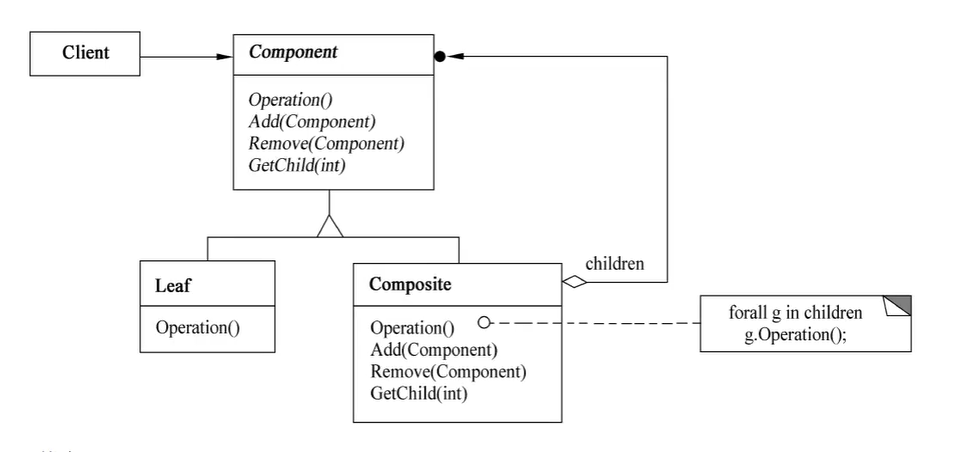
 * 意图: 将该对象组合成树形结构以表示“部分-整体”的层次结构。
 *      Composite使得用户对单个对象和组合对象的使用具有一致性。
 * 例子:文件和文件夹的关系
 * 适用于:
 *      想表示对象的部分和整体层次结构
 *      希望用户忽略组合对象与单个对象的不同,用户将统一使用组合结构的所有对象
 */
public class CompositePattern {
    public static void main(String[] args) {
        //第一部分:普通测试
        AbstractFile folderA = new Folder("folderA");
//        folderA.printName();
        AbstractFile folderB = new Folder("folderB");
        folderA.Add(folderB);
//        folderB.printName();
        AbstractFile file00 = new File("file00");
//        file00.printName();
        //第二部分:文件夹增加删除测试
        AbstractFile root = new Folder("root");
        root.Add(folderA);
        root.Add(file00);
//        root.Remove(file00);
        //第三部分:遍历组合获取子组件
        print(root);
    }
    static void print(AbstractFile file){
        file.printName();
        List<AbstractFile> childrenList = file.getChildren();
        if(childrenList == null) return;
        for (AbstractFile children:childrenList) {
//            children.printName();
            print(children);
        }
    }
}
//Component
abstract class AbstractFile{

    protected String name;

    public void printName(){
        System.out.println(name);
    }
    //public abstract boolean Add();
    public abstract void Add(AbstractFile file);
    public abstract void Remove(AbstractFile file);
    public abstract List<AbstractFile> getChildren();


}
//Composite:Folder文件夹
class Folder extends AbstractFile{

    private List<AbstractFile> childrenList = new ArrayList<AbstractFile>();


    public Folder(String name){
        //将name赋值给父类的name
        this.name=name;
    }

    @Override
    public void Add(AbstractFile file) {
        childrenList.add(file);
    }

    @Override
    public void Remove(AbstractFile file) {
        childrenList.remove(file);
    }

    @Override
    public List<AbstractFile> getChildren() {
        return childrenList;
    }
}
//Leaf:File文件
class File extends AbstractFile{
    public File(String name){
        //将name赋值给父类的name
        this.name=name;
    }

    @Override
    public void Add(AbstractFile file) {
        return;
    }

    @Override
    public void Remove(AbstractFile file) {
        return;
    }

    @Override
    public List<AbstractFile> getChildren() {
        return null;
    }
}


 浙公网安备 33010602011771号