
关于SSH框架的xml版整合
整合步骤:
一:引入节点
二:搭建分层
三:配置文件
四:web.xml
五:action层
六:UI层
第一步:引入节点(整合节点)
<!-- struts2整合spring -->
    <dependency>
      <groupId>org.apache.struts</groupId>
      <artifactId>struts2-spring-plugin</artifactId>
      <version>2.3.4.1</version>
    </dependency>
第二步:搭建分层
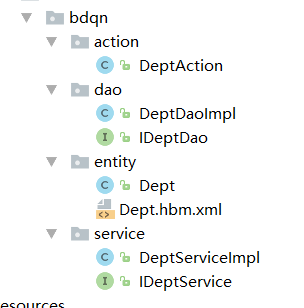
第三步:配置文件

applicationContext.xml文件
<!--数据源-->
    <bean id="dataSource" class="com.mchange.v2.c3p0.ComboPooledDataSource">
        <property name="driverClass" value="${jdbc.dirverClass}"></property>
        <property name="jdbcUrl" value="${jdbc.url}"></property>
        <property name="user" value="${jdbc.username}"></property>
        <property name="password" value="${jdbc.password}"></property>
    </bean>

    <!--识别jdbc.properties-->
    <context:property-placeholder location="classpath:jdbc.properties"></context:property-placeholder>

    <!--sessionfactory工厂-->
    <bean id="sessiofactory" class="org.springframework.orm.hibernate5.LocalSessionFactoryBean">
        <property name="dataSource" ref="dataSource"></property>
        <property name="hibernateProperties">
            <props>
                <prop key="hibernate.show_sql">true</prop>
                <prop key="hibernate.format_sql">true</prop>
                <prop key="hibernate.dialect">org.hibernate.dialect.Oracle10gDialect</prop>
                <prop key="hibernate.current_session_context_class">org.springframework.orm.hibernate5.SpringSessionContext</prop>
            </props>
        </property>
        <!--扫描小配置文件-->
        <property name="mappingDirectoryLocations" value="classpath:cn/com/bdqn/entity"></property>
    </bean>

    <!--dao层-->
    <bean id="deptDAO" class="cn.com.bdqn.dao.DeptDaoImpl">
        <property name="sessionFactory" ref="sessiofactory"></property>
    </bean>

    <!--service层-->
    <bean id="deptService" class="cn.com.bdqn.service.DeptServiceImpl">
        <property name="dao" ref="deptDAO"></property>
    </bean>

    <!--action-->
    <bean id="deptAction" class="cn.com.bdqn.action.DeptAction">
         <property name="service" ref="deptService"></property>
    </bean>

    <!--事务管理器-->
    <bean id="transactionManager" class="org.springframework.orm.hibernate5.HibernateTransactionManager">
        <property name="sessionFactory" ref="sessiofactory"></property>
    </bean>

    <!--事务注解配置-->
    <tx:annotation-driven transaction-manager="transactionManager"></tx:annotation-driven>
struts.xml文件
<?xml version="1.0" encoding="UTF-8" ?>
<!DOCTYPE struts PUBLIC
        "-//Apache Software Foundation//DTD Struts Configuration 2.3//EN"
        "http://struts.apache.org/dtds/struts-2.3.dtd">
<struts>
    <!--修改这个文件的时候,无需重新部署-->
    <constant name="struts.devMode" value="true"></constant>
    <package name="default" namespace="/" extends="struts-default">
        <action name="addDept" class="deptAction">
            <result>/index.jsp</result>
        </action>
    </package>
</struts>
四:web.xml
<!--1.上下文-->
  <context-param>
    <param-name>contextConfigLocation</param-name>
    <param-value>classpath:applicationContext.xml</param-value>
  </context-param>


  <filter>
    <filter-name>struts</filter-name>
    <filter-class>org.apache.struts2.dispatcher.ng.filter.StrutsPrepareAndExecuteFilter</filter-class>
  </filter>
  <filter-mapping>
    <filter-name>struts</filter-name>
    <url-pattern>/*</url-pattern>
  </filter-mapping>

  <!--监听器-->
  <listener>
    <listener-class>org.springframework.web.context.ContextLoaderListener</listener-class>
  </listener>
五:action层
public class DeptAction implements Action {

    private Dept dept;
    IDeptService service;

    public String execute() throws Exception {
        service.add(dept);
        return SUCCESS;
    }

    public Dept getDept() {
        return dept;
    }

    public void setDept(Dept dept) {
        this.dept = dept;
    }

    public IDeptService getService() {
        return service;
    }

    public void setService(IDeptService service) {
        this.service = service;
    }
}
六:UI界面
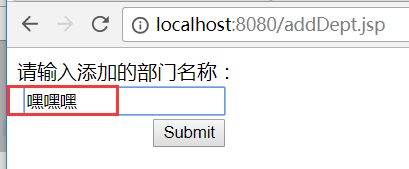
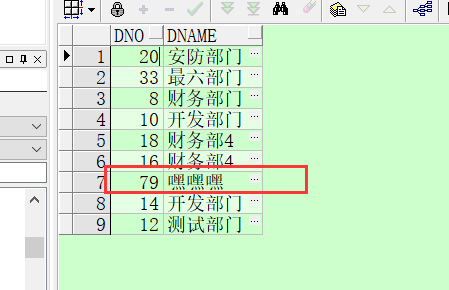
数据库:
Tp:SSH框架整合的时候比较容易,只要细心些都是能配出来的。。

 浙公网安备 33010602011771号