


java利用poi-tl生成Word并转为PDF
一、POI-TL
1. Maven依赖
<dependency>
    <groupId>com.deepoove</groupId>
    <artifactId>poi-tl</artifactId>
    <version>1.12.2</version>
</dependency>
<!-- Apache POI 核心依赖 -->
<dependency>
    <groupId>org.apache.poi</groupId>
    <artifactId>poi</artifactId>
    <version>5.2.3</version>
</dependency>
<dependency>
    <groupId>org.apache.poi</groupId>
    <artifactId>poi-ooxml</artifactId>
    <version>5.2.3</version>
</dependency>
2. 标签
A. 文本:{{text}},文本换行使用\n字符;如

B. 图片:{{@image}},使用Pictures构建图片模型,如:

if (StringUtils.isNotBlank(reportPreview.getHeaderLogoUrl())) {
                    map.put("headerLogo", (reportPreview.getHeaderLogoUrl().startsWith("http://") ? Pictures.ofUrl(reportPreview.getHeaderLogoUrl()) : Pictures.ofBytes(HttpsUtil.getByte(reportPreview.getHeaderLogoUrl()))).size(30, 15).create());
                }
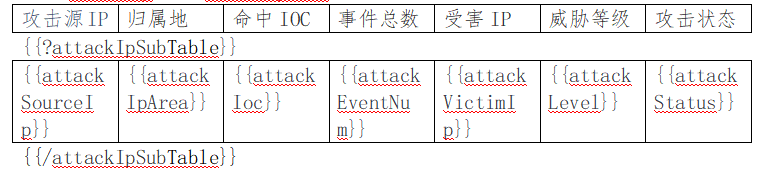
C. 区块对:{{?sections}}{{/sections}},开始标签和结束标签中间可以包含多个图片、表格、段落、列表和图表等,值为False或空就隐藏区块中的所有文档元素,值为非空集合就循环渲染,如:
3. 引用标签
A. 图片:引用图片标签是一个文本{{image}},需要用office打开设置,也是更改文字;
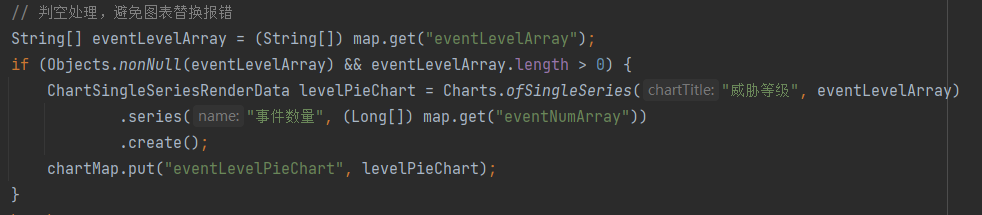
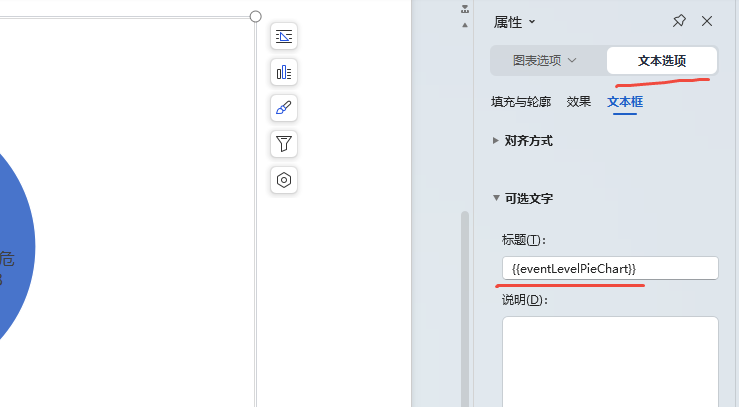
B. 单系列图表:指饼图、圆环图等,如使用WPS右键设置图表区域格式,打开找到文本选项里文字标题;
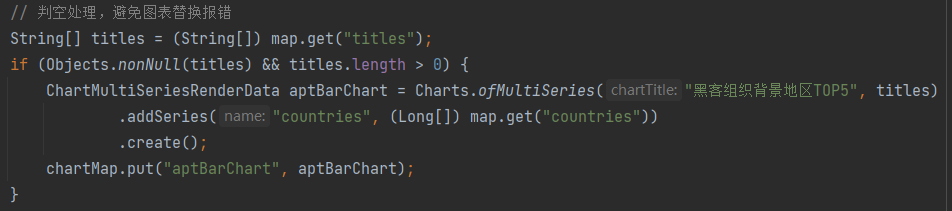
C. 多系列图表:指条形图、柱形图等,跟随上面一样;
4. 插件
A. 默认插件:poi-tl默认提供了八个策略插件,用来处理文本、图片、列表、表格、文档嵌套、引用图片、引用多系列图表、引用单系列图表等
B. 表格行循环:LoopRowTableRenderPolicy 是一个特定场景的插件,根据集合数据循环表格行
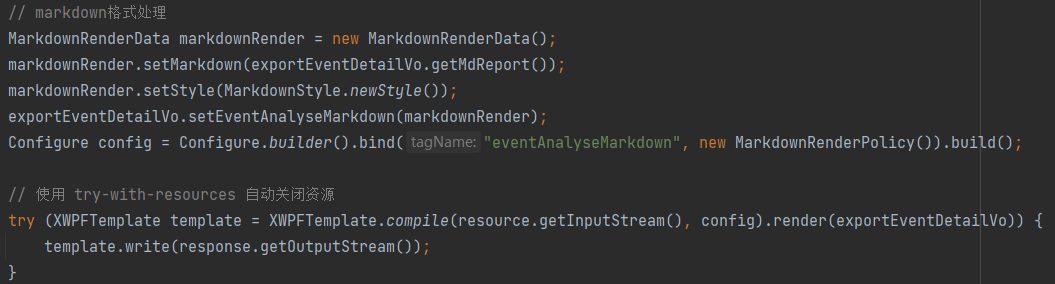
C. Markdown:MarkdownRenderPolicy 插件支持通过Markdown生成word文档
引入依赖:
<dependency>
  <groupId>com.deepoove</groupId>
  <artifactId>poi-tl-plugin-markdown</artifactId>
  <version>1.0.3</version>
</dependency>
代码示例:注意若生成文档出现标题和上级相同,可以将标题改为一级看看,就不一样了
5. 文档合并:将多个Word文档进行合并为一个,可用来解决模板自定义排序问题;
try {
            Map<String, Object> chartMap = new HashMap<>();
            NiceXWPFDocument mergeDoc = this.getDocument(0, reportPreview, null, chartMap);

            for (String type : types) {
                mergeDoc = mergeDoc.merge(this.getDocument(Integer.valueOf(type), reportPreview, typeNumberMap.get(type), chartMap));
            }

            try (ByteArrayOutputStream out = new ByteArrayOutputStream()) {
                // 此处用来解决模板中图型参数不被替换的问题
                XWPFTemplate.compile(mergeDoc).render(chartMap).writeAndClose(out);

                return out.toByteArray();
            }
        } catch (Exception e) {
            e.printStackTrace();
            log.error("报告WORD文档生成失败!");
            return null;
        }
6. 常见问题
问题一:生成的Word文档,当某个单元格内容多时,用libreOffice打开时表格线消失,但是Wps能正常显示;
解决办法:从1.10.0版本更新到1.12.2版本,注意多对比找到原因,然后看新版本是否解决,我在这里坑了很久。

可参考:Poi-tl官方文档
二、Word转为PDF
1. 实现方式
A. 使用spire.doc,但是生成pdf文档免费限制为10页;
B. 使用kkFileView,需要优化word模板才能调好样式,底层office使用的是libreOffice。
2. sprie.doc
A. Maven依赖
<!-- 转换doc为pdf的组件 -->
<dependency>
    <groupId>e-iceblue</groupId>
    <artifactId>spire.doc</artifactId>
    <version>5.4.10</version>
</dependency>
B. word转pdf代码且去除水印


public static byte[] convertToPdf(byte[] bytes) {
        if (Objects.isNull(bytes) || bytes.length == 0) {
            throw new IllegalArgumentException("Input byte array cannot be null or empty");
        }

        try (ByteArrayOutputStream out = new ByteArrayOutputStream()) {
            Document doc = new Document();
            // 加载文档内容
            doc.loadText(new ByteArrayInputStream(bytes));

            // 转换为PDF
            try (ByteArrayOutputStream pdfStream = new ByteArrayOutputStream()) {
                doc.saveToStream(pdfStream, FileFormat.PDF);
                doc.close();
                // 去除水印
                try (PDDocument pdDocument = PDDocument.load(pdfStream.toByteArray())) {
                    removeText(pdDocument, spire_watermark_text);
                    pdDocument.save(out);
                }
            }

            return out.toByteArray();
        } catch (Exception e) {
            log.error("转换doc至pdf出错!", e);
            throw new RuntimeException("Failed to convert document to PDF", e);
        }
    }
/** 去掉第三方组件添加的无用信息 */
public static final void removeText(PDDocument documentoPDF, String searchString) throws IOException {
   // 计量第几行的辅助变量,为了去掉第一页的页头的无用text信息
   int count = 0;
   final char[] charArray = searchString.toCharArray();

   for (PDPage page : documentoPDF.getPages()) {
      count++;
      PdfContentStreamEditor editor = new PdfContentStreamEditor(documentoPDF, page, count) {
         final StringBuilder recentChars = new StringBuilder();

         @Override
         protected void showGlyph(Matrix textRenderingMatrix, PDFont font, int code, String unicode, Vector displacement) throws IOException {
            String str = font.toUnicode(code);
            if (str != null) {
               recentChars.append(str);
            }

            super.showGlyph(textRenderingMatrix, font, code, unicode, displacement);
         }

         @Override
         protected void write(ContentStreamWriter contentStreamWriter, Operator operator, List<COSBase> operands) throws IOException {
            String recentText = recentChars.toString();
            if (this.pageIndex == 1) {
               // 第一行的特殊逻辑处理,只是处理searchString中出现的文本的信息
               if (recentText.length() == 0 || !inCharArray(recentText.charAt(recentText.length() - 1), charArray)) {
                  super.write(contentStreamWriter, operator, operands);
                  return;
               } else {
                  if (recentText.indexOf(searchString) != -1) {
                     // 这里设为2,是为了直接不处理,也就是不走if (this.pageIndex == 1) 这个判断
                     pageIndex = 2;
                  }
                  return;
               }
            } else {
               recentChars.setLength(0);
            }
            String oprStr = operator.getName();

            if (TEXT_SHOWING_OPERATORS.contains(oprStr) && searchString.equals(recentText)) {
               return;
            }

            super.write(contentStreamWriter, operator, operands);
         }
      };
      editor.processPage(page);
   }
}

/** 辅助判断方法,判断c是否在charArray中 */
public static final boolean inCharArray(char c, char[] charArray) {
   for (char ca : charArray) {
      if (c == ca) {
         return true;
      }
   }
   return false;
}
3. kkFileView:二次开发代码进行转换,可参考:kkFileView文档在线预览;
@PostMapping("/wordToPdf")
    public byte[] wordToPdf(@RequestBody byte[] sourceBytes) {
        if (Objects.isNull(sourceBytes) || sourceBytes.length == 0) {
            return null;
        }

        String fileName = String.format("%s/%s.docx", ConfigConstants.getFileDir(), UUID.randomUUID());
        File file = new File(fileName);
        String covertFileName = fileName.replace(".docx", ".pdf");
        File convertFile = null;
        try {
            FileUtils.writeByteArrayToFile(file, sourceBytes);
            FileAttribute fileAttribute = new FileAttribute();
            OfficeToPdfService.converterFile(file, covertFileName, fileAttribute);

            convertFile = new File(covertFileName);
            return FileUtils.readFileToByteArray(convertFile);
        } catch (Exception e) {
            e.printStackTrace();

            return null;
        } finally {
            // 完成后,删除文件
            file.delete();
            if (Objects.nonNull(convertFile)) {
                convertFile.delete();
            }
        }
    }
4. 问题:Word文档正常显示,转为PDF时本地运行正常,但服务器转后显示不正常,表现为汉字显示乱码或者框框。
解决办法:
A. 将windows上字体(C:windows\fonts)复制到Linux下:/usr/share/fonts
B. 更改权限:chmod 755 /usr/share/fonts/windows/*
C. 建立scale文件:cd /usr/share/fonts/windows/ && mkfontscale;
D. 刷新缓存:fc-cache。

 浙公网安备 33010602011771号