
Java面向对象学习(六)异常机制与处理
1.异常机制
1)异常例子:用户输入不一定符合程序的要求、程序要打开某个文件但是这个文件却不存在或格式不对、读取数据库但数据库是空的、程序运行的时候内存或硬盘满了等
2)Exception,为了让程序作出合理的处理而不至于程序崩溃,我们要处理异常
3)异常类型
(1).检查型异常:代码逻辑没有错误,但可能会引起的异常,例如打开一个文件,但这个文件不存在的异常,Java编译器和虚拟机都会进行检查,编译器一般会给出错误提示,提醒你去处理这个可能发现的异常。
(2).运行时异常(RuntimeException):是代码逻辑的的问题,是可以避免的,在编译时可以被忽略,程序运行会报的异常,是不检查异常,程序中可以选择捕获也可以不处理
(3).错误Error:由JVM虚拟机生成并抛出,与代码编写无关。例如在JVM试图执行应用时,产生Java虚拟机运行错误(Virtual MachineError)、类定义错误(NoClassDefFoundError)等。这些错误是不可查的,因为它们在应用程序的控制和处理能力之外,而且绝大多数是程序运行时不允许出现的状况。对于设计合理的应用程序来说,即使确实发生了错误,本质上也不应该试图去处理它所引起的异常状况。
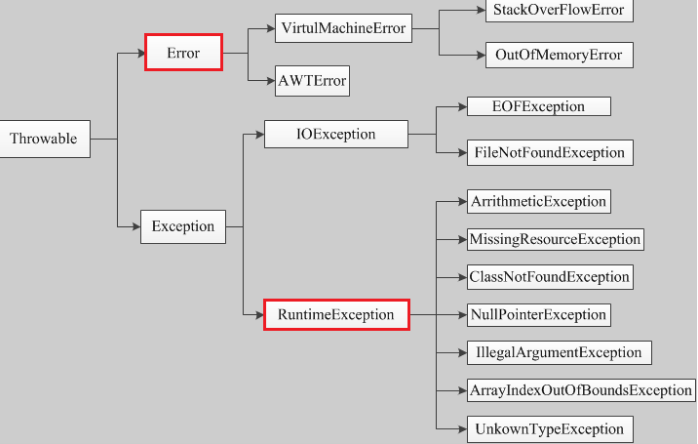
4)在java中,异常被当做对象来处理,java.lang.Throwable是所有异常的超类
2.异常处理:
(1)抛出
int a=0;
public void test(int a){
    if (a==0){
        throw new ArithmeticException();
    }
}
throw抛出: 表示主动抛出了一个异常实例,需要在调用方法时捕获处理。
public void test(int a,int b) throws ArithmeticException {
        System.out.println(a/b);
    }
throws抛出:在方法声明后面,可以写多个异常,告诉方法的调用者,方法中可能会出现这些异常,需要调用者调用方法时处理(捕获/继续抛出)
 1 //throw、throws使用
 2
 3 public class Demo08 {
 4     public static void main(String[] args) {
 5         test1();
 6         try {
 7             test2();    //这里test()方法会抛出异常,所以这里也要处理一下这个异常
 8         } catch (Exception e) {
 9             e.printStackTrace();
10         }
11         test3();
12     }
13     //主动抛出运行时异常
14     public static void test1() {
15         int a =0;
16         if (a==0){
17             //主动抛出一个运行时异常
18             throw new RuntimeException();
19         }
20     }
21     //主动抛出运检查异常并用throws解决
22     public static void test2() throws Exception {
23         int a =0;
24         if (a==0){
25             //主动抛出一个检查异常,这里会报红提示你解决这个检查异常。
26             //throw new Exception();Alt+Enter,选择第一个Add exception to method signatrue
27             throw new Exception();
28         }
29     }
30     //主动抛出运检查异常并用trycatch解决
31     public static void test3(){
32         int a =0;
33         if (a==0){
34             //主动抛出一个检查异常,这里会报红提示你解决这个检查异常。
35             //throw new Exception();Alt+Enter,选择第二个Surround with try/catch
36             try {
37                 throw new Exception();
38             } catch (Exception e) {
39                 e.printStackTrace();
40             }
41         }
42     }
43 }
throw和throws区别:
1)throw写在方法内部,
异常抛出后需要进行捕获。
(2)捕获
try {//监控的区域,这里面的代码运行发生的异常

}catch (要捕获的异常 异常名 ){//捕获异常
    //如果捕获到了异常,就执行下面的语句
}finally {//可选,无论是否捕获到异常,都会执

}
finally用于处理一些善后工作,比如IO流、资源的关闭
自动生成快捷键:Ctrl+Alt+t,自动生成捕获异常语句,我们也可以在语句中加入退出程序语句等
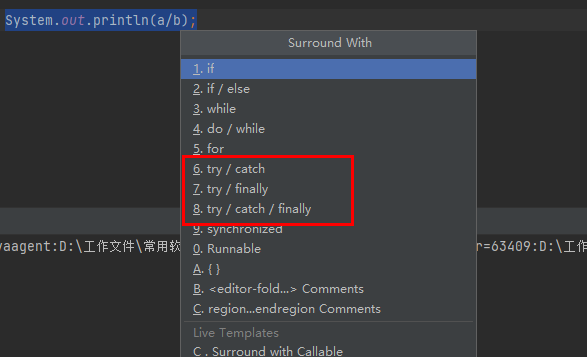
1         try {
2             System.out.println(a/b);
3         } catch (Exception e) {
4             System.exit(0);   //程序结束
5             e.printStackTrace();    //打印错误的栈信息,就是程序报的异常
6         } finally {
7         }
3.实例
1)创建两个变量,a=1,b=0,输出a/b
1 public class demo01 {
2     public static void main(String[] args) {
3         int a=1;
4         int b=0;
5         System.out.println(a/b);    //报错java.lang.ArithmeticException: / by zero
6     }
7 }
程序运行结果为

2)可以看到报了一个异常java.lang.ArithmeticException,于是写代码捕获这个异常
 1 public class demo01 {
 2     public static void main(String[] args) {
 3         int a=1;
 4         int b=0;
 5         //System.out.println(a/b);    //报错java.lang.ArithmeticException: / by zero
 6
 7         //捕获这个异常
 8         try {//监控的区域,这里面的代码运行发生的异常
 9             System.out.println(a/b);
10         }catch (ArithmeticException e){//catch(要捕获的异常 异常名):捕获异常
11             //如果捕获到了异常,就执行下面的语句
12             System.out.println("除数不能为0");
13         }finally {//可选,无论是否捕获到异常,都会执行
14             System.out.println("finally");
15         }
16     }
17 }
程序运行结果为
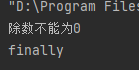
异常消失。
如果将代码中的b改成合法数字1,运行结果为
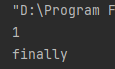
3)捕获多个异常
可以写多条catch来捕获多个异常,异常的顺序必须是从小到大,否则会报错。
 1         try {
 2             System.out.println(a/b);
 3         }catch (Error error){
 4             System.out.println("Error");
 5         }catch (Exception e){
 6             System.out.println("Exception");
 7         }catch (Throwable t){
 8             System.out.println("Throwable");
 9         }finally {
10             System.out.println("finally");
11         }
4)主动抛出异常
 1    public static void main(String[] args) {
 2         int a=1;
 3         int b=0;
 4
 5         new demo01().test(a,b);
 6     }
 7     //主动抛出异常,一般在方法中使用,用于该方法无法处理这个异常时
 8     public void test(int a,int b){
 9         if (b==0){
10             throw new ArithmeticException();
11        }
12     }
运行结果为:
可以看到程序没有运行a/b,但是主动抛出了这个异常
5)使用较多的方式:输出异常信息
1      try {//监控的区域,这里面的代码运行发生的异常
2             System.out.println(a/b);
3         }catch (ArithmeticException e){//catch(要捕获的异常 异常名):捕获异常
4             // 如果捕获到了异常,就执行下面的语句
5             e.printStackTrace();//显示异常的堆栈信息
6         }finally {//可选,无论是否捕获到异常,都会执行
7             System.out.println("finally");
8         }
多重catch可以用 | 连接
catch (ArithmeticException |NumberFormatException|ArrayStoreException exception)
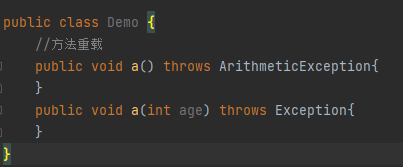
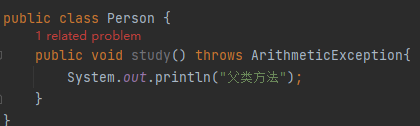
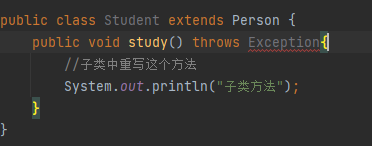
4.重载和重写中的异常使用(ArithmeticException < Exception)
1)重载:重载的方法之间的异常没有关系
1)重写:子类异常 < 父类异常,否则会报错
5.自定义异常(用到时再学)
用户自定义异常类,可以继承RuntimeException(运行时异常)或Exception(检查异常)
1)自定义异常继承运行时异常
 1 public class MyException extends RuntimeException{
 2     //定义一个无参构造器
 3     public MyException(){
 4
 5     }
 6     //定义一个有参构造器
 7     public MyException(String msg){
 8         //调用父类有参构造
 9         super(msg);
10     }
11
12 }
编写Test类
 1 public class Test {
 2     public static void main(String[] args) {
 3         sex("aaa");
 4     }
 5     public static void sex(String sex){
 6         if(sex.equals("男")||sex.equals("女")){
 7             System.out.println(sex);
 8         }else{
 9             throw new MyException("性别错误!");
10         }
11     }
12 }
可以看到运行Test类时,抛出了异常

2)自定义异常继承检查异常
 1 public class MyException extends Exception{
 2     //定义一个无参构造器
 3     public MyException(){
 4
 5     }
 6     //定义一个有参构造器
 7     public MyException(String msg){
 8         //调用父类有参构造
 9         super(msg);
10     }
11 }
在Test里中必须要处理,这里使用try/catch处理
 1 public class Test {
 2     public static void main(String[] args) {
 3         sex("aaa");
 4     }
 5     public static void sex(String sex){
 6         if(sex.equals("男")||sex.equals("女")){
 7             System.out.println(sex);
 8         }else{
 9             try {
10                 throw new MyException("性别错误!");
11             } catch (MyException e) {
12                 e.printStackTrace();
13             }
14         }
15     }

 浙公网安备 33010602011771号