
Ubuntu20.04搭建TR369服务器oktopus
前提:root用户登录
1. 安装unzip
apt install unzip
2. 安装docker
apt install docker.io
3. 升级docker compose到v2
3.1 创建docker compose插件目录
mkdir -p ~/.docker/cli-plugins
3.2 获取插件,若无法下载,可先用uname -m获取linux类型,然后在浏览器直接输入地址先下载文件,在复制到对应位置
curl -SL "https://github.com/docker/compose/releases/latest/download/docker-compose-linux-$(uname -m)" -o ~/.docker/cli-plugins/docker-compose
3.3 修改插件可执行权限
chmod +x ~/.docker/cli-plugins/docker-compose
4. 查看版本
docker compose version
显示如下

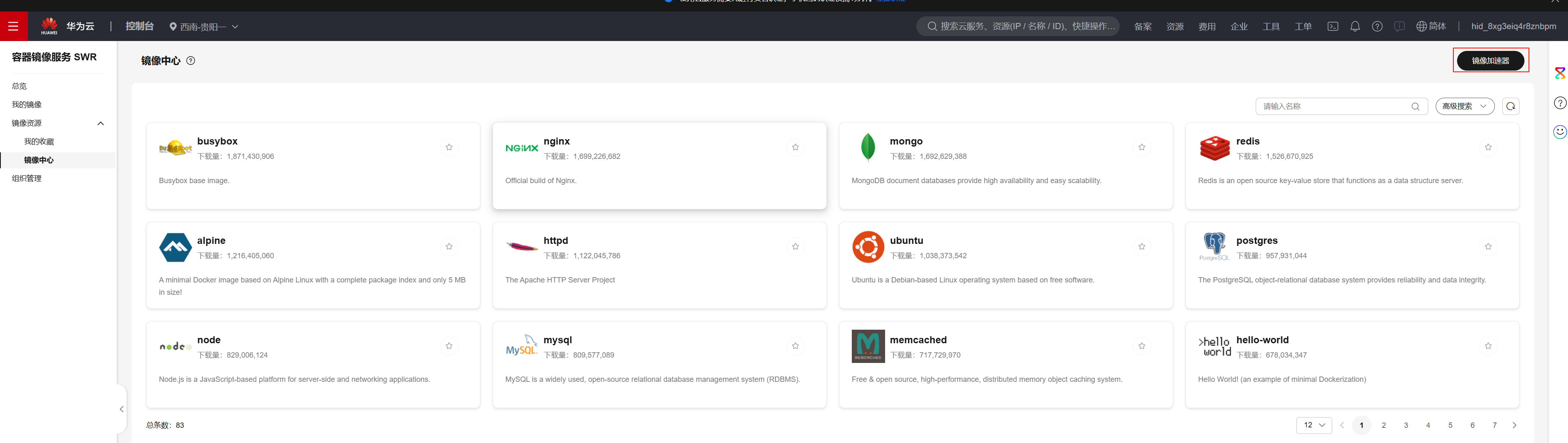
5. 获取华为云docker加速镜像地址
5.1 访问https://console.huaweicloud.com/swr/#/swr/mirror
5.2 点击获取加速镜像地址
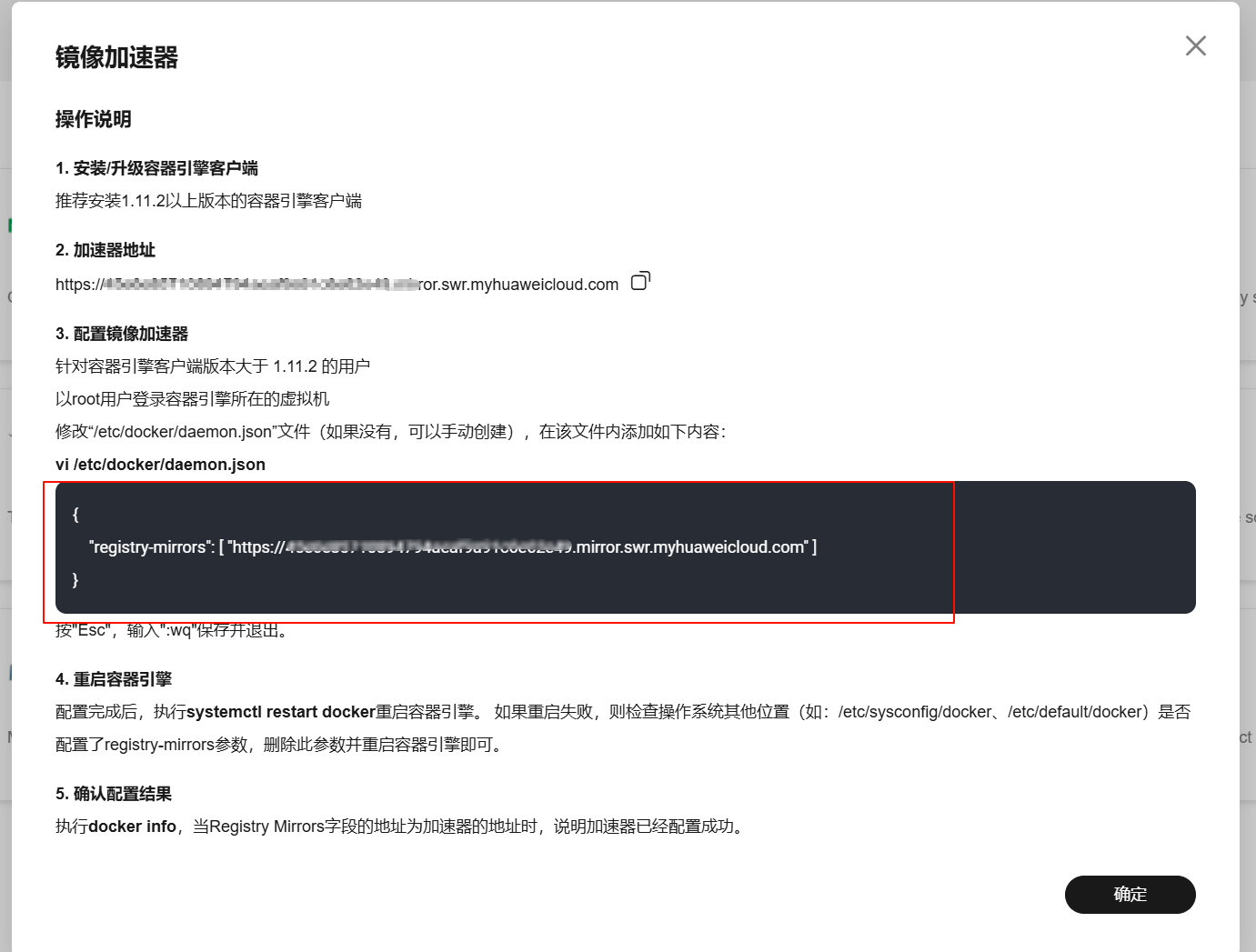
5.3 将加速地址写入docker加速镜像,并将下面的abc123替换为你的华为加速镜像地址
sudo tee /etc/docker/daemon.json <<-'EOF'
{
  "registry-mirrors": [
    "https://abc123.mirror.swr.myhuaweicloud.com"
  ]
}
EOF
6. 重启docker
systemctl daemon-reload
systemctl restart docker
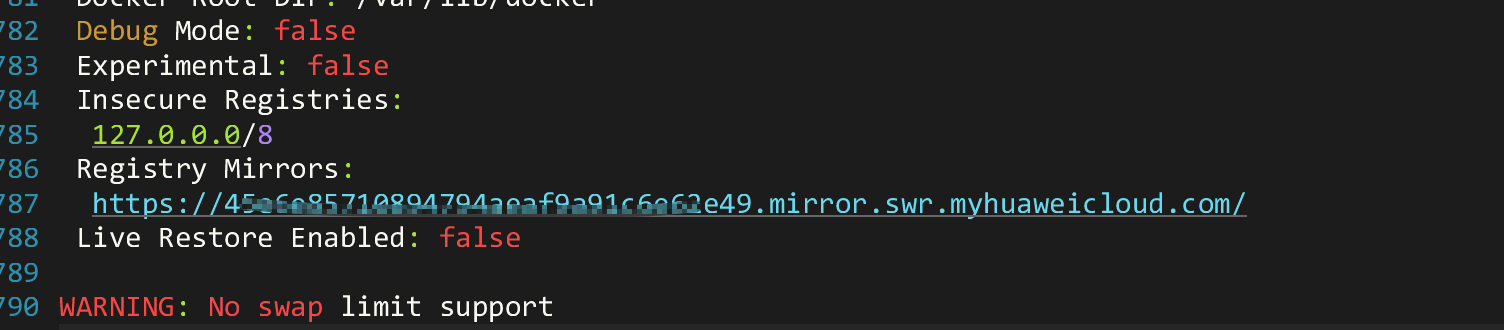
7. 验证地址是否加载
docker info
出现下图显示内容说明加载完成
8. 下载并安装oktopus
wget https://github.com/OktopUSP/oktopus/archive/refs/heads/main.zip && unzip main && cd oktopus-main/deploy/compose && COMPOSE_PROFILES=nats,controller,cwmp,mqtt,stomp,ws,adapter,frontend docker compose up -d
9. CPE连接参数位于/opt/oktopus-main/agent/目录下,如/opt/oktopus-main/agent/oktopus-mqtt-obuspa.txt
#
# This file contains a factory reset database in text format
#
# If no USP database exists when OB-USP-AGENT starts, then OB-USP-AGENT will create a database containing
# the parameters specified in a text file located by the '-r' option.
# Example:
#    obuspa -p -v 4 -r factory_reset_example.txt
#
# Each line of this file contains either a comment (denoted by '#' at the start of the line)
# or a USP data model parameter and its factory reset value.
# The parameter and value are separated by whitespace.
# The value may optionally be enclosed in speech marks "" (this is the only way to specify an empty string)
#
##########################################################################################################
#
# Adding MQTT parameters to test the datamodel interface
#

Device.LocalAgent.EndpointID "oktopus-0-mqtt"

## Adding boot params
Device.LocalAgent.Controller.1.BootParameter.1.Enable true
Device.LocalAgent.Controller.1.BootParameter.1.ParameterName "Device.LocalAgent.EndpointID"
Device.LocalAgent.Subscription.1.Alias cpe-1
Device.LocalAgent.Subscription.1.Enable true
Device.LocalAgent.Subscription.1.ID default-boot-event-ACS
Device.LocalAgent.Subscription.1.Recipient Device.LocalAgent.Controller.1
Device.LocalAgent.Subscription.1.NotifType Event
Device.LocalAgent.Subscription.1.ReferenceList Device.Boot!
Device.LocalAgent.Subscription.1.Persistent true

Device.LocalAgent.MTP.1.MQTT.ResponseTopicConfigured "oktopus/usp/v1/controller"
Device.LocalAgent.MTP.1.MQTT.Reference "Device.MQTT.Client.1"
Device.MQTT.Client.1.BrokerAddress "127.0.0.1"
Device.MQTT.Client.1.ProtocolVersion "5.0"
Device.MQTT.Client.1.BrokerPort "1883"
Device.MQTT.Client.1.TransportProtocol "TCP/IP"
Device.MQTT.Client.1.Username ""
Device.MQTT.Client.1.Password ""
Device.MQTT.Client.1.Alias "cpe-1"
Device.MQTT.Client.1.Enable true
Device.MQTT.Client.1.ClientID ""
Device.MQTT.Client.1.KeepAliveTime "60"

Device.MQTT.Client.1.ConnectRetryTime "5"
Device.MQTT.Client.1.ConnectRetryIntervalMultiplier   "2000"
Device.MQTT.Client.1.ConnectRetryMaxInterval "60"


Device.LocalAgent.Controller.1.Alias "cpe-1"
Device.LocalAgent.Controller.1.Enable true
Device.LocalAgent.Controller.1.PeriodicNotifInterval "86400"
Device.LocalAgent.Controller.1.PeriodicNotifTime "0001-01-01T00:00:00Z"
Device.LocalAgent.Controller.1.ControllerCode ""
Device.LocalAgent.Controller.1.MTP.1.Alias "cpe-1"
Device.LocalAgent.Controller.1.MTP.1.Enable true
Device.LocalAgent.Controller.1.MTP.1.Protocol "MQTT"
Device.LocalAgent.Controller.1.EndpointID "oktopusController"
Device.LocalAgent.Controller.1.MTP.1.MQTT.Reference "Device.MQTT.Client.1"
Device.LocalAgent.Controller.1.MTP.1.MQTT.Topic "oktopus/usp/v1/controller"


#
# The following parameters may be modified
#
Device.LocalAgent.MTP.1.Alias "cpe-1"
Device.LocalAgent.MTP.1.Enable true
Device.LocalAgent.MTP.1.Protocol "MQTT"

Internal.Reboot.Cause "LocalFactoryReset"

 浙公网安备 33010602011771号