
Python爬"Cosplay_中国"所有图片 coser图片
import os
import time
import re
import requests
from lxml import etree
from requests.adapters import HTTPAdapter


# 获取页面源码
def request_text(url, encode):
    reqs = requests.Session()
    reqs.mount('http://', HTTPAdapter(max_retries=3))
    reqs.mount('https://', HTTPAdapter(max_retries=3))
    try:
        reqs = reqs.get(url=url, headers={
             "User-Agent": "Mozilla/5.0 (Windows NT 10.0; Win64; x64) AppleWebKit/537.36 (KHTML, like Gecko) Chrome"
                           "/89.0.4389.82 Safari/537.36 Edg/89.0.774.50"
        }, timeout=5)
        reqs.encoding = encode
        page_code = reqs.text
        reqs.close()
        return page_code
    except requests.exceptions.RequestException as e:
        print(e)


# 获取页面资源二进制数据
def request_content(url):
    reqs = requests.Session()
    reqs.mount('http://', HTTPAdapter(max_retries=3))
    reqs.mount('https://', HTTPAdapter(max_retries=3))   # 设置超时重试次数为3次
    try:
        reqs = reqs.get(url=url, headers={
            "User-Agent": "Mozilla/5.0 (Windows NT 10.0; Win64; x64) AppleWebKit/537.36 (KHTML, like Gecko) Chrome"
                          "/89.0.4389.82 Safari/537.36 Edg/89.0.774.50"
        }, timeout=5)
        image_data = reqs.content
        reqs.close()
        return image_data
    except requests.exceptions.RequestException as e:
        print(e)


# 保存图片
def write_image(file_path, data):
    try:
        with open(file_path, mode="wb") as f:
            f.write(data)
        f.close()
    except:
        print("出现错误")
        return "continue"


# 对文件名、目录名进行过滤,匹配子页数、图片名、图片url
def re_info(obj, page_code):
    info_dict = dict()
    r = '[/\\\\.*?<>|:"中国"]+'
    info = obj.search(page_code)
    name = info.group("name")
    name = re.sub(r, " ", name)
    src = info.group("src")
    sub_page_num = info.group("page_num")
    info_dict["name"] = name
    info_dict["src"] = src
    info_dict["sub_page_num"] = int(sub_page_num)
    return info_dict


def main():
    start = time.perf_counter()
    page_num = 1
    count = 1
    domain = "http://www.cosplay8.com"
    obj = re.compile(r"<title>(?P<name>.*?)</title>"
                     r".*?<img src='(?P<src>.*?)'"
                     r".*?<span>共(?P<page_num>\d+)页", re.S
                     )
    obj1 = re.compile(r"(?P<sub_to_url>.*?).html", re.S)
    while page_num <= 90:
        url = f"http://www.cosplay8.com/pic/chinacos/list_22_{page_num}.html"
        main_page = request_text(url, "utf-8")
        html = etree.HTML(main_page)
        lis = html.xpath("/html/body/div[3]/ul/li")  # 获取当前页面所有<li>的xpath路径
        sub_url_list = list()

        # 遍历<li>的xpath路径,获取每个<li>的href地址并放入列表中
        for li in lis:
            sub_url = li.xpath("./a/@href")[0]
            sub_url_list.append(sub_url)

        # 遍历<li>的href地址, 获取每个<li>的页面源码,并进行正则匹配,获取img_src和子页面数量,对当前页图片下载
        for sub in sub_url_list:
            sub_urls = domain + sub
            sub_page = request_text(sub_urls, "utf-8")
            info_dict = re_info(obj, sub_page)
            img_src = domain + info_dict["src"]
            folder_path = "D:/img/" + info_dict["name"] + "_" + str(page_num)
            if not os.path.exists(folder_path):
                os.mkdir(folder_path)
            file_name = "/" + info_dict["name"] + ".jpg"
            file_path = folder_path + file_name
            write_image(file_path, request_content(img_src))
            count += 1
            time.sleep(0.5)

            # 遍历每个子页面,进行图片下载
            for i in range(2, info_dict["sub_page_num"] + 1):
                sub_to = obj1.search(sub_urls)
                sub_to_url = sub_to.group("sub_to_url")
                sub_to_urls = "%s_%d.html" % (sub_to_url, i)  # 对子页面链接进行修整
                sub_to_page = request_text(sub_to_urls, "utf-8")
                info_sub_dict = re_info(obj, sub_to_page)
                print(info_sub_dict["name"])
                img_src = domain + info_sub_dict["src"]
                file_path = folder_path + "/" + info_sub_dict["name"] + ".jpg"
                if write_image(file_path, request_content(img_src)) == "continue":
                    continue
                else:
                    write_image(file_path, request_content(img_src))
                count += 1
                time.sleep(0.5)
        page_num += 1
    end = time.perf_counter()
    print('耗时: %s Seconds' % (end - start))
    print("共下载完成%d图片" % count)


if __name__ == '__main__':
    main()

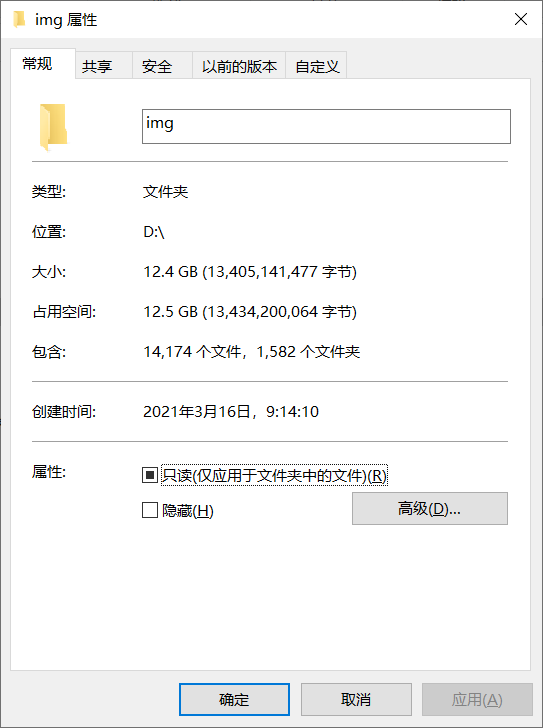
差不多有1万4千多张,没有全部扒完。扒到80页的时候发现后面的小姐姐没有前面的好看,就没扒了(嘻嘻)
下面附上几个好看的小姐姐


 浙公网安备 33010602011771号