
一、
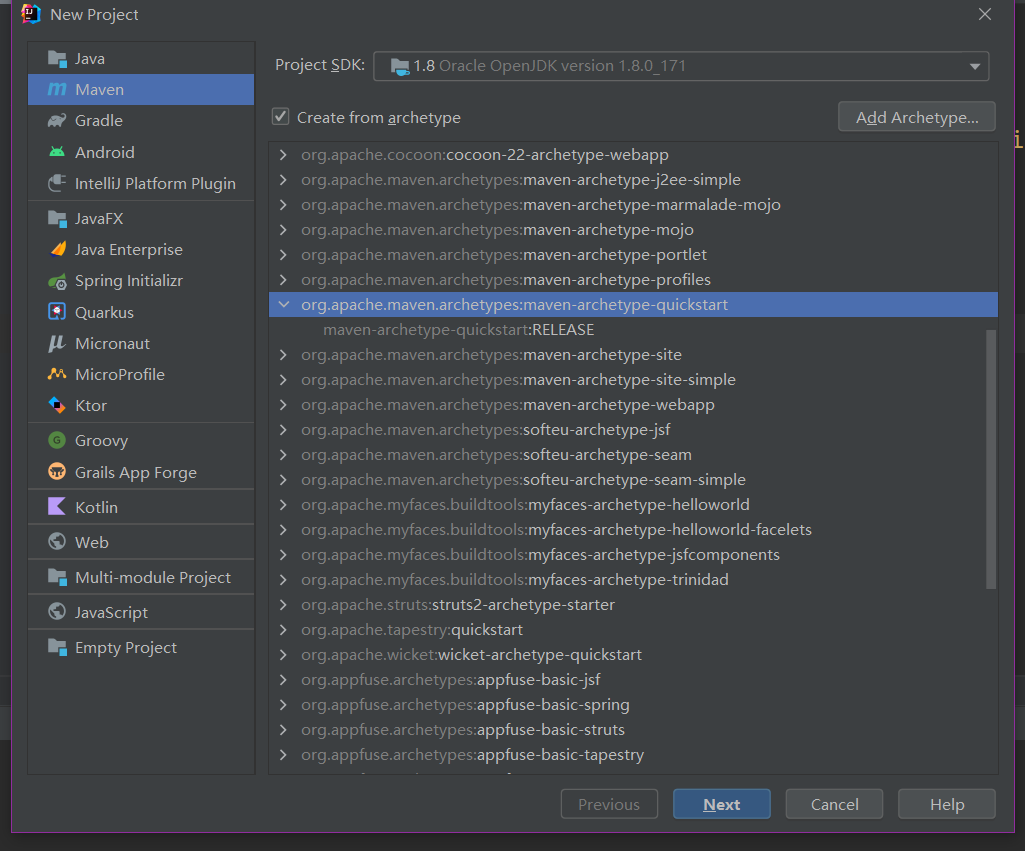
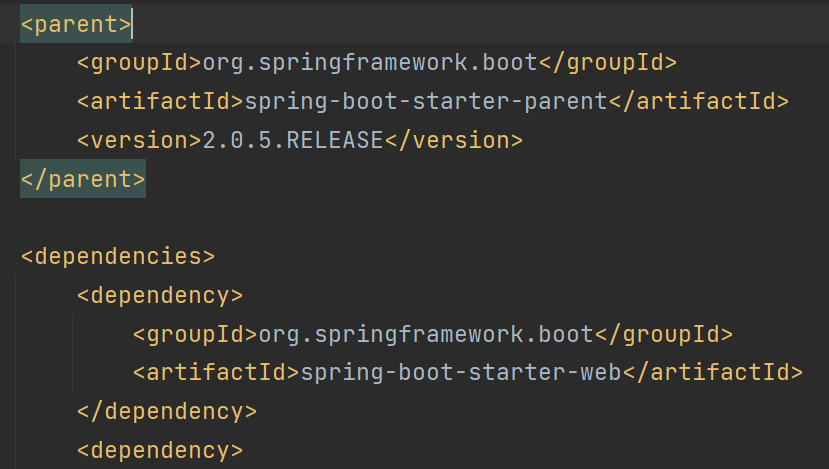
 1 <parent>
 2         <groupId>org.springframework.boot</groupId>
 3         <artifactId>spring-boot-starter-parent</artifactId>
 4         <version>2.0.5.RELEASE</version>
 5     </parent>
 6
 7
 8 <dependency>
 9             <groupId>org.springframework.boot</groupId>
10             <artifactId>spring-boot-starter-web</artifactId>
11         </dependency>
 1 package com.miaoshaProject;
 2
 3 import org.springframework.boot.SpringApplication;
 4 import org.springframework.boot.autoconfigure.EnableAutoConfiguration;
 5 import org.springframework.web.bind.annotation.RequestMapping;
 6 import org.springframework.web.bind.annotation.RestController;
 7
 8 /**
 9  * Hello world!
10  */
11 @EnableAutoConfiguration//创建bean 开启整个工程基于spring boot 自动化的配置
12 @RestController//spring mvc
13 public class App {
14     public static void main(String[] args) {
15         System.out.println("Hello World!");
16         SpringApplication.run(App.class);
17     }
18
19     @RequestMapping("/")//
20     public String home(){
21
22         return "Hello World!";
23     }
24 }
//application.properties
server.port=8081
二、配置mybatis
//application.properties
mybatis.mapperLocations=classpath:mapping/*.xml
1 <dependency>
2             <groupId>mysql</groupId>
3             <artifactId>mysql-connector-java</artifactId>
4             <version>8.0.28</version>
5         </dependency>
 1 <dependency>
 2             <groupId>com.alibaba</groupId>
 3             <artifactId>druid</artifactId>
 4             <version>1.1.3</version>
 5         </dependency>
 6         <dependency>
 7             <groupId>org.mybatis.spring.boot</groupId>
 8             <artifactId>mybatis-spring-boot-starter</artifactId>
 9             <version>1.3.1</version>
10         </dependency>
配置插件
1 <dependency>
2                             <groupId>org.mybatis.generator</groupId>
3                             <artifactId>mybatis-generator-core</artifactId>
4                             <version>1.3.5</version>
5                         </dependency>
 1 <!--mybatis插件-->
 2                 <plugin>
 3                     <groupId>org.mybatis.generator</groupId>
 4                     <artifactId>mybatis-generator-maven-plugin</artifactId>
 5                     <version>1.3.5</version>
 6                     <dependencies>
 7                         <!-- https://mvnrepository.com/artifact/org.mybatis.generator/mybatis-generator-core -->
 8                         <dependency>
 9                             <groupId>org.mybatis.generator</groupId>
10                             <artifactId>mybatis-generator-core</artifactId>
11                             <version>1.3.5</version>
12                         </dependency>
13                         <dependency>
14                             <groupId>mysql</groupId>
15                             <artifactId>mysql-connector-java</artifactId>
16                             <version>8.0.28</version>
17                         </dependency>
18                     </dependencies>
19                     <executions>
20                         <execution>
21                             <id>mybatis.generator</id>
22                             <phase>package</phase>
23                             <goals>
24                                 <goal>generate</goal>
25                             </goals>
26                         </execution>
27                     </executions>
28                     <configuration>
29                         <!--允许移动生产的文件-->
30                         <verbose>true</verbose>
31                         <!--允许自动覆盖文件 工作中不要配置这个 -->
32                         <overwrite>true</overwrite>
33                         <configurationFile>
34                             src/main/resources/mybatis-generator.xml
35                         </configurationFile>
36                     </configuration>
37                 </plugin>
三、创建表
/*
Navicat Premium Data Transfer
Source Server : testOne
Source Server Type : MySQL
Source Server Version : 80028
Source Host : localhost:3306
Source Schema : miaosha
Target Server Type : MySQL
Target Server Version : 80028
File Encoding : 65001
Date: 12/04/2022 16:50:38
*/
SET NAMES utf8mb4;
SET FOREIGN_KEY_CHECKS = 0;
-- ----------------------------
-- Table structure for user_info
-- ----------------------------
DROP TABLE IF EXISTS `user_info`;
CREATE TABLE `user_info` (
`id` int(0) NOT NULL AUTO_INCREMENT,
`name` varchar(64) CHARACTER SET utf8 COLLATE utf8_unicode_ci NOT NULL DEFAULT '',
`gender` int(0) NOT NULL DEFAULT 0 COMMENT '为1代表男性,2代表女性',
`age` int(0) NOT NULL DEFAULT 0,
`telpphone` varchar(32) CHARACTER SET utf8 COLLATE utf8_unicode_ci NOT NULL DEFAULT '',
`register_mode` varchar(10) CHARACTER SET utf8 COLLATE utf8_unicode_ci NOT NULL DEFAULT '' COMMENT '注册方式 byphone bywechat byalipay',
`third_party_id` varchar(64) CHARACTER SET utf8 COLLATE utf8_unicode_ci NOT NULL DEFAULT '' COMMENT '第三方id',
PRIMARY KEY (`id`) USING BTREE
) ENGINE = InnoDB CHARACTER SET = utf8 COLLATE = utf8_unicode_ci ROW_FORMAT = Dynamic;
-- ----------------------------
-- Table structure for user_password
-- ----------------------------
DROP TABLE IF EXISTS `user_password`;
CREATE TABLE `user_password` (
`id` int(0) NOT NULL AUTO_INCREMENT,
`encrpt_password` varchar(128) CHARACTER SET utf8 COLLATE utf8_unicode_ci NOT NULL DEFAULT '',
`user_id` int(0) NOT NULL DEFAULT 0,
PRIMARY KEY (`id`) USING BTREE
) ENGINE = InnoDB CHARACTER SET = utf8 COLLATE = utf8_unicode_ci ROW_FORMAT = Dynamic;
SET FOREIGN_KEY_CHECKS = 1;
四、mybatis-generator.xml
 1 <?xml version="1.0" encoding="UTF-8"?>
 2 <!DOCTYPE generatorConfiguration
 3         PUBLIC "-//mybatis.org//DTD MyBatis Generator Configuration 1.0//EN"
 4         "http://mybatis.org/dtd/mybatis-generator-config_1_0.dtd">
 5
 6 <generatorConfiguration>
 7     <!--驱动包的路径-->
 8     <!--<classPathEntry location="C:\Users\lhf\.m2\repository\mysql\mysql-connector-java\5.1.46\mysql-connector-java-5.1.46.jar" />-->
 9
10     <!--数据库连接-->
11     <context id="DB2Tables" targetRuntime="MyBatis3">
12         <!--注释-->
13         <!--<commentGenerator>
14             <property name="suppressAllComments" value="true"/>
15             <property name="suppressDate" value="true"/>
16         </commentGenerator>-->
17         <!--数据库连接地址及账号密码-->
18         <jdbcConnection driverClass="com.mysql.cj.jdbc.Driver"
19                         connectionURL="jdbc:mysql://127.0.0.1:3306/miaosha"
20                         userId="root"
21                         password="678678">
22         </jdbcConnection>
23
24         <!--<javaTypeResolver >
25             <property name="forceBigDecimals" value="false" />
26         </javaTypeResolver>-->
27         <!--生成DataObject类存放位置-->
28         <javaModelGenerator targetPackage="com.miaoshaProject.dataobject" targetProject="src/main/java">
29             <!--是否对model添加构造函数-->
30             <property name="constructorBased" value="false"/>
31             <!--是否允许子包-->
32             <property name="enableSubPackages" value="true"/>
33             <!--建立的model对象是否不可变,也就是生成的model没有setter方法-->
34             <property name="immutable" value="false"/>
35             <property name="trimStrings" value="true"/>
36         </javaModelGenerator>
37
38         <!--生成映射文件存放位置-->
39         <sqlMapGenerator targetPackage="mapping"  targetProject="src/main/resources">
40             <property name="enableSubPackages" value="true" />
41         </sqlMapGenerator>
42
43         <!--生成Dao类的存放位置-->
44         <!-- 客户端代码,生成易于使用的正对Model对象和XML配置文件的代码
45         type="ANNOTATEDMAPPER", 生成Java Model和基于注解的Mapper对象
46         type="MIXEDMAPPER", 生成基于注解的Java Model和相应的Mapper对象
47         type="XMLMAPPER", 生成SQLMap XML文件和独立的Mapper接口
48         -->
49         <javaClientGenerator type="XMLMAPPER" targetPackage="com.miaoshaProject.dao"  targetProject="src/main/java">
50             <property name="enableSubPackages" value="true" />
51         </javaClientGenerator>
52
53         <!--生成对应表及类名-->
54         <!--<table schema="mybatis" tableName="user_info" domainObjectName="UserDO"
55                 enableInsert="true" enableSelectByExample="false"
56                 enableDeleteByPrimaryKey="false" enableDeleteByExample="false"
57                 enableCountByExample="false" enableUpdateByExample="false"
58                 enableSelectByPrimaryKey="true" enableUpdateByPrimaryKey="true"/>-->
59         <table tableName="user_info" domainObjectName="UserDO"  ></table>
60         <!--enableCountByExample="false"
61         enableUpdateByExample="false" enableDeleteByExample="false"
62         enableSelectByExample="false" selectByExampleQueryId="false"
63         enableInsert="true" enableDeleteByPrimaryKey="false"-->
64         <table tableName="user_password" domainObjectName="UserPasswordDO"  ></table>
65         <!--enableCountByExample="false"
66         enableUpdateByExample="false" enableDeleteByExample="false"
67         enableSelectByExample="false" selectByExampleQueryId="false"
68         enableInsert="true" enableDeleteByPrimaryKey="false"-->
69
70     </context>
71
72 </generatorConfiguration>
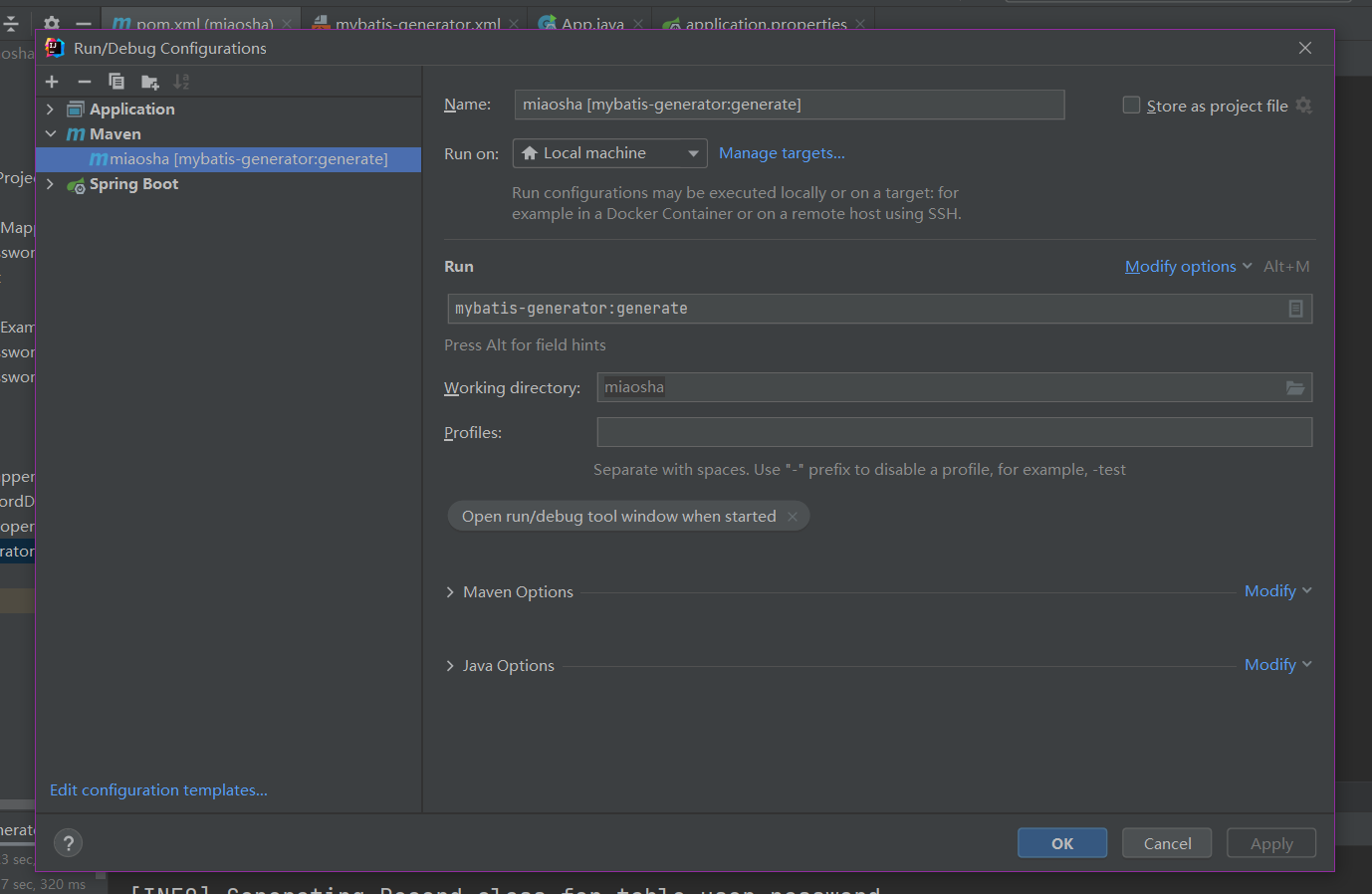
五、配置并运行插件
六、配置application.properties
 1 server.port=8081
 2 #mybatis mapping位置
 3 mybatis.mapperLocations=classpath:mapping/*.xml
 4 #数据库配置
 5 spring.datasource.name=miaosha
 6 spring.datasource.url=jdbc:mysql://127.0.0.1:3306/miaosha
 7 spring.datasource.username=root
 8 #druid配置
 9 spring.datasource.type=com.alibaba.druid.pool.DruidDataSource
10 spring.datasource.driver-class-name=com.mysql.cj.jdbc.Driver
七、APP.java测试
 1 package com.miaoshaProject;
 2
 3 import com.miaoshaProject.dao.UserDOMapper;
 4 import com.miaoshaProject.dataobject.UserDO;
 5 import org.mybatis.spring.annotation.MapperScan;
 6 import org.springframework.beans.factory.annotation.Autowired;
 7 import org.springframework.boot.SpringApplication;
 8 import org.springframework.boot.autoconfigure.SpringBootApplication;
 9 import org.springframework.web.bind.annotation.RequestMapping;
10 import org.springframework.web.bind.annotation.RestController;
11
12 /**
13  * Hello world!
14  */
15 //@EnableAutoConfiguration//创建bean 开启整个工程基于spring boot 自动化的配置
16 @SpringBootApplication(scanBasePackages = {"com.miaoshaProject"})//和EnableAutoConfiguration差不多
17 @RestController//spring mvc
18 @MapperScan("com.miaoshaProject.dao")//扫描dao
19 public class App {
20
21     //调试一下 先注入
22     @Autowired
23     private UserDOMapper userDOMapper;
24
25     public static void main(String[] args) {
26         System.out.println("Hello World!");
27         SpringApplication.run(App.class);
28     }
29
30     @RequestMapping("/")//
31     public String home(){
32
33         //
34         UserDO userDO = userDOMapper.selectByPrimaryKey(1);
35         if (userDO == null){
36             return "用户对象不存在";
37         }else {
38             return userDO.getName();
39         }
40     }
41 }
本文来自博客园,作者:荣慕平,转载请注明原文链接:https://www.cnblogs.com/rongmuping/articles/16135448.html

 浙公网安备 33010602011771号