RelativeLayout(相对布局)
相对布局由其名称大致可以猜测其是相对于其他的控件进行布局的。因此呢!其属性也就比较多了,不过基本上都是有迹可循的。下面就其属性值的特点可以将一些常用的属性分为以下三个类别。
1. 属性值为true或false(相对于父控件的位置)
|
android:layout_centerHrizontal |
水平居中 |
|
android:layout_centerVertical |
垂直居中 |
|
android:layout_centerInparent |
相对于父元素完全居中 |
|
android:layout_alignParentBottom |
贴紧父元素的下边缘 |
|
android:layout_alignParentLeft |
贴紧父元素的左边缘 |
|
android:layout_alignParentRight |
贴紧父元素的右边缘 |
|
android:layout_alignParentTop |
贴紧父元素的上边缘 |
|
android:layout_alignWithParentIfMissing |
如果对应的兄弟元素找不到的话就以父元素做参照物 |
2. 属性值必须为id的引用名"@id/id_name"
|
android:layout_below |
在某元素的下方 |
|
android:layout_above |
在某元素的的上方 |
|
android:layout_toLeftOf |
在某元素的左边 |
|
android:layout_toRightOf |
在某元素的右边 |
|
android:layout_alignTop |
本元素的上边缘和某元素的上边缘对齐 |
|
android:layout_alignLeft |
本元素的左边缘和某元素的左边缘对齐 |
|
android:layout_alignBottom |
本元素的下边缘和某元素的下边缘对齐 |
|
android:layout_alignRight |
本元素的右边缘和某元素的右边缘对齐 |
3. 属性值为具体的像素值
|
android:layout_marginBottom |
本元素底边缘离某元素的距离 |
|
android:layout_marginLeft |
本元素左边缘离某元素的距离 |
|
android:layout_marginRight |
本元素右边缘离某元素的距离 |
|
android:layout_marginTop |
本元素上边缘离某元素的距离 |
当然,除了这些个属性,像之前在LinearLayout中用到的android:background、android:gravity与android:layout_gravity等等属性该布局也都有用到。同样的,还是通过代码来加深对一些属性的认识
<RelativeLayout
xmlns:android="http://schemas.android.com/apk/res/android"
android:id="@+id/relativeLayout"
android:layout_width="match_parent"
android:layout_height="match_parent"
android:background="#acdefb">
<Button
android:id="@+id/tv0"
android:layout_width="80dp"
android:layout_height="wrap_content"
android:background="#FF0000"
android:layout_centerInParent="true"
android:textSize="24sp"
android:maxLines="2"
android:text="中间相对组件"/>
<Button
android:id="@+id/tv1"
android:layout_width="wrap_content"
android:layout_height="wrap_content"
android:background="#012345"
android:layout_above="@+id/tv0"
android:layout_toLeftOf="@+id/tv0"
android:layout_alignParentLeft="true"
android:layout_marginRight="30dp"
android:layout_marginBottom="30dp"
android:text="隐约雷鸣,阴霾天空"/>
<Button
android:id="@+id/tv2"
android:layout_width="wrap_content"
android:layout_height="wrap_content"
android:background="#465892"
android:layout_above="@+id/tv0"
android:layout_toRightOf="@+id/tv0"
android:layout_alignParentRight="true"
android:layout_marginLeft="30dp"
android:layout_marginBottom="30dp"
android:text="但盼风雨来,能留君在此"/>
<Button
android:id="@+id/tv3"
android:layout_width="wrap_content"
android:layout_height="wrap_content"
android:background="#458698"
android:layout_below="@+id/tv0"
android:layout_toLeftOf="@+id/tv0"
android:layout_alignParentLeft="true"
android:layout_marginRight="30dp"
android:layout_marginTop="30dp"
android:text="隐约雷鸣,阴霾天空"/>
<Button
android:id="@+id/tv4"
android:layout_width="wrap_content"
android:layout_height="wrap_content"
android:background="#864745"
android:layout_below="@+id/tv0"
android:layout_toRightOf="@+id/tv0"
android:layout_alignParentRight="true"
android:layout_marginLeft="30dp"
android:layout_marginTop="30dp"
android:text="即使天无雨,我亦留此地"/>
</RelativeLayout>

在上述代码中,首先创建一个Button组件tv0,处于父控件的中间的位置。然后使其他的四个Button相对于tv0的位置来设置其位置。具体为:左上角的tv1,将其设置为处于中间tv0的上边和左边,且距离其左边和上边30dp,以及贴紧父控件的左边缘;右上角的tv2,将其设置为处于中间tv0的上边和右边,且距离其右边和上边30dp,以及贴紧父控件的右边缘;左下角的tv3,将其设置为处于中间tv0的下边和左边,且距离其左边和下边30dp,以及贴紧父控件的左边缘;右下角的tv4,将其设置为处于中间tv0的下边和右边,且距离右边和下边30dp,以及贴紧父控件的右边缘。
RelativeLayout的叠加效果,如果不指定每个组件的相对位置,那么就会都叠加在左上角,有点类似于FrameLayout的叠加效果。当然,一般是指定:android:layout_marginTop、android:layout_marginBottom、 android:layout_marginLeft、android:layout_marginRight四个属性的属性值为负值来实现。依然是用代码来检测其叠加效果:
主要是讲上述五个组件的宽度和高度改为200dp,然后将上述四个属性的属性值改为负值
<?xml version="1.0" encoding="utf-8"?>
<RelativeLayout
xmlns:android="http://schemas.android.com/apk/res/android"
android:id="@+id/relativeLayout"
android:layout_width="match_parent"
android:layout_height="match_parent"
android:background="#acdefb">
<Button
android:id="@+id/tv0"
android:layout_width="150dp"
android:layout_height="150dp"
android:background="#FF0000"
android:layout_centerInParent="true"
android:textSize="24sp"
android:maxLines="2"
android:text="中间相对组件"/>
<Button
android:id="@+id/tv1"
android:layout_width="150dp"
android:layout_height="150dp"
android:background="#012345"
android:layout_above="@+id/tv0"
android:layout_toLeftOf="@+id/tv0"
android:layout_alignParentLeft="true"
android:layout_marginRight="-50dp"
android:layout_marginBottom="-50dp"
android:text="隐约雷鸣,阴霾天空"/>
<Button
android:id="@+id/tv2"
android:layout_width="150dp"
android:layout_height="150dp"
android:background="#465892"
android:layout_above="@+id/tv0"
android:layout_toRightOf="@+id/tv0"
android:layout_alignParentRight="true"
android:layout_marginLeft="-120dp"
android:layout_marginBottom="-50dp"
android:text="但盼风雨来,能留君在此"/>
<Button
android:id="@+id/tv3"
android:layout_width="150dp"
android:layout_height="150dp"
android:background="#458698"
android:layout_below="@+id/tv0"
android:layout_toLeftOf="@+id/tv0"
android:layout_alignParentLeft="true"
android:layout_marginRight="-120dp"
android:layout_marginTop="-50dp"
android:text="隐约雷鸣,阴霾天空"/>
<Button
android:id="@+id/tv4"
android:layout_width="150dp"
android:layout_height="150dp"
android:background="#864745"
android:layout_below="@+id/tv0"
android:layout_toRightOf="@+id/tv0"
android:layout_alignParentRight="true"
android:layout_marginLeft="-50dp"
android:layout_marginTop="-50dp"
android:text="即使天无雨,我亦留此地"/>
</RelativeLayout>
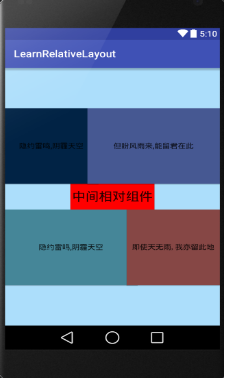
可以看到其叠加效果如上图所示:
只能是相对处在后面定义的组件叠加在前面的组件上,而不能是相对于前面的组件叠加在后边的组件上。此处的相对前后表示的是后一个组件的位置是相对前面的组件位置而定的
其次:要用来做后边组件相对的组件应该在前边进行定义,以免找不到组件造成错误
posted on 2016-07-18 23:56 Rocking7189 阅读(391) 评论(0) 收藏 举报

 浙公网安备 33010602011771号