
24-element-ui的input支持搜索和多tag标签
参考:https://blog.csdn.net/qq_36247432/article/details/88734522
效果图:

html代码
    <el-autocomplete
      class="inline-input"
      v-model="cSubcategoryNo"
      :fetch-suggestions="querySearch"
      placeholder="请输入内容"
      @select="handleSelect"
    ></el-autocomplete>
    <el-tag
      v-for="tag in selected"
      closable
      :disable-transitions="true"
      :key="tag"
      type="info"
      @close="handleClose(tag)"  # 定义了handleClose函数惨可以点击 ❌ 消除tag,这点官方文档好像有误
    >
      <span class="el-select__tags-text">{{ tag }}</span>
    </el-tag>
script代码
<script>
  export default {
    data() {
      return {
        restaurants: [],
        cSubcategoryNo: '',
        selected:[], // 获得value值
        selectedValue:[],  //获得code值
      };
    },
    methods: {
      querySearch(queryString, cb) {
        var restaurants = this.restaurants;
        var results = queryString ? restaurants.filter(this.createFilter(queryString)) : restaurants;
        // 调用 callback 返回建议列表的数据
        cb(results);
      },
      createFilter(queryString) {
        return (restaurant) => {
          return (restaurant.value.toLowerCase().indexOf(queryString.toLowerCase()) === 0);
        };
      },
      loadAll() {
        return [
          { "value": "三全鲜食(北新泾店)", "address": "长宁区新渔路144号" },
          { "value": "Hot honey 首尔炸鸡(仙霞路)", "address": "上海市长宁区淞虹路661号" },
          { "value": "新旺角茶餐厅", "address": "上海市普陀区真北路988号创邑金沙谷6号楼113" },
          { "value": "泷千家(天山西路店)", "address": "天山西路438号" },
          { "value": "胖仙女纸杯蛋糕(上海凌空店)", "address": "上海市长宁区金钟路968号1幢18号楼一层商铺18-101" },
          { "value": "贡茶", "address": "上海市长宁区金钟路633号" },
          { "value": "豪大大香鸡排超级奶爸", "address": "上海市嘉定区曹安公路曹安路1685号" },
          { "value": "茶芝兰(奶茶,手抓饼)", "address": "上海市普陀区同普路1435号" },
          { "value": "十二泷町", "address": "上海市北翟路1444弄81号B幢-107" },
          { "value": "星移浓缩咖啡", "address": "上海市嘉定区新郁路817号" },
          { "value": "阿姨奶茶/豪大大", "address": "嘉定区曹安路1611号" },
          { "value": "新麦甜四季甜品炸鸡", "address": "嘉定区曹安公路2383弄55号" },


        ];
      },
//多选栏中的删除
    handleClose(tag) {
      let item = this.selected.indexOf(tag);
        this.selected.splice(item, 1);
        this.selectedValue.splice(item, 1);
        console.log(this.selectedValue)
      },
//值
      handleSelect(item) {
        this.selected.push(item.value)
        this.selectedValue.push(item.address)
        this.cSubcategoryNo =""
        console.log(item);
      }
    },
    mounted() {
      this.restaurants = this.loadAll();
    }
  }
</script>
参考上面的结果以及这个组件(https://github.com/xiispace/el-input-tag/blob/master/src/ElInputTag.vue),实现了另外一种满足自己需求的样式如下,
和这个github上的组件相比,我这个的功能是支持搜索,结合了element-ui的autocomplete
同时参考了html的dom事件,参考:https://www.runoob.com/jsref/dom-obj-event.html
补充:有一个不带搜索的input-tag组件,链接:https://github.com/matiastucci/vue-input-tag
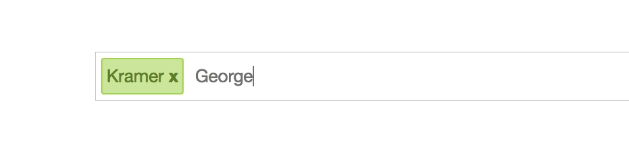
效果图:
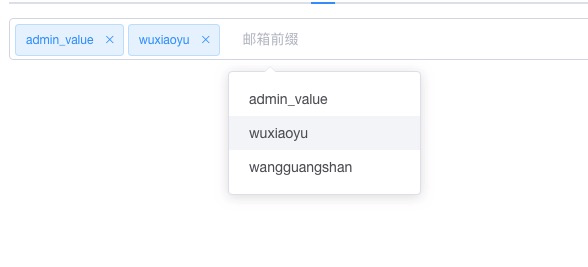
代码如下:
<template>
  <div
    class="el-input-tag input-tag-wrapper"
    :class="[size ? 'el-input-tag--' + size : '']"
    @click="foucusTagInput">
    <el-tag
      v-for="(tag, idx) in innerTags"
      :key="tag"
      :size="size"
      :closable="!readOnly"
      :disable-transitions="false"
      @close="remove(idx)">
      {{tag}}
    </el-tag>
    <el-autocomplete
        v-model.trim="newTag"
        :fetch-suggestions="UserNameSearchAsync"
        placeholder="邮箱前缀"
        style="outline:none;      border:none;"
         @select = "handleSelect"
        clearable
        ></el-autocomplete>
  </div>
</template>

<script>
export default {
  name: 'ElInputTag',
  props: {
    value: {
      type: Array,
      default: () => []
    },
    addTagOnKeys: {
      type: Array,
      default: () => [13, 188, 9]
    },
    readOnly: {
      type: Boolean,
      default: false
    },
    size: String
  },
  data () {
    return {
      newTag: '',
      innerTags: [...this.value],
      dialog_temp: {},
    }
  },
  watch: {
    value () {
      this.innerTags = [...this.value]
    }
  },
  methods: {
    foucusTagInput () {
      if (this.readOnly || !this.$el.querySelector('.tag-input')) {
        return
      } else {
        this.$el.querySelector('.tag-input').focus()
      }
    },
    // handleSelect是自己实现的方法
    handleSelect(item) {
        let addSuucess = false
        if (this.addTag(this.newTag.trim())) {
          addSuucess = true
        }
        if (addSuucess) {
        this.tagChange()
        this.newTag = ''
      }
      console.log('value---1')
      console.log(this.innerTags)   // 选中的数据保存在了this.innerTags中,这个用来和后端交互
      console.log('value---2')

    },
    // addNew是https://github.com/xiispace/el-input-tag/blob/master/src/ElInputTag.vue上原先的方法
    addNew (e) {
      if (e && (!this.addTagOnKeys.includes(e.keyCode)) && (e.type !== 'blur')) {
        return
      }
      if (e) {
        e.stopPropagation()
        e.preventDefault()
      }
      let addSuucess = false
      if (this.newTag.includes(',')) {
        this.newTag.split(',').forEach(item => {
          if (this.addTag(item.trim())) {
            addSuucess = true
          }
        })
      } else {
        if (this.addTag(this.newTag.trim())) {
          addSuucess = true
        }
      }
      if (addSuucess) {
        this.tagChange()
        this.newTag = ''
      }
    },
    addTag (tag) {
      tag = tag.trim()
      if (tag && !this.innerTags.includes(tag)) {
        this.innerTags.push(tag)
        return true
      }
      return false

    },
    remove (index) {
      this.innerTags.splice(index, 1)
      this.tagChange()
      console.log('value---1')
      console.log(this.innerTags)
      console.log('value---2')
    },
    removeLastTag () {
      if (this.newTag) {
        return
      }
      this.innerTags.pop()
      this.tagChange()
    },
    tagChange () {
      this.$emit('input', this.innerTags)
    },

    // 下面两个方法是autocomplete相关的搜索方法
    UserNameSearchAsync(queryString, cb) {
      var username_list = [
              { key: 'admin_key', value: 'admin_value' },
              { key: 'wuxiaoyu', value: 'wuxiaoyu' },
              { key: 'wangguangshan', value: 'wangguangshan' },
          ];
      var results = queryString
        ? username_list.filter(this.createUserNameFilter(queryString))
        : username_list;

      clearTimeout(this.timeout);
      this.timeout = setTimeout(() => {
        cb(results);
      }, 100 * Math.random());
    },
    createUserNameFilter(queryString) {
      return state => {
        return (
          state.value.toLowerCase().indexOf(queryString.toLowerCase()) === 0
        );
      };
    },
  }
}
</script>

<style scoped>
  .input-tag-wrapper {
    position: relative;
    font-size: 14px;
    background-color: #fff;
    background-image: none;
    border-radius: 4px;
    border: 1px solid #dcdfe6;
    box-sizing: border-box;
    color: #606266;
    display: inline-block;
    outline: none;
    padding: 0 10px 0 5px;
    transition: border-color .2s cubic-bezier(.645,.045,.355,1);
    width: 100%;
  }

  .el-tag {
    margin-right: 4px;
  }

  .tag-input {
    background: transparent;
    border: none!important;
    font-size: 14px;
    height: 40px;
    outline: none;
    padding-left: 0;
    width: 100px;
  }

  .el-input-tag--mini .tag-input{
    height: 28px;
    line-height: 28px;
  }

  .el-input-tag--small .tag-input{
    height: 32px;
    line-height: 32px;
  }

  .el-input-tag--medium .tag-input{
    height: 36px;
    line-height: 36px;
  }

  /* 下面这个的效果是autocomplete的input没有边框*/
  /deep/ input {
  /* input { */
    /* background-color: red!important;  调试用的样式 */
    outline:none!important;
    border:none!important;
  }
</style>
样式修改这块主要参考了
做有积累的事~~

 浙公网安备 33010602011771号