

Add support event triggers on authenticated login
目录结构
注:提前言明 本文借鉴了以下博主、书籍或网站的内容,其列表如下:
1、参考书籍:《PostgreSQL数据库内核分析》
2、参考书籍:《数据库事务处理的艺术:事务管理与并发控制》
3、PostgreSQL数据库仓库链接,点击前往
4、日本著名PostgreSQL数据库专家 铃木启修 网站主页,点击前往
5、参考书籍:《PostgreSQL中文手册》
6、参考书籍:《PostgreSQL指南:内幕探索》,点击前往
7、Waiting for PostgreSQL 17 – Add support event triggers on authenticated login,点击前往
1、本文内容全部来源于开源社区 GitHub和以上博主的贡献,本文也免费开源(可能会存在问题,评论区等待大佬们的指正)
2、本文目的:开源共享 抛砖引玉 一起学习
3、本文不提供任何资源 不存在任何交易 与任何组织和机构无关
4、大家可以根据需要自行 复制粘贴以及作为其他个人用途,但是不允许转载 不允许商用 (写作不易,还请见谅 💖)
5、本文内容基于PostgreSQL master源码开发而成
@
文章快速说明索引
学习目标:
做数据库内核开发久了就会有一种 少年得志,年少轻狂 的错觉,然鹅细细一品觉得自己其实不算特别优秀 远远没有达到自己想要的。也许光鲜的表面掩盖了空洞的内在,每每想到于此,皆有夜半临渊如履薄冰之感。为了睡上几个踏实觉,即日起 暂缓其他基于PostgreSQL数据库的兼容功能开发,近段时间 将着重于学习分享Postgres的基础知识和实践内幕。
学习内容:(详见目录)
1、深入理解PostgreSQL数据库之Add support event triggers on authenticated login
学习时间:
2024-03-28 12:31:44 星期四
学习产出:
1、PostgreSQL数据库基础知识回顾 1个
2、CSDN 技术博客 1篇
3、PostgreSQL数据库内核深入学习
注:下面我们所有的学习环境是Centos8+PostgreSQL master+Oracle19C+MySQL8.0
postgres=# select version();
                                                  version
------------------------------------------------------------------------------------------------------------
 PostgreSQL 17devel on x86_64-pc-linux-gnu, compiled by gcc (GCC) 8.5.0 20210514 (Red Hat 8.5.0-21), 64-bit
(1 row)

postgres=#

#-----------------------------------------------------------------------------#

SQL> select * from v$version;

BANNER        Oracle Database 19c EE Extreme Perf Release 19.0.0.0.0 - Production
BANNER_FULL	  Oracle Database 19c EE Extreme Perf Release 19.0.0.0.0 - Production Version 19.17.0.0.0
BANNER_LEGACY Oracle Database 19c EE Extreme Perf Release 19.0.0.0.0 - Production
CON_ID 0


#-----------------------------------------------------------------------------#

mysql> select version();
+-----------+
| version() |
+-----------+
| 8.0.27    |
+-----------+
1 row in set (0.06 sec)

mysql>
功能使用背景说明
有兴趣的小伙伴们可以去看一下该版patch的实现,如下:
此提交引入了登录事件触发器,允许在用户连接上触发一些操作。这对于日志记录或连接检查以及环境的某些个性化很有用。使用详细信息在包含的文档中进行了描述,但很快使用与其他触发器相同:创建返回 event_trigger 的函数,然后在登录事件上创建事件触发器
为了防止没有触发器时的连接时间开销,提交引入了 pg_database.dathasloginevt 标志,该标志指示数据库具有活动的登录触发器。该标志由 CREATE/ALTER EVENT TRIGGER 命令设置,并在连接时未找到活动触发器时取消设置
接下来,看一下该功能的相关使用,如下:
很久以前我们就有了 EVENT 触发器。虽然可能并没有真正使用它们(至少是直接使用它们,因为我们使用经常使用它们的 pgl_ddl_deploy),但它们肯定有它们的用例。
# 我这里的参数配置:

...
log_checkpoints = off
log_connections = on
log_disconnections = on
...
现在,我们可以在每次会话创建时执行一些代码。它看起来像:
[postgres@localhost:~/test/bin]$ ./psql
2024-03-27 21:54:09.128 PDT [12139] LOG:  connection received: host=[local]
2024-03-27 21:54:09.129 PDT [12139] LOG:  connection authenticated: user="postgres" method=trust (/home/postgres/test/bin/test/pg_hba.conf:117)
2024-03-27 21:54:09.129 PDT [12139] LOG:  connection authorized: user=postgres database=postgres application_name=psql
psql (17devel)
Type "help" for help.

postgres=# CREATE OR REPLACE FUNCTION login_validate() RETURNS event_trigger LANGUAGE plpgsql AS $$
postgres$# DECLARE
postgres$# BEGIN
postgres$#     IF session_user <> 'postgres' THEN
postgres$#         raise exception 'Go AWAY';
postgres$#     END IF;
postgres$#     raise log 'user login: %', session_user;
postgres$# END;
postgres$# $$;
CREATE FUNCTION
postgres=#
postgres=# CREATE EVENT TRIGGER login_validate
postgres-#   ON login
postgres-#   EXECUTE FUNCTION login_validate();
CREATE EVENT TRIGGER
postgres=# \q
2024-03-27 21:55:11.224 PDT [12139] LOG:  disconnection: session time: 0:01:02.095 user=postgres database=postgres host=[local]
[postgres@localhost:~/test/bin]$
有了这个,如果我尝试登录到我的数据库,并使用 postgres 帐户发出一些查询,我会得到:
[postgres@localhost:~/test/bin]$ ./psql -U postgres -d postgres -X -c 'select now()'
2024-03-27 21:58:32.917 PDT [12428] LOG:  connection received: host=[local]
2024-03-27 21:58:32.917 PDT [12428] LOG:  connection authenticated: user="postgres" method=trust (/home/postgres/test/bin/test/pg_hba.conf:117)
2024-03-27 21:58:32.917 PDT [12428] LOG:  connection authorized: user=postgres database=postgres application_name=psql
2024-03-27 21:58:32.919 PDT [12428] LOG:  user login: postgres
2024-03-27 21:58:32.919 PDT [12428] CONTEXT:  PL/pgSQL function login_validate() line 7 at RAISE
              now
-------------------------------
 2024-03-27 21:58:32.920223-07
(1 row)

2024-03-27 21:58:32.920 PDT [12428] LOG:  disconnection: session time: 0:00:00.004 user=postgres database=postgres host=[local]
[postgres@localhost:~/test/bin]$
但如果另一个用户尝试做同样的事情:
postgres=# create role test superuser password '1' login;
CREATE ROLE
postgres=# grant all privileges on database postgres to test;
GRANT
postgres=#
[postgres@localhost:~/test/bin]$ ./psql -U test -d postgres -X -c 'select now()'
2024-03-27 22:02:18.784 PDT [12812] LOG:  connection received: host=[local]
2024-03-27 22:02:18.784 PDT [12812] LOG:  connection authenticated: user="test" method=trust (/home/postgres/test/bin/test/pg_hba.conf:117)
2024-03-27 22:02:18.785 PDT [12812] LOG:  connection authorized: user=test database=postgres application_name=psql
2024-03-27 22:02:18.787 PDT [12812] FATAL:  Go AWAY
2024-03-27 22:02:18.787 PDT [12812] CONTEXT:  PL/pgSQL function login_validate() line 5 at RAISE
psql: error: connection to server on socket "/tmp/.s.PGSQL.5432" failed: FATAL:  Go AWAY
CONTEXT:  PL/pgSQL function login_validate() line 5 at RAISE
2024-03-27 22:02:18.787 PDT [12812] LOG:  disconnection: session time: 0:00:00.003 user=test database=postgres host=[local]
[postgres@localhost:~/test/bin]$
当然,还有更简单的方法来禁止用户连接。但强制执行某些策略可能会有所帮助,例如:每个连接都必须设置application_name:
postgres=# drop function login_validate cascade;
NOTICE:  drop cascades to event trigger login_validate
DROP FUNCTION
postgres=# CREATE OR REPLACE FUNCTION login_validate() RETURNS event_trigger LANGUAGE plpgsql AS $$
postgres$# DECLARE
postgres$# BEGIN
postgres$#     IF '' = current_setting('application_name') THEN
postgres$#         raise exception 'You don''t have application_name set!';
postgres$#     END IF;
postgres$#     raise log 'user logged with application name: %', current_setting('application_name');
postgres$# END;
postgres$# $$;
CREATE FUNCTION
postgres=#
postgres=# CREATE EVENT TRIGGER login_validate
postgres-#   ON login
postgres-#   EXECUTE FUNCTION login_validate();
CREATE EVENT TRIGGER
postgres=#
[postgres@localhost:~/test/bin]$ ./psql
2024-03-27 22:48:02.963 PDT [13644] LOG:  connection received: host=[local]
2024-03-27 22:48:02.964 PDT [13644] LOG:  connection authenticated: user="postgres" method=trust (/home/postgres/test/bin/test/pg_hba.conf:117)
2024-03-27 22:48:02.964 PDT [13644] LOG:  connection authorized: user=postgres database=postgres application_name=psql
2024-03-27 22:48:02.966 PDT [13644] LOG:  user logged with application name: psql
2024-03-27 22:48:02.966 PDT [13644] CONTEXT:  PL/pgSQL function login_validate() line 7 at RAISE
psql (17devel)
Type "help" for help.

postgres=# \q
2024-03-27 22:48:07.029 PDT [13644] LOG:  disconnection: session time: 0:00:04.066 user=postgres database=postgres host=[local]
[postgres@localhost:~/test/bin]$
但如果我尝试在不设置 application_name 的情况下运行最简单的应用程序:
## 安装相关依赖

[postgres@localhost:~/test/bin]$ sudo yum install perl-DBI -y
...
[postgres@localhost:~/test/bin]$ sudo yum install perl-DBD-Pg -y
...
[postgres@localhost:~/test/bin]$ perl -le 'use DBI; print DBI->connect("dbi:Pg:dbname=postgres;host=127.0.0.1;port=5432")->selectall_arrayref("select now()")->[0]->[0]'
2024-03-27 22:54:08.881 PDT [52215] LOG:  connection received: host=127.0.0.1 port=33408
2024-03-27 22:54:08.886 PDT [52215] LOG:  connection authenticated: user="postgres" method=trust (/home/postgres/test/bin/test/pg_hba.conf:119)
2024-03-27 22:54:08.886 PDT [52215] LOG:  connection authorized: user=postgres database=postgres
2024-03-27 22:54:08.888 PDT [52215] FATAL:  You don't have application_name set!
2024-03-27 22:54:08.888 PDT [52215] CONTEXT:  PL/pgSQL function login_validate() line 5 at RAISE
2024-03-27 22:54:08.889 PDT [52215] LOG:  disconnection: session time: 0:00:00.008 user=postgres database=postgres host=127.0.0.1 port=33408
DBI connect('dbname=postgres;host=127.0.0.1;port=5432','',...) failed: FATAL:  You don't have application_name set!
CONTEXT:  PL/pgSQL function login_validate() line 5 at RAISE at -e line 1.
Can't call method "selectall_arrayref" on an undefined value at -e line 1.
[postgres@localhost:~/test/bin]$
如果我通过环境变量提供 application_name 名称,它将立即通过:
[postgres@localhost:~/test/bin]$ PGAPPNAME=test perl -le 'use DBI; print DBI->connect("dbi:Pg:dbname=postgres;host=127.0.0.1;port=5432")->selectall_arrayref("select now()")->[0]->[0]'
2024-03-27 22:57:36.872 PDT [52400] LOG:  connection received: host=127.0.0.1 port=36198
2024-03-27 22:57:36.873 PDT [52400] LOG:  connection authenticated: user="postgres" method=trust (/home/postgres/test/bin/test/pg_hba.conf:119)
2024-03-27 22:57:36.874 PDT [52400] LOG:  connection authorized: user=postgres database=postgres application_name=test
2024-03-27 22:57:36.876 PDT [52400] LOG:  user logged with application name: test
2024-03-27 22:57:36.876 PDT [52400] CONTEXT:  PL/pgSQL function login_validate() line 7 at RAISE
2024-03-27 22:57:36.876919-07
2024-03-27 22:57:36.877 PDT [52400] LOG:  disconnection: session time: 0:00:00.005 user=postgres database=postgres host=127.0.0.1 port=36198
[postgres@localhost:~/test/bin]$
或通过连接选项:
[postgres@localhost:~/test/bin]$ perl -le 'use DBI; print DBI->connect("dbi:Pg:dbname=postgres;host=127.0.0.1;port=5432;application_name=whatever")->selectall_arrayref("select now()")->[0]->
[0]'
2024-03-27 22:59:06.474 PDT [52524] LOG:  connection received: host=127.0.0.1 port=54582
2024-03-27 22:59:06.480 PDT [52524] LOG:  connection authenticated: user="postgres" method=trust (/home/postgres/test/bin/test/pg_hba.conf:119)
2024-03-27 22:59:06.480 PDT [52524] LOG:  connection authorized: user=postgres database=postgres application_name=whatever
2024-03-27 22:59:06.485 PDT [52524] LOG:  user logged with application name: whatever
2024-03-27 22:59:06.485 PDT [52524] CONTEXT:  PL/pgSQL function login_validate() line 7 at RAISE
2024-03-27 22:59:06.488951-07
2024-03-27 22:59:06.491 PDT [52524] LOG:  disconnection: session time: 0:00:00.017 user=postgres database=postgres host=127.0.0.1 port=54582
[postgres@localhost:~/test/bin]$
使用相同的方法,我们可以制作触发器,禁止某些用户在特定时间登录,或者只是在登录时为用户预填充一些全局内容。
补丁实现原理分析
接着上面的触发器,看一下如下内容:
[postgres@localhost:~/test/bin]$
[postgres@localhost:~/test/bin]$ ./psql
2024-03-27 23:12:13.922 PDT [52868] LOG:  connection received: host=[local]
2024-03-27 23:12:13.924 PDT [52868] LOG:  connection authenticated: user="postgres" method=trust (/home/postgres/test/bin/test/pg_hba.conf:117)
2024-03-27 23:12:13.924 PDT [52868] LOG:  connection authorized: user=postgres database=postgres application_name=psql
2024-03-27 23:12:13.926 PDT [52868] LOG:  user logged with application name: psql
2024-03-27 23:12:13.926 PDT [52868] CONTEXT:  PL/pgSQL function login_validate() line 7 at RAISE
psql (17devel)
Type "help" for help.

postgres=# select * from pg_database;
 oid |  datname  | datdba | encoding | datlocprovider | datistemplate | datallowconn | dathasloginevt | datconnlimit | datfrozenxid | datminmxid | dattablespace | datcollate  |  datctype   | datlocale | daticurules | datcollversion |                         datacl
-----+-----------+--------+----------+----------------+---------------+--------------+----------------+--------------+--------------+------------+---------------+-------------+-------------+-----------+-------------+----------------+--------------------------------------------------------
   1 | template1 |     10 |        6 | c              | t             | t            | f              |           -1 |          731 |          1 |          1663 | en_US.UTF-8 | en_US.UTF-8 |           |             | 2.28           | {=c/postgres,postgres=CTc/postgres}
   4 | template0 |     10 |        6 | c              | t             | f            | f              |           -1 |          731 |          1 |          1663 | en_US.UTF-8 | en_US.UTF-8 |           |             |                | {=c/postgres,postgres=CTc/postgres}
   5 | postgres  |     10 |        6 | c              | f             | t            | t              |           -1 |          731 |          1 |          1663 | en_US.UTF-8 | en_US.UTF-8 |           |             | 2.28           | {=Tc/postgres,postgres=CTc/postgres,test=CTc/postgres}
(3 rows)

postgres=# \df
                            List of functions
 Schema |      Name      | Result data type | Argument data types | Type
--------+----------------+------------------+---------------------+------
 public | login_validate | event_trigger    |                     | func
(1 row)

postgres=# drop function login_validate cascade;
NOTICE:  drop cascades to event trigger login_validate
DROP FUNCTION
postgres=#
postgres=# select * from pg_database;
 oid |  datname  | datdba | encoding | datlocprovider | datistemplate | datallowconn | dathasloginevt | datconnlimit | datfrozenxid | datminmxid | dattablespace | datcollate  |  datctype   | datlocale | daticurules | datcollversion |                         datacl
-----+-----------+--------+----------+----------------+---------------+--------------+----------------+--------------+--------------+------------+---------------+-------------+-------------+-----------+-------------+----------------+--------------------------------------------------------
   1 | template1 |     10 |        6 | c              | t             | t            | f              |           -1 |          731 |          1 |          1663 | en_US.UTF-8 | en_US.UTF-8 |           |             | 2.28           | {=c/postgres,postgres=CTc/postgres}
   4 | template0 |     10 |        6 | c              | t             | f            | f              |           -1 |          731 |          1 |          1663 | en_US.UTF-8 | en_US.UTF-8 |           |             |                | {=c/postgres,postgres=CTc/postgres}
   5 | postgres  |     10 |        6 | c              | f             | t            | t              |           -1 |          731 |          1 |          1663 | en_US.UTF-8 | en_US.UTF-8 |           |             | 2.28           | {=Tc/postgres,postgres=CTc/postgres,test=CTc/postgres}
(3 rows)

postgres=# \q
2024-03-27 23:13:02.143 PDT [52868] LOG:  disconnection: session time: 0:00:48.221 user=postgres database=postgres host=[local]
[postgres@localhost:~/test/bin]$
[postgres@localhost:~/test/bin]$ ./psql
2024-03-27 23:13:05.130 PDT [53078] LOG:  connection received: host=[local]
2024-03-27 23:13:05.131 PDT [53078] LOG:  connection authenticated: user="postgres" method=trust (/home/postgres/test/bin/test/pg_hba.conf:117)
2024-03-27 23:13:05.131 PDT [53078] LOG:  connection authorized: user=postgres database=postgres application_name=psql
psql (17devel)
Type "help" for help.

postgres=# select * from pg_database;
 oid |  datname  | datdba | encoding | datlocprovider | datistemplate | datallowconn | dathasloginevt | datconnlimit | datfrozenxid | datminmxid | dattablespace | datcollate  |  datctype   | datlocale | daticurules | datcollversion |                         datacl
-----+-----------+--------+----------+----------------+---------------+--------------+----------------+--------------+--------------+------------+---------------+-------------+-------------+-----------+-------------+----------------+--------------------------------------------------------
   1 | template1 |     10 |        6 | c              | t             | t            | f              |           -1 |          731 |          1 |          1663 | en_US.UTF-8 | en_US.UTF-8 |           |             | 2.28           | {=c/postgres,postgres=CTc/postgres}
   4 | template0 |     10 |        6 | c              | t             | f            | f              |           -1 |          731 |          1 |          1663 | en_US.UTF-8 | en_US.UTF-8 |           |             |                | {=c/postgres,postgres=CTc/postgres}
   5 | postgres  |     10 |        6 | c              | f             | t            | f              |           -1 |          731 |          1 |          1663 | en_US.UTF-8 | en_US.UTF-8 |           |             | 2.28           | {=Tc/postgres,postgres=CTc/postgres,test=CTc/postgres}
(3 rows)

postgres=#
上述字段的定义及解释,如下:
// src/include/catalog/pg_database.h

...
	/* database has login event triggers? */
	bool		dathasloginevt;
...
接下来再创建一个login的事件触发器,内部元数据信息 如下:
postgres=# CREATE OR REPLACE FUNCTION login_validate() RETURNS event_trigger LANGUAGE plpgsql AS $$
postgres$# DECLARE
postgres$# BEGIN
postgres$#     IF '' = current_setting('application_name') THEN
postgres$#         raise exception 'You don''t have application_name set!';
postgres$#     END IF;
postgres$#     raise log 'user logged with application name: %', current_setting('application_name');
postgres$# END;
postgres$# $$;
CREATE FUNCTION
postgres=#
postgres=# CREATE EVENT TRIGGER login_validate
postgres-#   ON login
postgres-#   EXECUTE FUNCTION login_validate();
CREATE EVENT TRIGGER
postgres=#
postgres=# select datname,dathasloginevt from pg_database;
  datname  | dathasloginevt
-----------+----------------
 template1 | f
 template0 | f
 postgres  | t
(3 rows)

postgres=# select * from pg_trigger ;
 oid | tgrelid | tgparentid | tgname | tgfoid | tgtype | tgenabled | tgisinternal | tgconstrrelid | tgconstrindid | tgconstraint | tgdeferrable | tginitdeferred | tgnargs | tgattr | tgargs | tgqual | tgoldtable | tgnewtable
-----+---------+------------+--------+--------+--------+-----------+--------------+---------------+---------------+--------------+--------------+----------------+---------+--------+--------+--------+------------+------------
(0 rows)

postgres=#
postgres=# select * from pg_event_trigger ;
  oid  |    evtname     | evtevent | evtowner | evtfoid | evtenabled | evttags
-------+----------------+----------+----------+---------+------------+---------
 16394 | login_validate | login    |       10 |   16393 | O          |
(1 row)

postgres=#

下面首先看一下函数SetDatatabaseHasLoginEventTriggers,如下:
// src/backend/commands/event_trigger.c

/*
 * Set pg_database.dathasloginevt flag for current database indicating that
 * current database has on login event triggers.
 *
 * 为当前数据库设置 pg_database.dathasloginevt 标志,指示当前数据库具有登录事件触发器
 */
void
SetDatatabaseHasLoginEventTriggers(void)
{
	/* Set dathasloginevt flag in pg_database */
	Form_pg_database db;
	Relation	pg_db = table_open(DatabaseRelationId, RowExclusiveLock);
	HeapTuple	tuple;

	/*
	 * Use shared lock to prevent a conflict with EventTriggerOnLogin() trying
	 * to reset pg_database.dathasloginevt flag.  Note, this lock doesn't
	 * effectively blocks database or other objection.  It's just custom lock
	 * tag used to prevent multiple backends changing
	 * pg_database.dathasloginevt flag.
	 *
	 * 使用共享锁来防止与尝试重置 pg_database.dathasloginevt 标志的 EventTriggerOnLogin() 发生冲突
	 * 请注意,此锁不会有效地阻止数据库或其他异议
	 * 它只是用于防止多个后端更改 pg_database.dathasloginevt 标志的自定义锁定标记
	 */
	LockSharedObject(DatabaseRelationId, MyDatabaseId, 0, AccessExclusiveLock);

	tuple = SearchSysCacheCopy1(DATABASEOID, ObjectIdGetDatum(MyDatabaseId));
	if (!HeapTupleIsValid(tuple))
		elog(ERROR, "cache lookup failed for database %u", MyDatabaseId);
	db = (Form_pg_database) GETSTRUCT(tuple);
	if (!db->dathasloginevt)
	{
		db->dathasloginevt = true;
		CatalogTupleUpdate(pg_db, &tuple->t_self, tuple);
		CommandCounterIncrement();
	}
	table_close(pg_db, RowExclusiveLock);
	heap_freetuple(tuple);
}
下图是当新连接建立之后的函数调用,如下:

// src/backend/commands/event_trigger.c

/*
 * Fire login event triggers if any are present.  The dathasloginevt
 * pg_database flag is left unchanged when an event trigger is dropped to avoid
 * complicating the codepath in the case of multiple event triggers.  This
 * function will instead unset the flag if no trigger is defined.
 *
 * 如果存在,则触发登录事件
 * 当事件触发器被删除时,dathasloginevt pg_database 标志保持不变,以避免在多个事件触发器的情况下使代码路径复杂化
 * 如果没有定义触发器,此函数将取消设置该标志
 */
void
EventTriggerOnLogin(void)
{
	List	   *runlist;
	EventTriggerData trigdata;

	/*
	 * See EventTriggerDDLCommandStart for a discussion about why event
	 * triggers are disabled in single user mode or via a GUC.  We also need a
	 * database connection (some background workers don't have it).
	 *
	 * 有关为何在单用户模式下或通过 GUC 禁用事件触发器的讨论,请参阅 EventTriggerDDLCommandStart
	 * 我们还需要一个数据库连接(一些后台工作人员没有它)
	 */
	if (!IsUnderPostmaster || !event_triggers ||
		!OidIsValid(MyDatabaseId) || !MyDatabaseHasLoginEventTriggers)
		return;

	StartTransactionCommand();
	runlist = EventTriggerCommonSetup(NULL,
									  EVT_Login, "login",
									  &trigdata, false);

	if (runlist != NIL)
	{
		/*
		 * Event trigger execution may require an active snapshot.
		 * 事件触发器执行可能需要活动快照
		 */
		PushActiveSnapshot(GetTransactionSnapshot());

		/* Run the triggers. */
		// 运行触发器
		EventTriggerInvoke(runlist, &trigdata);

		/* Cleanup. */
		list_free(runlist);

		PopActiveSnapshot();
	}

	/*
	 * There is no active login event trigger, but our
	 * pg_database.dathasloginevt is set. Try to unset this flag.  We use the
	 * lock to prevent concurrent SetDatatabaseHasLoginEventTriggers(), but we
	 * don't want to hang the connection waiting on the lock.  Thus, we are
	 * just trying to acquire the lock conditionally.
	 *
	 * 没有活动的登录事件触发器,但我们的 pg_database.dathasloginevt 已设置
	 * 尝试取消设置此标志
	 * 我们使用锁来防止并发 SetDatatabaseHasLoginEventTriggers(),但我们不想挂起等待锁的连接
	 * 因此,我们只是尝试有条件地获取锁
	 */
	else if (ConditionalLockSharedObject(DatabaseRelationId, MyDatabaseId,
										 0, AccessExclusiveLock))
	{
		/*
		 * The lock is held.  Now we need to recheck that login event triggers
		 * list is still empty.  Once the list is empty, we know that even if
		 * there is a backend which concurrently inserts/enables a login event
		 * trigger, it will update pg_database.dathasloginevt *afterwards*.
		 *
		 * 锁被持有
		 * 现在我们需要重新检查登录事件触发器列表是否仍然为空
		 * 一旦列表为空,我们知道即使有一个后端同时插入/启用登录事件触发器,它也会更新 pg_database.dathasloginevt *之后*
		 */
		runlist = EventTriggerCommonSetup(NULL,
										  EVT_Login, "login",
										  &trigdata, true);

		if (runlist == NIL)
		{
			Relation	pg_db = table_open(DatabaseRelationId, RowExclusiveLock);
			HeapTuple	tuple;
			Form_pg_database db;
			ScanKeyData key[1];
			SysScanDesc scan;

			/*
			 * Get the pg_database tuple to scribble on.  Note that this does
			 * not directly rely on the syscache to avoid issues with
			 * flattened toast values for the in-place update.
			 *
			 * 获取要在其上书写的 pg_database 元组
			 * 请注意,这并不直接依赖于 syscache 来避免就地更新出现扁平化 toast 值的问题
			 */
			ScanKeyInit(&key[0],
						Anum_pg_database_oid,
						BTEqualStrategyNumber, F_OIDEQ,
						ObjectIdGetDatum(MyDatabaseId));

			scan = systable_beginscan(pg_db, DatabaseOidIndexId, true,
									  NULL, 1, key);
			tuple = systable_getnext(scan);
			tuple = heap_copytuple(tuple);
			systable_endscan(scan);

			if (!HeapTupleIsValid(tuple))
				elog(ERROR, "could not find tuple for database %u", MyDatabaseId);

			db = (Form_pg_database) GETSTRUCT(tuple);
			if (db->dathasloginevt)
			{
				db->dathasloginevt = false;

				/*
				 * Do an "in place" update of the pg_database tuple.  Doing
				 * this instead of regular updates serves two purposes. First,
				 * that avoids possible waiting on the row-level lock. Second,
				 * that avoids dealing with TOAST.
				 * 对 pg_database 元组进行“就地”更新。这样做而不是定期更新有两个目的
				 * 首先,这避免了可能等待行级锁。其次,这避免了处理 TOAST
				 *
				 * It's known that changes made by heap_inplace_update() may
				 * be lost due to concurrent normal updates.  However, we are
				 * OK with that.  The subsequent connections will still have a
				 * chance to set "dathasloginevt" to false.
				 * 众所周知,heap_inplace_update() 所做的更改可能会由于并发的正常更新而丢失
				 * 不过,我们对此表示同意\
				 * 后续连接仍有机会将“dathasloginevt”设置为 false
				 */
				heap_inplace_update(pg_db, tuple);
			}
			table_close(pg_db, RowExclusiveLock);
			heap_freetuple(tuple);
		}
		else
		{
			list_free(runlist);
		}
	}
	CommitTransactionCommand();
}
开始调试,如下:
## 附加的是 postmaster

{
    // 使用 IntelliSense 了解相关属性。
    // 悬停以查看现有属性的描述。
    // 欲了解更多信息,请访问: https://go.microsoft.com/fwlink/?linkid=830387
    "version": "0.2.0",
    "configurations": [
        {
            "name": "(gdb) 附加",
            "type": "cppdbg",
            "request": "attach",
            "program": "/home/postgres/test/bin/postgres",
            "MIMode": "gdb",
            "setupCommands": [
                {
                    "description": "为 gdb 启用整齐打印",
                    "text": "-enable-pretty-printing",
                    "ignoreFailures": true
                },
                {
                    "description": "将反汇编风格设置为 Intel",
                    "text": "-gdb-set disassembly-flavor intel",
                    "ignoreFailures": true
                },
                {
                    "text": "-gdb-set follow-fork-mode child"
                }
            ]
        }
    ]
}
此时的函数堆栈,如下:
EventTriggerOnLogin() (\home\postgres\postgres\src\backend\commands\event_trigger.c:900)
PostgresMain(const char * dbname, const char * username) (\home\postgres\postgres\src\backend\tcop\postgres.c:4315)
BackendMain(char * startup_data, size_t startup_data_len) (\home\postgres\postgres\src\backend\tcop\backend_startup.c:105)
postmaster_child_launch(BackendType child_type, char * startup_data, size_t startup_data_len, ClientSocket * client_sock) (\home\postgres\postgres\src\backend\postmaster\launch_backend.c:265)
BackendStartup(ClientSocket * client_sock) (\home\postgres\postgres\src\backend\postmaster\postmaster.c:3593)
ServerLoop() (\home\postgres\postgres\src\backend\postmaster\postmaster.c:1674)
PostmasterMain(int argc, char ** argv) (\home\postgres\postgres\src\backend\postmaster\postmaster.c:1372)
main(int argc, char ** argv) (\home\postgres\postgres\src\backend\main\main.c:197)
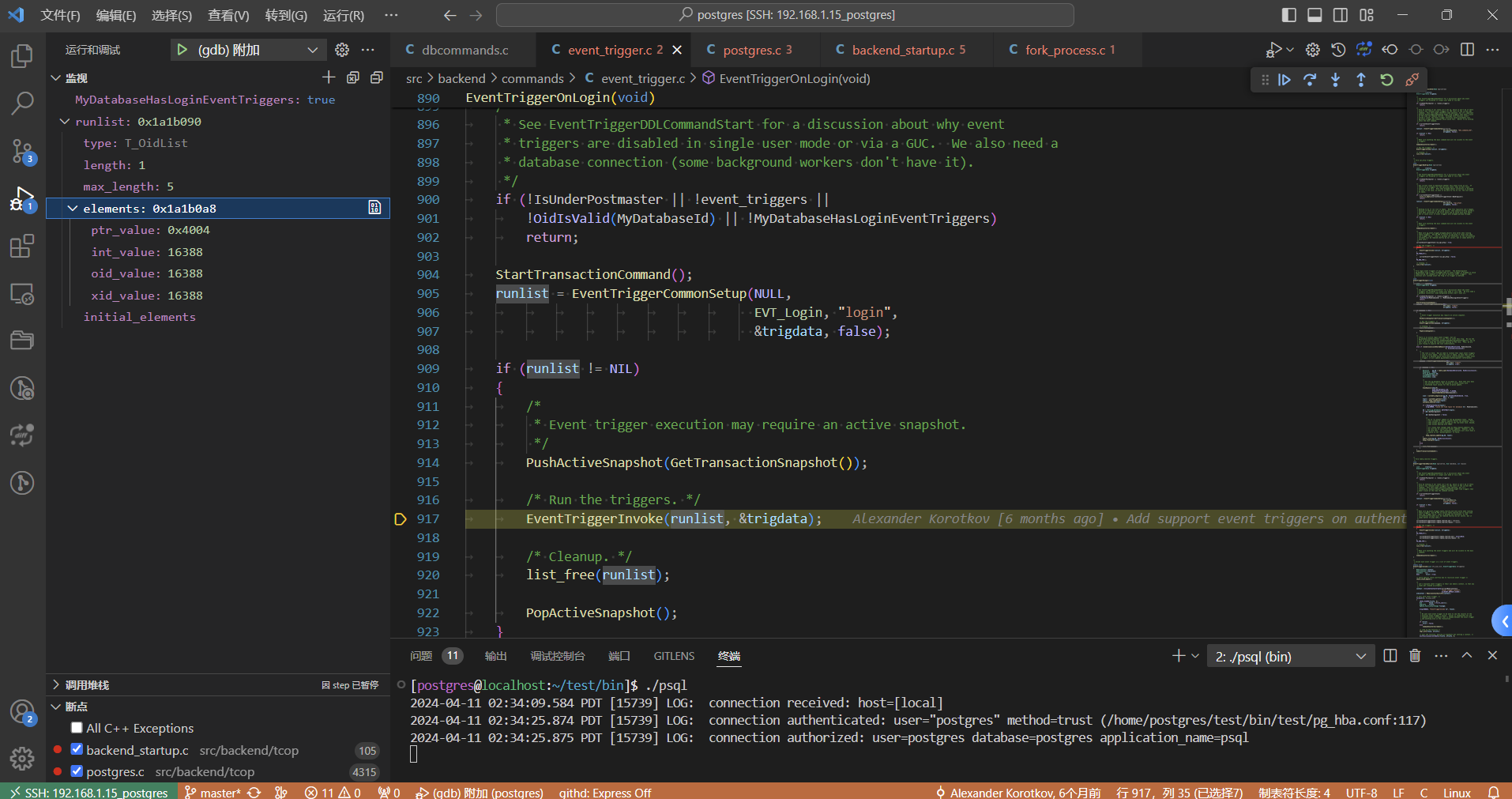
如上图所示:
- MyDatabaseHasLoginEventTriggers 为真,该值的更新 如下图所示
- runlist 链表中有一个元素
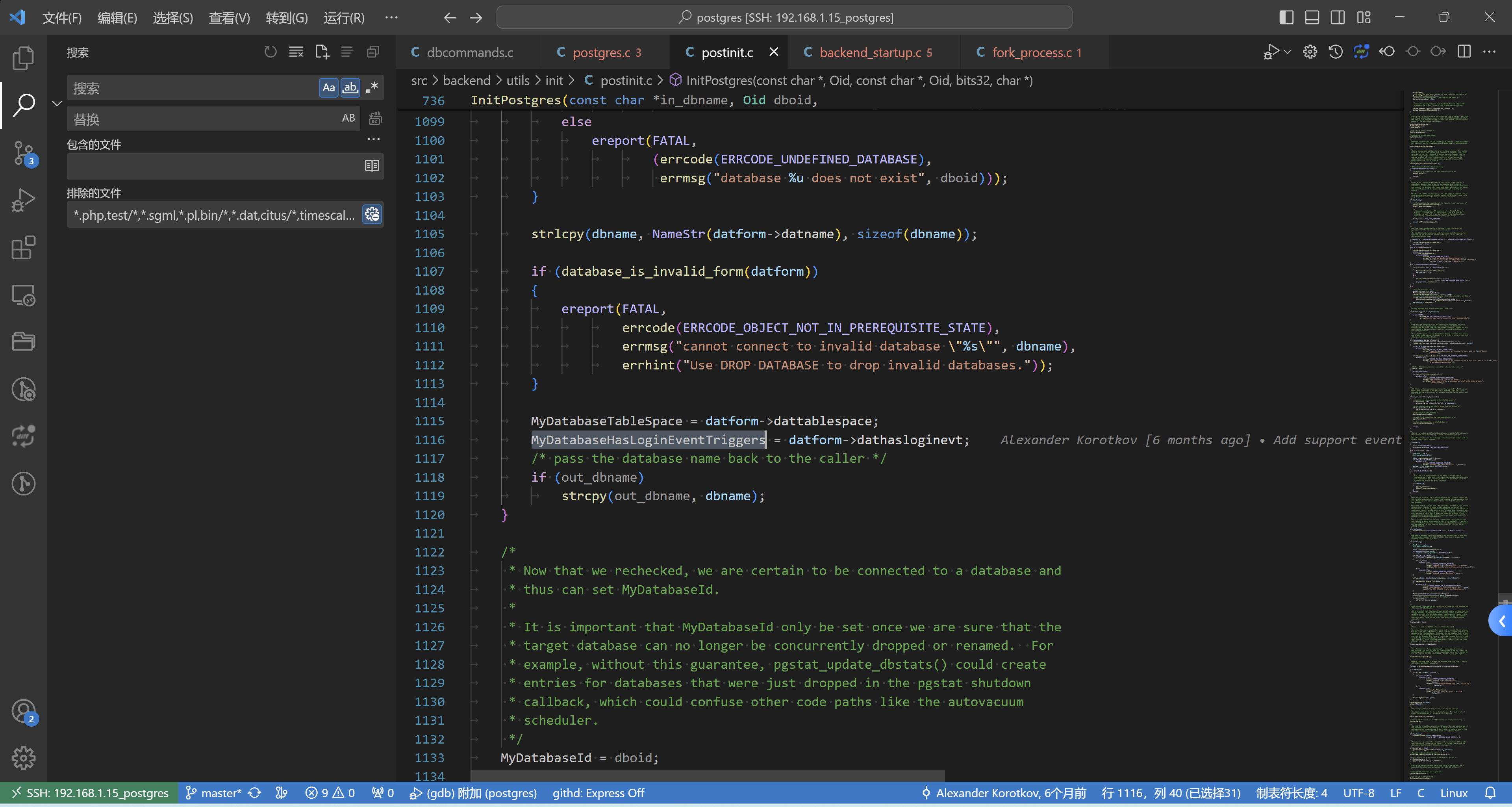
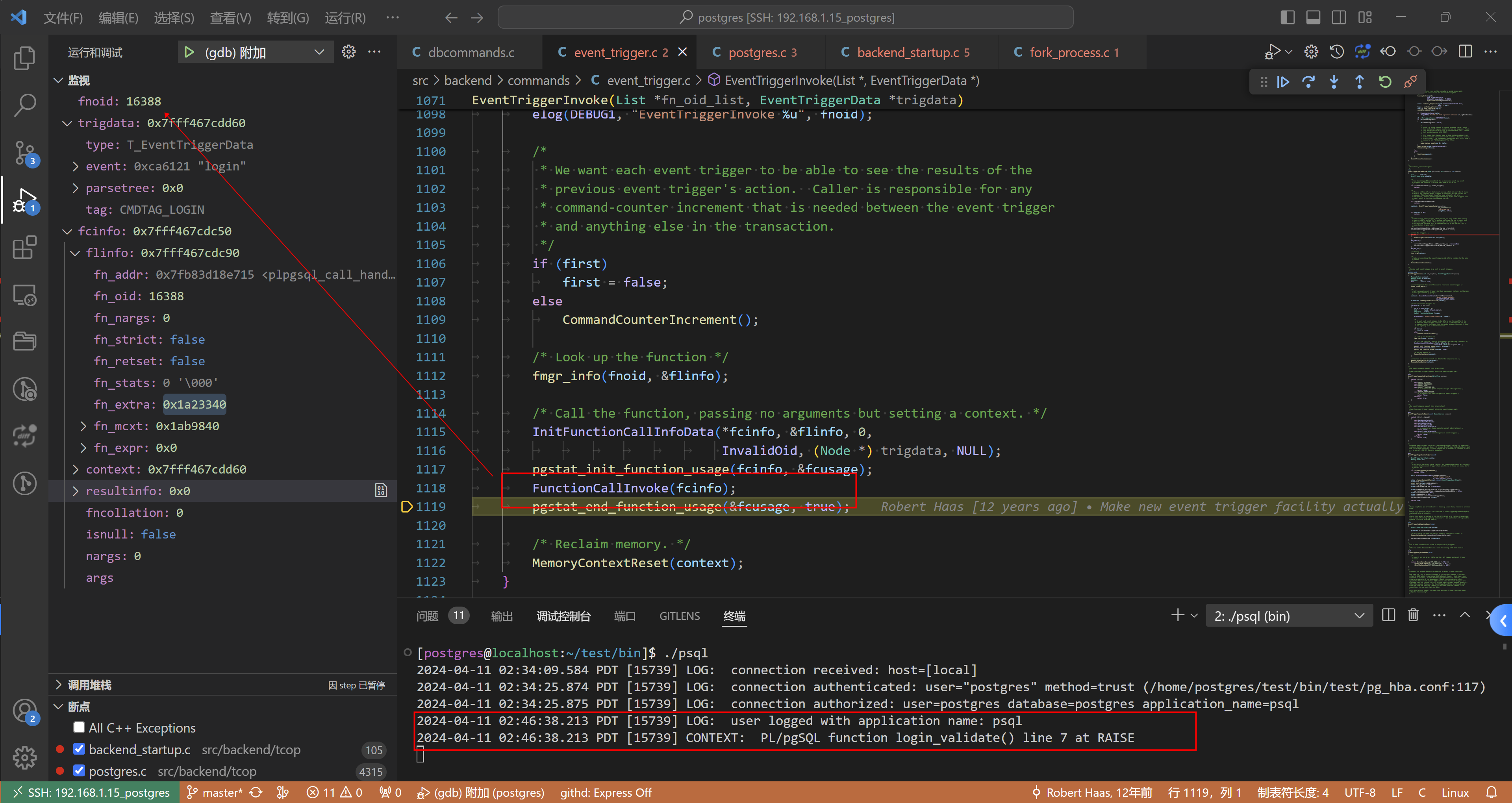
接下来就去执行这个触发器,如下:
// src/backend/commands/event_trigger.c

/*
 * Invoke each event trigger in a list of event triggers.
 */
static void
EventTriggerInvoke(List *fn_oid_list, EventTriggerData *trigdata)
{
	MemoryContext context;
	MemoryContext oldcontext;
	ListCell   *lc;
	bool		first = true;

	/* Guard against stack overflow due to recursive event trigger */
	check_stack_depth();

	/*
	 * Let's evaluate event triggers in their own memory context, so that any
	 * leaks get cleaned up promptly.
	 */
	context = AllocSetContextCreate(CurrentMemoryContext,
									"event trigger context",
									ALLOCSET_DEFAULT_SIZES);
	oldcontext = MemoryContextSwitchTo(context);

	/* Call each event trigger. */
	foreach(lc, fn_oid_list)
	{
		LOCAL_FCINFO(fcinfo, 0);
		Oid			fnoid = lfirst_oid(lc);
		FmgrInfo	flinfo;
		PgStat_FunctionCallUsage fcusage;

		elog(DEBUG1, "EventTriggerInvoke %u", fnoid);

		/*
		 * We want each event trigger to be able to see the results of the
		 * previous event trigger's action.  Caller is responsible for any
		 * command-counter increment that is needed between the event trigger
		 * and anything else in the transaction.
		 */
		if (first)
			first = false;
		else
			CommandCounterIncrement();

		/* Look up the function */
		fmgr_info(fnoid, &flinfo);

		/* Call the function, passing no arguments but setting a context. */
		InitFunctionCallInfoData(*fcinfo, &flinfo, 0,
								 InvalidOid, (Node *) trigdata, NULL);
		pgstat_init_function_usage(fcinfo, &fcusage);
		FunctionCallInvoke(fcinfo);
		pgstat_end_function_usage(&fcusage, true);

		/* Reclaim memory. */
		MemoryContextReset(context);
	}

	/* Restore old memory context and delete the temporary one. */
	MemoryContextSwitchTo(oldcontext);
	MemoryContextDelete(context);
}
postgres=# \x
Expanded display is on.
postgres=#
postgres=# select * from pg_proc where oid = 16388;
-[ RECORD 1 ]---+-------------------------------------------------------------------------------------------
oid             | 16388
proname         | login_validate
pronamespace    | 2200
proowner        | 10
prolang         | 13553
procost         | 100
prorows         | 0
provariadic     | 0
prosupport      | -
prokind         | f
prosecdef       | f
proleakproof    | f
proisstrict     | f
proretset       | f
provolatile     | v
proparallel     | u
pronargs        | 0
pronargdefaults | 0
prorettype      | 3838
proargtypes     |
proallargtypes  |
proargmodes     |
proargnames     |
proargdefaults  |
protrftypes     |
prosrc          |                                                                                           +
                | DECLARE                                                                                   +
                | BEGIN                                                                                     +
                |     IF '' = current_setting('application_name') THEN                                      +
                |         raise exception 'You don''t have application_name set!';                          +
                |     END IF;                                                                               +
                |     raise log 'user logged with application name: %', current_setting('application_name');+
                | END;                                                                                      +
                |
probin          |
prosqlbody      |
proconfig       |
proacl          |

postgres=# \x
Expanded display is off.
postgres=#

 浙公网安备 33010602011771号