

计算 schemas/AMs 大小的函数及 \dn++ 和 \dA++
目录结构
注:提前言明 本文借鉴了以下博主、书籍或网站的内容,其列表如下:
1、参考书籍:《PostgreSQL数据库内核分析》
2、参考书籍:《数据库事务处理的艺术:事务管理与并发控制》
3、PostgreSQL数据库仓库链接,点击前往
4、日本著名PostgreSQL数据库专家 铃木启修 网站主页,点击前往
5、参考书籍:《PostgreSQL中文手册》
6、参考书籍:《PostgreSQL指南:内幕探索》,点击前往
7、参考书籍:《事务处理 概念与技术》
8、PgSQL · 性能优化 · PostgreSQL TPC-C极限优化玩法,点击前往
1、本文内容全部来源于开源社区 GitHub和以上博主的贡献,本文也免费开源(可能会存在问题,评论区等待大佬们的指正)
2、本文目的:开源共享 抛砖引玉 一起学习
3、本文不提供任何资源 不存在任何交易 与任何组织和机构无关
4、大家可以根据需要自行 复制粘贴以及作为其他个人用途,但是不允许转载 不允许商用 (写作不易,还请见谅 💖)
5、本文内容基于PostgreSQL master源码开发而成
@
文章快速说明索引
学习目标:
做数据库内核开发久了就会有一种 少年得志,年少轻狂 的错觉,然鹅细细一品觉得自己其实不算特别优秀 远远没有达到自己想要的。也许光鲜的表面掩盖了空洞的内在,每每想到于此,皆有夜半临渊如履薄冰之感。为了睡上几个踏实觉,即日起 暂缓其他基于PostgreSQL数据库的兼容功能开发,近段时间 将着重于学习分享Postgres的基础知识和实践内幕。
学习内容:(详见目录)
1、深入理解PostgreSQL数据库计算 schemas/AMs 大小的函数及 \dn++ 和 \dA++
学习时间:
2024-03-13 14:00:12 星期三
学习产出:
1、PostgreSQL数据库基础知识回顾 1个
2、技术博客 1篇
3、PostgreSQL数据库内核深入学习
注:下面我们所有的学习环境是Centos8+PostgreSQL master+Oracle19C+MySQL8.0
postgres=# select version();
                                                  version
------------------------------------------------------------------------------------------------------------
 PostgreSQL 17devel on x86_64-pc-linux-gnu, compiled by gcc (GCC) 8.5.0 20210514 (Red Hat 8.5.0-21), 64-bit
(1 row)

postgres=#

#-----------------------------------------------------------------------------#

SQL> select * from v$version;

BANNER        Oracle Database 19c EE Extreme Perf Release 19.0.0.0.0 - Production
BANNER_FULL	  Oracle Database 19c EE Extreme Perf Release 19.0.0.0.0 - Production Version 19.17.0.0.0
BANNER_LEGACY Oracle Database 19c EE Extreme Perf Release 19.0.0.0.0 - Production
CON_ID 0


#-----------------------------------------------------------------------------#

mysql> select version();
+-----------+
| version() |
+-----------+
| 8.0.27    |
+-----------+
1 row in set (0.06 sec)

mysql>
功能使用背景说明
-
discussion:https://www.postgresql.org/message-id/flat/20210714030725.GG9600%40telsasoft.com
-
commitfest:https://commitfest.postgresql.org/47/3256/
获取最新patch,重新编译数据库 如下:
[postgres@localhost:~/postgres/patch → master]$ ls
0001-Add-pg_am_size-pg_namespace_size.patch  0002-psql-add-convenience-commands-dA-and-dn.patch  0003-f-convert-the-other-verbose-to-int-too.patch  0004-Move-the-double-plus-Size-columns-to-the-right.patch
[postgres@localhost:~/postgres/patch → master]$
[postgres@localhost:~/postgres/patch → master]$
[postgres@localhost:~/postgres/patch → master]$ ll
total 76
-rw-rw-r-- 1 postgres postgres  7768 Feb 18 18:38 0001-Add-pg_am_size-pg_namespace_size.patch
-rw-rw-r-- 1 postgres postgres  9609 Feb 18 18:38 0002-psql-add-convenience-commands-dA-and-dn.patch
-rw-rw-r-- 1 postgres postgres 41334 Feb 18 18:38 0003-f-convert-the-other-verbose-to-int-too.patch
-rw-rw-r-- 1 postgres postgres 10121 Feb 18 18:38 0004-Move-the-double-plus-Size-columns-to-the-right.patch
[postgres@localhost:~/postgres/patch → master]$
[postgres@localhost:~/postgres/patch → master]$
[postgres@localhost:~/postgres/patch → master]$ cd ..
[postgres@localhost:~/postgres → master]$
[postgres@localhost:~/postgres → master]$ git apply patch/0001-Add-pg_am_size-pg_namespace_size.patch
[postgres@localhost:~/postgres → master]$
[postgres@localhost:~/postgres → master]$ git apply patch/0002-psql-add-convenience-commands-dA-and-dn.patch
[postgres@localhost:~/postgres → master]$
[postgres@localhost:~/postgres → master]$ git apply patch/0003-f-convert-the-other-verbose-to-int-too.patch
[postgres@localhost:~/postgres → master]$
[postgres@localhost:~/postgres → master]$ git apply patch/0004-Move-the-double-plus-Size-columns-to-the-right.patch
[postgres@localhost:~/postgres → master]$
看一下相关函数的介绍,如下:
postgres=# select version();
                                                  version
------------------------------------------------------------------------------------------------------------
 PostgreSQL 17devel on x86_64-pc-linux-gnu, compiled by gcc (GCC) 8.5.0 20210514 (Red Hat 8.5.0-21), 64-bit
(1 row)

postgres=# \df+ pg_namespace_size
                                                                                                             List of functions
   Schema   |       Name        | Result data type | Argument data types | Type | Volatility | Parallel |  Owner   | Security | Access privileges | Language |     Internal name      |                    Description
------------+-------------------+------------------+---------------------+------+------------+----------+----------+----------+-------------------+----------+------------------------+----------------------------------------------------
 pg_catalog | pg_namespace_size | bigint           | name                | func | volatile   | safe     | postgres | invoker  |                   | internal | pg_namespace_size_name | total disk space usage for the specified namespace
 pg_catalog | pg_namespace_size | bigint           | oid                 | func | volatile   | safe     | postgres | invoker  |                   | internal | pg_namespace_size_oid  | total disk space usage for the specified namespace
(2 rows)

postgres=#
postgres=# \duS+
                                             List of roles
          Role name          |                         Attributes                         | Description
-----------------------------+------------------------------------------------------------+-------------
 pg_checkpoint               | Cannot login                                               |
 pg_create_subscription      | Cannot login                                               |
 pg_database_owner           | Cannot login                                               |
 pg_execute_server_program   | Cannot login                                               |
 pg_monitor                  | Cannot login                                               |
 pg_read_all_data            | Cannot login                                               |
 pg_read_all_settings        | Cannot login                                               |
 pg_read_all_stats           | Cannot login                                               |
 pg_read_server_files        | Cannot login                                               |
 pg_signal_backend           | Cannot login                                               |
 pg_stat_scan_tables         | Cannot login                                               |
 pg_use_reserved_connections | Cannot login                                               |
 pg_write_all_data           | Cannot login                                               |
 pg_write_server_files       | Cannot login                                               |
 postgres                    | Superuser, Create role, Create DB, Replication, Bypass RLS |

postgres=#
如上函数:计算具有指定名称或 OID 的命名空间(架构)中的表所使用的总磁盘空间。要使用此函数,您必须对指定命名空间具有 CREATE 权限或具有 pg_read_all_stats 角色的权限,除非它是当前数据库的默认命名空间。
postgres=# \df+ pg_am_size
                                                                                                        List of functions
   Schema   |    Name    | Result data type | Argument data types | Type | Volatility | Parallel |  Owner   | Security | Access privileges | Language |  Internal name  |                      Description
------------+------------+------------------+---------------------+------+------------+----------+----------+----------+-------------------+----------+-----------------+--------------------------------------------------------
 pg_catalog | pg_am_size | bigint           | name                | func | volatile   | safe     | postgres | invoker  |                   | internal | pg_am_size_name | total disk space usage for the specified access method
 pg_catalog | pg_am_size | bigint           | oid                 | func | volatile   | safe     | postgres | invoker  |                   | internal | pg_am_size_oid  | total disk space usage for the specified access method
(2 rows)

postgres=#
如上函数:使用具有指定名称或 OID 的访问方法计算表使用的总磁盘空间。
接下来,我们看一下schema相关的元命令,如下:
postgres=# select * from pg_namespace;
  oid  |      nspname       | nspowner |                            nspacl
-------+--------------------+----------+---------------------------------------------------------------
    99 | pg_toast           |       10 |
    11 | pg_catalog         |       10 | {postgres=UC/postgres,=U/postgres}
  2200 | public             |     6171 | {pg_database_owner=UC/pg_database_owner,=U/pg_database_owner}
 13200 | information_schema |       10 | {postgres=UC/postgres,=U/postgres}
(4 rows)

postgres=# \dn *
            List of schemas
        Name        |       Owner
--------------------+-------------------
 information_schema | postgres
 pg_catalog         | postgres
 pg_toast           | postgres
 public             | pg_database_owner
(4 rows)

postgres=#
postgres=# \dn+ *
                                                  List of schemas
        Name        |       Owner       |           Access privileges            |           Description
--------------------+-------------------+----------------------------------------+----------------------------------
 information_schema | postgres          | postgres=UC/postgres                  +|
                    |                   | =U/postgres                            |
 pg_catalog         | postgres          | postgres=UC/postgres                  +| system catalog schema
                    |                   | =U/postgres                            |
 pg_toast           | postgres          |                                        | reserved schema for TOAST tables
 public             | pg_database_owner | pg_database_owner=UC/pg_database_owner+| standard public schema
                    |                   | =U/pg_database_owner                   |
(4 rows)

postgres=# \dn++ *
                                                       List of schemas
        Name        |       Owner       |           Access privileges            |           Description            |  Size
--------------------+-------------------+----------------------------------------+----------------------------------+---------
 information_schema | postgres          | postgres=UC/postgres                  +|                                  | 216 kB
                    |                   | =U/postgres                            |                                  |
 pg_catalog         | postgres          | postgres=UC/postgres                  +| system catalog schema            | 6664 kB
                    |                   | =U/postgres                            |                                  |
 pg_toast           | postgres          |                                        | reserved schema for TOAST tables | 1000 kB
 public             | pg_database_owner | pg_database_owner=UC/pg_database_owner+| standard public schema           | 0 bytes
                    |                   | =U/pg_database_owner                   |                                  |
(4 rows)

postgres=# \dn++ pg_catalog
                                List of schemas
    Name    |  Owner   |  Access privileges   |      Description      |  Size
------------+----------+----------------------+-----------------------+---------
 pg_catalog | postgres | postgres=UC/postgres+| system catalog schema | 6664 kB
            |          | =U/postgres          |                       |
(1 row)

postgres=#
如上的 + 和 ++ 也是此次patch的新特性,我们后面再详细介绍其实现原理!
补丁实现核心原理
计算大小
postgres=# \d
Did not find any relations.
postgres=#
postgres=# create table t1 (id int, name text);
CREATE TABLE
postgres=#
postgres=# insert into t1 select generate_series(1,100000) as id, md5(random()::text) as name;
INSERT 0 100000
postgres=#
postgres=# select * from t1 limit 1;
 id |               name
----+----------------------------------
  1 | cf39df21ad05c88d9a2d2264b0642a5f
(1 row)

postgres=#
计算表/schema/am的大小,如下:
postgres=# select oid from pg_class where relname like 't1';
  oid
-------
 16388
(1 row)

postgres=# select pg_relation_size(16388);
 pg_relation_size
------------------
          6832128
(1 row)

postgres=# select pg_size_pretty(pg_relation_size(16388));
 pg_size_pretty
----------------
 6672 kB
(1 row)

postgres=# \d
        List of relations
 Schema | Name | Type  |  Owner
--------+------+-------+----------
 public | t1   | table | postgres
(1 row)

postgres=# select pg_namespace_size('public');
 pg_namespace_size
-------------------
           6864896
(1 row)

postgres=# select * from pg_namespace ;
  oid  |      nspname       | nspowner |                            nspacl
-------+--------------------+----------+---------------------------------------------------------------
    99 | pg_toast           |       10 |
    11 | pg_catalog         |       10 | {postgres=UC/postgres,=U/postgres}
  2200 | public             |     6171 | {pg_database_owner=UC/pg_database_owner,=U/pg_database_owner}
 13200 | information_schema |       10 | {postgres=UC/postgres,=U/postgres}
(4 rows)

postgres=# select pg_namespace_size(2200);
 pg_namespace_size
-------------------
           6864896
(1 row)

postgres=# select pg_size_pretty(pg_namespace_size(2200));
 pg_size_pretty
----------------
 6704 kB
(1 row)

postgres=#
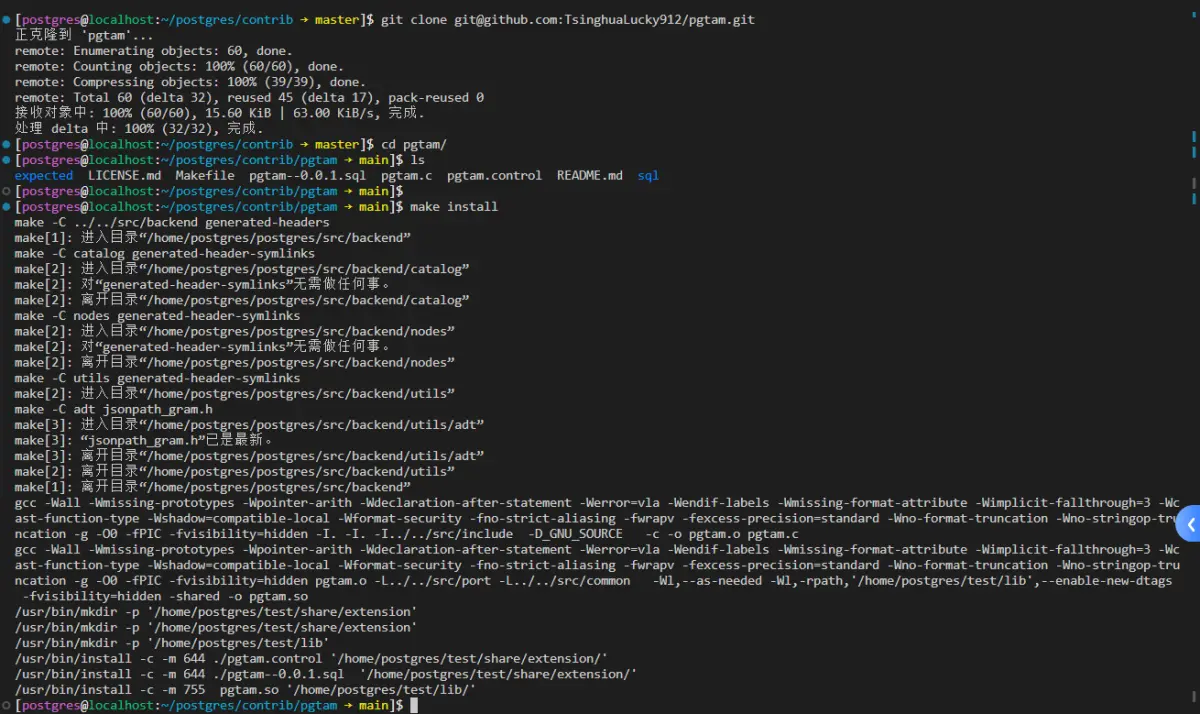
postgres=# create extension pgtam ;
CREATE EXTENSION
postgres=#
postgres=# select * from pg_am;
  oid  | amname |      amhandler       | amtype
-------+--------+----------------------+--------
     2 | heap   | heap_tableam_handler | t
   403 | btree  | bthandler            | i
   405 | hash   | hashhandler          | i
   783 | gist   | gisthandler          | i
  2742 | gin    | ginhandler           | i
  4000 | spgist | spghandler           | i
  3580 | brin   | brinhandler          | i
 16401 | mem    | mem_tableam_handler  | t
(8 rows)

postgres=# select pg_am_size(16401);
 pg_am_size
------------
          0
(1 row)

postgres=#
postgres=# create table t2 (id int, name text) using mem;
NOTICE:  in mem_tableam_handler: mem_tableam handler loaded
NOTICE:  Created table: [t2]
NOTICE:  in memam_relation_set_new_filelocator
NOTICE:  in mem_tableam_handler: mem_tableam handler loaded
NOTICE:  in memam_relation_needs_toast_table
CREATE TABLE
postgres=#
postgres=# insert into t2 select generate_series(1,100) as id, md5(random()::text) as name;
INSERT 0 100
postgres=#
postgres=# select pg_am_size(16401);
 pg_am_size
------------
          0
(1 row)

postgres=#
注:这里留上一个疑问 为什么am的size还是0?
而此时heap的size,如下:
postgres=# select pg_am_size(2);
 pg_am_size
------------
   11780096
(1 row)

postgres=# select pg_size_pretty(pg_am_size(2));
 pg_size_pretty
----------------
 11 MB
(1 row)

postgres=# drop table t1;
DROP TABLE
postgres=# vacuum;
VACUUM
postgres=# select pg_size_pretty(pg_am_size(2));
 pg_size_pretty
----------------
 4800 kB
(1 row)

postgres=#
注:有兴趣的小伙伴们可以自行编译安装citus,使用其列存进行实验!(目前citus上不支持最新master分支 暂不写这块)
namespace的计算逻辑,如下:
// src/backend/utils/adt/dbsize.c

Datum
pg_namespace_size_oid(PG_FUNCTION_ARGS)
{
	Oid			nspOid = PG_GETARG_OID(0);
	int64		size;

	size = calculate_namespace_size(nspOid);

	if (size < 0)
		PG_RETURN_NULL();

	PG_RETURN_INT64(size);
}

Datum
pg_namespace_size_name(PG_FUNCTION_ARGS)
{
	Name		nspName = PG_GETARG_NAME(0);
	Oid			nspOid = get_namespace_oid(NameStr(*nspName), false);
	int64		size;

	size = calculate_namespace_size(nspOid);

	if (size < 0)
		PG_RETURN_NULL();

	PG_RETURN_INT64(size);
}

/* Compute the size of relations in a schema (namespace) */
// 计算模式(命名空间)中表的大小
static int64
calculate_namespace_size(Oid nspOid)
{
	/*
	 * User must be a member of pg_read_all_stats or have CREATE privilege for
	 * target namespace.
   *
   * 用户必须是 pg_read_all_stats 的成员或具有目标命名空间的 CREATE 权限。
	 */
	if (!is_member_of_role(GetUserId(), ROLE_PG_READ_ALL_STATS))
	{
		AclResult	aclresult;

		aclresult = object_aclcheck(NamespaceRelationId, nspOid, GetUserId(), ACL_CREATE);
		if (aclresult != ACLCHECK_OK)
			aclcheck_error(aclresult, OBJECT_SCHEMA,
						   get_namespace_name(nspOid));
	}

	return calculate_size_attvalue(Anum_pg_class_relnamespace, nspOid);
}
访问方法AM的计算逻辑,如下:
// src/backend/utils/adt/dbsize.c

Datum
pg_am_size_oid(PG_FUNCTION_ARGS)
{
	Oid			amOid = PG_GETARG_OID(0);
	int64		size;

	size = calculate_am_size(amOid);

	if (size < 0)
		PG_RETURN_NULL();

	PG_RETURN_INT64(size);
}

Datum
pg_am_size_name(PG_FUNCTION_ARGS)
{
	Name		amName = PG_GETARG_NAME(0);
	Oid			amOid = get_am_oid(NameStr(*amName), false);
	int64		size;

	size = calculate_am_size(amOid);

	if (size < 0)
		PG_RETURN_NULL();

	PG_RETURN_INT64(size);
}

/* Compute the size of relations using the given access method */
// 使用给定的访问方法计算表的大小
static int64
calculate_am_size(Oid amOid)
{
	/* XXX acl_check? */

	return calculate_size_attvalue(Anum_pg_class_relam, amOid);
}
下面就看一下本次patch核心中的核心函数,如下:
/*
 * Return the sum of size of relations for which the given attribute of
 * pg_class matches the specified OID value.
 *
 * 返回 pg_class 的给定属性与指定 OID 值匹配的关系大小的总和
 */
static int64
calculate_size_attvalue(AttrNumber attnum, Oid attval)
{
	int64		totalsize = 0;
	ScanKeyData skey;
	Relation	pg_class;
	SysScanDesc scan;
	HeapTuple	tuple;

	ScanKeyInit(&skey, attnum,
				BTEqualStrategyNumber, F_OIDEQ, attval);

	pg_class = table_open(RelationRelationId, AccessShareLock);
	scan = systable_beginscan(pg_class, InvalidOid, false, NULL, 1, &skey);
	while (HeapTupleIsValid(tuple = systable_getnext(scan)))
	{
		Form_pg_class classtuple = (Form_pg_class) GETSTRUCT(tuple);
		Relation	rel;

		rel = try_relation_open(classtuple->oid, AccessShareLock);
		if (!rel)
			continue;

		for (ForkNumber forkNum = 0; forkNum <= MAX_FORKNUM; forkNum++)
			totalsize += calculate_relation_size(&(rel->rd_locator), rel->rd_backend, forkNum);

		relation_close(rel, AccessShareLock);
	}

	systable_endscan(scan);
	table_close(pg_class, AccessShareLock);
	return totalsize;
}
postgres=# select count(*) from pg_class where relam = 2;
 count
-------
   108
(1 row)

postgres=# select count(*) from pg_class where relnamespace = 2200;
 count
-------
     0
(1 row)

postgres=# create table t1 (id int, name text);
CREATE TABLE
postgres=# insert into t1 select generate_series(1,100000) as id, md5(random()::text) as name;
INSERT 0 100000
postgres=#

## 多出来的2个 分别是 pg_toast_16410 t1
postgres=# select count(*) from pg_class where relam = 2;
 count
-------
   110
(1 row)

postgres=# select count(*) from pg_class where relnamespace = 2200;
 count
-------
     1
(1 row)

postgres=#
如上的代码逻辑,开表pg_class 然后索引循环遍历,然后就可以使用函数 calculate_relation_size
这里调用如下片段的函数,还有(蓝色框的):
for (ForkNumber forkNum = 0; forkNum <= MAX_FORKNUM; forkNum++)
			totalsize += calculate_relation_size(&(rel->rd_locator), rel->rd_backend, forkNum);
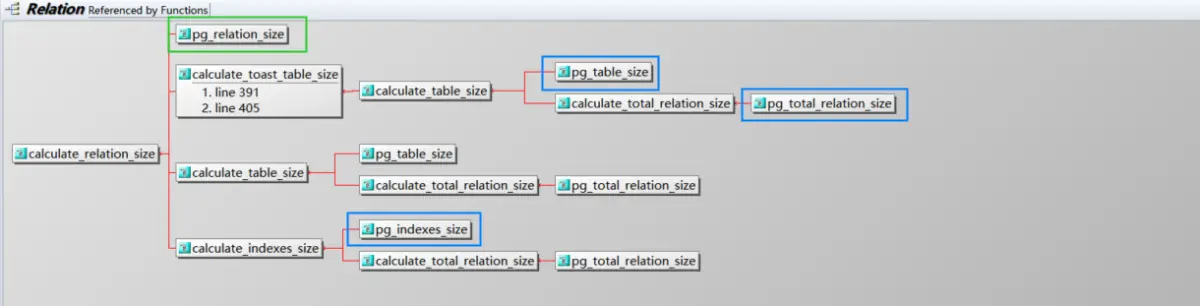
注:从上面图就可以知道 pg_relation_size和 pg_table_size 的差别在哪里了!
list ++
首先我们先看一下,上面两个元命令的内部转换情况,如下:
postgres=# create table t1 (id int, name text);
CREATE TABLE
postgres=# insert into t1 select generate_series(1,100000) as id, md5(random()::text) as name;
INSERT 0 100000
postgres=# \dn public
      List of schemas
  Name  |       Owner
--------+-------------------
 public | pg_database_owner
(1 row)

postgres=# \dn+ public
                                       List of schemas
  Name  |       Owner       |           Access privileges            |      Description
--------+-------------------+----------------------------------------+------------------------
 public | pg_database_owner | pg_database_owner=UC/pg_database_owner+| standard public schema
        |                   | =U/pg_database_owner                   |
(1 row)

postgres=# \dn++ public
                                            List of schemas
  Name  |       Owner       |           Access privileges            |      Description       |  Size
--------+-------------------+----------------------------------------+------------------------+---------
 public | pg_database_owner | pg_database_owner=UC/pg_database_owner+| standard public schema | 6696 kB
        |                   | =U/pg_database_owner                   |                        |
(1 row)

postgres=#
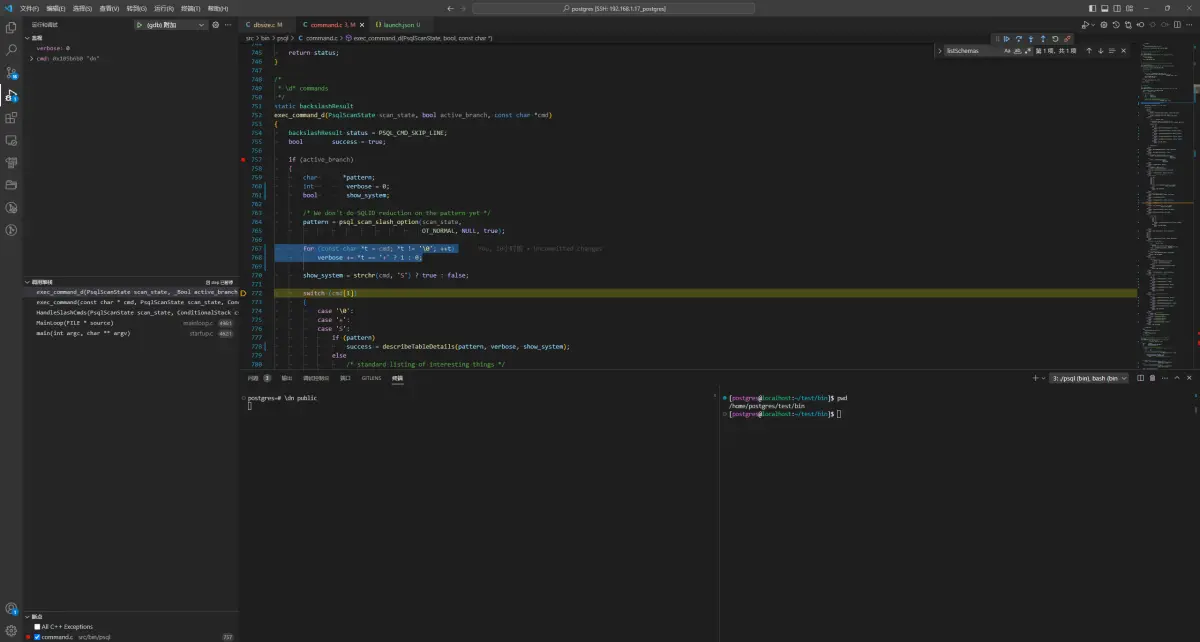
如上便是计算 + 的个数,对于 \dn \dn+ \dn++ 它们分别对应的SQL自然就是不同的,如下:
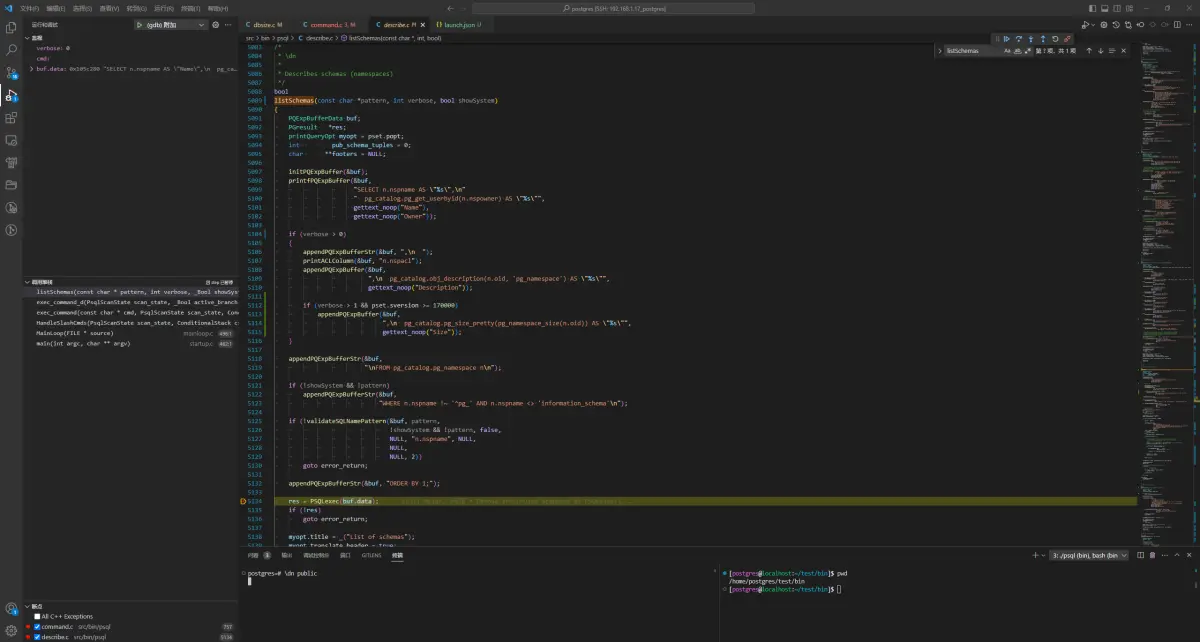
// 这里 buf.data 的值为:

\dn public
0x105c280 "SELECT n.nspname AS \"Name\",\n  pg_catalog.pg_get_userbyid(n.nspowner) AS \"Owner\"\nFROM pg_catalog.pg_namespace n\nWHERE n.nspname OPERATOR(pg_catalog.~) '^(public)$' COLLATE pg_catalog.default\nORDER BY 1;"

\dn+ public
0x106d600 "SELECT n.nspname AS \"Name\",\n  pg_catalog.pg_get_userbyid(n.nspowner) AS \"Owner\",\n  CASE WHEN pg_catalog.cardinality(n.nspacl) = 0 THEN '(none)' ELSE pg_catalog.array_to_string(n.nspacl, E'\\n') END AS \"Access privileges\",\n  pg_catalog.obj_description(n.oid, 'pg_namespace') AS \"Description\"\nFROM pg_catalog.pg_namespace n\nWHERE n.nspname OPERATOR(pg_catalog.~) '^(public)$' COLLATE pg_catalog.default\nORDER BY 1;"

\dn++ public
0x106d810 "SELECT n.nspname AS \"Name\",\n  pg_catalog.pg_get_userbyid(n.nspowner) AS \"Owner\",\n  CASE WHEN pg_catalog.cardinality(n.nspacl) = 0 THEN '(none)' ELSE pg_catalog.array_to_string(n.nspacl, E'\\n') END AS \"Access privileges\",\n  pg_catalog.obj_description(n.oid, 'pg_namespace') AS \"Description\",\n  pg_catalog.pg_size_pretty(pg_namespace_size(n.oid)) AS \"Size\"\nFROM pg_catalog.pg_namespace n\nWHERE n.nspname OPERATOR(pg_catalog.~) '^(public)$' COLLATE pg_catalog.default\nORDER BY 1;"
\dA的函数堆栈,如下:
describeAccessMethods(const char * pattern, int verbose) (\home\postgres\postgres\src\bin\psql\describe.c:148)
exec_command_d(PsqlScanState scan_state, _Bool active_branch, const char * cmd) (\home\postgres\postgres\src\bin\psql\command.c:794)
exec_command(const char * cmd, PsqlScanState scan_state, ConditionalStack cstack, PQExpBuffer query_buf, PQExpBuffer previous_buf) (\home\postgres\postgres\src\bin\psql\command.c:329)
HandleSlashCmds(PsqlScanState scan_state, ConditionalStack cstack, PQExpBuffer query_buf, PQExpBuffer previous_buf) (\home\postgres\postgres\src\bin\psql\command.c:230)
MainLoop(FILE * source) (\home\postgres\postgres\src\bin\psql\mainloop.c:496)
main(int argc, char ** argv) (\home\postgres\postgres\src\bin\psql\startup.c:462)
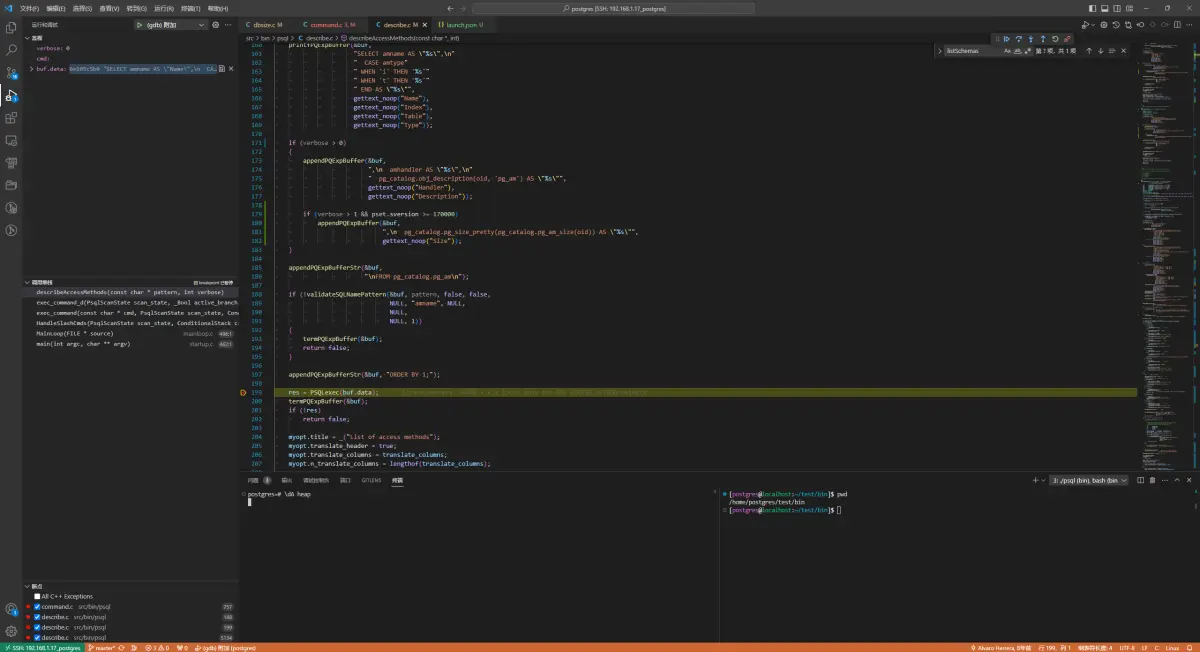
// 这里 buf.data 的值为:

\dA heap
0x105c5b0 "SELECT amname AS \"Name\",\n  CASE amtype WHEN 'i' THEN 'Index' WHEN 't' THEN 'Table' END AS \"Type\"\nFROM pg_catalog.pg_am\nWHERE amname OPERATOR(pg_catalog.~) '^(heap)$' COLLATE pg_catalog.default\nORDER BY 1;"

\dA+ heap
0x106db30 "SELECT amname AS \"Name\",\n  CASE amtype WHEN 'i' THEN 'Index' WHEN 't' THEN 'Table' END AS \"Type\",\n  amhandler AS \"Handler\",\n  pg_catalog.obj_description(oid, 'pg_am') AS \"Description\"\nFROM pg_catalog.pg_am\nWHERE amname OPERATOR(pg_catalog.~) '^(heap)$' COLLATE pg_catalog.default\nORDER BY 1;"

\dA++ heap
0x106de70 "SELECT amname AS \"Name\",\n  CASE amtype WHEN 'i' THEN 'Index' WHEN 't' THEN 'Table' END AS \"Type\",\n  amhandler AS \"Handler\",\n  pg_catalog.obj_description(oid, 'pg_am') AS \"Description\",\n  pg_catalog.pg_size_pretty(pg_catalog.pg_am_size(oid)) AS \"Size\"\nFROM pg_catalog.pg_am\nWHERE amname OPERATOR(pg_catalog.~) '^(heap)$' COLLATE pg_catalog.default\nORDER BY 1;"
小结一下:
- 元命令中根据+的个数,以转换出不同的SQL
- 对于获取size,元命令(不只是上面这两个)都是调用具体的pg_proc函数 例如:pg_am_size等

 浙公网安备 33010602011771号