
C# 学习细节记录(二) 字体图标\触摸屏\控件布局居中\将对象(引用)赋值为null\抽象类与接口简单理解
一、字体图标(矢量图)
 1     private void Form1_Load(object sender, EventArgs e)
 2         {
 3
 4             // 加载字体
 5             PrivateFontCollection pfc = new PrivateFontCollection();
 6             pfc.AddFontFile("../../iconfont.ttf");//加载字体
 7
 8             button1.Text = "\ue6dc";//
 9             button1.Font = new Font(pfc.Families[0], 50);
10             button1.ForeColor = Color.Blue;
11
12             button2.Text = "\ue610"+"";
13             button2.Font = new Font(pfc.Families[0], 15);
14             button2.ForeColor = Color.Red;
15         }
二、winform button 触摸屏
Click 事件没有问题
MouseDown 事件,在触摸屏上使用时,
第一种方法:双击触摸屏按压才能使用
第二种方法:按压触摸屏后拖动一下
第三种方法:使用和WPF的互操作性,使用WPF Button 的TouchDownEvent等事件
1             EHbtn_fan.Child = wpfbtn_fan;
2             EHbtn_zheng.Child = wpfbtn_zheng;
3             wpfbtn_fan.AddHandler(System.Windows.Controls.Button.TouchEnterEvent, new System.Windows.RoutedEventHandler(EHbtn_fan_MouseDown), true);
4             wpfbtn_fan.AddHandler(System.Windows.Controls.Button.TouchLeaveEvent, new System.Windows.RoutedEventHandler(EHbtn_fan_MouseUp), true);
5             wpfbtn_zheng.AddHandler(System.Windows.Controls.Button.MouseDownEvent, new System.Windows.RoutedEventHandler(EHbtn_zheng_MouseDown), true);
6             wpfbtn_zheng.AddHandler(System.Windows.Controls.Button.MouseUpEvent, new System.Windows.RoutedEventHandler(EHbtn_zheng_MouseUp), true);
三、控件居中对齐
将控件的Dock和Anchor 属性设置为None 后,控件将随父容器大小移动
四、将对象(引用)赋值为null
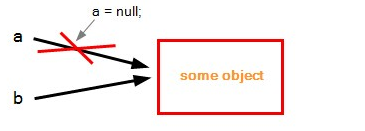
有对象a,b,将a=null,b并没有为null,因为赋值为空只是将a指向内存的指向切断了,b的指向并没有。
思维误区:本来以为a=null之后,b也应该等于null。
因为a,b存的都是对象在堆中的地址,将a=null,实际上是,将a指向的地址赋值为null,并不是将堆中的对象销毁,变成了null;
1 object a = 0;
2 object b = a;
3 a = null;
4 Console.WriteLine(b.ToString()); // Produces "0"
5 Console.Read();
五、抽象类和接口简单理解
比如你需要创建老鹰类、鸽子类等,他们都有飞的功能,这时需要用抽象类;
如果你需要创建老鹰类、飞机类,他们也都有飞的功能,但这时应该使用接口;
抽象类主要用于关系密切的对象;而接口适合为不相关的类提供通用功能。

 浙公网安备 33010602011771号