Freeswitch+Postgresql
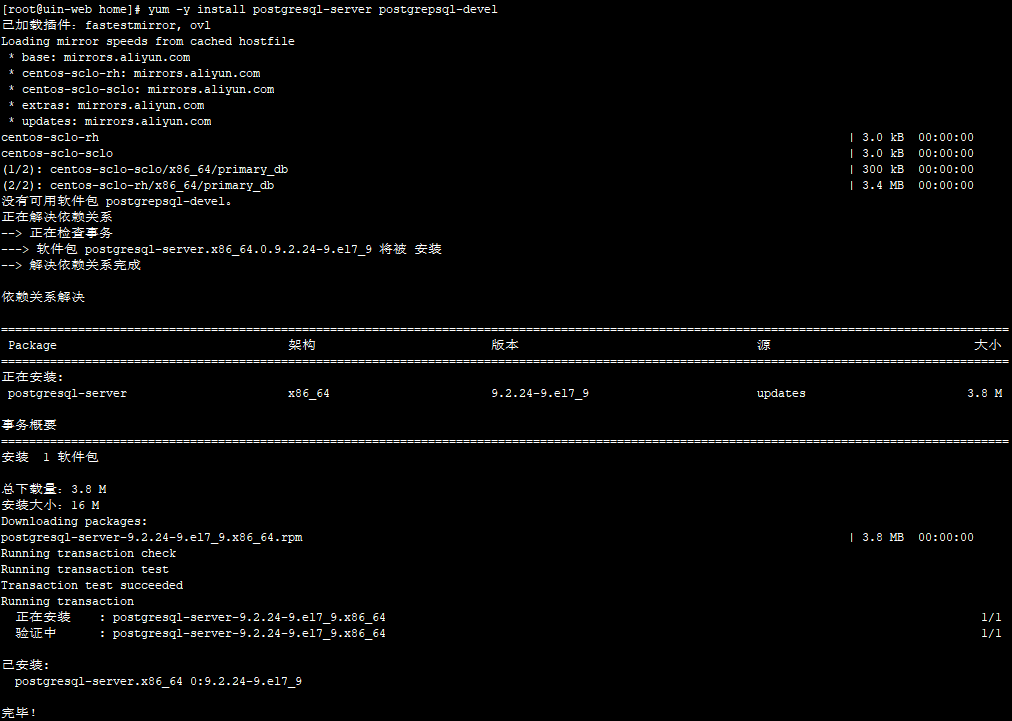
1. 安装postgresql并初始化DB
yum -y install postgresql-server postgrepsql-devel
/usr/bin/postgresql-setup initdb

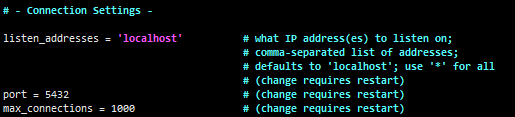
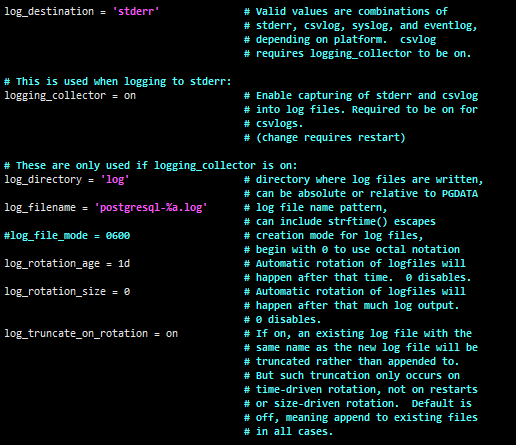
2. 修改配置文件,调整监听IP、端口、日志、最大连接数、授权等
sed -i 's/#log_truncate_on_rotation = off/log_truncate_on_rotation = on/g' /var/lib/pgsql/data/postgresql.conf
sed -i 's/#logging_collector = off/logging_collector = on/g'               /var/lib/pgsql/data/postgresql.conf
sed -i 's/#log_directory/log_directory/g'                                  /var/lib/pgsql/data/postgresql.conf
sed -i 's/#log_rotation_age/log_rotation_age/g'                            /var/lib/pgsql/data/postgresql.conf
sed -i 's/#log_filename/log_filename/g'                                    /var/lib/pgsql/data/postgresql.conf
sed -i 's/#log_rotation_size/log_rotation_size/g'                          /var/lib/pgsql/data/postgresql.conf
sed -i 's/#log_destination/log_destination/g'                              /var/lib/pgsql/data/postgresql.conf
sed -i 's/#listen_addresses/listen_addresses/g'                            /var/lib/pgsql/data/postgresql.conf
sed -i 's/max_connections = 100/max_connections = 1000/g'                  /var/lib/pgsql/data/postgresql.conf

vim /var/lib/pgsql/data//var/lib/pgsql/data/postgresql.conf
  listen_addressses='localhost';   (监听本机IP连接)

vim /var/lib/pgsql/data/pg_hba.conf
  host   all  all  0.0.0.0/0  trust  (允许所有IP访问)

3. 启动服务
systemctl start postgresql

systemctl enable postgresql
4. 锁定默认用户
usermod -L postgres (最好把postgresql默认系统用户postgres禁用掉)
5. 创建用户和数据库
sudo -u postgres psql
CREATE ROLE "freeswitch" WITH LOGIN;
ALTER USER postgres WITH PASSWORD 'postgres';
ALTER USER freeswitch WITH PASSWORD ''; **v12版本不能设置空密码,需要注意**
CREATE DATABASE freeswitch WITH OWNER = freeswitch ENCODING = 'UTF8';
grant all privileges on database freeswitch to freeswitch;
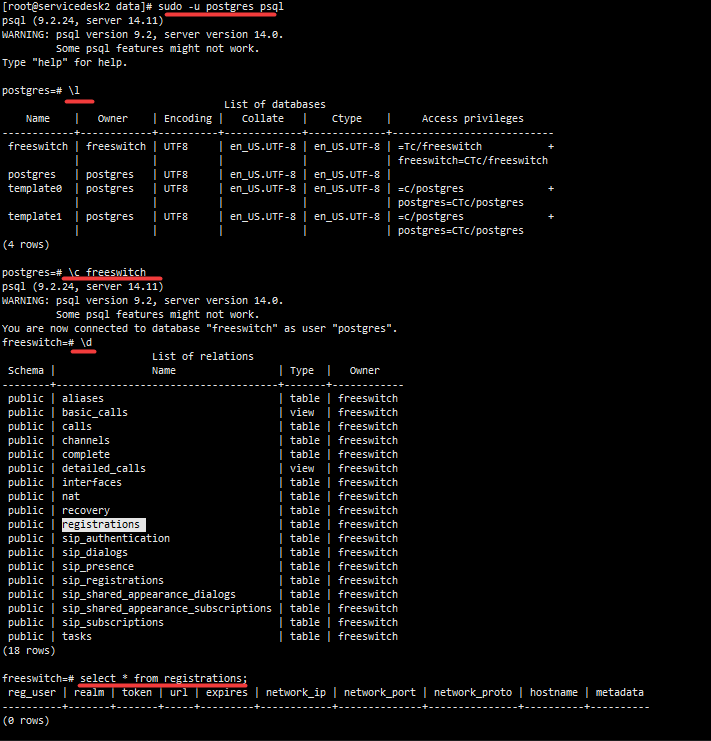
\l 显示全部数据库(相当于show database)
\c 数据库名 (相当于mysql中的,use 数据库)
\d 显示全部表(相当于show tables)
\q 退出PostgreSQL客户端
注:
DROP DATABASE freeswitch; **删除数据库**
alter database freeswitch owner to freeswitch; **变更数据库所有者**
/usr/bin/pg_dump -U freeswitch -h 127.0.0.1 -p 5432 freeswitch > /home/sqldump-20220524
/usr/bin/psql -U freeswitch -d freeswitch
6. 配置Freeswitch
1) freeswitch安装目录下执行 ./configure --enable-core-pgsql-support (如果源码安装时已在module.conf支持,可忽略)
2) 编辑switch.conf.xml,internal.xml文件,取消以下内容注释
<param name="odbc-dsn" value="pgsql://hostaddr=127.0.0.1 dbname=freeswitch user=freeswitch password='' options='-c client_min_messages=NOTICE' application_name='freeswitch'" />
3) 重启Freeswitch服务后,postgresql会自动创建表结构,截图如下:
问题1:
psql: FATAL: role "root" does not exist 需要切换postgres用户模式才能进入psql数据库
psql: FATAL: role "freeswitch" does not exist 执行CREATE ROLE "freeswitch" WITH LOGIN;
问题2:
# psql -U freeswitch -d freeswitch
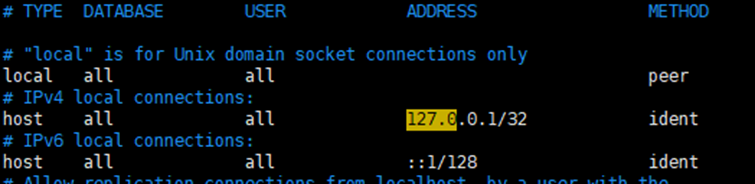
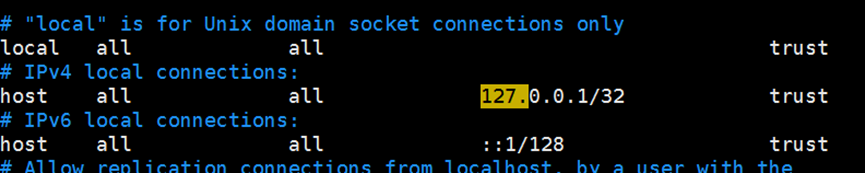
psql: FATAL: Peer authentication failed for user "freeswitch"
需要编辑/var/lib/pgsql/data/pg_hba.conf, 将登录方式由ident调整为trust
附:postgresql14安装
yum install -y https://download.postgresql.org/pub/repos/yum/reporpms/EL-7-x86_64/pgdg-redhat-repo-latest.noarch.rpm
yum install -y centos-release-scl-rh postgresql14-server postgresql14-devel
初始化数据库 /usr/pgsql-14/bin/postgresql-14-setup initdb
启动数据库 systemctl start postgresql-14
配置文件 /var/lib/pgsql/14/data/postgresql.conf

 浙公网安备 33010602011771号