
Configuration Transform插件生成各环境的web.config

场景
现有local,test,pre,product不同的环境使用数据库,接口地址,编译模式等配置参数是不一样的。使用手动copy很容出错效率还很慢。
解决方案
使用 编译条件+配置管理器+VS Configuration Transform 插件 会很方便的解决上面问。
Configuration Transform 插件
安装及使用
在VS菜单的 “工具”->“扩展和更新”中即可安装插件
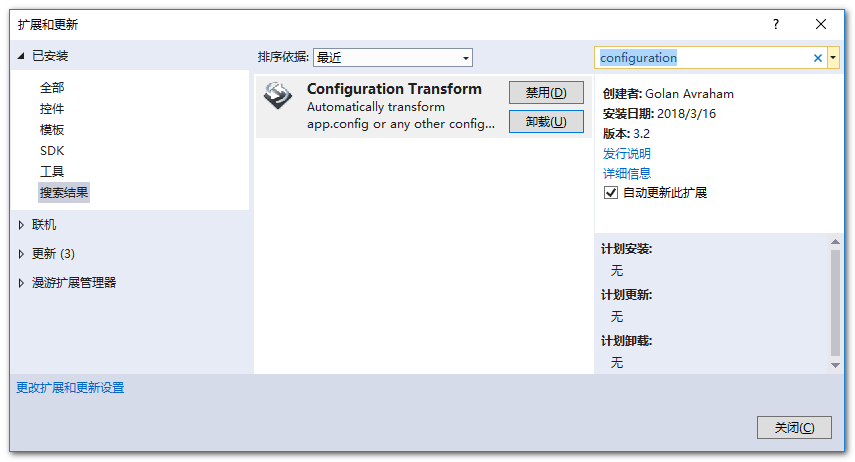
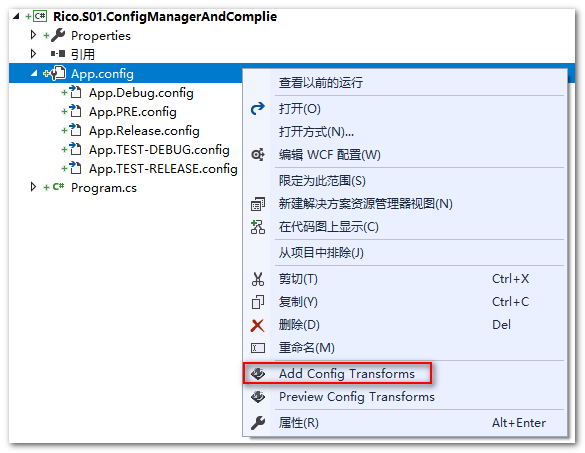
安装成功后,使用方式也很简单,右击config配置文件,菜单中会有Add Config Transform菜单项,
点击后会将配置管理器中预先定义好的配置项每个都成一个配置文件(如下图)
原理
vs的config文件引用了XML DOCUMENT TRANSFORM,主要使用该特性来实现将参数的替换,转换时机是在msbuild生成的时候。
大体流程是:在生成项目时Transformation Engine会从原配置App.config文件中获取所有xml节点,再从替换App.TEST-DEBUG.config文件中找到匹配的节点将其替换掉。
原xml文件App.config:
<configuration>
    <startup>
        <supportedRuntime version="v4.0" sku=".NETFramework,Version=v4.6.1" />
    </startup>
  <appSettings>
    <add key="name" value="默认值:DEBUG环境"/>
  </appSettings>
</configuration>
替换xml文件App.TEST-DEBUG.config:
<configuration xmlns:xdt="http://schemas.microsoft.com/XML-Document-Transform">
  <appSettings>
    <add xdt:Transform="Replace" xdt:Locator="Match(key)"  key="name" value="测试环境-release模式"/>
  </appSettings>
</configuration>
语法
实现转换使用两个特性:
- Locator属性
- Transform属性
Locator属性的值
这个属性用来定位
- Match():匹配节点中属性xxx的节点,比如:name,key等;
- Condition():匹配节点中满足一定条件节点;
- XPath():
Transform属性的值
这个属性用来表示操作的动作:
- Replace:替换
- Remove:删除第一个
- RemoveAll:删除所有
- Insert:从父节点中插入
- SetAttributes():设置属性值
- RemoveAttributes():移除属性值
- InsertAfter (XPath) ():过匹配 XPath的表达式的,找到节点,并子节点后面插入 XML
<authorization>
<deny users="AName" xdt:Transform="InsertAfter(/configuration/system.web/authorization/ allow[@roles='Admins']") />
</authorization>
- InsertBefore (XPath) :过匹配 XPath的表达式的,找到节点,并子节点后面插入 XML
- XSLT (filePath):
设置编译条件
Configuration Transform 可以生产配置转换文件,还需要配合编译条件。有的环境需要特定编译条件,有的环境不需要。
项目属性->生成页面中,可以实现不同配置有不同编译条件,如图:
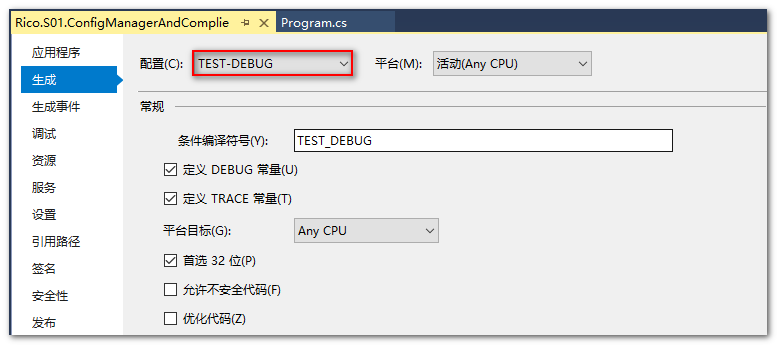
注意:配置管理器是配置项,不是编译条件,如果不进行上面编译条件设置,即使选择了配置环境下面的代码也不起作用。
static void Main(string[] args)
{
    var name = ConfigurationManager.AppSettings["name"];
#if DEBUG
    Console.WriteLine("DEBUG");
    Console.WriteLine($"name:{name}");
#elif TEST_DEBUG
    Console.WriteLine("TEST_DEBUG");
    Console.WriteLine($"name:{name}");
#elif TEST_RELEASE
    Console.WriteLine("TEST_RELEASE");
    Console.WriteLine($"name:{name}");
#elif PRE
    Console.WriteLine("PRE");
    Console.WriteLine($"name:{name}");
#elif RELEASE
    Console.WriteLine("RELEASE");
    Console.WriteLine($"name:{name}");
#endif
    Console.WriteLine("结束");
    Console.ReadKey();

}

 浙公网安备 33010602011771号