
Selenium (3) —— Selenium IDE + Firefox录制登录脚本(101 Tutorial)
Selenium (3) —— Selenium IDE + Firefox录制登录脚本(101 Tutorial)
selenium IDE版本: 2.9.1
firefox版本: 39.0.3
参考来源:
Understanding Selenium IDE vs Selenium RC
Selenium IDE Tutorial – Part 1
主要内容
Selenium IDE 是一个为进行Selenium测试的集成开发环境工具。Selenium测试可以用HTML table编写,也可以用其他语言来编写,比如C#,PHP,Perl,Python。IDE可以为我们录制,编辑和调试测试。目前IDE以addon的形式只支持Firefox。
安装
可以到以下地址安装
http://selenium-ide.openqa.org/download.jsp
https://addons.mozilla.org/en-US/firefox/addon/2079
安装完毕后需要重启firefox,注意当前最新的IDE 2.9.1与Firefox 40+不太兼容,建议使用40以下的版本,我这里使用的是39.0.3

录制
以登录cnblogs为例
IDE启动时,默认状态下是正在录制的
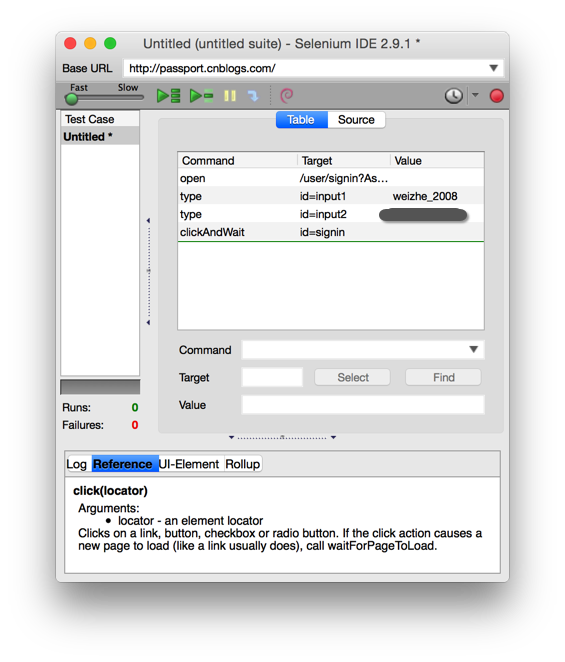
如果没有处于录制状态,需要点击右上角的红色按钮
-
我们在浏览器上一次进行以下操作
- 输入URL地址 http://passport.cnblogs.com/user/signin ,并访问
- 输入用户名、密码
- 点击登录
![]()
-
HTML table格式
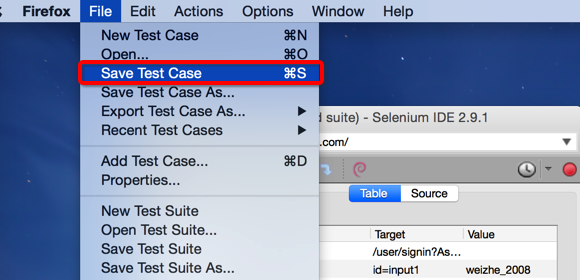
保存测试文件
![]()
查看录制文件
cnblogs
cnblogs open /user/signin?AspxAutoDetectCookieSupport=1 type id=input1 weizhe_2008 type id=input2 ******** clickAndWait id=signin
-
导出其他格式(Java,Ruby)
同样在文件菜单下,我们可以选择导出java或其他语言(File-> Export Test Case As...)
![]()
-
Java(Java / TestNG / WebDriver)
package com.example.tests;
import java.util.regex.Pattern;
import java.util.concurrent.TimeUnit;
import org.testng.annotations.;
import static org.testng.Assert.;
import org.openqa.selenium.*;
import org.openqa.selenium.firefox.FirefoxDriver;
import org.openqa.selenium.support.ui.Select;public class Cnblogs {
private WebDriver driver;
private String baseUrl;
private boolean acceptNextAlert = true;
private StringBuffer verificationErrors = new StringBuffer();@BeforeClass(alwaysRun = true)
public void setUp() throws Exception {
driver = new FirefoxDriver();
baseUrl = "http://passport.cnblogs.com/";
driver.manage().timeouts().implicitlyWait(30, TimeUnit.SECONDS);
}@Test
public void testCnblogs() throws Exception {
driver.get(baseUrl + "/user/signin?AspxAutoDetectCookieSupport=1");
driver.findElement(By.id("input1")).clear();
driver.findElement(By.id("input1")).sendKeys("weizhe_2008");
driver.findElement(By.id("input2")).clear();
driver.findElement(By.id("input2")).sendKeys("********");
driver.findElement(By.id("signin")).click();
}@AfterClass(alwaysRun = true)
public void tearDown() throws Exception {
driver.quit();
String verificationErrorString = verificationErrors.toString();
if (!"".equals(verificationErrorString)) {
fail(verificationErrorString);
}
}private boolean isElementPresent(By by) {
try {
driver.findElement(by);
return true;
} catch (NoSuchElementException e) {
return false;
}
}private boolean isAlertPresent() {
try {
driver.switchTo().alert();
return true;
} catch (NoAlertPresentException e) {
return false;
}
}private String closeAlertAndGetItsText() {
try {
Alert alert = driver.switchTo().alert();
String alertText = alert.getText();
if (acceptNextAlert) {
alert.accept();
} else {
alert.dismiss();
}
return alertText;
} finally {
acceptNextAlert = true;
}
}
} -
Ruby(Ruby / RSpec / WebDriver)
require "json"
require "selenium-webdriver"
require "rspec"
include RSpec::Expectationsdescribe "Cnblogs" do
before(:each) do
@driver = Selenium::WebDriver.for :firefox
@base_url = "http://passport.cnblogs.com/"
@accept_next_alert = true
@driver.manage.timeouts.implicit_wait = 30
@verification_errors = []
endafter(:each) do
@driver.quit
@verification_errors.should == []
endit "test_cnblogs" do
@driver.get(@base_url + "/user/signin?AspxAutoDetectCookieSupport=1")
@driver.find_element(:id, "input1").clear
@driver.find_element(:id, "input1").send_keys "weizhe_2008"
@driver.find_element(:id, "input2").clear
@driver.find_element(:id, "input2").send_keys "********"
@driver.find_element(:id, "signin").click
enddef element_present?(how, what)
${receiver}.find_element(how, what)
true
rescue Selenium::WebDriver::Error::NoSuchElementError
false
enddef alert_present?()
${receiver}.switch_to.alert
true
rescue Selenium::WebDriver::Error::NoAlertPresentError
false
enddef verify(&blk)
yield
rescue ExpectationNotMetError => ex
@verification_errors << ex
enddef close_alert_and_get_its_text(how, what)
alert = ${receiver}.switch_to().alert()
alert_text = alert.text
if (@accept_next_alert) then
alert.accept()
else
alert.dismiss()
end
alert_text
ensure
@accept_next_alert = true
end
end
-


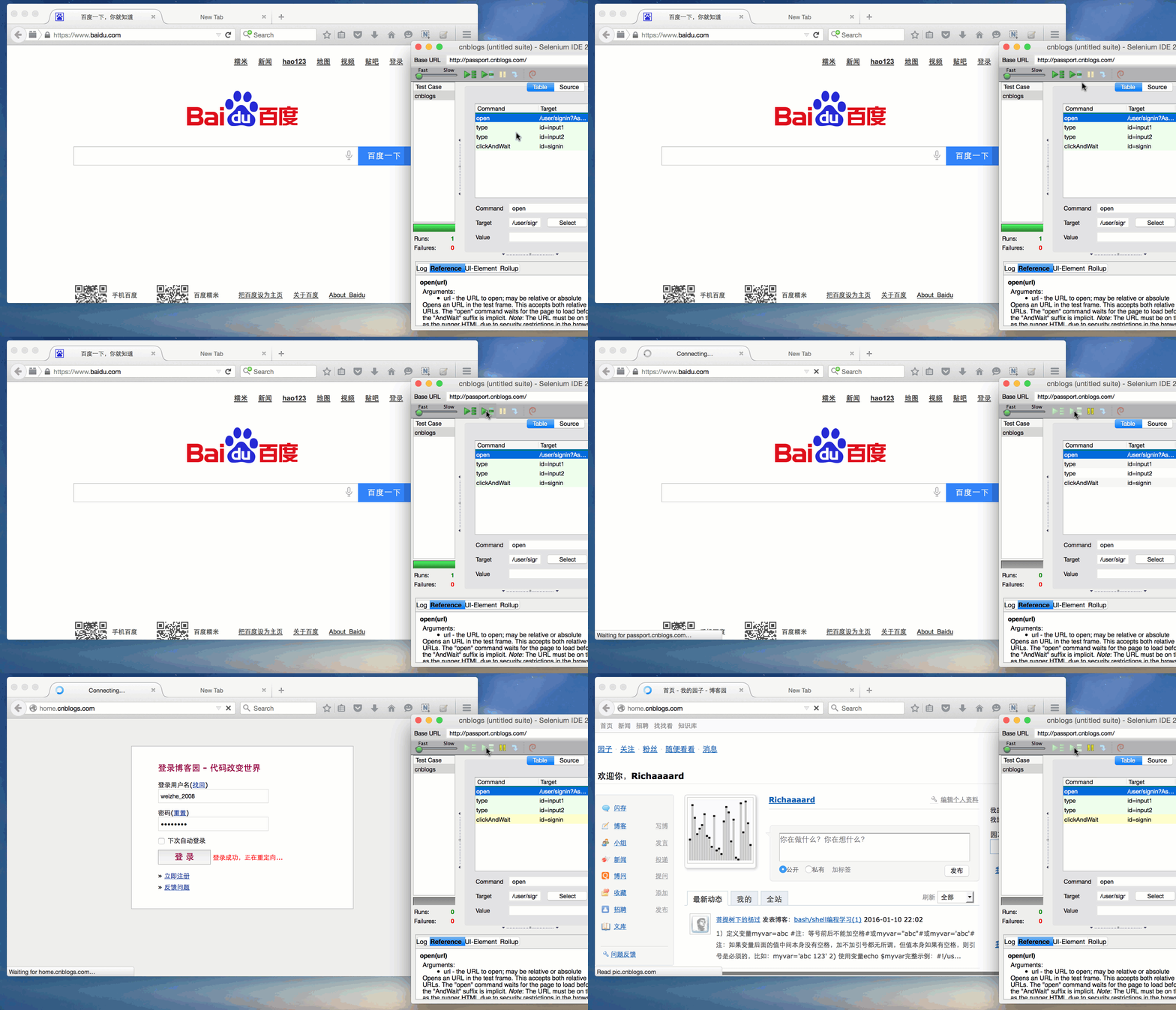
回放
点击Selenium IDE菜单栏上的绿色按钮

执行结果

 浙公网安备 33010602011771号