
vue中导入monaco-editor
monaco-editor
monaco-editor是一款代码编辑器,使用它我们可以再web实现vscode的基本功能,下面是在vue中使用monaco-editor流程
- 安装
npm install monaco-editor monaco-editor-webpack-plugin
- vue.config.js配置
这里我只添加了针对js的代码提示,如果只填写js的代码提示会发现并没有左右,后来在monaco-editor-webpack-plugin的介绍中发现了端倪:
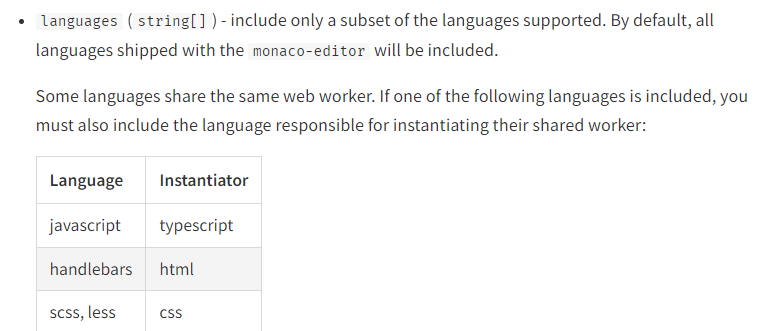
就是说添加js的语法提示必须依赖ts,所以必须把ts也加上
chainWebpack: (config) => {
config.plugin("monaco-editor").use(new MonacoWebpackPlugin({
languages: ["javascript","typescript"],
}));
},
- 在组件中使用
 1 import * as monaco from "monaco-editor/esm/vs/editor/edcore.main"; // 引入monaco-editor
 2 export default {
 3   name: "monacoEditor",
 4   props: {
 5     editorOptions: {
 6       type: Object,
 7       default: function () {
 8         return {
 9           selectOnLineNumbers: true,
10           roundedSelection: false,
11           readOnly: true, // 只读
12           cursorStyle: "line", //光标样式
13           automaticLayout: false, //自动布局
14           glyphMargin: true, //字形边缘
15           useTabStops: false,
16           fontSize: 28, //字体大小
17           autoIndent: true, //自动布局
18           quickSuggestionsDelay: 500, //代码提示延时
19           language: "javascript", //语言
20         };
21       },
22     },
23     codes: {
24       type: String,
25       default: function () {
26         return ``
27 };
28         `;
29       },
30     },
31   },
32   data() {
33     return {
34       editor: null,
35     };
36   },
37   mounted() {
38     this.initEditor();
39   },
40   methods: {
41     initEditor() {
42       const self = this;
43       // 初始化编辑器,确保dom已经渲染
44       this.editor = monaco.editor.create(self.$refs.monaco, {
45         value: self.codeValue || self.codes, // 编辑器初始显示内容
46         language: "javascript", // 支持语言
47         theme: "vs", // 主题
48         selectOnLineNumbers: true, //显示行号
49         editorOptions: self.editorOptions,// 编辑器配置
50         noSemanticValidation: true,// 不显示语法错误
51       });
52       //监测窗口变化
53       window.addEventListener("resize", function () {
54         self.editor.layout();
55       });
56     },
57   },
58 };
html代码
<template>
  <div id="monaco-editor-box">
    <div id="monaco-editor" ref="monaco"></div>
  </div>
</template>
然后就可以在web端使用了.

 浙公网安备 33010602011771号