Vue+Echarts--父组件+子组件(基础)
基本的思路就是:在父组件获取后端数据,然后传到子组件,子组件创建图表进行展示。
1、获取后端数据

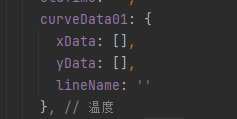
2、将数据传给子组件,并将子组件引入到父组件
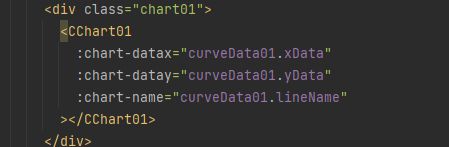
3、子组件接收数据
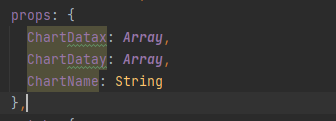
4、处理数据
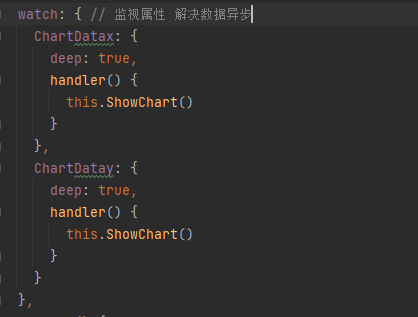
5、挂载到盒子上


6、创建图表
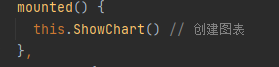
7、图表自适应
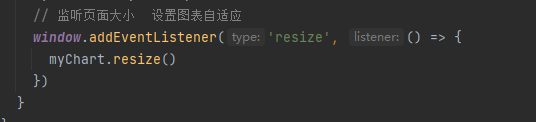
8、全部子组件代码
<template>
  <div>
    <div class="main" ref="myChart"></div>
  </div>
</template>

<script>
import * as echarts from 'echarts' // 引入echarts图表

require('echarts/theme/macarons') // 图表主题
export default {
  name: 'CChart01',
  props: {
    ChartDatax: Array, // 接收数据+数据类型
    ChartDatay: Array,
    ChartName: String
  },
  watch: { // 监视属性 解决数据异步
    ChartDatax: {
      deep: true,
      handler() {
        this.ShowChart()
      }
    },
    ChartDatay: {
      deep: true,
      handler() {
        this.ShowChart()
      }
    }
  },
  mounted() {
    this.ShowChart() // 创建图表
  },
  methods: {
    ShowChart() {
      const myChart = echarts.init(this.$refs.myChart, 'macarons') // 挂载节点
      const option = { // 配置项
        tooltip: {
          backgroundColor: '#00b8ff'
        },
        legend: {
          textStyle: { color: '#ffffff' }
        },
        grid: {
          left: '3%',
          right: '4%',
          bottom: '10%',
          containLabel: true
        }, // 图表在div中的位置
        xAxis: {
          type: 'category',
          data: this.ChartDatax,
          boundaryGap: false,
          axisLine: {
            lineStyle: {
              width: 2, // 线的大小
              type: 'solid' // 轴线的类型
            },
            onZero: false
          },
          axisLabel: { // 文字倾斜
            rotate: 80,
            textStyle: {
              fontSize: 12,
              fontWeight: 'bold'
            }
            // 坐标轴刻度标签的相关设置。
            // interval: 0,
          }
        },
        yAxis: {
          name: '温度(℃)',
          nameTextStyle: {
            fontSize: 14,
            padding: [10, 10, 10, 10],
            fontWeight: 'bold'
          },
          type: 'value',
          axisLine: {
            lineStyle: {
              width: 1, // 线的大小
              type: 'solid' // 轴线的类型
            },
            onZero: false
          },
          axisLabel: {
            textStyle: {
              fontWeight: 'bold',
              fontSize: 12
            },
            // 坐标轴刻度标签的相关配置
            interval: 0
          },
          splitArea: {
            show: false
          }
        },
        dataZoom: [
          {
            type: 'slider',
            height: 20,
            xAxisIndex: 0,
            filterMode: 'none',
            textStyle: { color: '#ffffff' }
          },
          {
            type: 'inside',
            height: 20,
            xAxisIndex: 0,
            filterMode: 'none',
            textStyle: { color: '#ffffff' }
          }
        ],
        series: {
          name: this.ChartName + '(℃)', // 图表名称
          type: 'line',
          data: this.ChartDatay, // 数据
          symbolSize: 6, // 点的大小
          emphasis: {
            focus: 'series' // 聚焦当前的区域高亮
          }
        }
      }
      myChart.setOption(option)
      // 监听页面大小  设置图表自适应
      window.addEventListener('resize', () => {
        myChart.resize()
      })
    }
  }
}
</script>

<style scoped lang="scss">
.main { // 样式,不设置高宽,图表不显示
  width: 800px;
  height: 600px;
  margin: 0 auto;
  border: 1px solid skyblue;
}
</style>
这种写法有利有弊,好处就在于便于理解,写法简单,展示图表没有问题。
弊端在于,想展示的数据过多的话,就会造成大量的代码冗杂。不灵活。要展示的折线数量事固定死的,不能应对高质量需求。

 浙公网安备 33010602011771号