Vue_Echarts : 解决__ob__: Observer
在Vue+Echarts做表中遇到一个问题,__ob__: Observer无法展示数据,
在这之前推荐一篇文章看一下,个人觉得挺不错的。
文章链接:
https://blog.csdn.net/weixin_38345306/article/details/123090611
话不多说,咱们上代码。
<template>
  <div class="ThecondChart">
    <div class="main" ref="myChart"></div>
    <!--    {{ this.TotalData.tableData}}-->
  </div>
</template>

<script>
import * as echarts from 'echarts'
import { GetRollData } from '@/api/commonApi'

require('echarts/theme/macarons') // echarts theme    echarts主题皮肤
export default {
  name: 'Chart02',
  props: ['lineCity'],
  data() {
    return {
      xData: [],
      yData: [],
      TotalData: {
        tableData: [],
        curveData: []
      },
    }
  },
  watch: {
    xData: {
      deep: true,
      handler(newValue) {
        // console.log(newValue)
        this.ShowChart()
      }
    }
  },
  mounted() {
    this.$nextTick(() => {
      this.GetChartData()
    })
  },
  methods: {
    GetChartData() {
      const tD = []
      const cD = []
      const that = this
      GetRollData({ city: this.lineCity }).then(res => {
        this.xData = res.data.curveData[0].linex
        this.yData = res.data.curveData[0].liney
      })
    },
    ShowChart() {
      const myChart = echarts.init(this.$refs.myChart, 'macarons')// macarons主题皮肤
      const option = {
        title: {
          text: '折线图',
          subtext: '副标题'
        },
        tooltip: {
          backgroundColor: 'pink'
        },
        legend: {
          textStyle: { color: '#ffffff' }
        },
        xAxis: {
          type: 'category',
          // 数据
          data: this.xData,
          boundaryGap: false,
          axisLine: {
            lineStyle: {
              width: 1, // 线的大小
              type: 'solid'// 轴线的类型
            },
            onZero: false
          },
          axisLabel: { // 文字倾斜
            rotate: 80,
            textStyle: {
              fontSize: 12,
              fontWeight: 'bold'
            }
            // 坐标轴刻度标签的相关设置。
            // interval: 0,
          }
        },
        yAxis: {
          name: '温度(℃)',
          nameTextStyle: {
            fontSize: 14,
            padding: [10, 10, 10, 10],
            fontWeight: 'bold'
          },
          type: 'value',
          axisLine: {
            lineStyle: {
              width: 1, // 线的大小
              type: 'solid'// 轴线的类型
            },
            onZero: false
          },
          axisLabel: {
            textStyle: {
              fontSize: 12,
              fontWeight: 'bold'
            },
            // 坐标轴刻度标签的相关设置。
            interval: 0
          },
          splitArea: {
            show: false
          }
        },
        dataZoom: [
          {
            type: 'slider',
            height: 20,
            xAxisIndex: 0,
            filterMode: 'none',
            textStyle: { color: '#ffffff' }
          },
          {
            type: 'inside',
            xAxisIndex: 0,
            height: 20,
            filterMode: 'none',
            textStyle: { color: '#ffffff' }
          }
        ],
        series: {
          name: '逐时温度(℃)',
          type: 'line',
          data: this.yData,
          emphasis: {
            focus: 'series' // 聚焦当前的区域高亮
          }
        }
      }
      // 设置自适应(拖拽的曲线最好不要设置)
      window.addEventListener('resize', () => {
        if (this.chart !== null) {
          this.chart.resize()
        }
      })
      myChart.setOption(option)
    }
  }
}
</script>

<style scoped lang="scss">
.main {
  width: 1200px;
  height: 600px;
  margin: 0 auto;
  border: #00ff9d 1px solid;
}
</style>
在这里我是用监视属性解决的这个问题。
下面我们拆分一下代码,详细解读一下,其实也很简单。
引入echarts,新版本引入写法。

主题皮肤

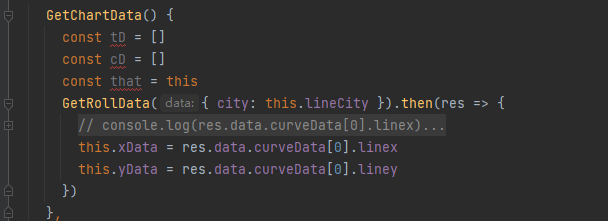
在后端接口获取数据。将x轴和y轴的数据赋值给data中的两个空数组分别为xData和yData。
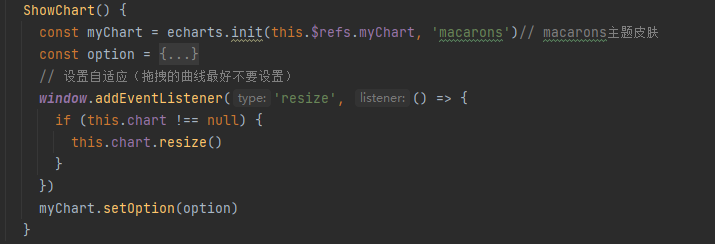
创建图表,引入主题皮肤,option内为配置项。
监视属性(watch),开启深度监视,监视xData数组的数据变化,创建图表。
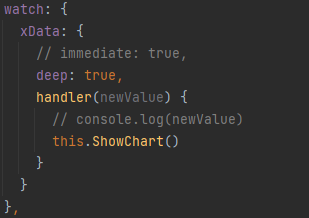
这样就可以正常展示图表数据了。

 浙公网安备 33010602011771号