
处理WPF加载NuGet DLL导致的异常
问题背景
由于WPF程序需要解析Json格式数据,因此通过NuGet Package为该工程安装了Newtonsoft.Json库。工程编译成功后,VS会自动将Newtonsoft.Json.dll拷贝到程序生成目录bin/Debug或者bin/Release。
在一次测试中忘记拷贝dll,程序运行时出现闪退,并且定位到闪退的时间点就是在解析Json数据附近。因为解析Json数据是被放在一个线程里,没有启动该线程程序不会崩溃,一旦启动线程程序就会崩溃。
猜测启动线程时抛出了加载DLL失败异常,尝试在解析Json数据时加try..catch去捕获System.IO.FileNotFoundException异常,然而并不能捕获。
解决办法
在WPF程序启动之前判断所依赖的DLL是否存在,如果不存在即弹出提示,退出程序。
在这里提出两种方式(任选其一即可):
- 在App中添加处理程序
 1 /// <summary>
 2 /// Interaction logic for App.xaml
 3 /// </summary>
 4 public partial class App : Application
 5 {
 6     protected override void OnStartup(StartupEventArgs e)
 7     {
 8         if (!System.IO.File.Exists("Newtonsoft.Json.dll"))
 9         {
10             MessageBox.Show("Newtonsoft.Json.dll is missing");
11             Current.Shutdown();
12         }
13
14         base.OnStartup(e);
15     }
16 }
- 在同一命令空间中添加程序入口,然后在项目属性里面选择程序入口点(Property=>Application=>Startup Object)。
 1 <summary>
 2 Entry point class to check existence of DLL
 3 </summary>
 4 public static class EntryPoint
 5 {
 6     [STAThread]
 7     public static void Main(string[] args)
 8     {
 9         //check the DLL file.
10         if (!File.Exists("Newtonsoft.Json.dll"))
11         {
12             MessageBox.Show("Newtonsoft.Json.dll is missing!");
13             return;
14         }
15
16         App app = new App();
17         app.InitializeComponent();
18         app.Run();
19     }
20 }
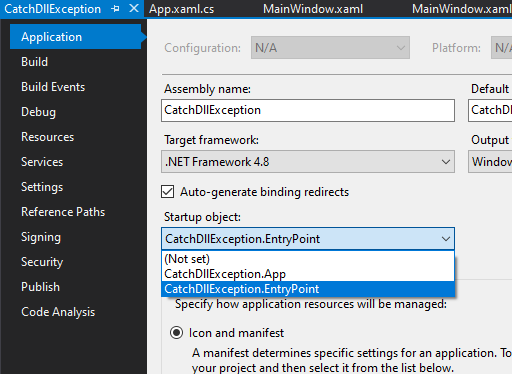
这篇文章的主要内容到此结束。
P.S. 如果是一个C# Console应用程序,在CMD中执行的时候产生错误提示:
Unhandled Exception: System.IO.FileNotFoundException: Could not load file or assembly 'xxx' or one of its dependencies. The system cannot find the file specified.
at xxx.Program.Main(String[] args)
这种情况我们也可以采用上面提到的第二中方法,在Main函数外面嵌套一层入口函数来判断是否存在依赖DLL,同样也需要设置Startup Object。
 1 public static class EntryPoint
 2 {
 3     [STAThread]
 4     public static void Main(string[] args)
 5     {
 6         //check the DLL file.
 7         if (!File.Exists("Newtonsoft.Json.dll"))
 8         {
 9             Console.WriteLine("Newtonsoft.Json.dll is missing!");
10             return;
11         }
12         // the real Main()
13         Program.Main(args);
14     }
15 }
参考:https://social.msdn.microsoft.com/Forums/sqlserver/en-US/360217ed-11d3-42a7-a678-0a4bf8f98c29/how-to-capture-filenotfoundexception-on-missing-references-dll-file?forum=wpf

 浙公网安备 33010602011771号