
安装nginx两种方式及遇到问题
1.手工部署
1)下载安装包:
wget http://nginx.org/download/nginx-1.20.1.tar.gz
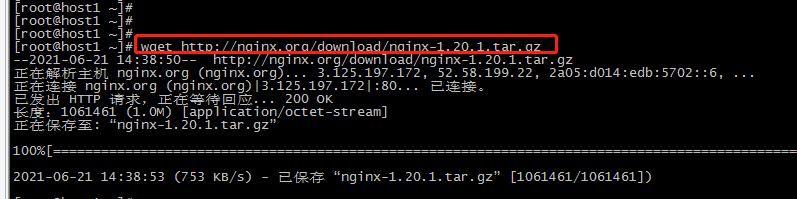
2)解压到指定目录:tar xvf nginx-1.20.1.tar.gz -C /usr/local/src/

3)安装编译相关组件(时间稍长):
yum -y install gcc pcre pcre-devel zlib zlib-devel openssl openssl-devel

4)进入到解压目录,执行配置:
cd /usr/local/src/nginx-1.20.1
执行配置,如下:
./configure
–prefix=/usr/local/nginx
–sbin-path=/usr/sbin/nginx
–conf-path=/etc/nginx/nginx.conf
–error-log-path=/var/log/nginx/error.log
–http-log-path=/var/log/nginx/access.log
–pid-path=/var/run/nginx.pid
–lock-path=/var/run/nginx.lock
–http-client-body-temp-path=/var/tmp/nginx/client
–http-proxy-temp-path=/var/tmp/nginx/proxy
–http-fastcgi-temp-path=/var/tmp/nginx/fcgi
–http-uwsgi-temp-path=/var/tmp/nginx/uwsgi
–http-scgi-temp-path=/var/tmp/nginx/scgi
–user=nginx
–group=nginx
–with-pcre
–with-http_v2_module
–with-http_ssl_module
–with-http_realip_module
–with-http_addition_module
–with-http_sub_module
–with-http_dav_module
–with-http_flv_module
–with-http_mp4_module
–with-http_gunzip_module
–with-http_gzip_static_module
–with-http_random_index_module
–with-http_secure_link_module
–with-http_stub_status_module
–with-http_auth_request_module
–with-mail
–with-mail_ssl_module
–with-file-aio
–with-ipv6
–with-http_v2_module
–with-threads
–with-stream
–with-stream_ssl_module

5)编译安装
make && make install
6)结果:
安装目录/usr/local/nginx下面只有一个html目录,未生成conf、sbin等目录
再次执行下面命令,退出当前会话,重新登录,目录生成
./configure --prefix=/usr/local/nginx
make
make install
2.自动安装(yum)
1)进入yum配置目录:cd vi /etc/yum.repo.d/
2)直接执行:vi nginx.repo
直接粘贴如下内容:
[nginx]
name=nginx repo
baseurl=http://nginx.org/packages/centos/7/x86_64/
gpgcheck=0
enabled=1
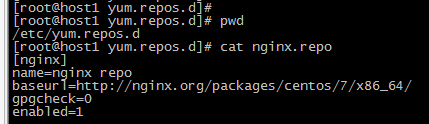
注:地址里面7代表censos版本
3)执行安装命令:
yum install epel-release
yum update
yum install -y nginx
4)结果:
报错:Not using downloaded nginx/repomd.xml because it is older than what we have:

解决:执行yum clean all ,重新安装yum -y install nginx


 浙公网安备 33010602011771号