


配置文件:
<?xml version="1.0" encoding="UTF-8"?>
<beans xmlns="http://www.springframework.org/schema/beans"
	xmlns:xsi="http://www.w3.org/2001/XMLSchema-instance"
	xsi:schemaLocation="http://www.springframework.org/schema/beans
        http://www.springframework.org/schema/beans/spring-beans.xsd">
	<!-- services -->
	<bean id="dataSource" class="org.springframework.jdbc.datasource.DriverManagerDataSource">
		<property name="driverClassName" value="com.mysql.jdbc.Driver"></property>
		<property name="url" value="jdbc:mysql://localhost/spring"></property>
		<property name="username" value="root"></property>
		<property name="password" value="123456"></property>
	</bean>
	<bean id="jdbcTemplate" class="org.springframework.jdbc.core.JdbcTemplate">
		<property name="dataSource" ref="dataSource"></property>
	</bean>

</beans>
测试文件:
package com.student.jdbc;

import org.springframework.context.ApplicationContext;
import org.springframework.context.support.ClassPathXmlApplicationContext;
import org.springframework.jdbc.core.JdbcTemplate;

public class JdbcTemplateTest {

	public static void main(String[] args) {
		ApplicationContext applicationContext = new ClassPathXmlApplicationContext("applicationContext.xml");
		JdbcTemplate jdbcTemplate = (JdbcTemplate) applicationContext.getBean("jdbcTemplate");
		jdbcTemplate.execute("create table account(" + "id int primary key auto_increment," + "username varchar(50),"+ "balance double)");
		System.out.println("账户表创建成功!!!!!");

	}

}
输出结果:
十月 16, 2019 6:21:57 下午 org.springframework.context.support.ClassPathXmlApplicationContext prepareRefresh
信息: Refreshing org.springframework.context.support.ClassPathXmlApplicationContext@799f7e29: startup date [Wed Oct 16 18:21:57 CST 2019]; root of context hierarchy
十月 16, 2019 6:21:58 下午 org.springframework.beans.factory.xml.XmlBeanDefinitionReader loadBeanDefinitions
信息: Loading XML bean definitions from class path resource [applicationContext.xml]
十月 16, 2019 6:21:58 下午 org.springframework.jdbc.datasource.DriverManagerDataSource setDriverClassName
信息: Loaded JDBC driver: com.mysql.jdbc.Driver
Wed Oct 16 18:21:58 CST 2019 WARN: Establishing SSL connection without server's identity verification is not recommended. According to MySQL 5.5.45+, 5.6.26+ and 5.7.6+ requirements SSL connection must be established by default if explicit option isn't set. For compliance with existing applications not using SSL the verifyServerCertificate property is set to 'false'. You need either to explicitly disable SSL by setting useSSL=false, or set useSSL=true and provide truststore for server certificate verification.
账户表创建成功!!!!!
mysql:运行结果:
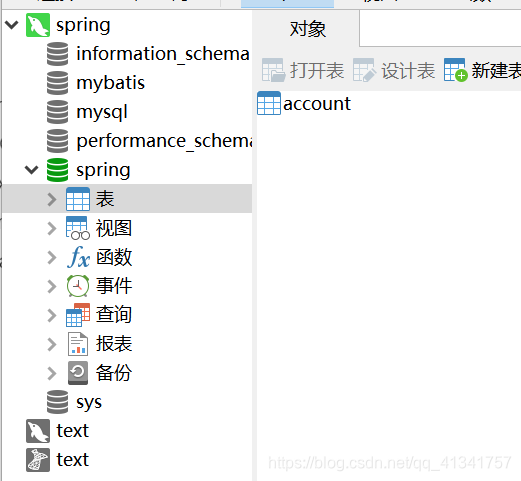
刷新发现创建了这个表。

 浙公网安备 33010602011771号