


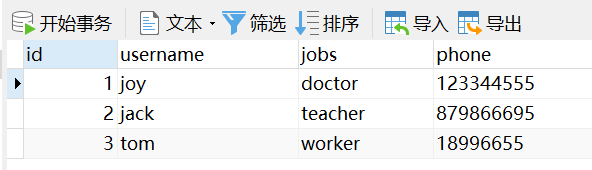
在MySQL中添加表和字段如下:
log4j.properties:日志文件:作用:让控制台输出SQL语句。
# Global logging configuration
log4j.rootLogger=ERROR, stdout
# MyBatis logging configuration...
log4j.logger.org.student=DEBUG
# Console output...
log4j.appender.stdout=org.apache.log4j.ConsoleAppender
log4j.appender.stdout.layout=org.apache.log4j.PatternLayout
log4j.appender.stdout.layout.ConversionPattern=%5p [%t] - %m%n
Customer类:
package com.student.po;

public class Customer {
	private Integer id;
	private String username;
	private String jobs;
	@Override
	public String toString() {
		return "Customer [id=" + id + ", username=" + username + ", jobs=" + jobs + ", phone=" + phone + "]";
	}
	public Integer getId() {
		return id;
	}
	public void setId(Integer id) {
		this.id = id;
	}
	public String getUsername() {
		return username;
	}
	public void setUsername(String username) {
		this.username = username;
	}
	public String getJobs() {
		return jobs;
	}
	public void setJobs(String jobs) {
		this.jobs = jobs;
	}
	public String getPhone() {
		return phone;
	}
	public void setPhone(String phone) {
		this.phone = phone;
	}
	private String phone;

}
CustomerMapper:配置文件
<?xml version="1.0" encoding="UTF-8" ?>
<!DOCTYPE mapper PUBLIC "-//mybatis.org//DTD Mapper 3.0//EN"
           "http://mybatis.org/dtd/mybatis-3-mapper.dtd">

<mapper namespace="com.student.mapper.CustomerMapper">
	<select id="findCustomerById" resultType="com.student.po.Customer" parameterType="Integer">
		select * from t_customer where id = #{id}
	</select>
</mapper>
mybatis-config :主配置文件
<?xml version="1.0" encoding="UTF-8" ?>
<!DOCTYPE configuration PUBLIC "-//mybatis.org//DTD Config 3.0//EN"
   "http://mybatis.org/dtd/mybatis-3-config.dtd">

<configuration>
	<environments default="mysql">
		<environment id="mysql">
			<transactionManager type="JDBC" />
			<dataSource type="POOLED">
				<property name="driver" value="com.mysql.jdbc.Driver" />
				<property name="url"
					value="jdbc:mysql://localhost:3306/mybatis" />
				<property name="username" value="root" />
				<property name="password" value="123456" />
			</dataSource>
		</environment>
	</environments>
	<mappers>
		<mapper resource="com/student/mapper/CustomerMapper.xml" />
	</mappers>
</configuration>
MybatisTest :测试文件
package com.student.test;

import java.io.InputStream;

import org.apache.ibatis.io.Resources;
import org.apache.ibatis.session.SqlSession;
import org.apache.ibatis.session.SqlSessionFactory;
import org.apache.ibatis.session.SqlSessionFactoryBuilder;
import org.junit.Test;

import com.student.po.Customer;

public class MybatisTest {

	@Test
	public void findCustomerByIdTest() throws Exception{
		String resource = "mybatis-config.xml";
		InputStream inputStream = Resources.getResourceAsStream(resource);
		SqlSessionFactory sqlSessionFactory = new SqlSessionFactoryBuilder().build(inputStream);
		SqlSession sqlSession = sqlSessionFactory.openSession();
		Customer customer = sqlSession.selectOne("com.student.mapper.CustomerMapper.findCustomerById",1);
		System.out.println(customer.toString());
		sqlSession.close();

	}

}
输出结果:
Thu Oct 17 19:35:38 CST 2019 WARN: Establishing SSL connection without server's identity verification is not recommended. According to MySQL 5.5.45+, 5.6.26+ and 5.7.6+ requirements SSL connection must be established by default if explicit option isn't set. For compliance with existing applications not using SSL the verifyServerCertificate property is set to 'false'. You need either to explicitly disable SSL by setting useSSL=false, or set useSSL=true and provide truststore for server certificate verification.
Customer [id=1, username=joy, jobs=doctor, phone=123344555]
在mapper文件中添加另一个select:
<?xml version="1.0" encoding="UTF-8" ?>
<!DOCTYPE mapper PUBLIC "-//mybatis.org//DTD Mapper 3.0//EN"
           "http://mybatis.org/dtd/mybatis-3-mapper.dtd">

<mapper namespace="com.student.mapper.CustomerMapper">
	<select id="findCustomerById" resultType="com.student.po.Customer" parameterType="Integer">
		select * from t_customer where id = #{id}
	</select>
	<select id="findCustomerByName" parameterType="String" resultType="com.student.po.Customer">
		select * from t_customer where username like '%${value}'
	</select>
</mapper>
在测试文件中添加另外的测试方法:
package com.student.test;

import java.io.InputStream;
import java.util.List;

import org.apache.ibatis.io.Resources;
import org.apache.ibatis.session.SqlSession;
import org.apache.ibatis.session.SqlSessionFactory;
import org.apache.ibatis.session.SqlSessionFactoryBuilder;
import org.junit.Test;

import com.student.po.Customer;

public class MybatisTest {

	/*
	@Test
	public void findCustomerByIdTest() throws Exception{
		String resource = "mybatis-config.xml";
		InputStream inputStream = Resources.getResourceAsStream(resource);
		SqlSessionFactory sqlSessionFactory = new SqlSessionFactoryBuilder().build(inputStream);
		SqlSession sqlSession = sqlSessionFactory.openSession();
		Customer customer = sqlSession.selectOne("com.student.mapper.CustomerMapper.findCustomerById",1);
		System.out.println(customer.toString());
		sqlSession.close();

	}
	*/
	@Test
	public void findCustomerByNameTest() throws Exception{
		String resource = "mybatis-config.xml";
		InputStream inputStream = Resources.getResourceAsStream(resource);
		SqlSessionFactory sqlSessionFactory = new SqlSessionFactoryBuilder().build(inputStream);
		SqlSession sqlSession = sqlSessionFactory.openSession();

		List<Customer> customers = sqlSession.selectList("com.student.mapper.CustomerMapper.findCustomerByName");
		for (Customer customer :customers) {
			System.out.println(customer);
		}
		sqlSession.close();

	}


}
运行结果:
Thu Oct 17 19:52:19 CST 2019 WARN: Establishing SSL connection without server's identity verification is not recommended. According to MySQL 5.5.45+, 5.6.26+ and 5.7.6+ requirements SSL connection must be established by default if explicit option isn't set. For compliance with existing applications not using SSL the verifyServerCertificate property is set to 'false'. You need either to explicitly disable SSL by setting useSSL=false, or set useSSL=true and provide truststore for server certificate verification.
Customer [id=1, username=joy, jobs=doctor, phone=123344555]
Customer [id=2, username=jack, jobs=teacher, phone=879866695]
Customer [id=3, username=tom, jobs=worker, phone=18996655]
在Mapper增加一个插入数据的代码:
<insert id="addCustomer" parameterType="com.student.po.Customer">
	   	insert into t_customer (username,jobs,phone)
	   	values(#{username},#{jobs},#{phone})
	</insert>
<?xml version="1.0" encoding="UTF-8" ?>
<!DOCTYPE mapper PUBLIC "-//mybatis.org//DTD Mapper 3.0//EN"
           "http://mybatis.org/dtd/mybatis-3-mapper.dtd">

<mapper namespace="com.student.mapper.CustomerMapper">
	<select id="findCustomerById" resultType="com.student.po.Customer" parameterType="Integer">
		select * from t_customer where id = #{id}
	</select>
	<select id="findCustomerByName" parameterType="String" resultType="com.student.po.Customer">
		select * from t_customer where username like '%${value}'
	</select>
	<insert id="addCustomer" parameterType="com.student.po.Customer">
	   	insert into t_customer (username,jobs,phone)
	   	values(#{username},#{jobs},#{phone})
	</insert>
</mapper>
在测试类中添加一个测试类:
@Test
	public void addCustomerTest() throws Exception{
		String resource = "mybatis-config.xml";
		InputStream inputStream = Resources.getResourceAsStream(resource);
		SqlSessionFactory sqlSessionFactory = new SqlSessionFactoryBuilder().build(inputStream);
		SqlSession sqlSession = sqlSessionFactory.openSession();

		Customer customer = new Customer();
		customer.setUsername("rose");
		customer.setJobs("ITboy");
		customer.setPhone("1234567654");
		int rows = sqlSession.insert("com.student.mapper.CustomerMapper.addCustomer",customer);
		if(rows>0)
		{
			System.out.println("您已经成功的插入了"+rows+"条数据");
		}
		else
		{
			System.out.println("执行插入操作失败!!!!");
		}
		sqlSession.commit();
		sqlSession.close();

	}
注意:
1.sqlSession.commit();必须写上,不然不会在数据库中显示。
2.数据库的id 必须设置成主键,并且支持自增长,否则会报错:id的值出错。
运行结果:
Thu Oct 17 20:41:00 CST 2019 WARN: Establishing SSL connection without server's identity verification is not recommended. According to MySQL 5.5.45+, 5.6.26+ and 5.7.6+ requirements SSL connection must be established by default if explicit option isn't set. For compliance with existing applications not using SSL the verifyServerCertificate property is set to 'false'. You need either to explicitly disable SSL by setting useSSL=false, or set useSSL=true and provide truststore for server certificate verification.
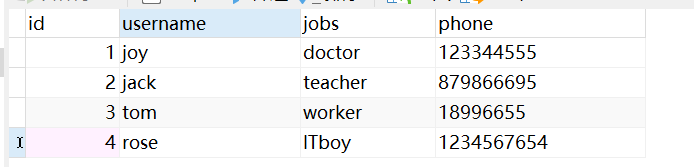
您已经成功的插入了1条数据
数据库查询一下:
在Mapper文件中增加一个更新方法:
<update id="updateCustomer" parameterType="com.student.po.Customer">
	 	update t_customer set
	 	username = #{username},jobs = #{jobs},phone=#{phone}
	 	where id = #{id}
	</update>
在测试文件添加更新的测试方法:
@Test
	public void updateCustomerTest() throws Exception{
		String resource = "mybatis-config.xml";
		InputStream inputStream = Resources.getResourceAsStream(resource);
		SqlSessionFactory sqlSessionFactory = new SqlSessionFactoryBuilder().build(inputStream);
		SqlSession sqlSession = sqlSessionFactory.openSession();

		Customer customer = new Customer();
		customer.setId(6);
		customer.setUsername("rose");
		customer.setJobs("programmer");
		customer.setPhone("00000000");
		int rows = sqlSession.update("com.student.mapper.CustomerMapper.updateCustomer",customer);
		if(rows>0)
		{
			System.out.println("您已经成功的修改了"+rows+"条数据");
		}
		else
		{
			System.out.println("执行修改操作失败!!!!");
		}
		sqlSession.commit();
		sqlSession.close();

	}
测试结果:
Thu Oct 17 20:53:01 CST 2019 WARN: Establishing SSL connection without server's identity verification is not recommended. According to MySQL 5.5.45+, 5.6.26+ and 5.7.6+ requirements SSL connection must be established by default if explicit option isn't set. For compliance with existing applications not using SSL the verifyServerCertificate property is set to 'false'. You need either to explicitly disable SSL by setting useSSL=false, or set useSSL=true and provide truststore for server certificate verification.
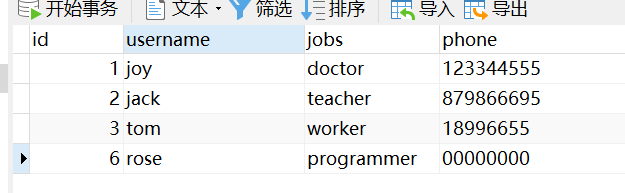
您已经成功的修改了1条数据
检查数据库:
在Mapper文件添加删除操作:
<delete id="deleteCustomer" parameterType="Integer">
	delete from t_customer where id=#{id}
	</delete>
测试文件添加测试方法:
@Test
	public void deleteCustomerTest() throws Exception{
		String resource = "mybatis-config.xml";
		InputStream inputStream = Resources.getResourceAsStream(resource);
		SqlSessionFactory sqlSessionFactory = new SqlSessionFactoryBuilder().build(inputStream);
		SqlSession sqlSession = sqlSessionFactory.openSession();
		int rows = sqlSession.delete("com.student.mapper.CustomerMapper.deleteCustomer",6);
		if(rows>0)
		{
			System.out.println("您已经成功的删除了"+rows+"条数据");
		}
		else
		{
			System.out.println("执行删除操作失败!!!!");
		}
		sqlSession.commit();
		sqlSession.close();

	}
运行结果:
Thu Oct 17 21:01:47 CST 2019 WARN: Establishing SSL connection without server's identity verification is not recommended. According to MySQL 5.5.45+, 5.6.26+ and 5.7.6+ requirements SSL connection must be established by default if explicit option isn't set. For compliance with existing applications not using SSL the verifyServerCertificate property is set to 'false'. You need either to explicitly disable SSL by setting useSSL=false, or set useSSL=true and provide truststore for server certificate verification.
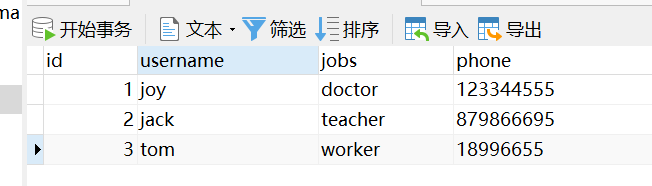
您已经成功的删除了1条数据
数据库检查:

 浙公网安备 33010602011771号