


传统DAO方式的开发整合
采用传统DAO方式的开发整合需要编写DAO接口以及接口的实现类 ,并且需要向DAO实现类中注入SqlSessionFactory,然后在方法体内通过SqlSessionFactory创建sqlsession。所以可以使用mybatis-spring包中的SqlSessionTemplate类和SqlSessionDaoSupport类来实现。
SqlSessionTemplate类是mybatis-spring的核心类,他负责管理mybatis的sqlsession,调用mybatis的sql方法。当调用sql方法时,SqlSessionTemplate将会保证使用的SqlSession和当前的spring的事务是相关的。并且他还管理bean的生命周期,包含必要的关闭,提交和回滚等。
SqlSessionDaoSupport类:是一个抽象支持类,他继承了DaoSupport类,主要是作为DAO的基类来使用。可以通过SqlSessionDaoSupport类的getSqlSession()方法来获取需要的SqlSession。
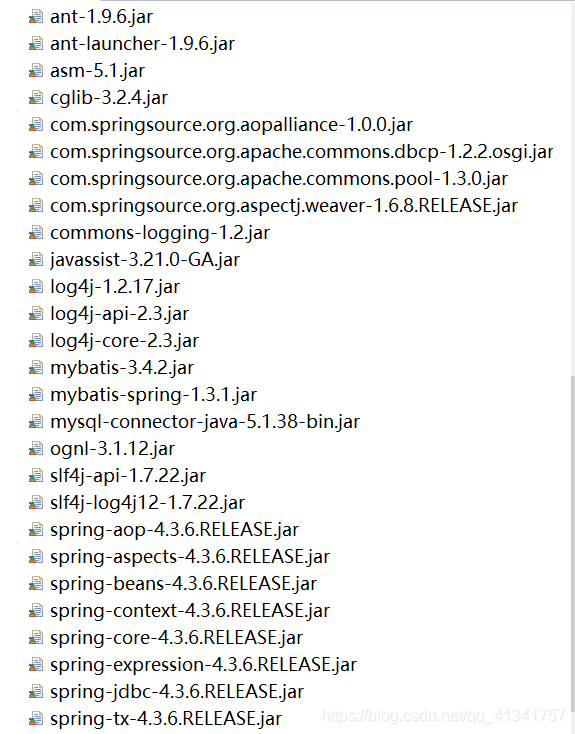
需要导入的包:
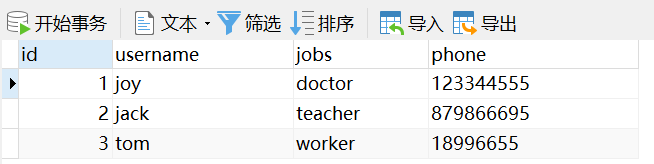
mysql数据库的初始数据:
log4j.properties
# Global logging configuration
log4j.rootLogger=ERROR, stdout
# MyBatis logging configuration...
log4j.logger.com.student=DEBUG
# Console output...
log4j.appender.stdout=org.apache.log4j.ConsoleAppender
log4j.appender.stdout.layout=org.apache.log4j.PatternLayout
log4j.appender.stdout.layout.ConversionPattern=%5p [%t] - %m%n
db.properties
jdbc.driver = com.mysql.jdbc.Driver
jdbc.url = jdbc:mysql://localhost:3306/mybatis
jdbc.username = root
jdbc.password = 123456
jdbc.maxIdle = 10
jdbc.initialSize = 5
mybatis-config:主配置文件
<?xml version="1.0" encoding="UTF-8" ?>
<!DOCTYPE configuration PUBLIC "-//mybatis.org//DTD Config 3.0//EN"
   "http://mybatis.org/dtd/mybatis-3-config.dtd">

<configuration>
	<typeAliases>
		<package name="com.student.po"/>
	</typeAliases>
	<mappers>
		<mapper resource="com/student/po/CustomerMapper.xml" />
	</mappers>
</configuration>
applicationContext:配置文件
<?xml version="1.0" encoding="UTF-8"?>

<beans xmlns="http://www.springframework.org/schema/beans"
	xmlns:xsi="http://www.w3.org/2001/XMLSchema-instance"
	xmlns:aop="http://www.springframework.org/schema/aop"
	xmlns:tx="http://www.springframework.org/schema/tx"
	xmlns:context="http://www.springframework.org/schema/context"
	xsi:schemaLocation="http://www.springframework.org/schema/beans
        http://www.springframework.org/schema/beans/spring-beans.xsd
        http://www.springframework.org/schema/tx
        http://www.springframework.org/schema/tx/spring-tx.xsd
        http://www.springframework.org/schema/context
        http://www.springframework.org/schema/context/spring-context.xsd
        http://www.springframework.org/schema/aop
        http://www.springframework.org/schema/aop/spring-aop.xsd">

	<!--读取db.properties文件 -->
	<context:property-placeholder
		location="classpath:db.properties" />

	<!-- 配置数据源 -->
	<bean id="dataSource"
		class="org.apache.commons.dbcp.BasicDataSource">
		<property name="driverClassName" value="${jdbc.driver}"></property>
		<property name="url" value="${jdbc.url}"></property>
		<property name="username" value="${jdbc.username}"></property>
		<property name="password" value="${jdbc.password}"></property>
		<property name="maxIdle" value="${jdbc.maxIdle}"></property>
		<property name="initialSize" value="${jdbc.initialSize}"></property>
	</bean>

	<!-- 事务管理器 -->
	<bean id="transactionManager"
		class="org.springframework.jdbc.datasource.DataSourceTransactionManager">
		<property name="dataSource" ref="dataSource"></property>
	</bean>

	<!--开启事务注解 -->
	<tx:annotation-driven
		transaction-manager="transactionManager" />

	<!-- sqpring 与mybatis整合 -->
	<!-- 配置mybatis工厂 -->
	<bean id="sqlSessionFactory"
		class="org.mybatis.spring.SqlSessionFactoryBean">
		<property name="dataSource" ref="dataSource"></property>
		<property name="configLocation"
			value="classpath:mybatis-config.xml"></property>
	</bean>

	<!--实例化DAO -->
	<bean id="customerDao"
		class="com.student.dao.impl.CustomerDaoImpl">
		<property name="sqlSessionFactory" ref="sqlSessionFactory"></property>
	</bean>

</beans>
UserDao :实体类的接口
package com.student.dao;

import com.student.po.Customer;

public interface CustomerDao {
	public Customer findCustomerById(Integer id);

}
实现类
package com.student.dao.impl;

import org.mybatis.spring.support.SqlSessionDaoSupport;

import com.student.dao.CustomerDao;
import com.student.po.Customer;

public class CustomerDaoImpl extends SqlSessionDaoSupport implements CustomerDao {

	@Override
	public Customer findCustomerById(Integer id) {
		return this.getSqlSession().selectOne("com.student.po.CustomerMapper.findCustomerById", id);
	}

}
CustomerDao:
package com.student.po;

public class Customer {
	private Integer id;
	private String username;
	private String jobs;
	private String phone;
	public Integer getId() {
		return id;
	}
	public void setId(Integer id) {
		this.id = id;
	}
	public String getUsername() {
		return username;
	}
	public void setUsername(String username) {
		this.username = username;
	}
	public String getJobs() {
		return jobs;
	}
	public void setJobs(String jobs) {
		this.jobs = jobs;
	}
	public String getPhone() {
		return phone;
	}
	public void setPhone(String phone) {
		this.phone = phone;
	}
	@Override
	public String toString() {
		return "Customer [id=" + id + ", username=" + username + ", jobs=" + jobs + ", phone=" + phone + "]";
	}


}
CustomerMapper:
<?xml version="1.0" encoding="UTF-8" ?>
<!DOCTYPE mapper PUBLIC "-//mybatis.org//DTD Mapper 3.0//EN"
           "http://mybatis.org/dtd/mybatis-3-mapper.dtd">

<mapper namespace="com.student.po.CustomerMapper">
	<select id="findCustomerById" resultType="customer" parameterType="Integer">
		select * from t_customer where id = #{id}
	</select>
</mapper>
DaoTest:
package com.student.text;

import org.junit.Test;
import org.springframework.context.ApplicationContext;
import org.springframework.context.support.ClassPathXmlApplicationContext;

import com.student.dao.CustomerDao;
import com.student.po.Customer;

public class DaoTest {

	@Test
	public void findCustomerByIdDao() {
		ApplicationContext applicationContext = new ClassPathXmlApplicationContext("applicationContext.xml");
		CustomerDao customerDao = (CustomerDao) applicationContext.getBean("customerDao");
		Customer customer = customerDao.findCustomerById(1);
		System.out.println(customer);

	}

}
测试结果:
Fri Oct 18 11:23:17 CST 2019 WARN: Establishing SSL connection without server's identity verification is not recommended. According to MySQL 5.5.45+, 5.6.26+ and 5.7.6+ requirements SSL connection must be established by default if explicit option isn't set. For compliance with existing applications not using SSL the verifyServerCertificate property is set to 'false'. You need either to explicitly disable SSL by setting useSSL=false, or set useSSL=true and provide truststore for server certificate verification.
Fri Oct 18 11:23:17 CST 2019 WARN: Establishing SSL connection without server's identity verification is not recommended. According to MySQL 5.5.45+, 5.6.26+ and 5.7.6+ requirements SSL connection must be established by default if explicit option isn't set. For compliance with existing applications not using SSL the verifyServerCertificate property is set to 'false'. You need either to explicitly disable SSL by setting useSSL=false, or set useSSL=true and provide truststore for server certificate verification.
Fri Oct 18 11:23:17 CST 2019 WARN: Establishing SSL connection without server's identity verification is not recommended. According to MySQL 5.5.45+, 5.6.26+ and 5.7.6+ requirements SSL connection must be established by default if explicit option isn't set. For compliance with existing applications not using SSL the verifyServerCertificate property is set to 'false'. You need either to explicitly disable SSL by setting useSSL=false, or set useSSL=true and provide truststore for server certificate verification.
Fri Oct 18 11:23:17 CST 2019 WARN: Establishing SSL connection without server's identity verification is not recommended. According to MySQL 5.5.45+, 5.6.26+ and 5.7.6+ requirements SSL connection must be established by default if explicit option isn't set. For compliance with existing applications not using SSL the verifyServerCertificate property is set to 'false'. You need either to explicitly disable SSL by setting useSSL=false, or set useSSL=true and provide truststore for server certificate verification.
Fri Oct 18 11:23:17 CST 2019 WARN: Establishing SSL connection without server's identity verification is not recommended. According to MySQL 5.5.45+, 5.6.26+ and 5.7.6+ requirements SSL connection must be established by default if explicit option isn't set. For compliance with existing applications not using SSL the verifyServerCertificate property is set to 'false'. You need either to explicitly disable SSL by setting useSSL=false, or set useSSL=true and provide truststore for server certificate verification.
Fri Oct 18 11:23:17 CST 2019 WARN: Establishing SSL connection without server's identity verification is not recommended. According to MySQL 5.5.45+, 5.6.26+ and 5.7.6+ requirements SSL connection must be established by default if explicit option isn't set. For compliance with existing applications not using SSL the verifyServerCertificate property is set to 'false'. You need either to explicitly disable SSL by setting useSSL=false, or set useSSL=true and provide truststore for server certificate verification.
DEBUG [main] - ==>  Preparing: select * from t_customer where id = ?
DEBUG [main] - ==> Parameters: 1(Integer)
DEBUG [main] - <==      Total: 1
Customer [id=1, username=joy, jobs=doctor, phone=123344555]

 浙公网安备 33010602011771号