


一:HTTP接口是什么?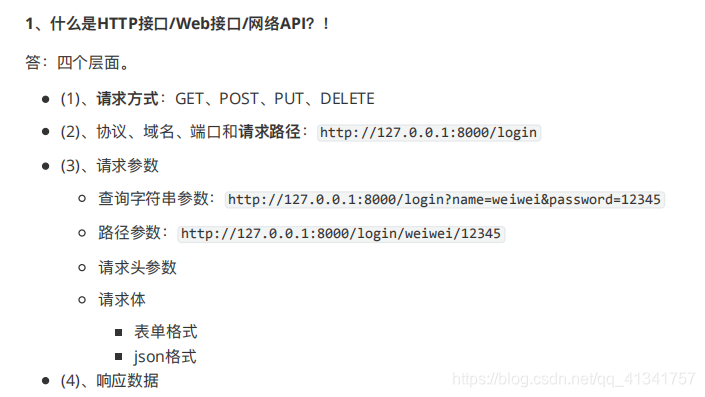
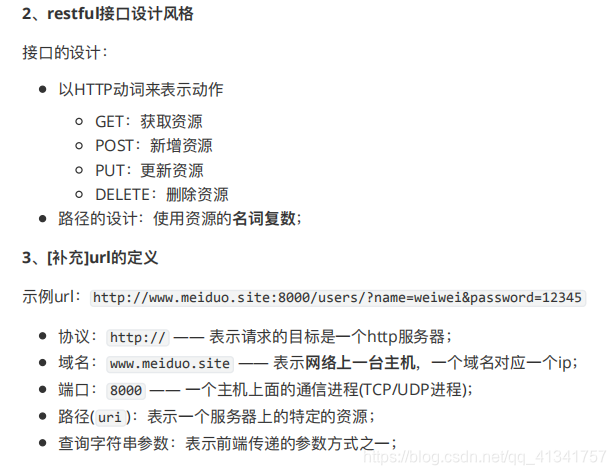
二:restful设计风格:
三:新建并注册用户模块:
1:在apps目录下创建users子应用:
(django_env) python@ubuntu:~/Desktop/meiduo_project$ cd meiduo_mall/
(django_env) python@ubuntu:~/Desktop/meiduo_project/meiduo_mall$ cd apps
(django_env) python@ubuntu:~/Desktop/meiduo_project/meiduo_mall/apps$ python ../manage.py startapp users
(django_env) python@ubuntu:~/Desktop/meiduo_project/meiduo_mall/apps$ ls
__init__.py  users
2:给user子应用创建urls子路由:
在子应用下新建urls.py文件
urlpatterns = [

]
3:在配置文件中注册子应用:
这里的路径不能使用直接使用users,为什么?
因为注册子应用的默认的导包路径是外层目录:而此时我的users在我的外层目录下的apps下的users路径里呢。
INSTALLED_APPS = [
    'django.contrib.admin',
    'django.contrib.auth',
    'django.contrib.contenttypes',
    'django.contrib.sessions',
    'django.contrib.messages',
    'django.contrib.staticfiles',
    'apps.users'
]
注意:注册应用一般是先写:django自己的应用,然后第三方应用,最后是自己写的应用。
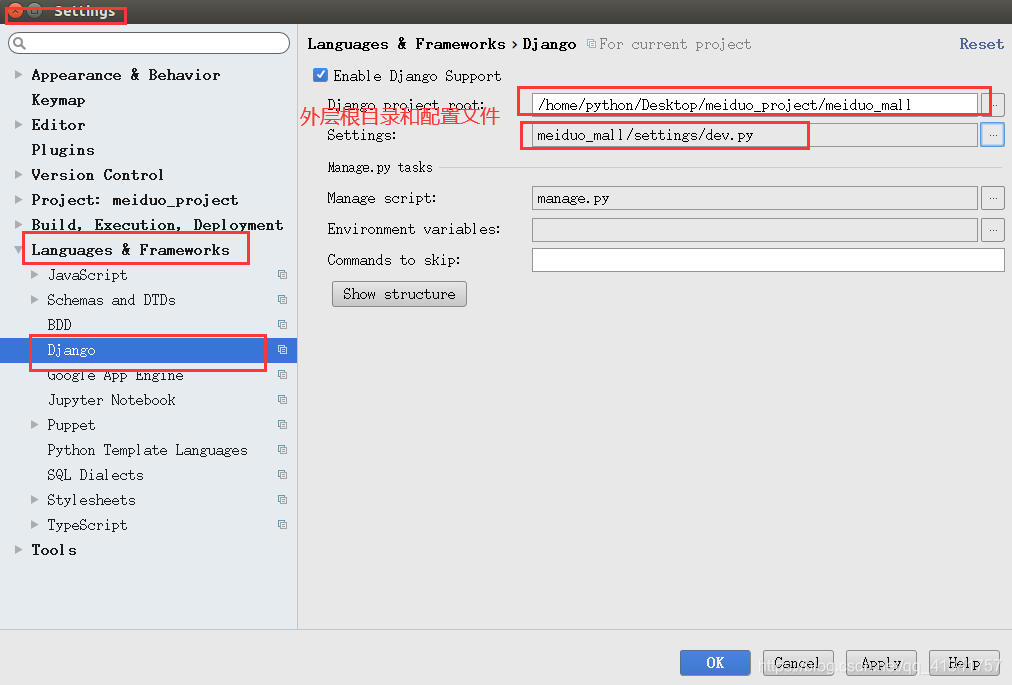
技巧:在写apps.users的时候我们发现,不会有提示,这说明我的pycharm找不到apps。
解决方案:因为找不到apps所以要将apps的上层目录标记一下,让pycharm能够找到,我们可以标记一下外层的目录。
第一步先配置这里:
第二步:右击外层目录,然后看图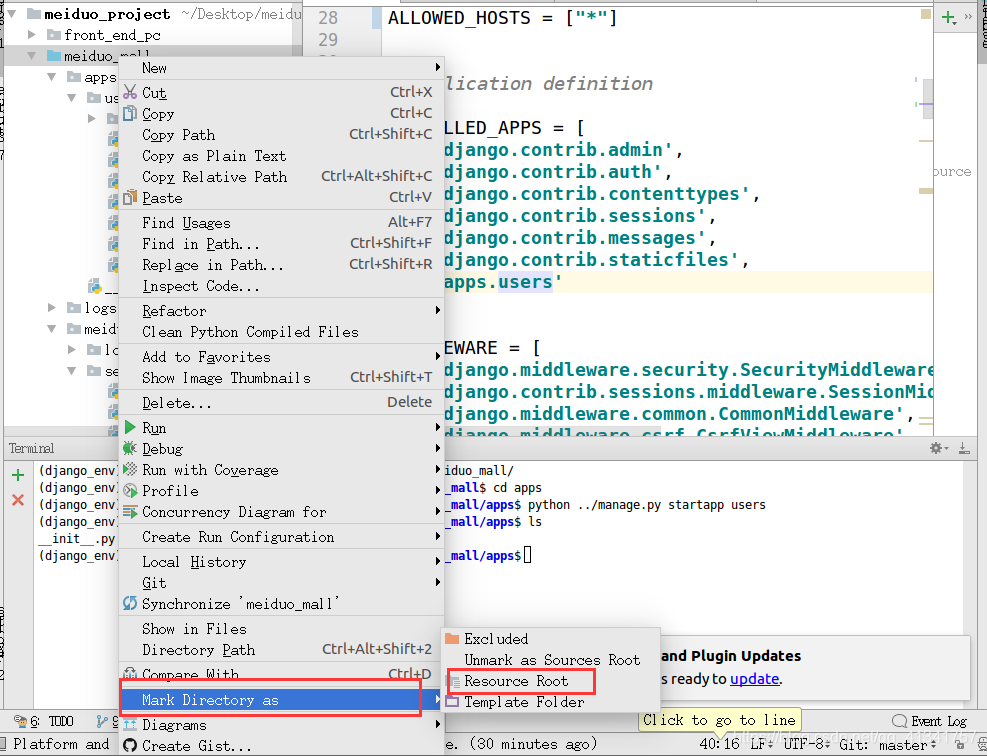
4:自定义用户模型类:
4.1:了解django自带的用户模型类:
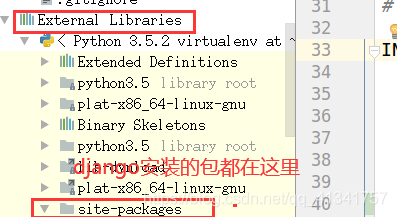
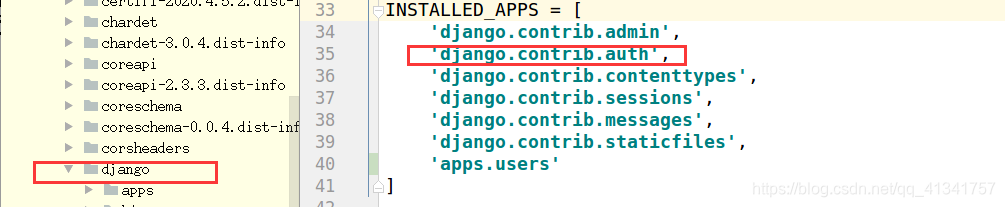
django用户自己定义的模型类在django.contrib.auth中。
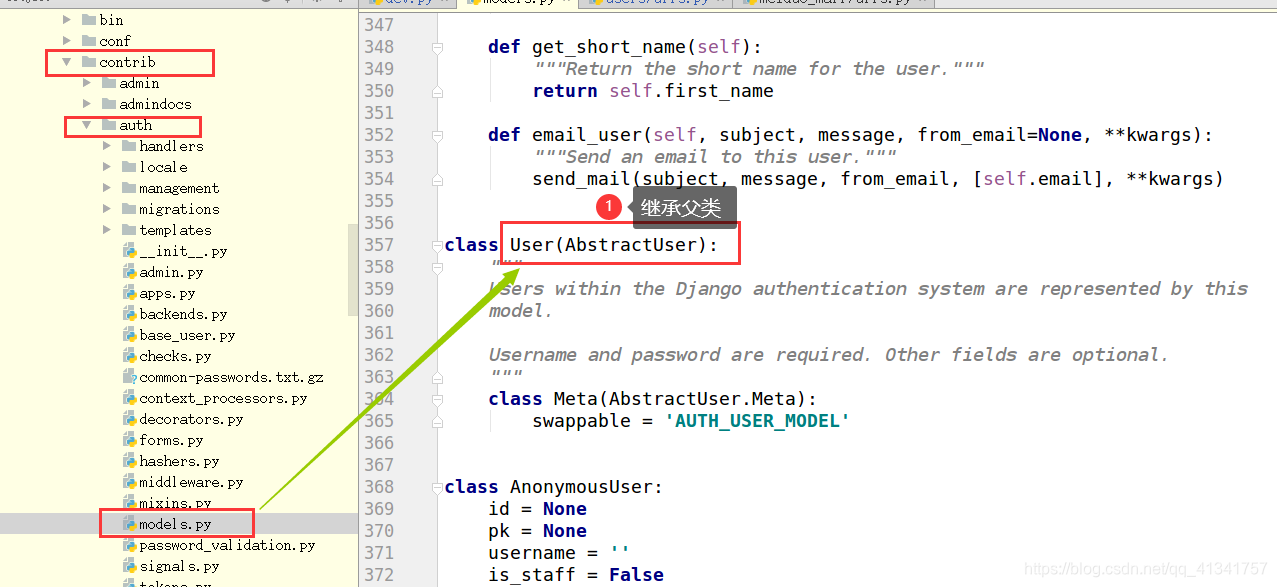
按下ctrl 点击AbstractUser 转到定义他的地方。
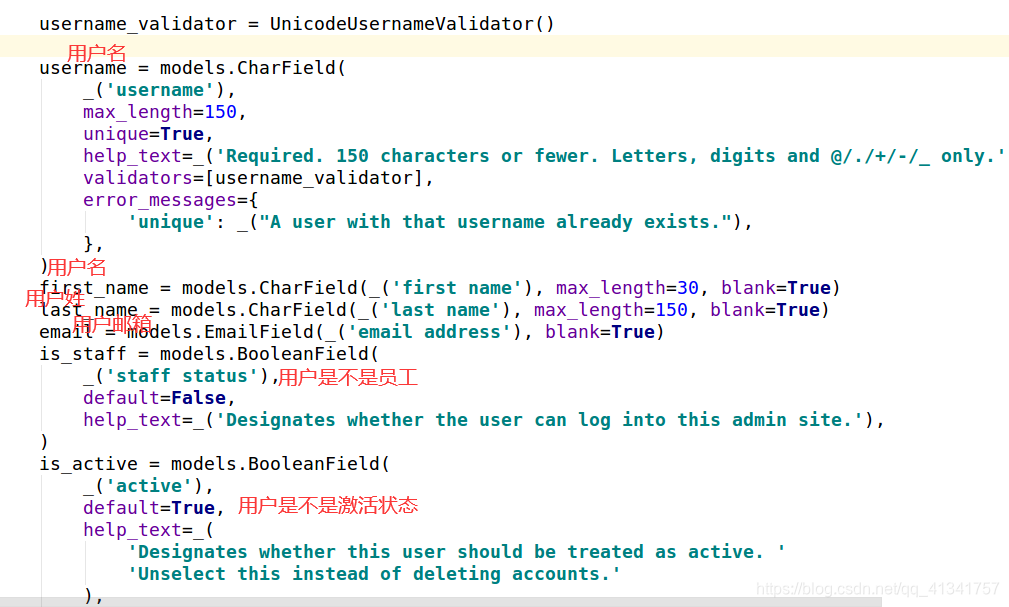
4.2:自定义用户的模型类:
在apps下的users下的models写代码:
from django.contrib.auth.models import AbstractUser
from django.db import models

# Create your models here.
class User(AbstractUser):

    mobile = models.CharField(max_length=11,unique=True,verbose_name="手机号")


    class Meta:
        db_table = "tb_users"

    def __str__(self):
        return self.username
4.3:告诉django你要用我的模型类,而不要用自己的:
在配置文件中加上这句话:
AUTH_USER_MODEL = 'users.User'
此时有个问题:这句话默认是直接找users,而不是自己的,而且这里的格式必须这样写:应用名称.User
但是这里的users不是导包路径,怎么做??
解决方案:
在配置文件导入sys模块:注意sys.path里面所有的都是导包路径,所以只需要将apps路径添加进来,以后apps里面的所有模型类都可以直接使用了。
sys.path.insert(
    0,"/home/python/Desktop/meiduo_project/meiduo_mall/apps"
)
但是这个路径是绝对路径:
修改:
sys.path.insert(
    0,os.path.join(os.path.dirname(BASE_DIR),"apps")
)
os.path.dirname(BASE_DIR)就是"/home/python/Desktop/meiduo_project/meiduo_mall/"
也就是导包目录的上层目录。
4.4:模型类迁移建表:
(django_env) python@ubuntu:~/Desktop/meiduo_project/meiduo_mall$ python manage.py makemigrations
Migrations for 'users':
  apps/users/migrations/0001_initial.py
    - Create model User
(django_env) python@ubuntu:~/Desktop/meiduo_project/meiduo_mall$ python manage.py migrate
Operations to perform:
  Apply all migrations: admin, auth, contenttypes, sessions, users
Running migrations:
  Applying contenttypes.0001_initial... OK
  Applying contenttypes.0002_remove_content_type_name... OK
  Applying auth.0001_initial... OK
  Applying auth.0002_alter_permission_name_max_length... OK
  Applying auth.0003_alter_user_email_max_length... OK
  Applying auth.0004_alter_user_username_opts... OK
  Applying auth.0005_alter_user_last_login_null... OK
  Applying auth.0006_require_contenttypes_0002... OK
  Applying auth.0007_alter_validators_add_error_messages... OK
  Applying auth.0008_alter_user_username_max_length... OK
  Applying auth.0009_alter_user_last_name_max_length... OK
  Applying auth.0010_alter_group_name_max_length... OK
  Applying auth.0011_update_proxy_permissions... OK
  Applying users.0001_initial... OK
  Applying admin.0001_initial... OK
  Applying admin.0002_logentry_remove_auto_add... OK
  Applying admin.0003_logentry_add_action_flag_choices... OK
  Applying sessions.0001_initial... OK
4.5:推送到远程仓库:
(django_env) python@ubuntu:~/Desktop/meiduo_project$ git add .
(django_env) python@ubuntu:~/Desktop/meiduo_project$ git commit -m "自定义用户模型类"
[master e2e0101] 自定义用户模型类
 14 files changed, 260 insertions(+), 61 deletions(-)
 create mode 100644 meiduo_mall/apps/__pycache__/__init__.cpython-35.pyc
 create mode 100644 meiduo_mall/apps/users/__pycache__/__init__.cpython-35.pyc
 create mode 100644 meiduo_mall/apps/users/__pycache__/admin.cpython-35.pyc
 create mode 100644 meiduo_mall/apps/users/__pycache__/models.cpython-35.pyc
 create mode 100644 meiduo_mall/apps/users/migrations/0001_initial.py
 create mode 100644 meiduo_mall/apps/users/migrations/__pycache__/0001_initial.cpython-35.pyc
 create mode 100644 meiduo_mall/apps/users/migrations/__pycache__/__init__.cpython-35.pyc
 create mode 100644 meiduo_mall/apps/users/urls.py
 create mode 100644 meiduo_mall/meiduo_mall/logs/meiduo.log
 rewrite meiduo_mall/meiduo_mall/settings/__pycache__/dev.cpython-35.pyc (87%)
(django_env) python@ubuntu:~/Desktop/meiduo_project$ git push
Username for 'https://gitee.com': 1173714240@qq.com
Password for 'https://1173714240@qq.com@gitee.com':
对象计数中: 28, 完成.
压缩对象中: 100% (27/27), 完成.
写入对象中: 100% (28/28), 9.50 KiB | 0 bytes/s, 完成.
Total 28 (delta 10), reused 0 (delta 0)
remote: Powered by GITEE.COM [GNK-5.0]
To https://gitee.com/ren_shan_wen/meiduo_project.git
   f881f31..e2e0101  master -> master
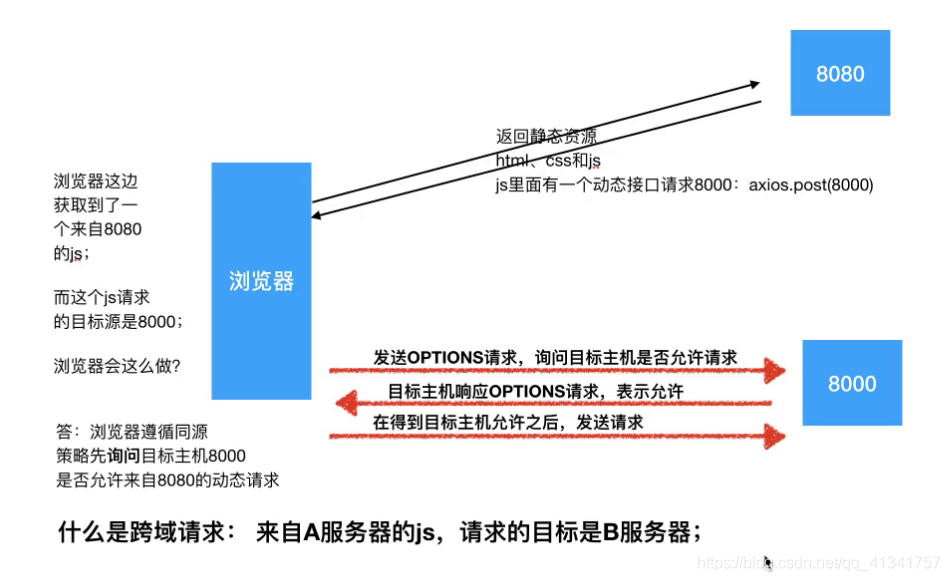
四:跨域请求:
1:了解跨域请求:图简单明了,无需赘述:
2:安装跨域包:
pip install django-cors-headers -i https://pypi.tuna.tsinghua.edu.cn/simple
3:注册刚才安装的包:本质也是个应用:
INSTALLED_APPS = [
    'django.contrib.admin',
    'django.contrib.auth',
    'django.contrib.contenttypes',
    'django.contrib.sessions',
    'django.contrib.messages',
    'django.contrib.staticfiles',
    'apps.users'
    'corsheaders',
]
4:添加中间件:
MIDDLEWARE = [
    'django.middleware.security.SecurityMiddleware',
    'django.contrib.sessions.middleware.SessionMiddleware',
    'django.middleware.common.CommonMiddleware',
    'django.middleware.csrf.CsrfViewMiddleware',
    'django.contrib.auth.middleware.AuthenticationMiddleware',
    'django.contrib.messages.middleware.MessageMiddleware',
    'django.middleware.clickjacking.XFrameOptionsMiddleware',
    # 解决跨域问题中间件
    'corsheaders.middleware.CorsMiddleware',
]
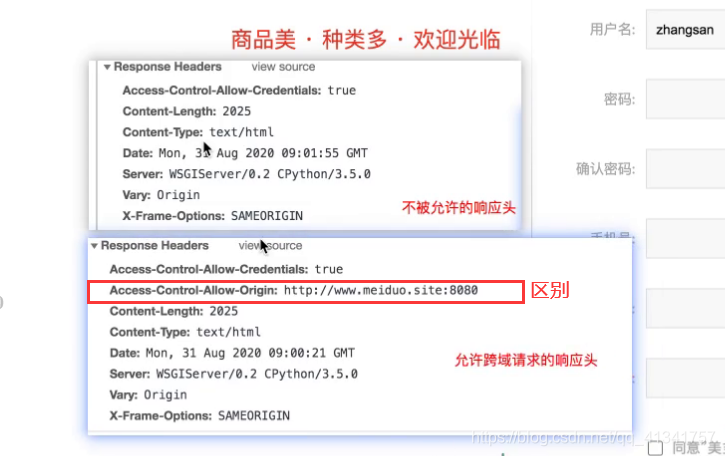
5:添加跨域白名单:
# CORS跨域请求白名单设置
CORS_ORIGIN_WHITELIST = (
    'http://127.0.0.1:8080',
    'http://localhost:8080',
    'http://www.meiduo.site:8080',
)
CORS_ALLOW_CREDENTIALS = True  # 允许携带cookie
6:允许所有的请求域名
ALLOWED_HOSTS = ["*"]
6:开启静态和动态两个。
测试:http://127.0.0.1:8080/register.html
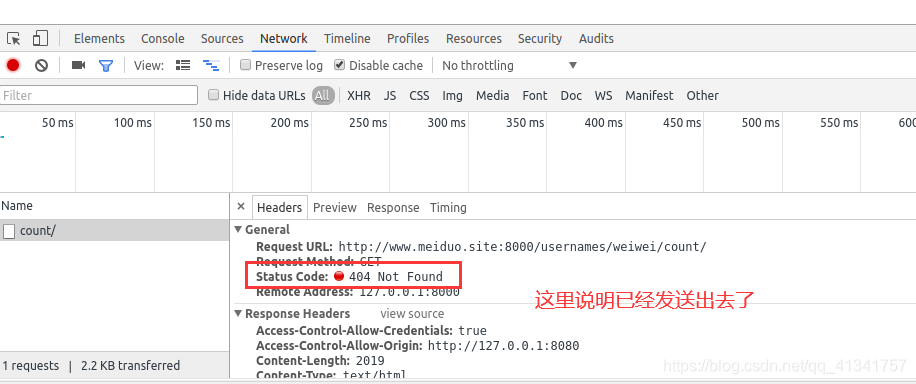
允许与不允许的区别:
五:判断用户名重复注册(小试牛刀):
1:在usrs.views中定义接口:
# Create your views here.
from django.views import View

from apps.users.models import User


class UsernameCountView(View):

    def  get(self, request , username):
        count = User.objects.filter(username=username).count()

        return JsonResponse({
            "code":0,
            "errmsg":'ok',
            "count":count,
        })
2:子路由加入总路由中:
urlpatterns = [
    path('admin/', admin.site.urls),
    path("", include("apps.users.urls")),
]
3:子路由判断是否符合条件:
from django.urls import re_path

from apps.users import views

urlpatterns = [
   re_path(r"^usernames/(?P<username>[A-Za-z0-9_-]{5,20})/count/$", views.UsernameCount.as_view()),
]
4:再次测试:
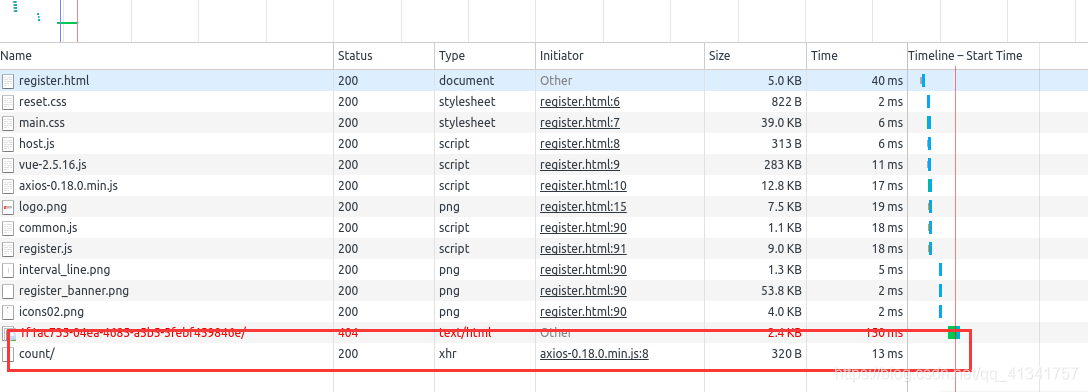
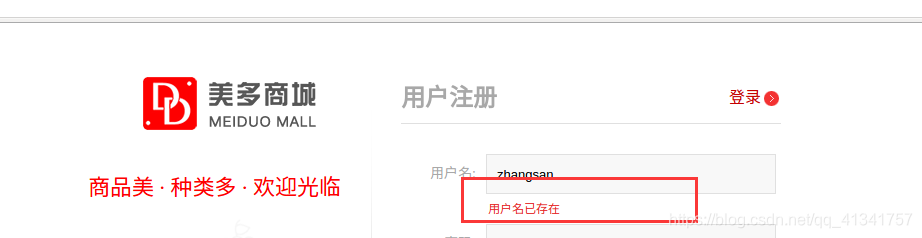
5:数据库增加张三用户,再次测试:

 浙公网安备 33010602011771号