
Android强化——对Margin与Padding理解
LinearLayout下
margin:外边扩大距离,外边为原。
padding:内边扩大距离,内边为原。
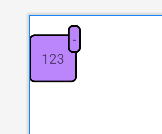
穿边要负margin
被遮挡调整ViewGroup大小,让内部居中
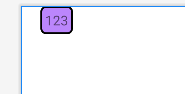
如:1. textView对齐左边时,marginLeft="20dp"
<LinearLayout xmlns:android="http://schemas.android.com/apk/res/android"
    android:orientation="horizontal"
    android:layout_width="match_parent"
    android:layout_height="match_parent">

    <TextView
        android:layout_width="wrap_content"
        android:layout_height="wrap_content"
        android:padding="5dp"
        android:text="123"
        android:layout_marginLeft="20dp"
        android:background="@drawable/shape_text"/>

</LinearLayout>
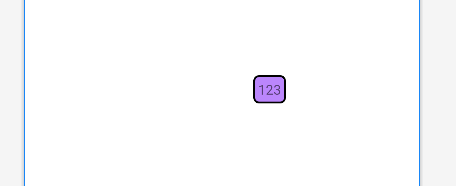
如:2. textView居中时,marginLeft=“100dp”
<LinearLayout xmlns:android="http://schemas.android.com/apk/res/android"
    android:orientation="horizontal"
    android:gravity="center"
    android:layout_width="match_parent"
    android:layout_height="match_parent">

    <TextView
        android:layout_width="wrap_content"
        android:layout_height="wrap_content"
        android:padding="5dp"
        android:text="123"
        android:layout_marginLeft="100dp"
        android:background="@drawable/shape_text"/>

</LinearLayout>
2. 穿边要负margin
<LinearLayout xmlns:android="http://schemas.android.com/apk/res/android"
    android:orientation="horizontal"
    android:layout_width="match_parent"
    android:layout_height="match_parent">

    <TextView
        android:layout_marginTop="20dp"
        android:layout_width="50dp"
        android:layout_height="50dp"
        android:text="123"
        android:background="@drawable/shape_text"
        android:gravity="center"/>

    <TextView
        android:padding="5dp"
        android:layout_width="wrap_content"
        android:layout_height="wrap_content"
        android:text="-"
        android:layout_marginLeft="-10dp"
        android:background="@drawable/shape_text"/>

</LinearLayout>

 浙公网安备 33010602011771号