
简述
在这篇文章里,我将介绍如何在AHK里给GUI加上滚动条。
实际上,这个问题已经困扰了我很久,这几天悄然在github上找到了实现方法。
但它是v1版本的,我将其语法升级到v2版本,并已经开始使用了。
值得说明的是,网上还有其他添加滚动条的库,比如:这个
接下来,我将对其使用方法及原理进行介绍。
效果图
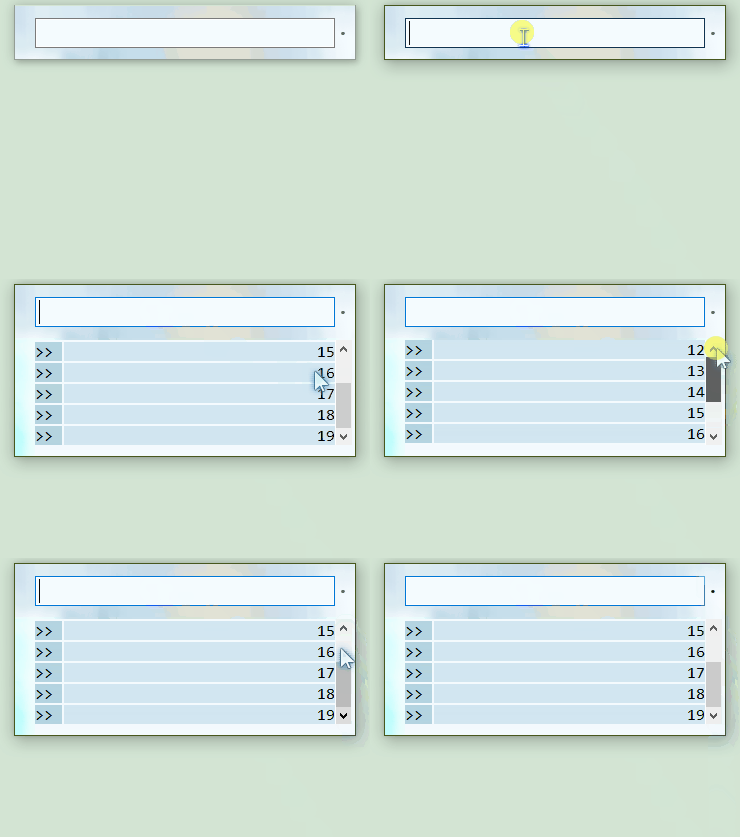
可以看到,当高度超过一定值时会出现滚动条,这点在稍后也会提到。
原理
实际上,滚动区域的所有控件是由一个单独的GUI管理,而这个GUI又被一个父gui包裹,实际上是给父gui添加滚动条。
而在上面的动图中,父gui就在输入框的下面,如下图所示,使用蓝框标注:
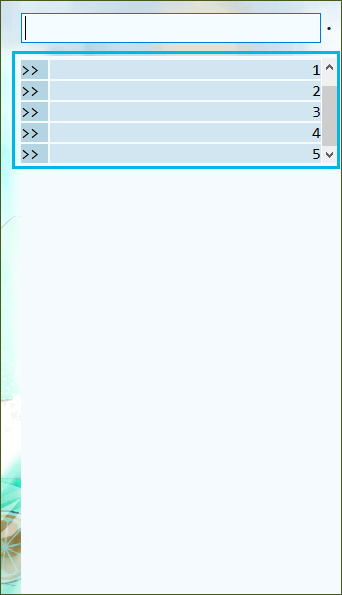
剩下的就是滚动条的api调用了。
代码
下面是实现滚动条的脚本代码,我保留了源脚本的注释,并将语法升为了AHK2。
此脚本没有额外依赖
#Requires AutoHotkey v2.0

; ======================================================================================================================
; Namepace:       ScrollGUI
; Function:       Creates a scrollable GUI as a parent for GUI windows.
; Tested with:    AHK 1.1.20.03 (1.1.20+ required)
; Tested on:      Win 8.1 (x64)
; License:        The Unlicense -> http://unlicense.org
; Change log:
;                 1.0.00.00/2015-02-06/just me        -  initial release on ahkscript.org
;                 1.0.01.00/2015-02-08/just me        -  bug fixes
;                 1.1.00.00/2015-02-13/just me        -  bug fixes, mouse wheel handling, AutoSize method
;                 1.2.00.00/2015-03-12/just me        -  mouse wheel handling, resizing, OnMessage, bug fixes
; ======================================================================================================================
class ScrollGUI {
  static instances := {}

  __New(HGUI, Width, Height, GuiOptions := "", ScrollBars := 3, Wheel := 0) {
    ; ===================================================================================================================
    ; __New          Creates a scrollable parent window (ScrollGUI) for the passed GUI.
    ; Parameters:
    ;    HGUI        -  HWND of the GUI child window.
    ;    Width       -  Width of the client area of the ScrollGUI.
    ;                   Pass 0 to set the client area to the width of the child GUI.
    ;    Height      -  Height of the client area of the ScrollGUI.
    ;                   Pass 0 to set the client area to the height of the child GUI.
    ;    ----------- Optional:
    ;    GuiOptions  -  GUI options to be used when creating the ScrollGUI (e.g. +LabelMyLabel).
    ;                   Default: empty (no options)
    ;    ScrollBars  -  Scroll bars to register:
    ;                   1 : horizontal
    ;                   2 : vertical
    ;                   3 : both
    ;                   Default: 3
    ;    Wheel       -  Register WM_MOUSEWHEEL / WM_MOUSEHWHEEL messages:
    ;                   1 : register WM_MOUSEHWHEEL for horizontal scrolling (reqires Win Vista+)
    ;                   2 : register WM_MOUSEWHEEL for vertical scrolling
    ;                   3 : register both
    ;                   4 : register WM_MOUSEWHEEL for vertical and Shift+WM_MOUSEWHEEL for horizontal scrolling
    ;                   Default: 0
    ; Return values:
    ;    On failure:    False
    ; Remarks:
    ;    The dimensions of the child GUI are determined internally according to the visible children.
    ;    The maximum width and height of the parent GUI will be restricted to the dimensions of the child GUI.
    ;    If you register mouse wheel messages, the messages will be passed to the focused control, unless the mouse
    ;    is hovering on one of the ScrollGUI's scroll bars. If the control doesn't process the message, it will be
    ;    returned back to the ScrollGUI.
    ;    Common controls seem to ignore wheel messages whenever the CTRL is down. So you can use this modifier to
    ;    scroll the ScrollGUI even if a scrollable control has the focus.
    ; ===================================================================================================================
    static WS_HSCROLL := "0x100000", WS_VSCROLL := "0x200000"
    ScrollBars &= 3, Wheel &= 7
    if ((ScrollBars != 1) && (ScrollBars != 2) && (ScrollBars != 3))
      || ((Wheel != 0) && (Wheel != 1) && (Wheel != 2) && (Wheel != 3) && (Wheel != 4))
      return false
    ; if ![1, 2, 3].Includes(ScrollBars) || ![0, 1, 2, 3, 4].Includes(wheel)
    ;   return false
    if !DllCall("User32.dll\IsWindow", "Ptr", HGUI, "UInt")
      return false
    ; Child GUI
    if !this._AutoSize(HGUI, &GuiW, &GuiH)
      return false
    g := GuiFromHwnd(HGUI)
    g.Opt('-Caption -Resize')
    g.Show(Format('w{} h{} Hide', GuiW, GuiH))
    MaxH := GuiW, MaxV := GuiH, LineH := Ceil(MaxH / 20), LineV := Ceil(MaxV / 20)
    ; ScrollGUI
    if (Width = 0) || (Width > MaxH)
      Width := MaxH
    if (Height = 0) || (Height > MaxV)
      Height := MaxV
    Styles := (ScrollBars & 1 ? " +" . WS_HSCROLL : "") . (ScrollBars & 2 ? " +" . WS_VSCROLL : "")

    container := Gui(GuiOptions Styles)
    HWND := container.Hwnd
    container.Show(Format('w{} h{} hide', Width, Height))
    container.Opt(Format('+MaxSize{}x{}', MaxH, MaxV))
    PageH := Width + 1, PageV := Height + 1
    ; Instance variables
    this.container := container, this.HWND := HWND, this.HGUI := HGUI
    this.Width := Width, this.Height := Height
    this.UseShift := this.ScrollH := this.ScrollV := false
    if (ScrollBars & 1) {
      this.SetScrollInfo(0, { Max: MaxH, Page: PageH, Pos: 0 }) ; SB_HORZ = 0
      OnMessage(0x0114, (p*) => this.On_WM_Scroll(p*)) ; WM_HSCROLL = 0x0114
      if (Wheel & 1)
        OnMessage(0x020E, (p*) => this.On_WM_Wheel(p*)) ; WM_MOUSEHWHEEL = 0x020E
      else if (Wheel & 4) {
        OnMessage(0x020A, (p*) => this.On_WM_Wheel(p*)) ; WM_MOUSEWHEEL = 0x020A
        this.UseShift := true
      }
      this.MaxH := MaxH, this.LineH := LineH, this.PageH := PageH, this.PosH := 0
      this.ScrollH := true, this.WheelH := Wheel & 5
    }
    if (ScrollBars & 2) {
      this.SetScrollInfo(1, { Max: MaxV, Page: PageV, Pos: 0 }) ; SB_VERT = 1
      OnMessage(0x0115, (p*) => this.On_WM_Scroll(p*)) ; WM_VSCROLL = 0x0115
      if (Wheel & 6)
        OnMessage(0x020A, (p*) => this.On_WM_Wheel(p*)) ; WM_MOUSEWHEEL = 0x020A
      this.MaxV := MaxV, this.LineV := LineV, this.PageV := PageV, this.PosV := 0
      this.ScrollV := true, this.WheelV := Wheel & 6
    }
    ; Set the position of the child GUI
    g.Opt('+parent' HWND)
    g.Show('x0 y0')
    ; Adjust the scroll bars
    ScrollGUI.Instances.%HWND% := this
    this.Size()
    OnMessage(0x0005, (p*) => this.On_WM_Size(p*)) ; WM_SIZE = 0x0005
  }

  __Delete() {
    this.Destroy()
  }

  ; ===================================================================================================================
  ; Show           Shows the ScrollGUI.
  ; Parameters:
  ;    Title       -  Title of the ScrollGUI window
  ;    ShowOptions -  Gui, Show command options, width or height options are ignored
  ; Return values:
  ;    On success: True
  ;    On failure: false
  ; ===================================================================================================================
  Show(Title := "", ShowOptions := "") {
    ShowOptions := RegExReplace(ShowOptions, "i)\+?AutoSize")
    W := this.Width, H := this.Height
    this.container.Show(ShowOptions ' w' w ' h' h)
    WinSetTitle(Title, this.container)
    return true
  }
  ; ===================================================================================================================
  ; Destroy        Destroys the ScrollGUI and the associated child GUI.
  ; Parameters:
  ;    None.
  ; Return values:
  ;    On success: True
  ;    On failure: false
  ; Remarks:
  ;    Use this method instead of 'Gui, Destroy' to remove the ScrollGUI from the 'Instances' object.
  ; ===================================================================================================================
  Destroy() {
    if ScrollGUI.Instances.HasProp(this.HWND) {
      GuiFromHwnd(this.HWND).Destroy()
      ScrollGUI.Instances.DeleteProp(this.HWND)
      return true
    }
  }
  ; ===================================================================================================================
  ; AdjustToChild  Adjust the scroll bars to the new child dimensions.
  ; Parameters:
  ;    None
  ; Return values:
  ;    On success: True
  ;    On failure: false
  ; Remarks:
  ;    Call this method whenever the visible area of the child GUI has to be changed, e.g. after adding, hiding,
  ;    unhiding, resizing, or repositioning controls.
  ;    The dimensions of the child GUI are determined internally according to the visible children.
  ; ===================================================================================================================
  AdjustToChild() {
    RC := Buffer(16, 0)
    DllCall("User32.dll\GetWindowRect", "Ptr", this.HGUI, "Ptr", RC.Ptr)
    PrevW := NumGet(RC, 8, "Int") - NumGet(RC, 0, "Int")
    PrevH := Numget(RC, 12, "Int") - NumGet(RC, 4, "Int")
    DllCall("User32.dll\ScreenToClient", "Ptr", this.HWND, "Ptr", RC.Ptr)
    XC := XN := NumGet(RC, 0, "Int")
    YC := YN := NumGet(RC, 4, "Int")
    if !this._AutoSize(this.HGUI, &GuiW, &GuiH)
      return false
    g := GuiFromHwnd(this.HGUI)
    g.Show(Format('x{} y{} w{} h{}', XC, YC, GuiW, GuiH))
    MaxH := GuiW, MaxV := GuiH
    this.container.Opt(Format('+MaxSize{}x{}', MaxH, MaxV))
    if (GuiW < this.Width) || (GuiH < this.Height) {
      g.Show('w' GuiW ' h' GuiH)
      this.Width := GuiW, this.SetPage(1, MaxH + 1)
      this.Height := GuiH, this.SetPage(2, MaxV + 1)
    }
    LineH := Ceil(MaxH / 20), LineV := Ceil(MaxV / 20)
    if this.ScrollH {
      this.SetMax(1, MaxH)
      this.LineH := LineH
      if (XC + MaxH) < this.Width {
        XN += this.Width - (XC + MaxH)
        if (XN > 0)
          XN := 0
        this.SetScrollInfo(0, { Pos: XN * -1 })
        this.GetScrollInfo(0, &SI)
        this.PosH := NumGet(SI, 20, "Int")
      }
    }
    if this.ScrollV {
      this.SetMax(2, MaxV)
      this.LineV := LineV
      if (YC + MaxV) < this.Height {
        YN += this.Height - (YC + MaxV)
        if (YN > 0)
          YN := 0
        this.SetScrollInfo(1, { Pos: YN * -1 })
        this.GetScrollInfo(1, &SI)
        this.PosV := NumGet(SI, 20, "Int")
      }
    }
    if (XC != XN) || (YC != YN)
      DllCall("User32.dll\ScrollWindow", "Ptr", this.HWND, "Int", XN - XC, "Int", YN - YC, "Ptr", 0, "Ptr", 0)
    return true
  }
  ; ===================================================================================================================
  ; SetMax         Sets the width or height of the scrolling area.
  ; Parameters:
  ;    SB          -  Scroll bar to set the value for:
  ;                   1 = horizontal
  ;                   2 = vertical
  ;    Max         -  Width respectively height of the scrolling area in pixels
  ; Return values:
  ;    On success: True
  ;    On failure: False
  ; ===================================================================================================================
  SetMax(SB, Max) {
    ; SB_HORZ = 0, SB_VERT = 1
    SB--
    if (SB != 0) && (SB != 1)
      return false
    if (SB = 0)
      this.MaxH := Max
    else
      this.MaxV := Max
    return this.SetScrollInfo(SB, { Max: Max })
  }
  ; ===================================================================================================================
  ; SetLine        Sets the number of pixels to scroll by line.
  ; Parameters:
  ;    SB          -  Scroll bar to set the value for:
  ;                   1 = horizontal
  ;                   2 = vertical
  ;    Line        -  Number of pixels.
  ; Return values:
  ;    On success: True
  ;    On failure: false
  ; ===================================================================================================================
  SetLine(SB, Line) {
    ; SB_HORZ = 0, SB_VERT = 1
    SB--
    if (SB != 0) && (SB != 1)
      return false
    if (SB = 0)
      this.LineH := Line
    else
      this.LineV := Line
    return true
  }
  ; ===================================================================================================================
  ; SetPage        Sets the number of pixels to scroll by page.
  ; Parameters:
  ;    SB          -  Scroll bar to set the value for:
  ;                   1 = horizontal
  ;                   2 = vertical
  ;    Page        -  Number of pixels.
  ; Return values:
  ;    On success: True
  ;    On failure: false
  ; Remarks:
  ;    If the ScrollGUI is resizable, the page size will be recalculated automatically while resizing.
  ; ===================================================================================================================
  SetPage(SB, Page) {
    ; SB_HORZ = 0, SB_VERT = 1
    SB--
    if (SB != 0) && (SB != 1)
      return false
    if (SB = 0)
      this.PageH := Page
    else
      this.PageV := Page
    return this.SetScrollInfo(SB, { Page: Page })
  }
  ; ===================================================================================================================
  ; Methods for internal or system use!!!
  ; ===================================================================================================================
  _AutoSize(HGUI, &Width, &Height) {
    DHW := A_DetectHiddenWindows
    DetectHiddenWindows(1)
    RECT := Buffer(16, 0)
    Width := Height := 0
    HWND := HGUI
    CMD := 5 ; GW_CHILD
    L := T := R := B := LH := TH := ""
    while (HWND := DllCall("GetWindow", "Ptr", HWND, "UInt", CMD, "UPtr")) && (CMD := 2) {
      WinGetPos(&x, &y, &w, &h, HWND)

      W += X, H += Y
      Styles := WinGetStyle(HWND)
      if (Styles & 0x10000000) { ; WS_VISIBLE
        if (L = "") || (X < L)
          L := X
        if (T = "") || (Y < T)
          T := Y
        if (R = "") || (W > R)
          R := W
        if (B = "") || (H > B)
          B := H
      }
      else {
        if (LH = "") || (X < LH)
          LH := X
        if (TH = "") || (Y < TH)
          TH := Y
      }
    }
    DetectHiddenWindows DHW
    if (LH != "") {
      POINT := Buffer(8, 0)
      NumPut('int', LH, POINT, 0)
      DllCall("ScreenToClient", "Ptr", HGUI, "Ptr", &POINT)
      LH := NumGet(POINT, 0, "Int")
    }
    if (TH != "") {
      POINT := Buffer(8, 0)
      NumPut('int', TH, POINT, 4)
      DllCall("ScreenToClient", "Ptr", HGUI, "Ptr", &POINT)
      TH := NumGet(POINT, 4, "Int")
    }
    NumPut('int', L, RECT, 0), NumPut('int', T, RECT, 4)
    NumPut('int', R, RECT, 8), NumPut('int', B, RECT, 12)
    DllCall("MapWindowPoints", "Ptr", 0, "Ptr", HGUI, "Ptr", RECT.Ptr, "UInt", 2)
    Width := NumGet(RECT, 8, "Int") + (LH != "" ? LH : NumGet(RECT, 0, "Int"))
    Height := NumGet(RECT, 12, "Int") + (TH != "" ? TH : NumGet(RECT, 4, "Int"))
    return true
  }
  ; ===================================================================================================================
  GetScrollInfo(SB, &SI) {
    SI := Buffer(28, 0) ; SCROLLINFO
    NumPut("UInt", 28, SI, 0)
    NumPut("UInt", 0x17, SI, 4) ; SIF_ALL = 0x17
    return DllCall("User32.dll\GetScrollInfo", "Ptr", this.HWND, "Int", SB, "Ptr", SI.Ptr, "UInt")
  }
  ; ===================================================================================================================
  SetScrollInfo(SB, Values) {
    static SIF := { Max: 0x01, Page: 0x02, Pos: 0x04 }
    static Off := { Max: 12, Page: 16, Pos: 20 }
    Mask := 0
    SI := Buffer(28, 0) ; SCROLLINFO
    NumPut("UInt", 28, SI, 0)
    for Key, Value In Values.OwnProps() {
      if SIF.HasProp(Key) {
        Mask |= SIF.%Key%
        NumPut("UInt", Value, SI, Off.%Key%)
      }
    }
    if (Mask) {
      NumPut("UInt", Mask | 0x08, SI, 4) ; SIF_DISABLENOSCROLL = 0x08
      return DllCall("User32.dll\SetScrollInfo", "Ptr", this.HWND, "Int", SB, "Ptr", SI.Ptr, "UInt", 1, "UInt")
    }
    return false
  }
  ; ===================================================================================================================
  On_WM_Scroll(WP, LP, Msg, HWND) {
    ; WM_HSCROLL = 0x0114, WM_VSCROLL = 0x0115
    if (ScrollGUI.instances.HasProp(HWND))
      Instance := ScrollGUI.Instances.%HWND%
    if ((Msg = 0x0114) && Instance.ScrollH)
      || ((Msg = 0x0115) && Instance.ScrollV)
      return Instance.Scroll(WP, LP, Msg, HWND)
  }
  ; ===================================================================================================================
  Scroll(WP, LP, Msg, HWND) {
    ; WM_HSCROLL = 0x0114, WM_VSCROLL = 0x0115
    static SB_LINEMINUS := 0, SB_LINEPLUS := 1, SB_PAGEMINUS := 2, SB_PAGEPLUS := 3, SB_THUMBTRACK := 5
    if (LP != 0)
      return
    SB := (Msg = 0x0114 ? 0 : 1) ; SB_HORZ : SB_VERT
    SC := WP & 0xFFFF
    SD := (Msg = 0x0114 ? this.LineH : this.LineV)
    SI := 0
    if !this.GetScrollInfo(SB, &SI)
      return
    PA := PN := NumGet(SI, 20, "Int")
    PN := (SC = 0) ? PA - SD ; SB_LINEMINUS
      : (SC = 1) ? PA + SD ; SB_LINEPLUS
      : (SC = 2) ? PA - NumGet(SI, 16, "UInt") ; SB_PAGEMINUS
      : (SC = 3) ? PA + NumGet(SI, 16, "UInt") ; SB_PAGEPLUS
      : (SC = 5) ? NumGet(SI, 24, "Int") ; SB_THUMBTRACK
      : PA
    if (PA = PN)
      return 0
    this.SetScrollInfo(SB, { Pos: PN })
    this.GetScrollInfo(SB, &SI)
    PN := NumGet(SI, 20, "Int")
    if (SB = 0)
      this.PosH := PN
    else
      this.PosV := PN
    if (PA != PN) {
      HS := (Msg = 0x0114) ? PA - PN : 0
      VS := (Msg = 0x0115) ? PA - PN : 0
      DllCall("User32.dll\ScrollWindow", "Ptr", this.HWND, "Int", HS, "Int", VS, "Ptr", 0, "Ptr", 0)
    }
    return 0
  }
  ; ===================================================================================================================
  On_WM_Size(WP, LP, Msg, HWND) {
    if ((WP = 0) || (WP = 2)) && ScrollGUI.instances.HasProp(HWND)
      return ScrollGUI.Instances.%HWND%.Size(LP & 0xFFFF, (LP >> 16) & 0xFFFF)
  }
  ; ===================================================================================================================
  Size(Width := 0, Height := 0) {
    if (Width = 0) || (Height = 0) {
      RC := Buffer(16, 0)

      DllCall("User32.dll\GetClientRect", "Ptr", this.HWND, "Ptr", RC.Ptr)
      Width := NumGet(RC, 8, "Int")
      Height := Numget(RC, 12, "Int")
    }
    SH := SV := 0
    if this.ScrollH {
      if (Width != this.Width) {
        this.SetScrollInfo(0, { Page: Width + 1 })
        this.Width := Width
        this.GetScrollInfo(0, &SI)
        PosH := NumGet(SI, 20, "Int")
        SH := this.PosH - PosH
        this.PosH := PosH
      }
    }
    if this.ScrollV {
      if (Height != this.Height) {
        this.SetScrollInfo(1, { Page: Height + 1 })
        this.Height := Height
        this.GetScrollInfo(1, &SI)
        PosV := NumGet(SI, 20, "Int")
        SV := this.PosV - PosV
        this.PosV := PosV
      }
    }
    if (SH) || (SV)
      DllCall("User32.dll\ScrollWindow", "Ptr", this.HWND, "Int", SH, "Int", SV, "Ptr", 0, "Ptr", 0)
    return 0
  }
  ; ===================================================================================================================
  On_WM_Wheel(WP, LP, Msg, HWND) {
    ; MK_SHIFT = 0x0004, WM_MOUSEWHEEL = 0x020A, WM_MOUSEHWHEEL = 0x020E, WM_NCHITTEST = 0x0084
    HACT := WinActive("A") + 0
    if (HACT != HWND) && (ScrollGUI.instances.HasProp(HACT)) {
      Instance := ScrollGUI.Instances.%HACT%
      OnBar := SendMessage(0x0084, 0, LP & 0xFFFFFFFF, , HACT)
      if (OnBar = 6) && Instance.WheelH ; HTHSCROLL = 6
        return Instance.Wheel(WP, LP, 0x020E, HACT)
      if (OnBar = 7) && Instance.WheelV ; HTVSCROLL = 7
        return Instance.Wheel(WP, LP, 0x020A, HACT)
    }
    if (ScrollGUI.instances.HasProp(HWND)) {
      Instance := ScrollGUI.Instances.%HWND%
      if ((Msg = 0x020E) && Instance.WheelH)
        || ((Msg = 0x020A) && (Instance.WheelV || (Instance.WheelH && Instance.UseShift && (WP & 0x0004))))
        return Instance.Wheel(WP, LP, Msg, HWND)
    }
  }
  ; ===================================================================================================================
  Wheel(WP, LP, Msg, HWND) {
    ; MK_SHIFT = 0x0004, WM_MOUSEWHEEL = 0x020A, WM_MOUSEHWHEEL = 0x020E, WM_HSCROLL = 0x0114, WM_VSCROLL = 0x0115
    ; SB_LINEMINUS = 0, SB_LINEPLUS = 1
    if (Msg = 0x020A) && this.UseShift && (WP & 0x0004)
      Msg := 0x020E
    Msg := (Msg = 0x020A ? 0x0115 : 0x0114)
    SB := ((WP >> 16) > 0x7FFF) || (WP < 0) ? 1 : 0
    return this.Scroll(SB, 0, Msg, HWND)
  }

}
使用示例
下面是我写的几个例子,可以帮助快速的了解其功能。
#Include ScrollGui.ahk

Esc:: ExitApp()

; ========== sample 1
; 演示常规使用
parent := Gui('+Resize')
parent.BackColor := 'f1ffb1'
parent.AddText('x0 y0', 'Sample')

child := Gui()
Loop 100 { ; 添加一些控件
  i := A_Index
  Loop 5 {
    If A_Index = 1
      child.AddText('xm y+10 w21 h21 0x201', i)
    Else
      child.AddText('xm y+10 w21 h21 yp 0x201', i)
    child.AddEdit(' x+10 yp w55 hp r1', A_Index)
  }
}

; 注意:width 和 height 参数超过 child 的宽高则无效,以最大为准
; 所以,可能需要像下面一样添加占位
; e.g.
; child.AddText('w300 h400 x0 y0')
SG1 := ScrollGUI(child.Hwnd, 0, 100, "-Caption -Resize", 2, 2)
SG1.SetLine(2, 31)
SG1.Show("ScrollGUI1 Title", "x0 y100 NA")
; 将窗口嵌入到 gui 中
SG1.container.Opt('+Parent' parent.Hwnd)
DllCall('SetParent', 'ptr', SG1.container.Hwnd, 'ptr', parent.Hwnd)
parent.Show('w300 h400')


; ========= sample 2
; 演示 AdjustToChild 方法的使用方法
g2 := Gui()
g2.AddButton('x0 y0 w80 h20', 'Change size').OnEvent('Click', fn)
Loop 10 {
  i := A_Index
  Loop 5 {
    If A_Index = 1
      g2.AddText('xm y+10 w22 0x201', i)
    Else
      g2.AddText('x+10 w22 yp 0x201', i)
    g2.AddEdit('x+10 yp w55 hp r1', A_Index)
  }
}
SG2 := ScrollGUI(g2.Hwnd, 330, 200, "Caption Resize", 3, 4)
SG2.Show("ScrollGUI2 Title", "x100 y500 NA")

fn(*) {
  SG2.container.Move(, , 30) ; 父容器尺寸变化时需要调用
  SG2.AdjustToChild()

  ; 同样,子 gui 添加了新控件时也到调用,不再演示
}

; ========== sample 3
; 演示手动发送消息
child1 := Gui()
child1.SetFont('s15')
child1.AddText('x0 y0 w200 h100')
Loop 60 {
  i := A_Index
  t := child1.AddText('x0 yp+20 h20 Border Backgroundc8ffcb', i)
}
child1.BackColor := 'e5ffee'

SG3 := ScrollGUI(child1.Hwnd, 200, 200, "-Caption -Resize", 2, 2)
SG3.SetLine(2, 20)
SG3.Show("ScrollGUI1 Title", "x500 y500 NA")

container := SG3.container


a:: {
  SG3.On_WM_Scroll(1, 0, 0x0115, container.Hwnd)
}

d:: {
  SG3.On_WM_Scroll(0, 0, 0x0115, container.Hwnd)
}

q:: {
  while SG3.PosV > 1
    SendMessage(0x0115, 2, 0, SG3.container)
}

e:: {
  while SG3.MaxV - SG3.PageV + 1 > SG3.PosV
    SendMessage(0x0115, 3, 0, SG3.container)
}

; 如果要隐藏滚动条,调用下面的方法
; WinSetRegion('0-0 w180 h200', container)

 浙公网安备 33010602011771号