
Oracle Enterprise Manager Cloud Control 13.5 安装失败后重新安装
如果由于各种原因导致的安装过程中断需要进行重新安装的
①如果是虚拟机,首推利用快照进行还原进行重新安装
②如果不是虚拟机或者没有给虚拟机打快照,就需要进行卸载,并对数据库已经建立了的配置进行清空
卸载方法可参考oracle官方文档:https://docs.oracle.com/en/enterprise-manager/cloud-control/enterprise-manager-cloud-control/13.5/emadv/deinstalling-enterprise-manager-single-and-multi-oms-environments.html#
其中重要的内容如下:
cp <ORACLE_HOME>/sysman/install/EMDeinstall.pl <temporary_location>
For example,
cp /u01/software/em13c/oraclehome/sysman/install/EMDeinstall.pl /u01/tmp_deinstall
<ORACLE_HOME>/perl/bin/perl <temporary_location>/EMDeinstall.pl -mwHome <ORACLE_HOME> -stageLoc <temporary_location>
You will be prompted for database credentials (SYS and SYSMAN) and the WebLogic Domain credentials. Enter the credentials and proceed with the deinstallation.
For example,
/u01/software/em13c/oraclehome/perl/bin/perl /u01/tmp_deinstall/EMDeinstall.pl -mwHome /u01/software/em13c/oraclehome -stageLoc /u01/tmp_deinstall
严格按照该语句执行,会自动卸载掉已装的OMS
3、将OMS配置所在数据库进行清空
如果不清空进行安装可能会有如下报错
The referenced database doesn’t contain a valid Management Repository
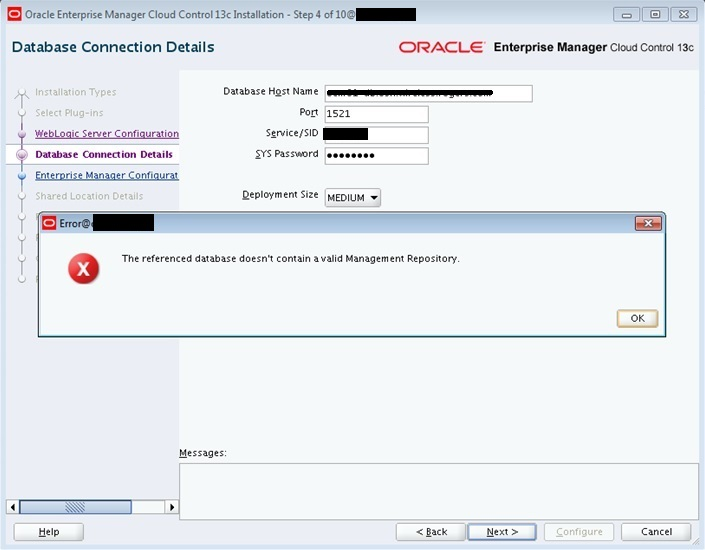
该提示原因是:Doc ID 2183332.1
This issue occurs when a previous upgrade attempt had failed during the configuration phase, with partial repository updates, and the repository was restored to a pre-upgrade state.
The /gc_inst directory was deleted, but the EM 13c system software binaries had been retained from the previous software only install.
也就是说之前oms孙然卸载了,但是前一次安装的信息仍然存在数据库中
Doc中给的方法如下:
The upgrade to 13c should be initiated from scratch to match the state of the restored EM 12.1.0.5 repository:
1) Deinstall the 13c OMS and remove the 13c installation directories.
2) Install an EM 13c Cloud Control system with the software-only method.
3) Upgrade the OMS to 13c using: <OMS Home>/sysman/install/ConfigureGC.sh
我按照这种方法操作后,仍然报该错误,后在别处查资料发现需要在OMS所配置的数据库
1. Drop sysman related schemas. ---因为OMS会建sysman相关用户,所以需要删除上一次建立的sysman相关schema
DROP USER SYSMAN CASCADE;
DROP USER SYSMAN_OPSS CASCADE;
DROP USER SYSMAN_MDS CASCADE;
DROP USER SYSMAN_APM CASCADE;
DROP USER SYSMAN_RO CASCADE;
DROP USER SYSMAN_BIPLATFORM CASCADE;
DROP USER SYSMAN_STB CASCADE;
2. Remove Synonyms related to sysman accounts : ---删除sysman相关SYNONYM
DECLARE
CURSOR l_syn_csr IS
SELECT 'DROP ' ||
CASE owner
WHEN 'PUBLIC'
THEN 'PUBLIC SYNONYM '
ELSE 'SYNONYM ' || owner || '.'
END ||
synonym_name AS cmd
FROM
dba_synonyms
WHERE
table_owner IN (
'SYSMAN',
'SYSMAN_MDS',
'MGMT_VIEW',
'SYSMAN_BIP',
'SYSMAN_APM',
'BIP',
'SYSMAN_OPSS',
'SYSMAN_RO'
);
BEGIN
FOR l_syn_rec IN l_syn_csr LOOP
BEGIN
EXECUTE IMMEDIATE l_syn_rec.cmd;
EXCEPTION
WHEN OTHERS THEN
dbms_output.put_line( '===> ' || l_syn_rec.cmd );
dbms_output.put_line( sqlerrm );
END;
END LOOP;
END;
/
3. Removing remaining Objects and tablespaces : ---删除相关表空间
DROP USER mgmt_view CASCADE;
DROP TABLESPACE mgmt_ecm_depot_ts INCLUDING CONTENTS AND DATAFILES CASCADE CONSTRAINTS;
DROP TABLESPACE mgmt_tablespace INCLUDING CONTENTS AND DATAFILES CASCADE CONSTRAINTS;
DROP TABLESPACE mgmt_ad4j_ts INCLUDING CONTENTS AND DATAFILES CASCADE CONSTRAINTS;
4. As proper database cleaning using RepManager dropall didn't happen, so we have to clean up the registry details : ---删除相关schema registry信息
DELETE
FROM
schema_version_registry
WHERE
(comp_name,owner) IN (
('Authorization Policy Manager','SYSMAN_APM'),
('Metadata Services','SYSMAN_MDS'),
('Oracle Platform Security Services','SYSMAN_OPSS')
);
commit;
5. Retry with the installation, it should complete successfully.
进行上述操作时可能会遇到 表或视图不存在的情况,无需理会
删除完成后再次安装就不会再有报错了

 浙公网安备 33010602011771号