
JDBC操作
一、插入数据
package TestJDBC;

import java.sql.DriverManager;
import java.sql.SQLException;
import java.sql.Statement;

import com.sun.jdi.connect.spi.Connection;

public class TestJDBC {

	public static void main(String[] args) {
		// TODO Auto-generated method stub
		 try {
	            Class.forName("com.mysql.cj.jdbc.Driver");

	            java.sql.Connection c = DriverManager
	                    .getConnection(
	                            "jdbc:mysql://127.0.0.1:3306/mysql?characterEncoding=UTF-8",
	                            "root", "密码");

	            System.out.println("连接成功,获取连接对象: " + c);

	            Statement s = c.createStatement();
	            //System.out.println("获Statement对象: " + s);
	            String sql =  "insert into hero values(2,"+"'lax'"+","+50+","+313.0f+")";
	            s.execute(sql);
	            System.out.println("执行插入语句成功!");

	        } catch (ClassNotFoundException e) {
	            e.printStackTrace();
	        } catch (SQLException e) {
	            // TODO Auto-generated catch block
	            e.printStackTrace();
	        }

	    }

}
二、关闭连接
package jdbc;

import java.sql.Connection;
import java.sql.DriverManager;
import java.sql.SQLException;
import java.sql.Statement;

public class TestJDBC {
    public static void main(String[] args) {

        Connection c = null;
        Statement s = null;
        try {
            Class.forName("com.mysql.jdbc.Driver");

            c = DriverManager.getConnection("jdbc:mysql://127.0.0.1:3306/how2java?characterEncoding=UTF-8", "root",
                    "admin");

            s = c.createStatement();

            String sql = "insert into hero values(null," + "'提莫'" + "," + 313.0f + "," + 50 + ")";

            s.execute(sql);

        } catch (ClassNotFoundException e) {
            // TODO Auto-generated catch block
            e.printStackTrace();
        } catch (SQLException e) {
            // TODO Auto-generated catch block
            e.printStackTrace();
        } finally {
            // 数据库的连接时有限资源,相关操作结束后,养成关闭数据库的好习惯
            // 先关闭Statement
            if (s != null)
                try {
                    s.close();
                } catch (SQLException e) {
                    // TODO Auto-generated catch block
                    e.printStackTrace();
                }
            // 后关闭Connection
            if (c != null)
                try {
                    c.close();
                } catch (SQLException e) {
                    // TODO Auto-generated catch block
                    e.printStackTrace();
                }

        }

    }
}
三、插入数据
在Hero表中插入100条数据,代码如下:
package TestJDBC;

import java.sql.DriverManager;
import java.sql.SQLException;
import java.sql.Statement;

import com.sun.jdi.connect.spi.Connection;

public class TestJDBC {

	public static void main(String[] args) {
		// TODO Auto-generated method stub
		 try {
	            Class.forName("com.mysql.cj.jdbc.Driver");

	            java.sql.Connection c = DriverManager
	                    .getConnection(
	                            "jdbc:mysql://127.0.0.1:3306/mysql?characterEncoding=UTF-8",
	                            "root", "密码");

	            System.out.println("连接成功,获取连接对象: " + c);

	            Statement s = c.createStatement();
	            //System.out.println("获Statement对象: " + s);
	            for(int i =3;i<103;i++) {
	            	String sql = "insert into Hero values("+i+","+"'hero"+i+"'"+","+50+","+313.0f+")";
		            s.execute(sql);
	            }


	        } catch (ClassNotFoundException e) {
	            e.printStackTrace();
	        } catch (SQLException e) {
	            // TODO Auto-generated catch block
	            e.printStackTrace();
	        }

	    }

}
在navicat中观察插入结果
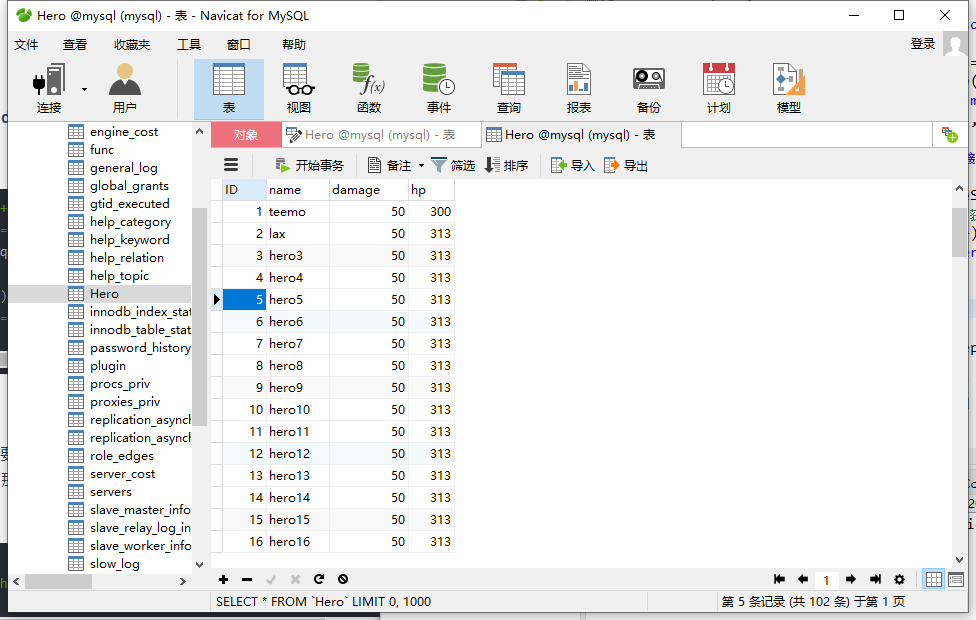
在插入中要注意SQL语句的编写,字符串要用双引号引起来,变量和常量不需要。

 浙公网安备 33010602011771号