
C#基本语法
C#基本语法
线程
5
1
// 线程
2
new Thread(函数).start();
3
4
// UI线程
5
Dispatcher.Invoke();
控制台输出
7
1
Console.WriteLine("Hello Word"); //输入一行并换行
2
3
Console.Write("Hello Word"); //输入一行不换行
4
5
Console.Read() //接收输入的内容
6
7
Console.ReadLine() //接收输入的一行内容
Async和Await异步编程
4
1
Async和Await异步编程
2
3
使用Async修饰 Bambda表达式和匿名方法
4
常量的定义
5
1
const 常量
2
静态常量,必须先给常量赋值
3
4
readonly 动态常量
5
只能在类中定义
c#变量类型
19
1
sbyte 有符号8位整数
2
short 有符号16位整数
3
int 有符号32位整数
4
long 有符号64位整数
5
6
byte 无符号8位整数
7
ushort 无符号16位整数
8
uint 无符号32位整数
9
ulong 无符号64位整数
10
11
float 精确到7位数(浮点型)
12
double 精确到15-16位数(浮点型)
13
decimal 精确到128位数(高精度浮点型)
14
15
bool 布尔值(true / false)
16
17
char 字符类型
18
19
string 字符串类型
类型强制转换
12
1
Convert.ToString(); //强制转换为字符串
2
3
Convert.Toint32(); //转换为int32位
4
5
int a = 1;
6
float b = 1.0F;
7
string c = "1.0";
8
// 几种转换方式
9
Convert.ToInt32(b);
10
11
// 转换失败判断,省去try catch
12
int.TryParse(c,out int errorB);
class转换
17
1
class Ca { };
2
class Cb : Ca { };
3
class Cc : Cb { };
4
5
// 类型转换,使用as转换,转换失败为null
6
Cc CC = new Cc();
7
var IsCa = CC as Ca;
8
if (IsCa != null)
9
{
10
11
}
12
13
// 类型转换, 如果CC 是 Ca的子类那就把CC赋值给CC1
14
if (CC is Ca CC1)
15
{
16
17
}
((dynamc)x)
28
1
class Ca
2
{
3
public Date Date { get; set; }
4
}
5
class Date
6
{
7
public string like { get; set; }
8
}
9
10
// object 对象
11
object Oa = new Ca
12
{
13
Date = new Date
14
{
15
like = "10"
16
}
17
};
18
19
// 普通获取like值方法
20
var OaVlue = Oa.GetType().GetProperty("Date").GetValue(Oa);
21
var value = OaVlue.GetType().GetProperty("like").GetValue(OaVlue);
22
23
Console.WriteLine(value);
24
25
// dynamic获取值
26
27
var value2 = ((dynamic)Oa).Date.like;
28
Console.WriteLine(value2);
? ??
5
1
string? a = null;
2
// ?? 跟三元表达式类似( ? : ), Kotlin中的 ( ?: )
3
var length = a?.Length ?? 0;
4
// ?? 的优先级高于 ? : ,
5
var IsNull = (length == 0 ? "1" : "0") ?? "1";
const 与 readonly
3
1
const # 变量,枚举等
2
3
readonly # 可以用于对象,枚举等类型第一次赋值后不可再次赋值。 对象可以改变。
位运算符
4
1
Console.WriteLine("位与计算8与12= " + (8&12)); //等于8
2
Console.WriteLine("位或计算8与12= " + (8|12)); //等于12
3
Console.WriteLine("位异或计算8与12= "+(8 ^ 12)); //等于4
4
Console.WriteLine("位取反计算= " + (~123)); //等于-124
移位运算符
2
1
Console.WriteLine("右移位运算符= "+( 48 >> 3 )); // 48 / 6 = 6 (3的2次幂=6)
2
Console.WriteLine("左移位运算符= "+( 48 << 6 )); // 48 * 12 = 3072 (6的2次幂=12)
算数运算Math
1
1
double d = Math.Pow(4, 16); //取指定次幂,还有更多自行了解
指数
4
1
科学计数法
2
3
double A = 123e3; // 结果=123000
4
double B = 123e-3; //结果=0.123
元组
37
1
元组 var a = (1,2);
2
3
var Int = 1;
4
var Int2 = 2;
5
var C = (A:Int,B:Int2); //具有名称的元组,类似json的name
6
var B = (Int,Int2); //无名称的元组用 变量名替代
7
var A = ("你是猪吗?","你是啥?"); //无名称元组,用Item替代
8
MessageBox.Show(A.Item1);
9
MessageBox.Show(B.Int.ToString()); //因为是int类型所以要转换字符串
10
MessageBox.Show(C.A.ToString());
11
var Item1 = (A:"A",B:"B");
12
var Item2 = (A:"A",B:"B");
13
MessageBox.Show((Item1 == Item2).ToString()); //比较元组
14
(string A, string B)? nulltype = Item1; //可空元组
15
MessageBox.Show((nulltype == Item2).ToString()); //可空元组比较
16
-----------------------------------------------------------------------------------------------------
17
var Int = (A: 5,B:10);
18
(int? a, int? b) nullInt = (5,10);
19
MessageBox.Show((nullInt == Int).ToString()); //int类型元组比较值相同为true
20
21
(long a, long b) Long = (5,10);
22
MessageBox.Show((Long == Int).ToString()); //int类型和long类型比较值相同也为true
23
24
//不同的成员名称比较值相同为true,因为元组名称不参与比较
25
var Int2 = (5,10);
26
MessageBox.Show((Int2 == (A:5,B:10)).ToString());
27
28
(int a, (int b, int c)) Tuple = (5,(5,10)); //嵌套元组
29
MessageBox.Show((Tuple == (5,(5,10))).ToString());
30
------------------------------------------------------------------------------------------------------
31
//元组赋值,元素类型或者数量不同的元组无法赋值
32
var A = (5 , 10);
33
var B = (A:10,B:20);
34
A = B;
35
B = A;
36
MessageBox.Show(A.ToString());
37
MessageBox.Show(B.ToString());
协变 out, 逆变in
5
1
公式:
2
3
协变:IFoo<父类> = IFoo<子类>;
4
5
逆变:IBar<子类> = IBar<父类>;
out 与 ref
5
1
首先:两者都是按地址传递的,使用后都将改变原来参数的数值。
2
3
其次:ref可以把参数的数值传递进函数,但是out是要把参数清空,
4
就是说你无法把一个数值从out传递进去的,out进去后,参数的数值为空,
5
所以你必须初始化一次。这个就是两个的区别,或者说就像有的网友说的,ref是有进有出,out是只出不进。
Lambda表达式
75
1
参数 => 表达式;
2
//左边是参数,另一边是表达式
3
Func<int, int> Fun = X => X * X; // X是Fun的参数
4
MessageBox.Show(Fun(5).ToString()); //output 25; 返回;5 * 5=25
5
-----------------------------------------------------------------------------------------
6
int[] a = { 1,2,3,4,5};
7
var Fun = a.Select(x=>x*x); //x = x * x
8
MessageBox.Show(string.Join("",Fun));
9
-------------------------------------------------------------------------------------------
10
delegate int del(int A, int B); //委托
11
private void CheckBox_Checked(object sender, RoutedEventArgs e) //点击事件
12
{
13
14
del c = (int A,int B) => A + B; //lambda表达式
15
MessageBox.Show(c(5,10).ToString()); //5+10 =15 再转换为字符转
16
17
}
18
------------------------------------------------------------------------------------------------
19
delegate int del(int A, int B); //委托
20
private void CheckBox_Checked(object sender, RoutedEventArgs e)
21
{
22
del L = (int W, int R) => { int w = W + R; return w; }; //lambda表达式,具有多个语句要加{ 表达式 }
23
MessageBox.Show(L(100,50).ToString()); //返回结果150
24
25
}
26
-------------------------------------------------------------------------------------------------------
27
List<string> list = new List<string>() //
28
{
29
"Participate",
30
"参与",
31
"warning",
32
"警告",
33
"initialization",
34
"初始化",
35
"database",
36
"数据库",
37
"different",
38
"不同的",
39
"meament",
40
"成员",
41
"Exposes",
42
"公开",
43
"over",
44
"结束",
45
"coliection",
46
"收集",
47
"simple",
48
"简单的"
49
};
50
MessageBox.Show(list.First(x =>x.Length > 1)); //使用lambda表达式输出第一个大于1的成员
51
------------------------------------------------------------------------------------------------------------
52
private void CheckBox_Checked(object sender, RoutedEventArgs e) //点击事件
53
{
54
55
Lambda("你是猪",X=>X+"Pig"); //lambda表达式
56
57
58
}
59
60
public void Lambda(string a , Func<string , string>Fun) //lambda函数
61
{
62
MessageBox.Show(Fun(a));
63
}
64
--------------------------------------------------------------------------------------------------------
65
//元组和Lambda一起使用
66
Func<(int, int, int), (int, int, int)> Fun = a => (2*a.Item1,2*a.Item2,2*a.Item3);
67
var A = (3,6,9); //声明元组
68
MessageBox.Show(Fun(A).ToString()); //结果是(6,12,18)
69
70
//自定义元组的名称 ITEM1,ITEM2,ITEM3
71
Func<(int ITEM1, int ITEM2, int ITEM3), (int, int, int)> Fun = a => (2*a.ITEM1,2*a.ITEM2,2*a.ITEM3);
72
var A = (3,6,9); //声明元组
73
MessageBox.Show(Fun(A).ToString()); //结果是(9,12,18)
74
----------------------------------------------------------------------------------------------------------
75
事件与委托
8
1
委托和事件
2
首先 net团队为了实现一些类似于函数指针的通用的功能,经过各个应用场景的需求 创建了 委托这个东西,
3
4
事件是对委托进一步具体化,其实事件也是委托 只是 事件对委托提出了更具体的规范,所以委托和事件 在功能上有很大的重叠。
5
6
委托就像函数指针 你可以把一个函数进行传递 你也可以写个方法 方法的参数 是个委托 这样调用方法时可以传入一个函数作为参数,委托往往又返回值或数据更改,
7
事件相对于委托的不同 在于 事件往往是多播的 事件 不需要返回任何值 事件可以被订阅 也可以不被订阅 ,也就是说事件只是发出一个通知,事件的处理程序还是一个委托 但是这个事件 你可以处理 也可以不处理 总之是事件发生了 你管与不管程序还在继续下一步操作,事件在 wpf winfrom 这些程序中被应用,事件的一般格式 是 无返回值 有两个参数 一个是 事件触发者 类一个参数是 事件参数
8
委托相对于事件的不同,委托往往需要你返回一个值,委托单播的比较多,委托往往不能为空,也就是说委托就是交给调用程序去做某件事情,而且需要委托返回一个处理结果,委托的应用 在 ef实体框架里面 linqcha询方法 里面被广泛应用
委托与事件
65
1
// 窗口一
2
3
public partial class Form1 : Form
4
{
5
public Form1()
6
{
7
InitializeComponent();
8
}
9
10
11
12
private void button1_Click(object sender, EventArgs e)
13
{
14
// 申明类
15
16
CDeleGate CD = new CDeleGate();
17
18
// 实例化委托,
19
DELEGATE_ Dele = CD.PrintMsg;
20
21
Dele("点击事件");
22
23
// 绑定事件, 将PrinMsg跟Event_事件绑定
24
CD.Event_ += Dele;
25
26
// 委托作为参数,使用该参数就是调用事件
27
CD.ReturnMsg(Dele);
28
29
// 此时PrintMsg已经跟Event_事件绑定,所以调用此函数会输出"调用事件"
30
CD.ClickMsg();
31
}
32
}
33
34
// 类
35
36
namespace 委托与事件
37
{
38
public delegate void DELEGATE_(string msg);
39
40
class CDeleGate
41
{
42
// 注册事件
43
public event DELEGATE_ Event_;
44
45
// 功能
46
public void PrintMsg(string msg)
47
{
48
MessageBox.Show(msg);
49
}
50
51
// 委托
52
public void ReturnMsg(DELEGATE_ ms)
53
{
54
ms("我是委托");
55
}
56
57
// 调用事件
58
59
public void ClickMsg()
60
{
61
Event_("调用事件");
62
}
63
}
64
}
65
委托类型
8
1
Action<in T>-----------------------------------------------------------
2
public delegate void Action();
3
public delegate void Action<in T>(T A , T B);
4
public delegate void Action<in T2 , in T2>(T1 A , T2 B);
5
Func<in T>--------------------------------------------------------------
6
public delegate TResult Func<in TResult>();
7
public delegate TResult Func<in T , in TResult>(T ags);
8
委托的一个小列子
21
1
窗口2的代码------------------------------------------------------------------------------------------------
2
public delegate void dele<in T>(T A , T B); //delegate声明委托返回值为void参数类型为析构方法
3
public dele<int> Dele; //dele<T>类型的方法
4
5
private void Button_Click(object sender, RoutedEventArgs e) //按钮事件给Dele赋值Dele又给委托赋值
6
{
7
Dele(10,10); //参数一是10,参数2是10
8
}
9
窗口1的代码-------------------------------------------------------------------------------------------------
10
private void Button_Click(object sender, RoutedEventArgs e) //按钮点击事件
11
{
12
窗口2 F = new 窗口2(); //初始化窗口2
13
F.Dele += mess; //绑定委托给方法mess
14
F.Show(); //显示窗口2
15
16
}
17
18
void mess(int a,int b) //mess的返回值必须和委托的返回值一致
19
{
20
MessageBox.Show(a+":返回值");
21
}
委托通常和event一起使用
25
1
窗口2的代码---------------------------------------------------------------------------------
2
public static class Action //声明一个静态类
3
{
4
public static Action<string> ACtion; //ACtion方法使用委托Action<T>
5
public static void Mess(string msg) //静态函数给委托赋值
6
{
7
ACtion(msg);
8
}
9
}
10
private void Button_Click_3(object sender, RoutedEventArgs e) //按钮点击事件
11
{
12
Action.Mess("ACtion回调!"); //使用静态函数Action.Mess("赋值的字符串")
13
}
14
窗口1的代码---------------------------------------------------------------------------------
15
private void Button_Click_2(object sender, RoutedEventArgs e)
16
{
17
窗口2 F = new 窗口2(); //实例化窗口2
18
Action.ACtion += mess; //窗口2中的委托绑定mess方法
19
F.Show(); //显示窗口2
20
}
21
22
private void mess(string a) //此方法的返回值必须和委托的返回值一致
23
{
24
MessageBox.Show("收到子窗口传值:"+a);
25
}
委托实例3 delegate和event(事件)一起使用
23
1
窗口2的代码-----------------------------------------------------------------------------------------
2
public delegate void Mydelegate(string a); //delegate声明委托,无返回值,string类型的参数
3
public event Mydelegate Myevent;//Mydelegate类型的方法(Myevent)
4
private void Button_Click_2(object sender, RoutedEventArgs e)
5
{
6
if (Myevent != null) //如果事件不为空
7
{
8
Myevent("我是委托的字符串"); //
9
}
10
this.Close(); //关闭当前窗口
11
}
12
窗口1的代码------------------------------------------------------------------------------------------
13
private void Button_Click_2(object sender, RoutedEventArgs e) //按钮点击事件
14
{
15
窗口2 F = new 窗口2(); //初始化窗口2
16
F.Myevent += mess; //绑定委托给mess
17
F.Show();//显示窗口2
18
}
19
20
private void mess(string a) //此方法的返回值必须和委托一致
21
{
22
MessageBox.Show("收到子窗口传值:"+a);
23
}
数组
59
1
//一维数组
2
3
数组类型[] 数组名; int[] a;
4
5
//初始化数组
6
7
int[] a = new int[3]{1,2,3}; //表示该数组长度为3
8
int[] a = new int[]{1,2,3}; //不定义长度
9
int[] a = {1,2,3}
10
11
一维数组输出
12
Console.WriteLine(a[1]); 输出a数组第一个值
13
数组循环输出使用for循环
14
15
-------------------------------------------------------------------
16
17
//二维数组
18
数据类型[][] 数组名;
19
数据类型[,] 数组名;
20
21
int[][] a;
22
int[,] a;
23
24
-----------------------------------------------------------------
25
//初始化二维数组
26
第一种
27
int[][] a = new int[2][];
28
a[0] = new int[]{ 1,2};
29
a[1] = new int[]{ 1,2};
30
31
第二种
32
int[,] b = new int[2,3];
33
b[0, 0] = 0;// 第一个0表示第一个数组,第二个0表示第一个数组里面的第一个值
34
b[0, 1] = 0;// 第一个0表示第一个数组,第二个1表示第一个数组里面的第二个值
35
b[1, 0] = 0;// 第一个1表示第二个数组,第二个0表示第二个数组里面的第一个值
36
b[1, 1] = 0;// 第一个1表示第二个数组,第二个1表示第二个数组里面的第二个值
37
第三种
38
int[,] c = new int[2, 2] { { 0, 1 }, { 1, 1 } }; //表示两个数组,两个值
39
int[,] c = new int[,] { { 0, 1 }, { 1, 1 } }; //也表示两个数组,两个值
40
int[,] c = { { 0, 1 }, { 1, 1 } }; //也表示两个数组,两个值
41
42
二维数组输出Console.WriteLine(a[0][0]); //a[0][0]表示输出第1个数组第一个值
43
二维数组输出Console.WriteLine(a[1,0]); //a[1,0]表示输出第2个数组第一个值
44
45
---------------------------------------------------------------------------
46
int[][] c = new int[2][]; //new int[2][]表示两个数组,值自定义
47
c[0] = new int[4] { 1, 2, 3, 4 };
48
c[1] = new int[6] { 1, 2, 3, 4,5,6 };
49
50
51
for(int i =0;i<c.Length; i++)
52
{
53
for (int s =0;s<c[i].Length;s++)
54
{
55
Console.Write(c[i][s]);
56
}
57
Console.WriteLine();
58
}
59
------------------------------------------------------------------------------
数组与array类属性
| IsFixedSize 获取一个值,该值指示数组是否带有固定大小。 |
IsReadOnly 获取一个值,该值指示数组是否只读。 |
Length 获取一个 32 位整数,该值表示所有维度的数组中的元素总数。 |
LongLength 获取一个 64 位整数,该值表示所有维度的数组中的元素总数。 |
Rank 获取数组的秩(维度)。 |
数组方法
Clear 根据元素的类型,设置数组中某个范围的元素为零、为 false 或者为 null。 |
Copy(Array, Array, Int32) 从数组的第一个元素开始复制某个范围的元素到另一个数组的第一个元素位置。长度由一个 32 位整数指定。 |
CopyTo(Array, Int32) 从当前的一维数组中复制所有的元素到一个指定的一维数组的指定索引位置。索引由一个 32 位整数指定。 |
GetLength 获取一个 32 位整数,该值表示指定维度的数组中的元素总数。 |
GetLongLength 获取一个 64 位整数,该值表示指定维度的数组中的元素总数。 |
GetLowerBound 获取数组中指定维度的下界。 |
GetType 获取当前实例的类型。从对象(Object)继承。 |
GetUpperBound 获取数组中指定维度的上界。 |
GetValue(Int32) 获取一维数组中指定位置的值。索引由一个 32 位整数指定。 |
IndexOf(Array, Object) 搜索指定的对象,返回整个一维数组中第一次出现的索引。 |
Reverse(Array) 逆转整个一维数组中元素的顺序。 |
SetValue(Object, Int32) 给一维数组中指定位置的元素设置值。索引由一个 32 位整数指定。 |
| Sort(Array) 使用数组的每个元素的 IComparable 实现来排序整个一维数组中的元素。 |
ToString 返回一个表示当前对象的字符串。从对象(Object)继承。 |
Foreach 数组循环
21
1
foreach(数据类型 循环后的数据 in 数组)
2
{
3
Console.WriteLine(循环后的数据);
4
}
5
6
//实例
7
8
int[][] c = new int[3][]; //表示两个数组,两个值
9
c[0] = new int[4] { 1, 2, 3, 4 };
10
c[1] = new int[6] { 1, 2, 3, 4,5,6 };
11
c[2] = new int[6] { 1, 2, 3, 4,5,6 };
12
13
Console.WriteLine("------------------------------------------------------------------------");
14
for (int i=0;i<c.Length;i++)
15
{
16
foreach (int cc in c[i])
17
{
18
Console.WriteLine(cc);
19
}
20
Console.WriteLine("--------------------------------------------------------------");
21
}
数组排序
7
1
从小到大排序
2
3
array.sort(数组);
4
5
逆向排序
6
7
array.Reverse(数组);
字符串
176
1
声明字符串
2
3
char a ='子'; //char 只能包含一个字符
4
5
string b = "多个字符串"; //string 可以定义多个字符串
6
7
Console.WriteLine("------------------------------------------------------------------------");
8
char[] a = { '1','2','3','4','5'};
9
string b = new string(a);
10
string b2 = new string(a,1,2);
11
//第一个参数是字符数组,第二个参数是从数组的哪个位置开始,第三个参数是从数组哪个位置结束
12
b2的结果是:23
13
b的结果是:12345
14
15
Console.WriteLine("------------------------------------------------------------------------");
16
17
获取字符串的长单
18
19
string str = "获取字符串的长度";
20
int str2 = str.Length;
21
22
Console.WriteLine("------------------------------------------------------------------------");
23
24
获取字符串指定位置
25
string b = "获取字符串长度";
26
char b2 = b[3]; //获取第三个字符
27
28
Console.WriteLine("------------------------------------------------------------------------");
29
30
字符串索引位置IndexOf
31
string b = "123132长获取长字符串长度";
32
int b2 = b.IndexOf("长");
33
int b3 = b.IndexOf("长",7); //从第7个字符串以后开始查找
34
int b4 = b.IndexOf("长",10,4); //从第10个字符串开始查找4个字符串内的索引
35
36
LastIndexOF返回字符最后一次出现的索引位置
37
string b = "123132长获取长字符串长度";
38
int b2 = b.LastIndexOf("长");
39
int b3 = b.LastIndexOf("长",7); //从倒数第7个字符串以后开始查找
40
int b4 = b.LastIndexOf("长",10,4); //从倒数第10个字符串开始查找4个字符串内的索引
41
42
Console.WriteLine("------------------------------------------------------------------------");
43
44
判断字符串首尾内容
45
StartsWith判断字符串的开始内容
46
StartsWith有三个参数第一个参数是寻找到字符串,第二个参数是是否区分大小写,第三个参数是null(他返回的是bool类型)
47
string a = "你好C c#";
48
bool b = a.StartsWith("你好c",true,null);
49
Console.WriteLine(b);
50
51
EndsWith判断结束内容
52
Endswith有三个参数第一个参数是寻找到字符串,第二个参数是是否区分大小写,第三个参数是null(他返回的是bool类型)
53
string a = "c# 你好C";
54
bool b = a.EndsWith("你好c",true,null);
55
Console.WriteLine(b);
56
PS:如果要区分大小写,请把后面两个参数删除即可
57
58
Console.WriteLine("------------------------------------------------------------------------");
59
比较两个字符串是否相同
60
61
Compare方法
62
数值类型.Compare(变量1,变量2);
63
数值类型.Compare(变量1,变量2,bool); //boll值是否区分大小写
64
int.Compare(1,1);
65
PS:0=相同 -1=不相同
66
67
CompareTo方法
68
变量1.CompareTo(变量2);
69
PS:0=相同 -1=不相同
70
71
Equals方法
72
变量1.Equals(变量2);
73
数据类型.Equals(变量1,变量2);
74
Ps:ture=相同 flase=不相同
75
76
Console.Write("---------------------------------------------------------------------------------------");
77
字符串大小写转换
78
string a = "字符串大小写转换";
79
a.ToUpper();
80
a.ToLower();
81
82
Console.Write("----------------------------------------------------------------------------------------");
83
格式化字符串
84
Console.WriteLine(string.Format("货币显示:{0:C}", 10));
85
Console.WriteLine(string.Format("整型显示:{0:d}", 123456));
86
Console.WriteLine(string.Format("指数计数法显示:{0:E}", 123456));
87
Console.WriteLine(string.Format("精小数:{0:F}", 123456));
88
Console.WriteLine(string.Format("输入小数点后两位:{0:N}", 123456));
89
Console.WriteLine(string.Format("百分比显示:{0:P0}", 0.09)); //在P后面加0表示不保留小数
90
Console.WriteLine(string.Format("十进制显示:{0:X}", 123456));
91
格式化时间
92
DateTime time = DateTime.Now; //初始化时间
93
Console.WriteLine(time);
94
Console.WriteLine(time.ToString("Y")); //年月格式
95
Console.WriteLine(time.ToString("d")); //长时间格式
96
Console.WriteLine(time.ToString("D")); //短时间格式
97
Console.WriteLine(time.ToString("f")); //完整时间,不带秒 yyy年mm月dd日 hh:mm
98
Console.WriteLine(time.ToString("F")); //完整时间,带秒 yyy年mm月dd日 hh:mm:ss
99
Console.WriteLine(time.ToString("G")); //完整时间,不带秒 yyy-mm-dd hh:mm
100
Console.WriteLine(time.ToString("g")); //完整时间,带秒 yyy-mm-dd hh:mm:ss
101
Console.WriteLine(time.ToString("M")); //mm月dd日
102
Console.WriteLine(time.ToString("T")); // hh:mm:ss
103
Console.WriteLine(time.ToString("t")); // hh:mm
104
105
Console.WriteLine("---------------------------------------------------------------------------");
106
截取字符串
107
string a = "截取字符串";
108
string b = a.Substring(2); //结果是:字符串 (截取前两个字符)
109
110
string a = "截取字符串.cs";
111
string b = a.Substring(0,a.IndexOf(".")); //结果是:截取字符串
112
string c = a.Substring(a.IndexOf(".")); //结果是:.cs
113
114
Console.WriteLine("-----------------------------------------------------------------------------");
115
分割字符串
116
Split()有两个参数,第一个参数是分割符,第二个参数是分割的次数!
117
string a = "a1*s2*d3*f4*g5*h6*j7";
118
string[] b = a.Split('*'); //用*号分割字符串
119
foreach (string s in b) //循环输出
120
{
121
Console.WriteLine(s+"\n");
122
}
123
分割指定次数
124
string a = "a1*s2*d3*f4*g5*h6*j7";
125
tring[] b = a.Split(new char[]{ '*'},2);
126
127
Consloe.WriteLine("---------------------------------------------------------------------------------------------");
128
去除空白字符
129
Trim() 去除前后空格
130
string a = "*123*"; //删除前后*号
131
string b = a.Trim(new char[] { '*'});
132
string a = " 123 "; //删除前后空格
133
string b = a.Trim();
134
135
Console.WriteLine("----------------------------------------------------------------------------------------------");
136
替换字符
137
string a = "Hello Word ! 替换的字符";
138
string b = a.Replace("替换的字符","替换后的字符");
139
Console.WriteLine("----------------------------------------------------------------------------------------------");
140
可变字符串类
141
StringBuilder a = new StringBuilder("(),(),(),2,4,6,7,8");
142
Console.WriteLine(a);
143
a.Remove(0,8);
144
a.Insert(0,"(门前大桥下),(游过一群鸭),(快来快来数一数)");
145
Console.WriteLine(a);
146
147
Console.WriteLine("-----------------------------------------------");
148
StringBuilder b = new StringBuilder("替换:我将被替换");
149
Console.WriteLine(b);
150
b.Replace("我将被替换","我已经被替换");
151
Console.WriteLine(b);
152
Console.WriteLine("------------------------------------------------");
153
StringBuilder C = new StringBuilder("孙子兵法最后一记:");
154
Console.WriteLine(C);
155
C.AppendLine("走为上策!");
156
Console.WriteLine(C);
157
Console.WriteLine("--------------------------------------------------");
158
StringBuilder d = new StringBuilder(":走为上策!");
159
Console.WriteLine(d);
160
d.Insert(0,"孙子兵法:");
161
Console.WriteLine(d);
162
163
Console.WriteLine("--------------------------------------------------------------------------------");
164
随机数
165
Random A = new Random();
166
int B = A.Next();
167
MessageBox.Show(B.ToString());
168
随机数
169
Random A = new Random(); //实例化Random();
170
string C=null; //定义一个空的字符串变量
171
for (int i = 0; i < 4; i++) // 循环4次
172
{
173
int B = A.Next(0, 10); //随机数字
174
C += B.ToString(); //相加数字,转换为字符串
175
}
176
字符串@换行
10
1
// 使用@
2
string a = @"asdf
3
asdf
4
asdf
5
asdf
6
asdf";
7
// 不使用@
8
string b = "saf" +
9
"asdf" +
10
"asdf";
转义字符
12
1
转义字符
2
3
\0 空格字符 ASCII代码 0
4
\n 换行 ASCII代码 10
5
\t 水平制表符 ASCII代码 9
6
\b 退格 ASCII代码 8
7
\r 回车 ASCII代码 13
8
\f 换页 ASCII代码 12
9
\\ 反斜杠 ASCII代码 92
10
\‘ 单引号 ASCII代码 39
11
\“ 双引号 ASCII代码 34
12
Dictionary字典
12
1
Dictionary<string, string> dictionary = new Dictionary<string, string>()
2
{
3
{"key1","value1" },
4
{"key2","value2" },
5
{"key3","value3" },
6
{"key4","value4" },
7
};
8
9
foreach (var item in dictionary)
10
{
11
Console.WriteLine(" 我是key= "+item.Key +" 我是value= "+ item.Value);
12
}
面向对象
95
1
class Car //声明class对象
2
{
3
private string age; //声明私密变量age
4
public string Age //声明公开Age属性(Age属性是用来改变age变量的)
5
{
6
get { return age; } //如果访问Age属性就返回age变量的值
7
set //如果设置Age属性就设置age属性的值 Age=1 其实是 age=1
8
{
9
if (value == "0")
10
{
11
age = "数据不合法!";
12
}
13
else
14
{
15
age = value;
16
}
17
}
18
}
19
}
20
21
调用上面的例子
22
Car a = new Car();
23
a.Age = "数据合法";
24
Console.WriteLine(a.Age);
25
26
Console.WriteLine("-------------------------------------------------------------------------------------------");
27
构造函数
28
class Car
29
{
30
public string abc;
31
32
public Car() { } //声明构造方法
33
public Car(string Age) //声明构造方法
34
{
35
abc = Age; //给abc赋值
36
Console.WriteLine("构造方法:"+Age); //输出Age
37
Console.WriteLine(abc); //输出赋值后的abc
38
39
}
40
}
41
调用方法
42
Car a = new Car("Car"); //既可以加参数,又可以不加参数
43
Car a = new Car(); //也是可以的,因为上面声明了两次
44
45
Console.WriteLine("----------------------------------------------------------------------------------------"):
46
私有构造函数
47
class Car
48
{
49
public string abc; //声明函数abc
50
51
52
public static Car fun(string a , string b) //声明公共静态析构函数fun(),用来访问私有析构函数。私有析构函数无法在外部访问
53
{
54
55
return new Car(a , b); //实例化 私有析构函数
56
}
57
58
private Car(string a , string b) //私有析构函数
59
{
60
Console.WriteLine(a+b);
61
}
62
63
}
64
65
调用方法
66
Car a = Car.fun("你是","猪?"); // 不需要new关键词,直接调用。
67
68
Console.WriteLine("--------------------------------------------------------------------------------------------------");
69
静态构造函数,static + 类名 ,静态构造函数只会调用一次
70
class Car
71
{
72
73
74
static Car()
75
{
76
Console.WriteLine("-----------------------------------------");
77
Console.WriteLine("我是静态构造函数");
78
Console.WriteLine("-----------------------------------------");
79
}
80
81
82
}
83
84
调用方法
85
Car a = new Car(); //需要new关键词
86
87
Console.WriteLine("----------------------------------------------------------------------------------------------------------");
88
析构函数(程序结束是运行)
89
90
~类名()
91
{
92
93
}
94
95
Console.WriteLine("-------------------------------------------------------------------------------------------------------------");
方法的使用
46
1
params定义多个参数
2
实例化:
3
public int fun1(params int[] b)
4
{
5
int i = 0;
6
for (int mess=0;mess<b.Length; mess++)
7
{
8
i += b[mess];
9
}
10
11
return i;
12
}
13
调用方法:
14
message Mess = new message(); //实例化类
15
int a = Mess.fun1(1000,5,6,10,5,6,48,97,132,56,789,456); //调用方法(params可以无数个参数)
16
17
Console.WriteLine("-----------------------------------------------------------------------------------------------------------------------------");
18
如果想更换函数外部的变量:可以使用 ref 修饰符
19
实例:
20
21
public void fun3(ref int a, ref int b)
22
{
23
Console.WriteLine(a);
24
Console.WriteLine(b);
25
Console.WriteLine("当前是未更改的值!--------------------------------------------------------------");
26
int c = a;
27
a = b;
28
b = c;
29
Console.WriteLine("当前值已经更改!");
30
Console.WriteLine(a);
31
Console.WriteLine(b);
32
33
34
}
35
36
调用例子
37
int a = 50;
38
int b = 100;
39
Mess.fun3(ref a,ref b);
40
Console.WriteLine("-------------------------------------------------------");
41
Console.WriteLine("a="+a);
42
Console.WriteLine("b="+b);
43
44
Console.WriteLine("------------------------------------------------------------------------------------------------------------------------------------------");
45
46
枚举
13
1
enum 来枚举(内容可以是字符串,也可以是整数!)
2
enum Enum
3
{
4
你是个弟弟,
5
你是个傻逼,
6
你是个丑弟弟,
7
弟弟玩意=456
8
}
9
10
调用方法
11
Console.WriteLine(Enum.你是个丑弟弟); //枚举名称.枚举值
12
13
Console.WriteLine((int)Enum.弟弟玩意); //要获取枚举的值,必须转换类型
静态成员static
9
1
static 方法名 数据类型()
2
{
3
Console.WriteLine("我是静态成员!");
4
}
5
6
调用方法:
7
8
类名.方法名();
9
类继承
23
1
class 爹
2
{
3
public string a;
4
5
public FUN_爹()
6
{
7
Console.WriteLine("调用儿子类赋值后的a="+a);
8
}
9
}
10
11
class 儿子 : 爹 //用冒号继承 : (php是extends)
12
{
13
public void Fun()
14
{
15
this.a="调用父类的a变量,并赋值!"; //this.变量=""; (php是this->a="")
16
}
17
}
18
19
调用方法
20
21
儿子 a = new 儿子();
22
a.Fun();
23
a.FUN_爹();
base(继承父类的构造函数)
26
1
当前类的构造函数():base("父类参数一","父类参数二")
2
{
3
}
4
5
Console.WriteLine("----------------------------------------------");
6
class SGYY
7
{
8
public string a, b, c;
9
10
public SGYY(string a ,string b)
11
{
12
this.a = a;
13
this.b = b;
14
}
15
16
}
17
18
class SGYY2 : SGYY //继承父类
19
{
20
public string q, w;
21
public SGYY2() : base("父类中构造函数的参数一", "父类中构造函数的参数二") //继承父类的构造函数
22
{
23
Console.WriteLine(a);
24
Console.WriteLine(b);
25
}
26
}
继承父类方法并重写
父类方法用virtual
子类方法用override
50
1
class Program
2
{
3
static void Main(string[] args)
4
{
5
Man man = new Man(); //声明类
6
Lman Man = new Lman(); //声明类
7
Sman Sman = new Sman(); //声明类
8
Man[] M = {man,Man,Sman }; //父类型数组{类1,类2,类3}
9
M[0].A = "我是父类A"; //给变量赋值
10
M[1].A = "我是LMan类A"; //给变量赋值
11
M[2].A = "我是Sman类A"; //给变量赋值
12
M[0].Fun(); //实例化重写后的方法
13
M[1].Fun(); //实例化重写后的方法
14
M[2].Fun(); //实例化重写后的方法
15
16
}
17
}
18
19
class Man //父类
20
{
21
public string A;
22
public virtual void Fun() //父类中的方法使用Vietual关键词
23
{
24
Console.WriteLine("我是父类的方法,并且没有被重置!");
25
Console.WriteLine("我是父类中的变量:A={0}", A);
26
27
}
28
}
29
30
class Lman : Man
31
{
32
public override void Fun() //子类中的方法使用overide关键词重写父类中的方法
33
{
34
Console.WriteLine("---------------------------------------------------------------------");
35
Console.WriteLine("我也是父类方法,但是已被重置!");
36
Console.WriteLine("我是Man继承父类中的变量:A={0}", A);
37
38
}
39
}
40
41
class Sman : Man
42
{
43
public override void Fun() //子类中的方法使用overide关键词重写父类中的方法
44
{
45
Console.WriteLine("---------------------------------------------------------------------");
46
Console.WriteLine("我也是父类方法,但是已被重置!");
47
Console.WriteLine("我是Man继承父类中的变量:A={0}", A);
48
49
}
50
}
抽象类的使用
父类使用 abstract
父类中的方法用: abstract
子类继承父类使用 :
子类中的方法使用:override
52
1
class Program
2
{
3
static void Main(string[] args)
4
{
5
Cra C = new market(); //实例化使用父类的名称 : 父类名 C= new 子类();
6
Cra B = new market(); //实例化使用父类的名称 : 父类名 B = new 子类();
7
C.Funa(); //使用方法不做描述
8
C.Func();
9
B.Funa();
10
B.Funb();
11
12
}
13
}
14
15
public abstract class Cra //抽象类也是使用abstract
16
{
17
public abstract void Funb(); //抽象方法使用abstract
18
public abstract void Func(); //抽象方法使用abstract
19
20
public void Funa() //抽象类中的方法
21
{
22
Console.WriteLine("---------------------------------------------------------");
23
Console.WriteLine("我是抽象类中的方法!");
24
}
25
}
26
27
public class market:Cra //market继承Cra
28
{
29
public override void Func() //使用override继承抽象类
30
{
31
Console.WriteLine("抽象类1");
32
}
33
34
public override void Funb() //使用override继承抽象类
35
{
36
Console.WriteLine("抽象类2");
37
}
38
39
}
40
41
public class market2 : Cra //market2继承Cra
42
{
43
public override void Func() //使用override继承抽象类的方法
44
{
45
Console.WriteLine("抽象类1");
46
}
47
public override void Funb() //使用override继承抽象类中的方法
48
{
49
Console.WriteLine("抽象类2");
50
}
51
52
}
接口的使用
interface 接口名称{}
单个接口方法
42
1
interface JK //intorface声明接口
2
{
3
string a //声明属性也就是变量
4
{
5
get;
6
set;
7
}
8
9
void Fun(); //声明一个方法
10
11
}
12
13
public class Car:JK //继承JK接口
14
{
15
16
string A; //声明一个属性也就是变量
17
public string a //给接口中的变量赋值 (如果是单个接口,接口名不相同要用public修饰符,如果是多个接口,相同的方法名,就不要public修饰符)
18
{
19
get
20
{
21
return A;
22
}
23
set
24
{
25
A = value;
26
}
27
}
28
29
public void Fun() //重写接口中的方法
30
{
31
Console.WriteLine("继承接口后的变量={0}",A);
32
}
33
}
34
class Program
35
{
36
static void Main(string[] args)
37
{
38
JK a = new Car(); //实例化接口: 接口名 A = new 继承类名() = JK a = new Car();
39
a.a = "变量"; //这些不用多说,都是基本方法
40
a.Fun();
41
}
42
}
多个接口方法:interface
79
1
interface JK //interface声明接口1
2
{
3
4
string a //声明a属性(也就是变量)
5
{
6
get;
7
set;
8
}
9
10
void Fun();
11
12
}
13
14
interface JK2 //interface声明接口1
15
{
16
17
string a //声明a属性(也就是变量)
18
{
19
get;
20
set;
21
}
22
23
void Fun();
24
25
}
26
27
public class Car:JK,JK2 //继承接口用冒号: 如果要继承多个用逗号 ,
28
{
29
30
string A; //声明一个属性,也就是变量
31
32
string JK2.a //如果存在多个接口并且方法相同,要用: 接口名.属性/方法 JK.a / JK.Fun()
33
{
34
get
35
{
36
return A;
37
}
38
set
39
{
40
A = value;
41
}
42
}
43
string JK.a //如果存在多个接口并且方法相同,要用: 接口名.属性/方法 JK.a / JK.Fun()
44
{
45
get
46
{
47
return A;
48
}
49
set
50
{
51
A = value;
52
}
53
}
54
void JK.Fun() //如果存在多个接口并且方法相同,要用: 接口名.属性/方法 JK.a / JK.Fun()
55
{
56
Console.WriteLine("------------------------------------------------------------------");
57
Console.WriteLine("JK继承接口后的变量={0}",A); //输出赋值后的变量
58
}
59
60
61
62
void JK2.Fun() //如果存在多个接口并且方法相同,要用: 接口名.属性/方法 JK2.a / JK2.Fun()
63
{
64
Console.WriteLine("------------------------------------------------------------------");
65
Console.WriteLine("JK2继承接口后的变量={0}", A); //输出赋值后的变量
66
}
67
}
68
class Program
69
{
70
static void Main(string[] args)
71
{
72
JK jk1 = new Car(); //实例化: 接口名 A = new 类名(); JK jk1 = new Car();
73
jk1.a = "我是接口1";
74
jk1.Fun();
75
JK2 jk2 = new Car(); //实例化: 接口名 A = new 类名(); JK2 jk2 = new Car();
76
jk2.a = "我是接口2";
77
jk2.Fun();
78
}
79
}
Form窗体
show(); 相当于易语言中的载入(窗口1,假); //启动一个窗口时其他窗口可用
showDialog(); 相当于易语言中的载入(窗口1,真); //启动一个窗口时,其他窗口不可用
14
1
显示和隐藏窗体
2
show();//显示
3
close();//关闭
4
Hide(); //隐藏
5
6
使用方法
7
Form2 F = new Form2(); //窗口名 变量名 = new 窗口名();
8
F.Show(); //显示
9
F.close(); //关闭
10
F.Hide(); //隐藏
11
12
Console.WriteLine("-------------------------------------------------------------");
13
14
父窗体
把IsMdiContainer设置位true
子窗体
赋值后的窗体.MdiParent = this;
8
1
Form2 From = new Form2();
2
private void button1_Click(object sender, EventArgs e)
3
{
4
5
From.Show(); //显示窗口2
6
From.MdiParent = this; //定义子窗口 From.MdiParent = this;
7
8
}
子窗口排列
16
1
private void button1_Click(object sender, EventArgs e)
2
{
3
Form2 From = new Form2(); //实例化窗口2
4
Form3 From1 = new Form3(); //实例化窗口3
5
Form4 From2 = new Form4(); //实例化窗口4
6
From.Show(); //显示该窗口
7
From1.Show(); //显示该窗口
8
From2.Show(); //显示该窗口
9
From.MdiParent = this; //定义子窗口 From.MdiParent = this;
10
From2.MdiParent = this; //定义子窗口 From.MdiParent = this;
11
From1.MdiParent = this; //定义子窗口 From.MdiParent = this;
12
LayoutMdi(MdiLayout.ArrangeIcons); //定义子窗口显示方法:这是默认的
13
LayoutMdi(MdiLayout.Cascade); //请自行尝试
14
LayoutMdi(MdiLayout.TileVertical);//请自行尝试
15
LayoutMdi(MdiLayout.TileHorizontal);//请自行尝试
16
}
关闭窗口
AppLication.Exit();
1
1
Application.Exit();
listview超级列表
插入行
50
1
1:给列赋值
2
ListViewItem item = new ListViewItem(); //实例化对象
3
item.SubItems[1].Text = "Tommy"; //第一列
4
item.SubItems.Add("2"); //第二列
5
item.SubItems.Add("3"); //第三列
6
listView1.Items.Add(item); //插入数据
7
8
2.种方法
9
ListViewItem item = new ListViewItem("1"); // 创建一行,在这里把第一个值附上
10
item.SubItems.Add("1");
11
item.SubItems.Add("2");
12
listView1.Items.Add(item); //插入数据
13
14
3.种方法
15
ListViewItem item0 = new ListViewItem(new string[]{"1","2","3" }); //创建1行
16
ListViewItem item1= new ListViewItem(new string[]{"1","2","3" }); //创建行
17
listView1.Items.AddRange(new ListViewItem[] { item0, item1 }); //插入数据
18
4.种方法
19
listView1.Items.Add("第一项"); //添加文件名
20
listView1.Items[listView1.Items.Count - 1].SubItems.Add("第二项"); //listView1.Items.Count - 1
21
listView1.Items[listView1.Items.Count - 1].SubItems.Add("第三项"); //listView1.Items.Count - 1
22
4.种方法(说明)//上面的就是例子
23
listView1.Items.Add("第一列"); //第一列不要索引
24
listView1.Items[0].SubItems.Add("第一列"); //第二列之后的要索引
25
listView1.Items[0].SubItems.Add("第一列"); //获取总数-1 , 英文从0开始计算
26
27
Console.WriteLIne("------------------------------------------------------------------------");
28
获取选中行的数据
29
string name = this.listView1.FocusedItem.SubItems[0].Text;
30
列表框的name 列号
31
32
Console.WriteLIne("------------------------------------------------------------------------");
33
删除
34
listView1.Items.RemoveAt(int index); //删除指定的号码
35
36
Console.WriteLIne("------------------------------------------------------------------------");
37
删除所有
38
listView1.Items.Clear();
39
Console.WriteLIne("------------------------------------------------------------------------");
40
向指定的组里面添加项
41
ListViewItem Item = new ListViewItem("第"+textBox1.Text+"组,第一个"); //声明ListViewItem()
42
Item.SubItems.Add("第" + textBox1.Text + "组,第二个"); //添加数据
43
listView1.Items.Add(Item).Group = listView1.Groups[0]; //向第一组添加数据
44
//用编辑框添加指定的组
45
listView1.Items.Add(Item).Group = listView1.Groups[Convert.ToInt32(textBox2.Text)];//要先把数据类型转换一下
46
47
Console.WriteLIne("------------------------------------------------------------------------");
48
获取选中的号码
49
50
TreeView树形控件使用
21
1
添加数据的方法
2
TreeNode A = treeView1.Nodes.Add("节点0","添加父节点"); //顶级节点(相当于爷爷)
3
TreeNode B = A.Nodes.Add("子节点"); //父节点(相当于爸爸)
4
TreeNode C = B.Nodes.Add("子节点中的子节点"); //子节点(相当于儿子)
5
//给顶级节点用TreeNodes赋值,再给父节点赋值,如此循环。
6
A.Nodes.Add("顶级节点"); //用TreeNodes赋值后的A添加
7
B.Nodes.Add("父节点"); //用TreeNodes赋值后的A添加
8
C.Nodes.Add("子节点"); //用TreeNodes赋值后的A添加
9
10
Console.WriteLine("----------------------------------------------------------------------------------");
11
根据选中的来添加节点
12
TreeNode A = treeView1.SelectedNode; //实例化一个对象
13
A.Nodes.Add("123"); //给选中的对象添加值
14
MessageBox.Show("选中的:" + A.Text); //信息框显示添加的值
15
16
Console.WriteLine("-----------------------------------------------------------------------------------");
17
删除选中的节点
18
TreeNode A = treeView1.SelectedNode; //实例化TreeNode对象
19
treeView1.Nodes.Remove(A); //删除选中的对象
20
21
菜单快捷键
1
1
&+快捷键 // 比如 &F
MessageBox.Show("");信息框
8
1
MessageBox.Show("消息内容","teitl",按钮,t图标);
2
3
实例:
4
DialogResult a = MessageBox.Show("进度条满了!","提示",MessageBoxButtons.YesNo,MessageBoxIcon.Information);
5
if (a == DialogResult.Yes)
6
{
7
MessageBox.Show("你点了确定!");
8
}
openFileDialog,打开对话框
10
1
openFileDialog1.FileName = "打开GTA5游戏目录"; //输入框提示
2
openFileDialog1.Filter = "dll(*.dll)|*.DLL|exe(*.exe)|*.EXE"; //打开文件的类型
3
openFileDialog1.Title = "请打开GTA5所在目录"; //titel 对话框标题
4
openFileDialog1.InitialDirectory = "C:\\"; //打开的目录
5
DialogResult a = openFileDialog1.ShowDialog(); //显示对话框
6
if (a == DialogResult.OK) //判断对话框返回的值
7
{
8
string B = openFileDialog1.FileName; //选中的目标路劲
9
MessageBox.Show(B); //信息框显示
10
}
saveFileDialog,另存对话框
10
1
saveFileDialog1.Filter = "程序(exe)|*.exe"; //保存文件类型
2
saveFileDialog1.FileName = "IMP安装器.exe"; //保存文件默认名称
3
saveFileDialog1.Title = "请选择保存的目录"; //title标题
4
saveFileDialog1.InitialDirectory = "C:\\"; //默认路径
5
DialogResult A = saveFileDialog1.ShowDialog(); //返回值,成功是OK
6
if (A == DialogResult.OK) //判断是否等于OK
7
{
8
string B = saveFileDialog1.FileName; //返回保存的路径
9
MessageBox.Show("保存路径是:"+B); //信息框提示
10
}
FolderBrowserDialog , 选择目录对话框
7
1
folderBrowserDialog1.Description = "请选择GTA5目录";
2
DialogResult A = folderBrowserDialog1.ShowDialog();
3
if (A == DialogResult.OK)
4
{
5
string B = folderBrowserDialog1.SelectedPath;
6
MessageBox.Show(B);
7
}
try{}catch(Exception ex){} 异常处理
11
1
object o2 = null; //定义一个空的对象
2
try //try语句
3
{
4
int i2 = (int)o2; // 错误的语句
5
}
6
catch (Exception E) //
7
{
8
MessageBox.Show(E.Message); //返回错误信息
9
throw;
10
}
11
异常处理常用的 catch(异常类){}
20
1
Exception //基类Exception
2
3
ArithmeticException //算数运算发生的异常
4
5
ArrayTypeMismatchException //存储数组时,存储的数据跟实际数组类型不相同导致失败
6
7
DivideByZeroException //尝试将整数除0时发生的异常
8
9
IndexOutOfRangeException //试图访问小于0或者超出数组最大数的时候的异常
10
11
InvalidCastException //从父类继承的子类运行失败触发的异常
12
13
OutOfMemoryException //在需要引用对象的场合使用null就会触发此错误
14
15
OverflowException //再选中的上下文中所进行的算数运算符,类型转换时引发的错误
16
17
StackOverflowException //挂载的方法调用过多导致执行堆栈溢出引发的异常
18
19
TypeInitializationException //在静态构造函数中引发异常,并且没有捕捉到他的catch字句时引发
20
try-catch-finally , finally无论是否发生错误都会执行
16
1
int i;
2
string A = "错误类型";
3
try
4
{
5
i = Convert.ToInt32(A); //把字符串强制转换为整型,就会触发异常
6
7
}
8
catch (Exception E)
9
{
10
MessageBox.Show(E.ToString()); //异常信息
11
12
}
13
finally
14
{
15
MessageBox.Show("判断完毕"); //无论是否异常都执行
16
}
thorw , 主动抛出异常
16
1
int i= 10 ;
2
int A = 0;
3
try
4
{
5
if (A != i)
6
{
7
throw new ArithmeticException(); //使用throw new ArithmeticException();抛出运算错误的异常
8
}
9
10
}
11
catch (ArithmeticException E)
12
{
13
MessageBox.Show(E.Message); //异常信息
14
15
}
16
File类文件操作
1
1
using System.IO; //使用前引入
22
1
Copy //复制文件
2
Create //创建文件
3
Delete //删除文件
4
Exists //判断文件是否存在
5
Move //移动文件
6
Open //打开指定文件
7
CreateText // 创建或者打开文件用以写入UTF-8的编码文本
8
GetCreationTime //返回指定的文件或者目录创建的日期和时间
9
GetLastAccessTime //返回上一次访问目录或者文件的时间
10
GetLastWriteTime //返回上一次写入指定文件的时间
11
OpenRead //打开现有文件以进行读取
12
OpenText //打开现有UTF-8文件以进行读取
13
OpenWrite //打开现有文件以进行写入
14
ReadAllLines //打开一个文本文件,将文件的所有行都读入一个字符串数组,然后关闭该文件
15
ReadAllText //打开一个文件,将文件的所有内容读入一个字符串,然后关闭该文件
16
Replace //替换文件
17
SetCreationTime //设置创建文件的日期和时间
18
SetLastAccessTime //设置上次访问的日期和时间
19
SetLastWriteTime //设置上次写入的日期和时间
20
WriteAllLines //创建一个新文件,在其中写入指定的字符串,然后关闭该文件,如果文件已经存在则改写此文件。
21
WriteAllText //创建一个新文件,在其中写入内容,然后关闭该文件,如果文件已经存在则改写此文件。
22
Fileinfo文件操作类
11
1
CreationTime //获取或者设置当前FileSysteminfo对象的创建时间
2
Directory//获取父目录的实例
3
DirectoryName //获取目录完整路径的字符串
4
Exists//获取指定文件是否存在
5
Extension//获取文件名扩展名部分的字符串
6
FullName //获取目录或者文件的完整目录
7
IsReadOnly//获取或者设置当前文件是否为只读的值
8
LastAccessTime //获取或者设置上次访问当前文件或者目录的时间
9
LastWriteTime//获取或者设置上次写入当前文件或者目录的时间
10
Lenght //获取或者设置当前文件的大小
11
Name//获取文件
文件操作使用方法
44
1
判断文件是否存在File方法
2
3
bool A = File.Exists("C:\\IMP\\IMP.dll");
4
if (A == true)
5
{
6
MessageBox.Show("文件存在");
7
}
8
else
9
{
10
MessageBox.Show("文件不存在!");
11
}
12
13
Console.WriteLine("---------------------------------------------------------------------------------------");
14
判断文件是否存在FileInfo方法
15
16
FileInfo A = new FileInfo("C:\\IMP\\IMP.DLL");
17
bool B = A.Exists;
18
if (B == true)
19
{
20
MessageBox.Show("文件存在!");
21
}
22
else
23
{
24
MessageBox.Show("文件不存在!");
25
}
26
27
Console.WriteLine("---------------------------------------------------------------------------------------");
28
创建文件夹第一种方法
29
FileStream a = File.Create("C:\\IMP\\IMP.TXT");
30
a.Close(); //释放资源
31
Console.Writeline("--------------------------------------------------------------------------------------");
32
复制文件
33
try //try语句抛出异常
34
{
35
File.Copy("c:\\imp\\dd.log", "c:\\impulse\\dd.log", true); //复制文件,true为可以覆盖,false为不可以覆盖,默认为false
36
}
37
catch (Exception E) //异常
38
{
39
40
MessageBox.Show( E.Message); //输出异常信息
41
}
42
43
Console.WriteLine("---------------------------------------------------------------------------------------");
44
文件夹操作。使用Directory
16
1
Directory.CreateDirectory("路径"); //创建文件夹
2
Directory.Delete("删除的目录地址");//删除目录
3
Directory.Exists("判目录是否存在");//确定指定路径是否引用磁盘上的现有目录
4
Directory.GetCreationTime("获取目录的创建时间"); //获取目录的创建时间
5
Directory.GetDirectories("返回指定目录中子目录的名称"); //返回指定目录中的子目录名称
6
Directory.GetDirectoryRoot("返回指定路径的券信息,根信息或者同时返回");
7
Directory.GetFiles("返回指定目录中的文件名称"); //返回指定目录中的文件名称
8
Directory.GetFileSystemEntries("返回指定目录的所有文件和子目录的名称");
9
Directory.GetLastAccessTime("返回指定目录上次访问时间");
10
Directory.GetLastWriteTime("返回指定目录上次修改的时间");
11
Directory.GetParent("检索指定路径的父目录,包括绝对路径和相对路劲");
12
Directory.Move("移动前", "移动后"); //移动文件
13
Directory.SetCreationTime("路径", DateTime.Now); //"为指定的目录设置创建日期和时间"
14
Directory.SetCurrentDirectory("将运用程序的运行目录设置为指定的目录");
15
Directory.SetLastAccessTime("设置上次访问目录的时间",DateTime.Now);
16
Directory.SetLastWriteTime("设置上次写入目录的时间",DateTime.Now);
IO文件操作流
20
1
FileStream(); // FileStream 变量 = new FileStream("路径",FileMode.枚举);
2
3
FileStream A = new FileStream(null,FileMode.Open);
4
A.Close(); //释放
5
A.Write(); //字节快写入文件流
6
A.Flush(); //清除数据的缓冲区,使得所有文件都写入文件中
7
A.Dispose(); //释放由Stream使用的所有资源
8
A.Position; //获取或者设置此流的位置
9
A.Read(); //从流中读取字节快,并将该数据写入缓冲区
10
A.Seek(); //将流当前的位置设置为指定值
11
A.Length; //获取字节的长度
12
A.BeginRead(); //开始异步读操作
13
A.BeginWrite(); //开始异步写操作
14
A.CanRead; //获取一个值,该值表示当前流是否支持被读取
15
A.CanSeek; //获取一个值,该值表示当前流是否支持被查找
16
A.CanTimeout; //获取一个值,该值表示当前流是否可以超时
17
A.CanWrite; //获取一个值,该值表示当前流是否支持被写入
18
A.CopyTo(); //从当前流中读取字节并写到另一字节中
19
A.CopyToAsync(); //从当前流中异步读取字节并写道另一字节中
20
读写文件操作
8
1
StreamReader B = new StreamReader("C:\\IMP\\IMP.log"); //实例化StreamReader();
2
string C = B.ReadToEnd(); //读入数据
3
B.Close(); //释放内存
4
5
StreamWriter A = new StreamWriter("C:\\IMP\\IMP.log"); //实例化StreamWriter();
6
A.Write(C); //写入刚刚读取的数据
7
A.WriteLine(textBox1.Text); //再写入编辑框的数据
8
A.Close(); //释放内存
Graphice,绘制
13
1
常用的 Graphice函数
2
DrawString(String, Font, Brush, PointF); //绘制字符串
3
DrawArc(); //绘制弧线
4
DrawLine(); //绘制直线
5
DrawEllipse(); //椭圆
6
DrawPie(); //扇形
7
DrawPolygon(); //多边形
8
DrawBezier(); //贝塞尔曲线
9
DrawRectangle(); //矩形
10
FillPie(); //实心扇形
11
FillEllipse(); //实心椭圆
12
FillPolygon(); //实心多边形
13
FillRectangle(); //实心矩形
socket网络协议
7
1
//引入 using System.Net;
2
//引入 using System.Net.Sockets;
3
4
Dns类 //提供简单的域名解析功能。
5
TcpClient //客户端
6
TcpListener //服务端
7
Socket //Berkeley 套接字接口
线程
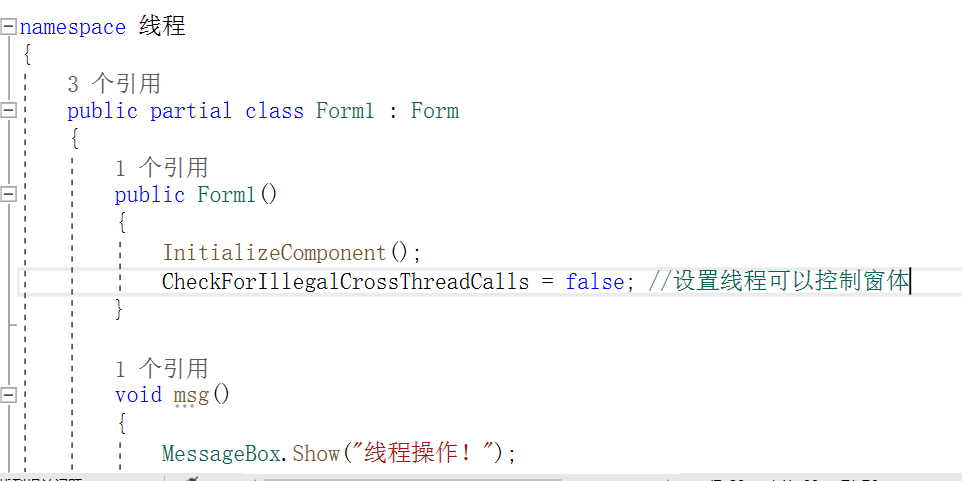
winform线程要控制窗体控件必须
CheckForIllegalCrossThreadCalls = false;
17
1
using System.Threading;
2
3
Thread //类,创建和控制线程,设置其优先级并获取其状态。
4
Console.WriteLine("--------------------------------------------------------------------------------------");
5
void msg() //首先声明一个方法
6
{
7
MessageBox.Show("线程操作!");
8
}
9
10
private void button1_Click(object sender, EventArgs e) //按钮的点击事件
11
{
12
Thread THREAD = new Thread( new ThreadStart(msg)); //使用Thread实例化线程
13
THREAD.Start(); //开始线程
14
15
16
}
17
Console.WriteLine("--------------------------------------------------------------------------------------");
winform或者wpf要控制图形界面必须使用使用 lnvoke或者Beginlnvoke委托任务给主线程,lnvoke是同步执行,Beginlnvoke是异步执行
24
1
using System.Threading; //引用Threading;
2
using System.Windows.Threading; //引用Windows.Threading;
3
4
private void Button_Click(object sender, RoutedEventArgs e) //按钮
5
{
6
Thread thread = new Thread( new ThreadStart(Fun)); //初始化线程
7
thread.Start(); //启动线程
8
}
9
10
public void Fun() //方法
11
{
12
13
Dispatcher.Invoke(new Action(XC)); //把进度条走动委托给主线程
14
15
}
16
17
public void XC() //进度条走动方法
18
{
19
20
for (int i = 0; i <=100; i++)
21
{
22
jdt.Value = i;
23
}
24
}
线程
58
1
using System.Threading;
2
using SYsten.Window.Threading;
3
--------------------------------------------------------
4
Dispatcher.Invoke(new Action(JDT));//使用主线程执行此函数
5
------------------------------------------------------------
6
Thread Thread_1 = new Thread(new ThreadStart(get)); //实例化线程
7
Thread_1.Start(); //启动线程
8
------------------------------------------------------------------------------------
9
Thread_1.Sleep(1000); //线程延时1秒
10
---------------------------------------------------------------------------------------
11
Thread_1.Join(); //线程休眠
12
Thread_1.join(1000); //停止一秒
13
----------------------------------------------------------------------------------------
14
public void LOCK() //lock,互斥锁,只有执行完lock里面的操作才会执行其他线程
15
{
16
lock (this) //开始锁住{}里面的操作
17
{
18
19
MessageBox.Show("先运行完Lock里面的代码才会执行其他线程的代码");
20
MessageBox.Show("先运行完Lock里面的代码才会执行其他线程的代码");
21
MessageBox.Show("先运行完Lock里面的代码才会执行其他线程的代码");
22
MessageBox.Show("先运行完Lock里面的代码才会执行其他线程的代码");
23
MessageBox.Show("先运行完Lock里面的代码才会执行其他线程的代码");
24
25
}
26
}
27
28
29
public void MONITOR()//Monitor,互斥锁,只有执行完Monitor里面的操作才会执行其他线程
30
{
31
Monitor.Enter(this); //开始锁
32
33
MessageBox.Show("先运行完Monitor里面的操作才会执行其他线程的代码!");
34
MessageBox.Show("先运行完Monitor里面的操作才会执行其他线程的代码!");
35
MessageBox.Show("先运行完Monitor里面的操作才会执行其他线程的代码!");
36
MessageBox.Show("先运行完Monitor里面的操作才会执行其他线程的代码!");
37
MessageBox.Show("先运行完Monitor里面的操作才会执行其他线程的代码!");
38
39
Monitor.Exit(this); //结束锁
40
}
41
42
public void MUTEX() //Mutex线程同步
43
{
44
Mutex MT = new Mutex(true); //创建Mutex
45
46
MT.WaitOne(); //加锁
47
48
//执行的造作
49
MessageBox.Show("先执行加锁的操作,执行完成以后才执行其他线程的操作");
50
MessageBox.Show("先执行加锁的操作,执行完成以后才执行其他线程的操作");
51
MessageBox.Show("先执行加锁的操作,执行完成以后才执行其他线程的操作");
52
MessageBox.Show("先执行加锁的操作,执行完成以后才执行其他线程的操作");
53
54
MT.ReleaseMutex();//释放资源
55
}
56
----------------------------------------------------------------------------------------
57
58
线程操作图形界面必须把方法委托给主线程,否则会报错。
Dispatcher.Invoke(new ThreadStart(方法名));
本文来自博客园,作者:Entity110,转载请注明原文链接:https://www.cnblogs.com/rdr2/p/15232074.html

 浙公网安备 33010602011771号