Vue常用特性
强制转换成数值型(原本文本框是字符串) v-model.number
去掉空格 v-model.trim
转变为change事件 失去焦点才改变值 v-model.lazy
自定义指令 directive
<div id="app">
<input type="text" v-focus> //使用自定义指令必须加v- ,这个绑定的input就执行里面的函数
<input type="text">
</div>
Vue.directive('focus', {
inserted: function (el) {
el.focus();
}
});
带参数的自定义指令
Vue.directive("color", {
bind: function (el, binding) {
console.log(binding.value.color); //blue
console.log(binding.value); //返回 Object 里面包含color
console.log(binding.value.name); //undefind
el.style.backgroundColor = binding.value.color;
}});
Vue.directive('red',{
bind:function(el,binding){
console.log(binding.value.red)
el.style.backgroundColor=binding.value.red;
}
});
bind 和 inserted
共同点: dom插入都会调用,bind在inserted之前 不同点: bind 时父节点为 null inserted 时父节点存在。 bind是在dom树绘制前调用,inserted在dom树绘制后调用
局部自定义指令 directives 这里面加s
var vm = new Vue({
el: '#app',
data: {},
directives: {
focus: {
inserted: function (el) {
el.focus();
}
}
}
})
computed 计算属性 split('')转化为数组,默认是逗号分隔 reverse()数组翻转 join('')把数组拼接成字符串,并去掉空格
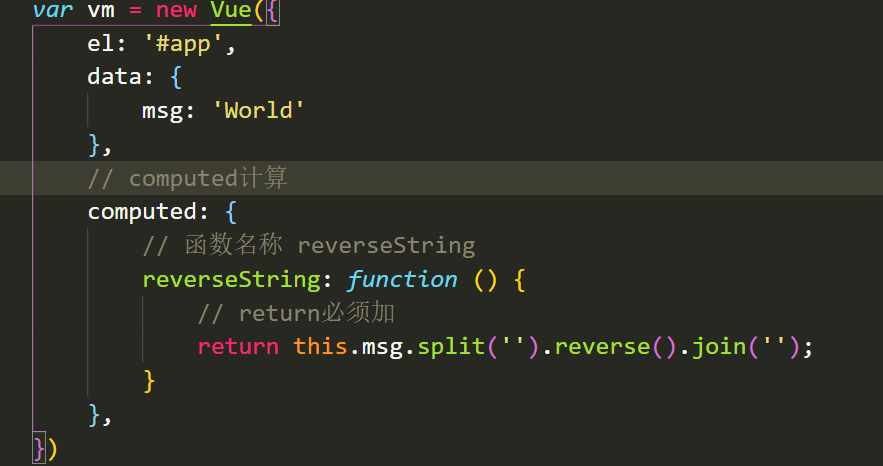
把函数名套在查值表达式就可以了

计算属性与方法的区别
1.计算属性是基于它们的依赖进行缓存的
2.方法不存在缓存
*/
侦听器watch 数据变化时执行异步或开销较大的操作 侦听的数据就是这个函数名称
watch: {
// 函数名和值一致 侦听F属性
F: function (val) {
console.log(val);
// val+空格+Green
this.Z = val + ' ' + this.X;
},
// 侦听X属性
X: function (val) {
console.log(val);
this.Z = this.F + ' ' + val;
}
a撒旦r vm = new Vue({
el: '#app',
data: {},
directives: {
focus: {
inserted: function (el) {
el.focus();
}
}
}
})

 浙公网安备 33010602011771号