
Spring Boot(二)使用JSP
1、配置pom.xml文件
<project xmlns="http://maven.apache.org/POM/4.0.0"
	xmlns:xsi="http://www.w3.org/2001/XMLSchema-instance"
	xsi:schemaLocation="http://maven.apache.org/POM/4.0.0 http://maven.apache.org/xsd/maven-4.0.0.xsd">
	<modelVersion>4.0.0</modelVersion>
	<groupId>com.github.ralgond</groupId>
	<artifactId>boot-jsp</artifactId>
	<version>0.0.1-SNAPSHOT</version>

	<parent>
		<groupId>org.springframework.boot</groupId>
		<artifactId>spring-boot-starter-parent</artifactId>
		<version>2.3.0.RELEASE</version>
	</parent>

	<dependencies>
		<dependency>
			<groupId>org.springframework.boot</groupId>
			<artifactId>spring-boot-starter-web</artifactId>
		</dependency>
		<!-- https://mvnrepository.com/artifact/org.apache.tomcat.embed/tomcat-embed-jasper -->
		<dependency>
			<groupId>org.apache.tomcat.embed</groupId>
			<artifactId>tomcat-embed-jasper</artifactId>
			<scope>provided</scope>
		</dependency>

	</dependencies>


	<properties>
		<start-class>com.github.ralgond.bootjsp.MainApp</start-class>
	</properties>

	<build>
		<plugins>
			<plugin>
				<groupId>org.apache.maven.plugins</groupId>
				<artifactId>maven-compiler-plugin</artifactId>
				<version>3.0</version>
				<configuration>
					<source>1.8</source>
					<target>1.8</target>
				</configuration>
			</plugin>
			<plugin>
				<groupId>org.springframework.boot</groupId>
				<artifactId>spring-boot-maven-plugin</artifactId>
			</plugin>
		</plugins>

		<resources>
			<resource>
				<directory>src/main/webapp</directory>
				<targetPath>META-INF/resources</targetPath>
				<includes>
					<include>**/*.*</include>
				</includes>
			</resource>

			<resource>
				<directory>src/main/resources</directory>
				<targetPath>BOOT-INF/classes</targetPath>
				<includes>
					<include>**/*.*</include>
				</includes>
			</resource>
		</resources>
	</build>

</project>
2、配置位于src/main/resources的application.properties
server.port=8888
spring.mvc.view.prefix=/WEB-INF/jsp/
spring.mvc.view.suffix=.jsp
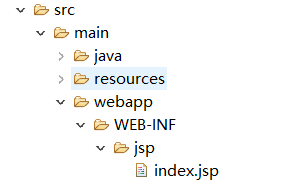
3、添加index.jsp
index.jsp的位置如下图:
index.jsp的内容如下:
<%@ page language="java" contentType="text/html; charset=ISO-8859-1"
    pageEncoding="ISO-8859-1"%>
<!DOCTYPE html>
<html>
<head>
<meta charset="ISO-8859-1">
<title>Insert title here</title>
</head>
<body>
Hello, ${name}
</body>
</html>
4、编写主启动类
package com.github.ralgond.bootjsp;

import org.springframework.boot.SpringApplication;
import org.springframework.boot.autoconfigure.SpringBootApplication;
import org.springframework.stereotype.Controller;
import org.springframework.ui.Model;
import org.springframework.web.bind.annotation.RequestMapping;
import org.springframework.web.bind.annotation.RequestMethod;

@SpringBootApplication
@Controller
public class MainApp {
	@RequestMapping(method=RequestMethod.GET, value="/hello")
	public String hello(Model model) {
		model.addAttribute("name", "world");
		return "index";
	}
	public static void main(String args[]) {
		SpringApplication.run(MainApp.class, args);
	}
}
5、运行
启动主启动类,在浏览器输入 http://localhost:8888/hello ,便可以看到下面内容:
Hello, world

 浙公网安备 33010602011771号