
Spring Cloud(六)Spring Cloud Alibaba的Sentinel
1、搭建Dashboard
下载jar包 https://github.com/alibaba/Sentinel/releases/download/v1.8.0/sentinel-dashboard-1.8.0.jar
启动:java -jar sentinel-dashboard-1.8.0.jar
登录:用户名和密码均为sentinel
2、创建一个maven工程并编辑pom.xml
<project xmlns="http://maven.apache.org/POM/4.0.0"
	xmlns:xsi="http://www.w3.org/2001/XMLSchema-instance"
	xsi:schemaLocation="http://maven.apache.org/POM/4.0.0 http://maven.apache.org/xsd/maven-4.0.0.xsd">
	<modelVersion>4.0.0</modelVersion>
	<groupId>com.github.ralgond</groupId>
	<artifactId>ali-sentinel</artifactId>
	<version>0.0.1-SNAPSHOT</version>

	<parent>
		<groupId>org.springframework.boot</groupId>
		<artifactId>spring-boot-starter-parent</artifactId>
		<version>2.3.0.RELEASE</version>
	</parent>

	<dependencies>
		<dependency>
			<groupId>org.springframework.boot</groupId>
			<artifactId>spring-boot-starter-web</artifactId>
		</dependency>

		<dependency>
			<groupId>org.springframework.boot</groupId>
			<artifactId>spring-boot-starter-actuator</artifactId>
		</dependency>

		<!-- https://mvnrepository.com/artifact/com.alibaba.cloud/spring-cloud-starter-alibaba-sentinel -->
		<dependency>
			<groupId>com.alibaba.cloud</groupId>
			<artifactId>spring-cloud-starter-alibaba-sentinel</artifactId>
			<version>2.2.3.RELEASE</version>
		</dependency>

	</dependencies>

	<properties>
		<start-class>com.github.raglond.ali.sentinel.SentinelApplication</start-class>
	</properties>

	<build>
		<plugins>
			<plugin>
				<groupId>org.apache.maven.plugins</groupId>
				<artifactId>maven-compiler-plugin</artifactId>
				<version>3.0</version>
				<configuration>
					<source>1.8</source>
					<target>1.8</target>
				</configuration>
			</plugin>
			<plugin>
				<groupId>org.springframework.boot</groupId>
				<artifactId>spring-boot-maven-plugin</artifactId>
			</plugin>
		</plugins>

	</build>
</project>
3、在src/main/resources下面创建一个yml文件application.yml
server:
  port: 8001

spring:
  application:
    name: ali-sentinel

  cloud:
    sentinel:
      transport:
        dashboard: localhost:8080
        port: 8719

management:
  endpoints:
    web:
      exposure:
        include: '*'
4、创建主类
package com.github.raglond.ali.sentinel;

@SpringBootApplication
@RestController
public class SentinelApplication {

	@RequestMapping(method=RequestMethod.GET, value="/testA")
	public String testA() {
		return "...testA";
	}

	@RequestMapping(method=RequestMethod.GET, value="/testB")
	public String testB() {
		return "...testB";
	}

	public static void main(String args[]) {
		SpringApplication.run(SentinelApplication.class, args);
	}
}
5、编译打包执行
编译打包:mvn clean package
执行:java -jar target\ali-sentinel-0.0.1-SNAPSHOT.jar
在浏览器上输入 http://localhost:8001/testA ,便可以在dashboard上看到相关的统计信息。
6、一组相同的机器需要逐台配置规则
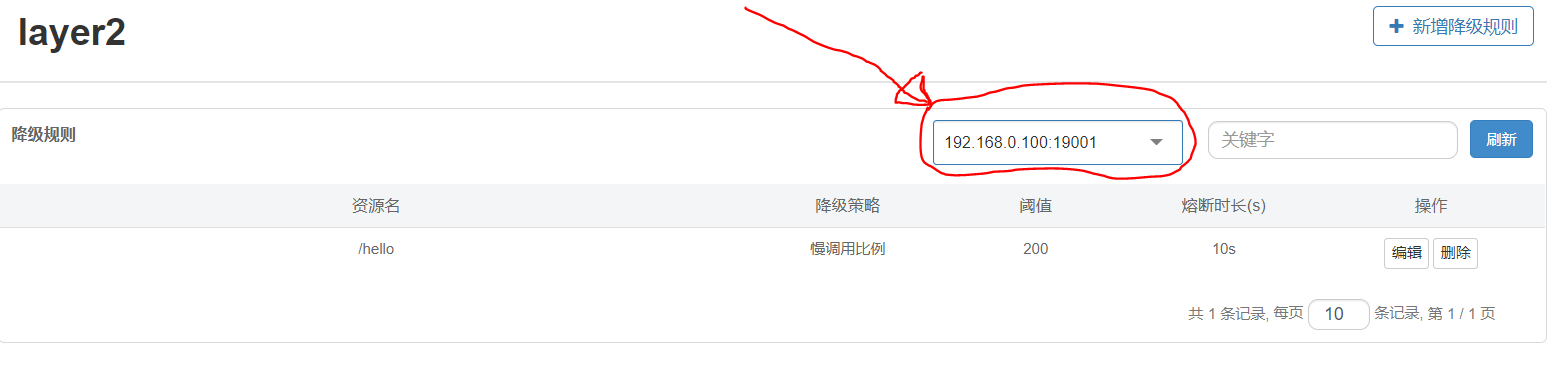
sentinel控制台上有切换机器的下拉列表(看下图),千万要记得逐台配置,不然你会发现只有第一台机器的规则生效,而其他的都没有生效。
7、429状态码
不管是流控的直接失败操作还是降级操作,服务端都会返回一段文字:“Blocked by Sentinel (flow limiting)”,Http响应的状态码是429。
8、Feign客户端侧遇到429状态码还会重试吗?
不会。遇到429后会立刻报异常:
feign.FeignException$TooManyRequests: [429] during [GET] to [http://layer2/hello] [Layer1FeignClient#hello()]: [Blocked by Sentinel (flow limiting)]
        at feign.FeignException.clientErrorStatus(FeignException.java:213) ~[feign-core-10.10.1.jar!/:na]
        at feign.FeignException.errorStatus(FeignException.java:177) ~[feign-core-10.10.1.jar!/:na]
        at feign.FeignException.errorStatus(FeignException.java:169) ~[feign-core-10.10.1.jar!/:na]
        at feign.codec.ErrorDecoder$Default.decode(ErrorDecoder.java:92) ~[feign-core-10.10.1.jar!/:na]
        at feign.AsyncResponseHandler.handleResponse(AsyncResponseHandler.java:96) ~[feign-core-10.10.1.jar!/:na]
        at feign.SynchronousMethodHandler.executeAndDecode(SynchronousMethodHandler.java:138) ~[feign-core-10.10.1.jar!/:na]
        at feign.SynchronousMethodHandler.invoke(SynchronousMethodHandler.java:89) ~[feign-core-10.10.1.jar!/:na]
        at com.alibaba.cloud.sentinel.feign.SentinelInvocationHandler.invoke(SentinelInvocationHandler.java:107) ~[spring-cloud-starter-alibaba-sentinel-2.2.3.RELEASE.jar!/:2.2.3.RELEASE]
        at com.sun.proxy.$Proxy71.hello(Unknown Source) ~[na:na]
        at com.github.ralgond.sc2.layer1.Layer1Application.hello(Layer1Application.java:44) ~[classes!/:0.0.1-SNAPSHOT]
        ...

 浙公网安备 33010602011771号