

【ABP】项目示例(8)——数据迁移
数据迁移
在上一章节中,已经展示了数据播种的用途之一,即单元测试中进行数据初始化,在这一章节中,实现数据播种的另一重要用途,即数据迁移
该项目使用的是代码优先的开发模式,需要将领域模型迁移到数据库中的数据模型
EF数据迁移
在程序包管理控制台选中General.Backend.EntityFrameworkCore,执行以下命令安装EF数据迁移相关的Nuget包
Install-Package Microsoft.EntityFrameworkCore.Design -v 8.0.4
Install-Package Microsoft.EntityFrameworkCore.Tools -v 8.0.4
数据迁移需要一个单独的启动项目来进行运行,创建名称为General.Backend.DbMigrator的控制台项目
General.Backend.DbMigrator添加项目引用General.Backend.EntityFrameworkCore
新建名称为appsettings.json的默认加载配置文件,配置MySql数据库连接信息,并将文件属性设置为始终复制到输出目录
{
  "ConnectionStrings": {
    "Default": "server=localhost;database=general;user=youruser;password=yourpassword;port=yourport;CharSet=utf8mb4;Allow User Variables=True;SslMode=none;AllowLoadLocalInfile=true;"
  }
}
在名称为General.Backend.EntityFrameworkCore的类库中,新建名称为GeneralDbContextFactory的数据迁移配置类,指定数据迁移的数据库连接信息和迁移类库
public class GeneralDbContextFactory : IDesignTimeDbContextFactory<GeneralDbContext>
{
    public GeneralDbContext CreateDbContext(string[] args)
    {
        var configuration = BuildConfiguration();
        var builder = new DbContextOptionsBuilder<GeneralDbContext>()
            .UseMySql(
                connectionString: configuration.GetConnectionString("Default"),
                serverVersion: MySqlServerVersion.LatestSupportedServerVersion,
                mySqlOptionsAction: optionsBuilder => optionsBuilder.MigrationsAssembly(Assembly.GetExecutingAssembly().FullName
            ));

        return new GeneralDbContext(builder.Options);
    }

    private static IConfigurationRoot BuildConfiguration()
    {
        var builder = new ConfigurationBuilder()
            .SetBasePath(Path.Combine(Directory.GetCurrentDirectory(), "../General.Backend.DbMigrator/"))
            .AddJsonFile("appsettings.json", optional: false);

        return builder.Build();
    }
}
接下来进行数据迁移,选中General.Backend.DbMigrator作为启动项目,在程序包管理控制台选中General.Backend.EntityFrameworkCore,执行以下命令
Add-Migration Init
Update-Database
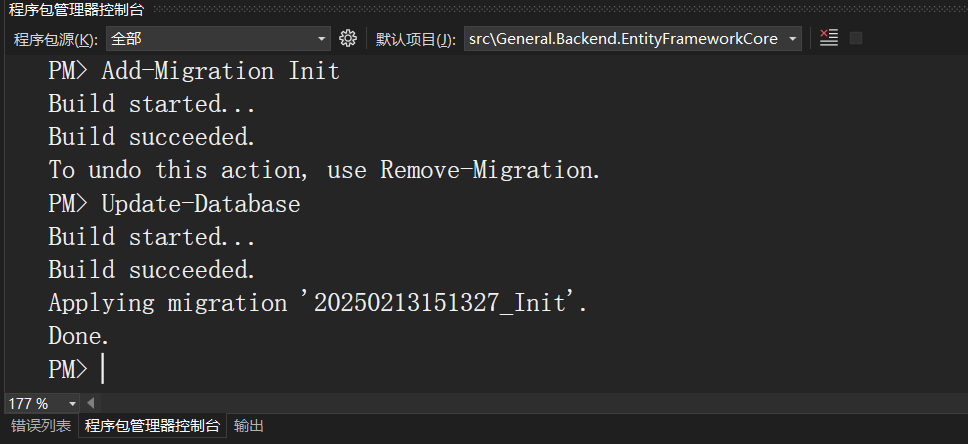
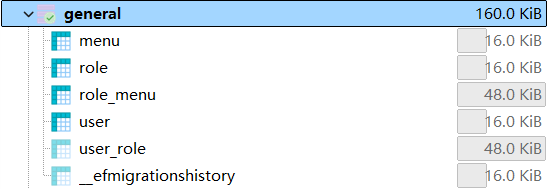
从图中可以看出已经成功进行了数据迁移,将领域模型映射到数据库中的表结构,生成对应的表
但是系统运行所依赖的初始数据并没有生成,这时就需要在数据迁移的过程中进行数据播种
ABP数据迁移
在名称为General.Backend.Domain的类库中的DataSeed文件夹下,新建名称为IGeneralDbSchemaMigrator的接口
public interface IGeneralDbSchemaMigrator
{
    public Task MigrateAsync();
}
在名称为General.Backend.EntityFrameworkCore的类库中,新建名称为GeneralDbSchemaMigrator的迁移类,实现数据库迁移
public class GeneralDbSchemaMigrator : IGeneralDbSchemaMigrator, ITransientDependency
{
    private readonly IServiceProvider _serviceProvider;

    public GeneralDbSchemaMigrator(IServiceProvider serviceProvider)
    {
        _serviceProvider = serviceProvider;
    }

    public async Task MigrateAsync()
    {
        await _serviceProvider
            .GetRequiredService<GeneralDbContext>()
            .Database
            .MigrateAsync();
    }
}
在名称为General.Backend.Domain的类库中的DataSeed文件夹下,新建名称为GeneralDbMigrationService的迁移服务类,所有实现了IGeneralDbSchemaMigrator接口的迁移类都将进行数据库迁移,然后进行数据播种
public class GeneralDbMigrationService : ITransientDependency
{
    private readonly IDataSeeder _dataSeeder;
    private readonly IEnumerable<IGeneralDbSchemaMigrator> _generalDbSchemaMigrators;

    public GeneralDbMigrationService(
        IDataSeeder dataSeeder,
        IEnumerable<IGeneralDbSchemaMigrator> generalDbSchemaMigrators)
    {
        _dataSeeder = dataSeeder;
        _generalDbSchemaMigrators = generalDbSchemaMigrators;
    }

    public async Task MigrateAsync()
    {
        var initialMigrationAdded = AddInitialMigrationIfNotExist();
        if (initialMigrationAdded)
        {
            return;
        }

        foreach (var migrator in _generalDbSchemaMigrators)
        {
            await migrator.MigrateAsync();
        }
        await _dataSeeder.SeedAsync();
    }

    private static bool AddInitialMigrationIfNotExist()
    {
        try
        {
            if (!DbMigrationsProjectExists())
            {
                return false;
            }
        }
        catch (Exception)
        {
            return false;
        }

        try
        {
            if (!MigrationsFolderExists())
            {
                AddInitialMigration();
                return true;
            }
            else
            {
                return false;
            }
        }
        catch (Exception)
        {
            return false;
        }
    }

    private static bool DbMigrationsProjectExists()
    {
        var dbMigrationsProjectFolder = GetEntityFrameworkCoreProjectFolderPath();
        return dbMigrationsProjectFolder != null;
    }

    private static bool MigrationsFolderExists()
    {
        var dbMigrationsProjectFolder = GetEntityFrameworkCoreProjectFolderPath();
        return dbMigrationsProjectFolder != null && Directory.Exists(Path.Combine(dbMigrationsProjectFolder, "Migrations"));
    }

    private static void AddInitialMigration()
    {
        string argumentPrefix;
        string fileName;
        if (RuntimeInformation.IsOSPlatform(OSPlatform.OSX) || RuntimeInformation.IsOSPlatform(OSPlatform.Linux))
        {
            argumentPrefix = "-c";
            fileName = "/bin/bash";
        }
        else
        {
            argumentPrefix = "/C";
            fileName = "cmd.exe";
        }
        var procStartInfo = new ProcessStartInfo(fileName,
            $"{argumentPrefix} \"abp create-migration-and-run-migrator \"{GetEntityFrameworkCoreProjectFolderPath()}\"\""
        );
        try
        {
            Process.Start(procStartInfo);
        }
        catch (Exception)
        {
            throw new Exception("无法运行ABP命令行");
        }
    }

    private static string? GetEntityFrameworkCoreProjectFolderPath()
    {
        var slnDirectoryPath = GetSolutionDirectoryPath();
        return slnDirectoryPath == null
            ? throw new Exception("未找到解决方案文件夹")
            : Directory.GetDirectories(slnDirectoryPath).FirstOrDefault(d => d.EndsWith(".EntityFrameworkCore"));
    }

    private static string? GetSolutionDirectoryPath()
    {
        var currentDirectory = new DirectoryInfo(AppContext.BaseDirectory);
        while (currentDirectory != null && Directory.GetParent(currentDirectory.FullName) != null)
        {
            currentDirectory = Directory.GetParent(currentDirectory.FullName);
            if (currentDirectory != null && Directory.GetFiles(currentDirectory.FullName).FirstOrDefault(f => f.EndsWith(".sln")) != null)
            {
                return currentDirectory.FullName;
            }
        }
        return null;
    }
}
在程序包管理控制台选中General.Backend.DbMigrator,执行以下命令安装ABP依赖注入和托管主机相关的Nuget包
Install-Package Volo.Abp.Autofac -v 8.3.0
Install-Package Microsoft.Extensions.Hosting -v 8.0.0
在名称为General.Backend.DbMigrator的类库中,新建名称为GeneralDbMigratorModule 的迁移模块类
[DependsOn(
    typeof(AbpAutofacModule),
    typeof(GeneralDomainModule),
    typeof(GeneralEntityFrameworkCoreModule))]
public class GeneralDbMigratorModule : AbpModule
{

}
接下来新建名称为DbMigratorHostedService的托管服务类,迁移程序启动时,调用迁移服务类中的MigrateAsync方法,进行数据迁移和数据播种
public class DbMigratorHostedService : IHostedService
{
    private readonly IHostApplicationLifetime _hostApplicationLifetime;
    private readonly IConfiguration _configuration;

    public DbMigratorHostedService(
        IHostApplicationLifetime hostApplicationLifetime,
        IConfiguration configuration)
    {
        _hostApplicationLifetime = hostApplicationLifetime;
        _configuration = configuration;
    }

    public async Task StartAsync(CancellationToken cancellationToken)
    {
        using (var application = await AbpApplicationFactory.CreateAsync<GeneralDbMigratorModule>(options =>
        {
            options.Services.ReplaceConfiguration(_configuration);
            options.UseAutofac();
        }))
        {
            await application.InitializeAsync();

            await application
                .ServiceProvider
                .GetRequiredService<GeneralDbMigrationService>()
                .MigrateAsync();

            await application.ShutdownAsync();

            _hostApplicationLifetime.StopApplication();
        }
    }

    public Task StopAsync(CancellationToken cancellationToken)
    {
        return Task.CompletedTask;
    }
}
修改General.Backend.DbMigrator项目中的启动类Program,添加托管服务类到主机服务中
internal class Program
{
    static async Task Main(string[] args)
    {
        await CreateHostBuilder(args).RunConsoleAsync();
    }

    public static IHostBuilder CreateHostBuilder(string[] args)
    {
        var hostBuilder = Host.CreateDefaultBuilder(args)
            .ConfigureServices((hostContext, services) =>
            {
                services.AddHostedService<DbMigratorHostedService>();
            });
        return hostBuilder;
    }
}
最后验证数据迁移和数据播种功能,将启动项目设置为General.Backend.DbMigrator,点击运行
输出如下信息,表明数据迁移成功
查询数据库的user和role表,可以看到已经存在了一个管理员用户和管理员角色,表明数据播种成功

解决方案的目录结构现如下
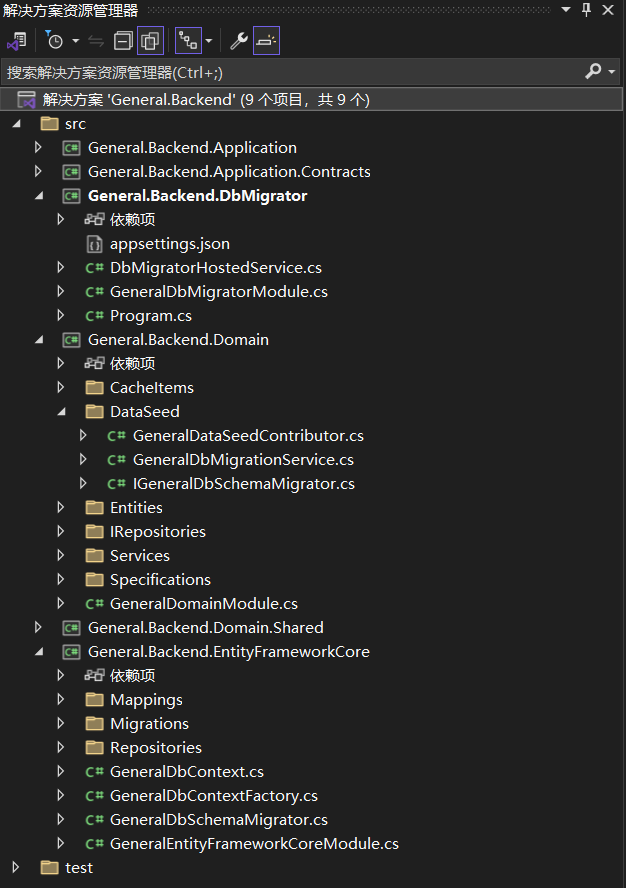
在下一章节中,实现表现层

 浙公网安备 33010602011771号