

重置CentOS 7.2 ROOT密码
说明:
本文档已在CentOS 7.2 内核版本 3.10.0 系统中测试成功;
--------------------------------------------------------------------------------------------------------
第一个里程碑 -- 在启动GRUB菜单中选择编辑选项,按键 "e" 进入编辑;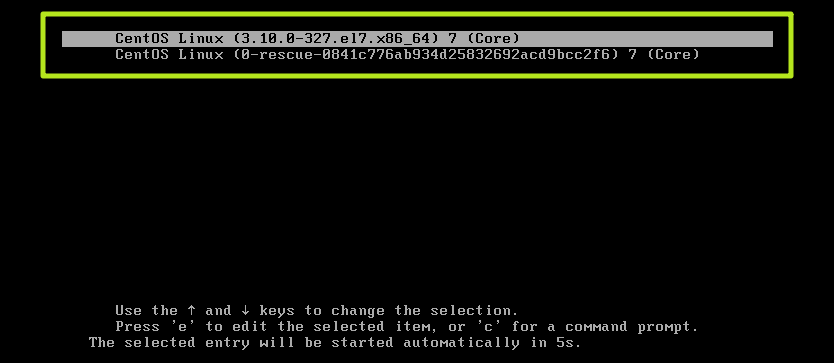
第二个里程碑 -- 大约在第16行找到 "ro" 将 "ro" 修改为 " rw init=/sysroot/bin/bash ";

第三个里程碑 -- 同时按下 " ctrl + x ",进入单用户模式;
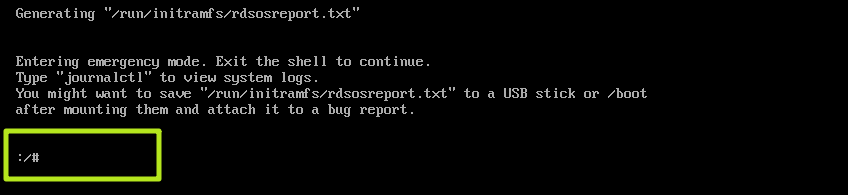
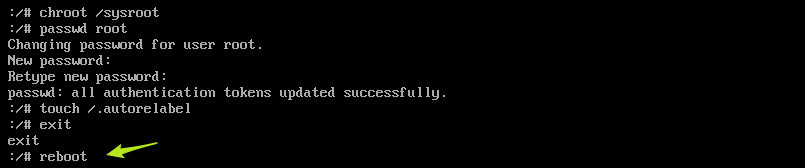
第四个里程碑 -- 用 "chroot /sysroot " 命令进入系统;

第五个里程碑 -- " passwd root " 重置root密码;

第六个里程碑 -- 用 " touch /.autorelabel " 更新SELinux信息;

第七个里程碑 -- 输入 " exit "退出 chroot ;

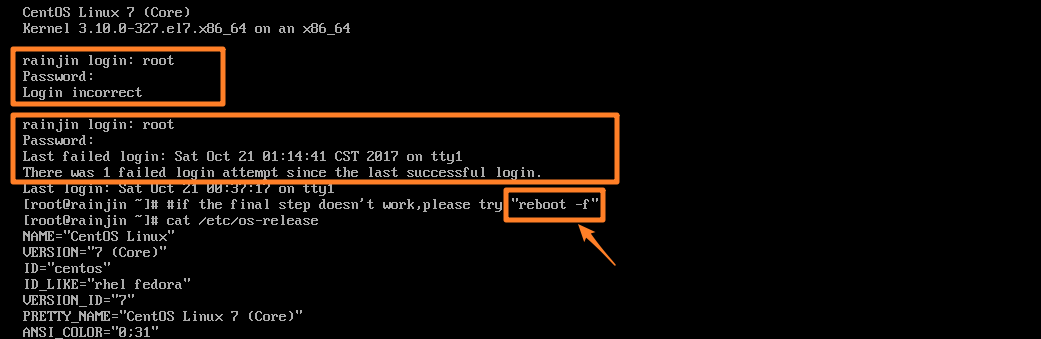
第八个里程碑 -- 用 " reboot -f " 重启你的系统;
第九个里程碑 -- 登陆系统测试;
参考文档: https://www.unixmen.com/reset-root-password-centos-7/
声明: 本文档本着开源精神,一起探讨,共同进步!!!

 浙公网安备 33010602011771号