
贪吃蛇
涉及知识点
帧的概念
GUI相关Api
定时器
键盘监听
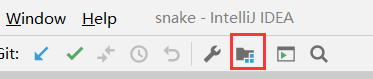
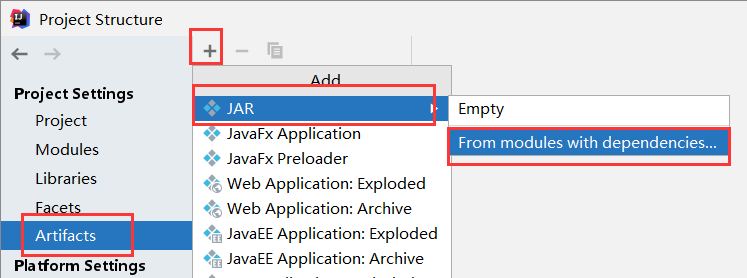
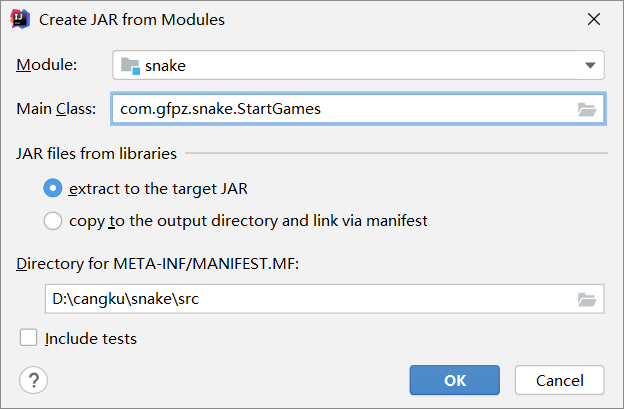
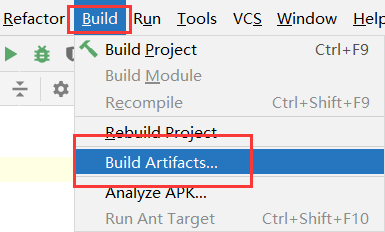
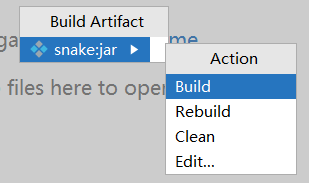
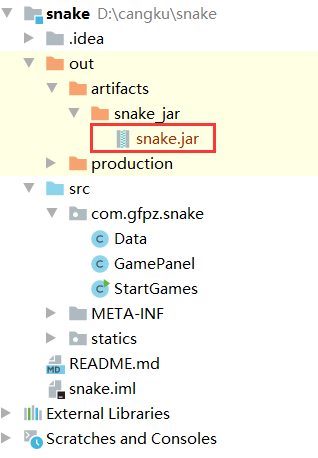
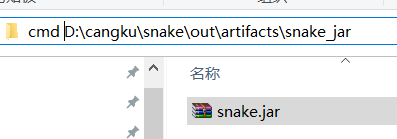
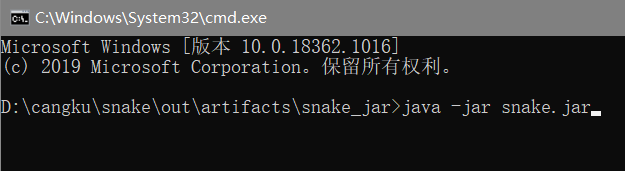
Java工程打包
源码
import javax.swing.*;
import java.awt.*;
import java.net.URL;

/**
 * 这个类的作用就是绘制一个窗口,然后把panel面板显示在上面即可
 */
public class StartGames {
    public static void main(String[] args) {
        //绘制静态窗口 JFrame
        JFrame frame = new JFrame("贪吃蛇🐍");
        //设置界面大小
        frame.setBounds(10, 10, 900, 720);
        frame.setResizable(false);
        frame.setDefaultCloseOperation(JFrame.EXIT_ON_CLOSE);
        frame.setIconImage(Data.tb.getImage());
        //面板JPanel  可以加入到JFrame窗口
        frame.add(new GamePanel());
        frame.setVisible(true);
    }
}
import javax.swing.*;
import java.net.URL;

/**
 * 存放外部数据
 */
public class Data {
    //头部的图片 URL:定位图片的地址   ImageIcon:图片
    public static URL headerURL = Data.class.getResource("/statics/header.png");
    public static ImageIcon header = new ImageIcon(headerURL);
    //头部
    public static URL upUrl = Data.class.getResource("/statics/up.png");
    public static URL downUrl = Data.class.getResource("/statics/down.png");
    public static URL leftUrl = Data.class.getResource("/statics/left.png");
    public static URL rightUrl = Data.class.getResource("/statics/right.png");
    public static ImageIcon up = new ImageIcon(upUrl);
    public static ImageIcon down = new ImageIcon(downUrl);
    public static ImageIcon left = new ImageIcon(leftUrl);
    public static ImageIcon right = new ImageIcon(rightUrl);
    //身体
    public static URL bodyURL = Data.class.getResource("/statics/body.png");
    public static ImageIcon body = new ImageIcon(bodyURL);
    //食物
    public static URL foodURL = Data.class.getResource("/statics/food.png");
    public static ImageIcon food = new ImageIcon(foodURL);
    //图标
    public static URL tbURL = Data.class.getResource("/statics/xxnxs.png");//tb.jpg  xxnxs.png
    public static ImageIcon tb = new ImageIcon(tbURL);
}
import javax.swing.*;
import java.awt.*;
import java.awt.event.ActionEvent;
import java.awt.event.ActionListener;
import java.awt.event.KeyEvent;
import java.awt.event.KeyListener;
import java.util.Random;

public class GamePanel extends JPanel implements KeyListener, ActionListener {

    int lenth;//蛇的长度
    int[] snakeX = new int[600];//蛇的坐标
    int[] snakeY = new int[500];
    String fx;// R L  U  D  方向
    String fx0;//标识当前的前进方向
    boolean isStart = false;//游戏是否开始
    Timer timer = new Timer(150, this);//定时器  每秒 监听当前窗口  需要实现接口:ActionListener
    //定义一个食物
    int foodx;
    int foody;
    Random random = new Random();

    //死亡判断
    boolean isFail = false;

    //积分系统
    int score;

    //初始化
    public void init() {
        lenth = 3;
        snakeX[0] = 100;
        snakeY[0] = 100;//头部坐标
        snakeX[1] = 75;
        snakeY[1] = 100;//第一个身体坐标
        snakeX[2] = 50;
        snakeY[2] = 100;//第二个身体坐标
        fx = "R";
        fx0 = fx;

        foodx = 25 + 25 * random.nextInt(34);
        foody = 75 + 25 * random.nextInt(24);

        score = 0;
    }

    //构造器  调 初始化方法
    public GamePanel() {
        init();
        this.setForeground(Color.pink);
        //获取键盘的监听事件
        this.setFocusable(true);
        this.addKeyListener(this);//!!!
        timer.start();//让时间动起来
    }

    //画板:画界面,画🐍
    //Graphics 画笔
    @Override
    protected void paintComponent(Graphics g) {
        super.paintComponent(g);//清屏
        this.setBackground(Color.WHITE);//设置背景颜色
        //绘制头部 广告
        Data.header.paintIcon(this, g, 25, 11);
        //绘制游戏区域
        g.fillRect(25, 75, 850, 600);
        //画一条静态的蛇
        if (fx.equals("R")) {
            Data.right.paintIcon(this, g, snakeX[0], snakeY[0]);
        } else if (fx.equals("L")) {
            Data.left.paintIcon(this, g, snakeX[0], snakeY[0]);
        } else if (fx.equals("U")) {
            Data.up.paintIcon(this, g, snakeX[0], snakeY[0]);
        } else if (fx.equals("D")) {
            Data.down.paintIcon(this, g, snakeX[0], snakeY[0]);
        }
        fx0 = fx;//方向定了之后 下一步的上一步才是确定的!
        for (int i = 1; i < lenth; i++) {
            Data.body.paintIcon(this, g, snakeX[i], snakeY[i]);
        }

        //画积分
        g.setColor(Color.WHITE);
        g.setFont(new Font("微软雅黑", Font.BOLD, 18));
        g.drawString("长度:"+lenth,750,30);
        g.drawString("分数:"+lenth,750,55);

        //画食物
        Data.food.paintIcon(this, g, foodx, foody);

        //游戏是否开始
        if (false == isStart) {
            //画一段文字
            g.setColor(Color.WHITE);
            g.setFont(new Font("微软雅黑", Font.BOLD, 40));
            g.drawString("按下空格开始游戏。", 300, 300);
        }

        //失败提醒
        if (isFail) {
            //画一段文字
            g.setColor(Color.red);
            g.setFont(new Font("微软雅黑", Font.BOLD, 40));
            g.drawString("游戏失败,按下空格重新开始丶", 200, 300);
        }
    }

    //监听键盘的输入  要求类需要实现 KeyListener 接口
    //并重写如下方法

    /**
     * 键盘按下 未释放
     *
     * @param e
     */
    @Override
    public void keyPressed(KeyEvent e) {
        //获取键盘是哪个键
        int keyCode = e.getKeyCode();
        if (keyCode == KeyEvent.VK_SPACE) {
            if(isFail){//失败时按的空格,再来一次
                isFail = false;
                init();//重新初始化游戏
            }else{//暂停游戏
                isStart = !isStart;//!!!
            }
            repaint();//刷新界面!!!
        }
        //键盘控制走向  考虑转弯方向不能为180°
        if (keyCode == KeyEvent.VK_LEFT && !fx0.equals("R")) {
            fx = "L";
        } else if (keyCode == KeyEvent.VK_RIGHT && !fx0.equals("L")) {
            fx = "R";
        } else if (keyCode == KeyEvent.VK_UP && !fx0.equals("D")) {
            fx = "U";
        } else if (keyCode == KeyEvent.VK_DOWN && !fx0.equals("U")) {
            fx = "D";
        }

    }

    @Override
    public void keyTyped(KeyEvent e) {
        //键盘按下 弹起
    }

    @Override
    public void keyReleased(KeyEvent e) {
        //释放某个键
    }

    //定时器  监听时间  执行定时操作
    @Override
    public void actionPerformed(ActionEvent e) {
        //如果游戏处于开始状态  并且游戏没有结束
        if (isStart&&!isFail) {
            for (int i = lenth - 1; i > 0; i--) {//除了脑袋  身体都向脑袋方向进行移动
                snakeX[i] = snakeX[i - 1];
                snakeY[i] = snakeY[i - 1];
            }

            //通过控制方向让头部移动
            if (fx.equals("R")) {
                snakeX[0] = snakeX[0] + 25;//头部移动
                if (snakeX[0] > 850) {
                    snakeX[0] = 25;
                }//边界判断
            } else if (fx.equals("L")) {
                snakeX[0] = snakeX[0] - 25;//头部移动
                if (snakeX[0] < 25) {
                    snakeX[0] = 850;
                }//边界判断
            } else if (fx.equals("U")) {
                snakeY[0] = snakeY[0] - 25;//头部移动
                if (snakeY[0] < 75) {
                    snakeY[0] = 650;
                }//边界判断
            } else if (fx.equals("D")) {
                snakeY[0] = snakeY[0] + 25;//头部移动
                if (snakeY[0] > 650) {
                    snakeY[0] = 75;
                }//边界判断
            }

            //吃食物 头和食物坐标重合
            if (snakeX[0] == foodx && snakeY[0] == foody) {
                //蛇长度 +1
                lenth++;

                score = score + 10;

                //重新生成食物
                foodx = 25 + 25 * random.nextInt(34);
                foody = 75 + 25 * random.nextInt(24);
            }

            //结束判断
            for(int i=1;i<lenth;i++){//遍历生体,看是否与头相碰
                if(snakeX[0]==snakeX[i]&&snakeY[0]==snakeY[i]){
                    isFail = true;
                }
            }

            repaint();//刷新界面!!!
        }
        timer.start();//让时间动起来
    }
}
https://github.com/ChenCurry/snake.git
击石乃有火,不击元无烟!!

 浙公网安备 33010602011771号