
SpringBoot微服务HTTPS通信实践:Nacos注册与Feign自签名证书配置指南
前言
最近笔者有个项目需要从单体后端迁移到微服务架构后端,使用的技术栈是springboot + nacos + openfeign。为了确保通信安全,所有服务都启用了https。前期不使用https的demo很快就跑通了,但是今天在继续搭建启用https的demo时,遇到了很多坑,在此记录一下,希望能帮助到同样遇到此类问题的uu们。
demo环境
- springboot版本:3.4.5
- java版本:17.0.12
- 系统版本:macOS Sequoia
- 包管理工具:maven
- 服务组成:系统目前有2个服务,名字分别为auth-service和business-service
- Feign服务接口
@FeignClient("auth-service")
interface AuthService {

    @PostMapping("/auth/renew_jwt")
    fun renewJwt(
        @RequestParam("loginSessionId") loginSessionId: String
    ): ActionResult

}
要点记录
- 如果需要服务注册到nacos时声明自己使用https,那么需要在metadata里添加
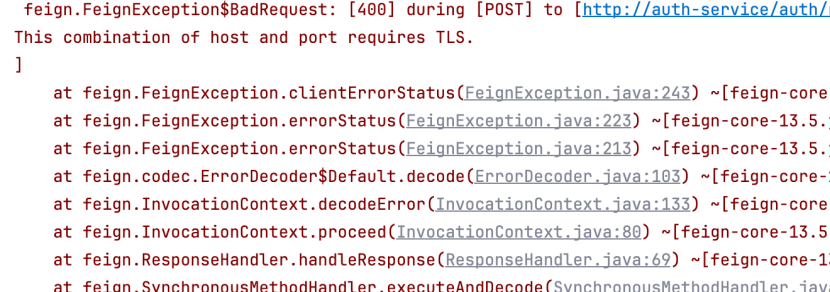
secure=true,如果不设置这个字段,那么feign在访问时默认会以http协议访问,会直接导致访问失败,同时报错This combination of host and port requires TLS.
- 在注册到nacos时,需要指定feign访问时的ip为https证书里的域名,否则后面会因为域名不对而无法通过证书验证。如果域名错误,会报错
HTTPS hostname wrong: should be <xxxxxx(这里是feign实际访问的ip)>

最终的nacos配置如下所示
spring:
  cloud:
    nacos:
      discovery:
        server-addr: 127.0.0.1:8848
        metadata:
          secure: true
        ip: 127.0.0.1
- 在本地使用自签名证书进行开发时,需要通过代码配置将自签名证书加入到信任证书列表中,否则feign发送请求时会因为证书无法验证而拒绝请求。
这一步也是坑最多的地方,笔者在这里整整卡了半天,下面本文将展示出笔者遇到的所有报错和解决办法
当没有配置信任自签名证书时,会报feign.RetryableException: PKIX path building failed: sun.security.provider.certpath.SunCertPathBuilderException: unable to find valid certification path to requested target executing POST http://auth-service/xxx

这个报错是因为feign客户端无法验证自签名证书的有效性。 需要注意的是,即使在macos的系统钥匙串里信任了这个证书,即使在浏览器上已经能够使用https://127.0.0.1访问了,在这里仍然会出现无法验证自签名证书有效性的问题,这应该是java的证书库和macos的不通用导致的。
解决方法为,首先把证书导出为crt文件
keytool -exportcert -alias my-service -keystore keystore.p12 -storepass <keystore密码> -file server.crt
然后把server.crt导入到信任证书库中
keytool -importcert -alias my-service -file server.crt -keystore client-truststore.jks -storepass <信任证书库的密码>
最终就会得到client-truststore.jks,这就是信任证书库,把它放到resources目录下备用。
接着还需要配置通过Bean注入FeignClient,如果启用了loadBalancer,直接参考下面的代码即可,添加之后只需要配置dev-config.feignSSLTrustLocalCert为true就会自动配置和注入改造后的FeignClient
@Configuration
open class FeignSSLConfig{

    @Bean
    @ConditionalOnProperty(name = ["dev-config.feignSSLTrustLocalCert"], havingValue = "true", matchIfMissing = false)
    open fun feignClient(
        loadBalancerClient: LoadBalancerClient,
        loadBalancerClientFactory: LoadBalancerClientFactory,
        transformers: List<LoadBalancerFeignRequestTransformer>
    ): Client {
        val sslContext = SSLContexts.custom()
            .loadTrustMaterial(ClassPathResource("client-truststore.jks").url, "123456".toCharArray())
            .build()

        val client = Client.Default(sslContext.socketFactory, DefaultHostnameVerifier())
        return FeignBlockingLoadBalancerClient(client, loadBalancerClient, loadBalancerClientFactory, transformers)
    }

}
坑点
在启用了loadBalancer的情况下,改造FeignClient时没有使用FeignBlockingLoadBalancerClient
一开始AI给出的改造建议是直接返回Client.Default,代码如下所示
@Bean
    public Client feignClient(SSLContext sslContext) {
        return new Client.Default(sslContext.getSocketFactory(), new DefaultHostnameVerifier());
    }
在实际运行后,会报错UnknownHostException,如下图所示
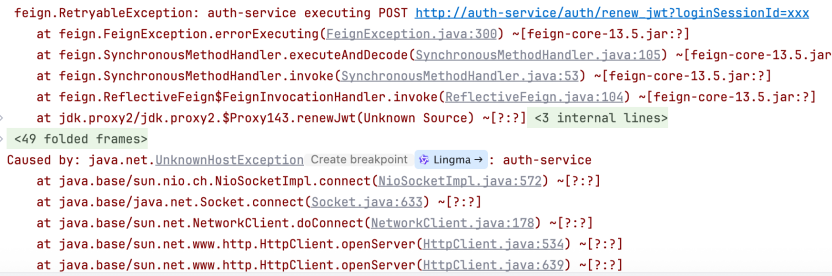
这是因为把auth-service解析到具体的ip是在loadBalancer里面完成的,直接返回Client.Default会导致Feign请求没有经过loadBalancer,从而导致无法把auth-service正确解析到具体的ip上面。
tricks
- 可以设置feign日志为FULL来观察具体的请求情况
@Bean
fun feignLoggerLevel(): Logger.Level {
    return Logger.Level.FULL
}
- 可以通过添加
-Djavax.net.debug=ssl:handshake参数来观察具体的https握手过程

 浙公网安备 33010602011771号