


springboot项目配置redis
一、POM文件中引入redis的jar包

<?xml version="1.0" encoding="UTF-8"?>
<project xmlns="http://maven.apache.org/POM/4.0.0"
    xmlns:xsi="http://www.w3.org/2001/XMLSchema-instance"
    xsi:schemaLocation="http://maven.apache.org/POM/4.0.0 http://maven.apache.org/xsd/maven-4.0.0.xsd">
    <modelVersion>4.0.0</modelVersion>
    <parent>
        <groupId>org.springframework.boot</groupId>
        <artifactId>spring-boot-starter-parent</artifactId>
        <version>2.4.5</version>
        <relativePath /> <!-- lookup parent from repository -->
    </parent>
    <groupId>com.tt</groupId>
    <artifactId>demo-2</artifactId>
    <version>0.0.1-SNAPSHOT</version>
    <name>demo-2</name>
    <description>Demo project for Spring Boot</description>
    <properties>
        <java.version>1.8</java.version>
    </properties>
    <dependencies>
        <dependency>
            <groupId>org.springframework.boot</groupId>
            <artifactId>spring-boot-starter-web</artifactId>
        </dependency>

        <dependency>
            <groupId>org.mybatis.spring.boot</groupId>
            <artifactId>mybatis-spring-boot-starter</artifactId>
            <version>1.3.2</version>
        </dependency>
        <dependency>
            <groupId>com.alibaba</groupId>
            <artifactId>druid-spring-boot-starter</artifactId>
            <version>1.1.9</version>
        </dependency>
        <dependency>
            <groupId>mysql</groupId>
            <artifactId>mysql-connector-java</artifactId>
        </dependency>
        <dependency>
            <groupId>org.springframework.boot</groupId>
            <artifactId>spring-boot-starter-test</artifactId>
            <scope>test</scope>
        </dependency>
        <dependency>
            <groupId>org.springframework.boot</groupId>
            <artifactId>spring-boot-starter-thymeleaf</artifactId>
        </dependency>
        <dependency>
            <groupId>org.springframework.boot</groupId>
            <artifactId>spring-boot-starter-data-redis</artifactId>
        </dependency>
        <dependency>
            <groupId>org.springframework.boot</groupId>
            <artifactId>spring-boot-starter-log4j2</artifactId>
        </dependency>
    </dependencies>


    <build>
        <plugins>
            <plugin>
                <groupId>org.springframework.boot</groupId>
                <artifactId>spring-boot-maven-plugin</artifactId>
            </plugin>
            <plugin>
                <groupId>org.mybatis.generator</groupId>
                <artifactId>mybatis-generator-maven-plugin</artifactId>
                <version>1.3.2</version>
                <configuration>
                    <configurationFile>D:/workspace/demo-2/src/main/resources/generator/generatorConfig.xml</configurationFile>
                    <overwrite>true</overwrite>
                    <verbose>true</verbose>
                </configuration>
            </plugin>
        </plugins>
    </build>

</project>
二、application.yml中进行redis缓存库的配置
spring:
 redis:
   database: 0
   host: 127.0.0.1
   port: 6379
   password:
 datasource:
    driverClassName: com.mysql.cj.jdbc.Driver
    password: qiuying524
    url: jdbc:mysql://192.168.0.139:3306/springboot?useUnicode=true&autoReconnect=true&failOverReadOnly=false&maxReconnects=10
    username: root
 thymeleaf:
   prefix: classpath:/templates/
   suffix: .jsp
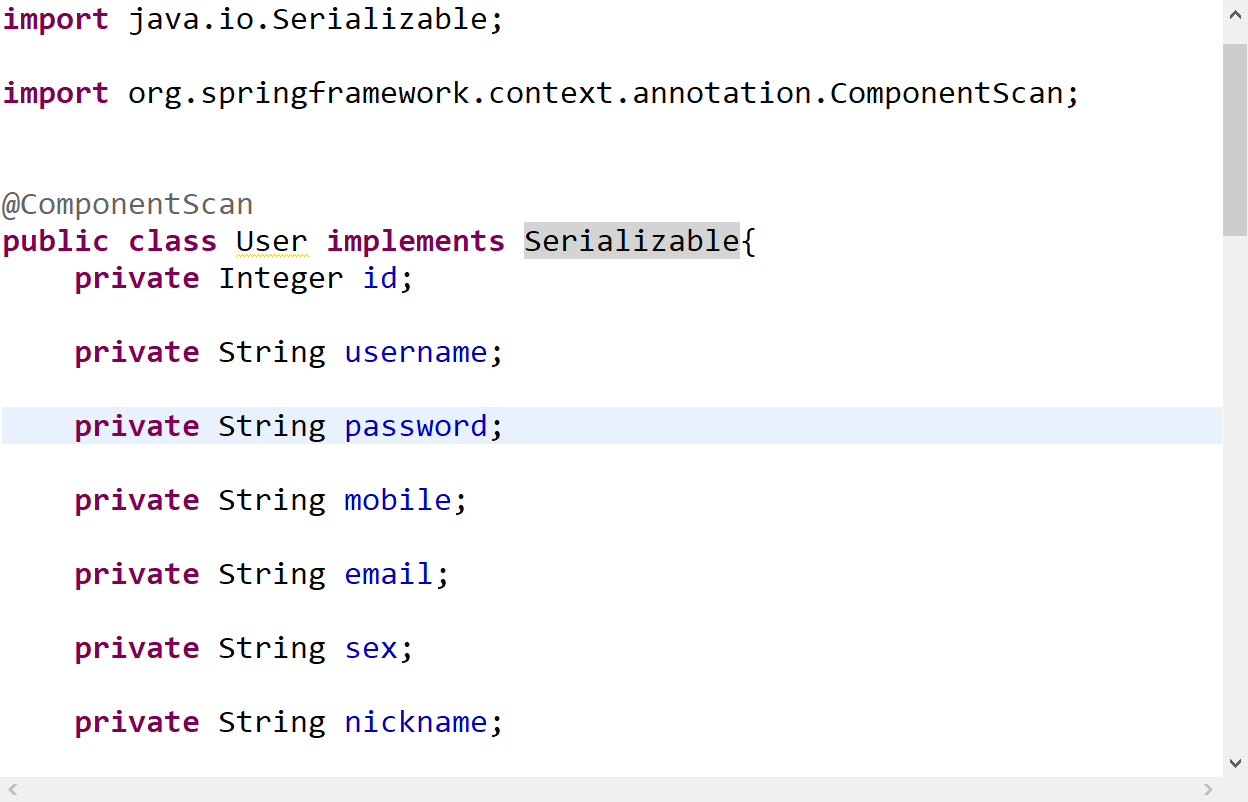
三、实体类中一定要实现序列化。否则会报错。
四、新建一个redisConfig配置类
1、加上注解@Configuration和@EnableCaching
package com.tt.springboot.config;
import org.springframework.beans.factory.annotation.Value;
import org.springframework.cache.annotation.CachingConfigurerSupport;
import org.springframework.cache.annotation.EnableCaching;
import org.springframework.cache.interceptor.KeyGenerator;
import org.springframework.context.annotation.Bean;
import org.springframework.context.annotation.Configuration;
import org.springframework.data.redis.connection.RedisConnectionFactory;
import org.springframework.data.redis.core.RedisTemplate;
import org.springframework.data.redis.core.StringRedisTemplate;
import org.springframework.data.redis.serializer.Jackson2JsonRedisSerializer;

import com.fasterxml.jackson.annotation.JsonAutoDetect;
import com.fasterxml.jackson.annotation.PropertyAccessor;
import com.fasterxml.jackson.databind.ObjectMapper;


/**
 * Redis缓存配置类
 * @author szekinwin
 *
 */
@Configuration
@EnableCaching
public class RedisConfig extends CachingConfigurerSupport{

    @Value("${spring.redis.host}")
    private String host;
    @Value("${spring.redis.port}")
    private int port;
    @Value("${spring.redis.password}")
    private String password;

    //自定义缓存key生成策略
    @Bean
    public KeyGenerator keyGenerator() {
        return new KeyGenerator(){
            @Override
            public Object generate(Object target, java.lang.reflect.Method method, Object... params) {
                StringBuffer sb = new StringBuffer();
                sb.append(target.getClass().getName());
                sb.append(method.getName());
                for(Object obj:params){
                    sb.append(obj.toString());
                }
                return sb.toString();
            }
        };
    }
    //缓存管理器
//    @Bean
//    public CacheManager cacheManager(@SuppressWarnings("rawtypes") RedisTemplate redisTemplate) {
//        RedisCacheManager cacheManager = new RedisCacheManager(null, null);
//        //设置缓存过期时间
//        cacheManager.setDefaultExpiration(10000);
//        return cacheManager;
//    }
    @Bean
    public RedisTemplate<String, String> redisTemplate(RedisConnectionFactory factory){
        StringRedisTemplate template = new StringRedisTemplate(factory);
        setSerializer(template);//设置序列化工具
        template.afterPropertiesSet();
        return template;
    }
     private void setSerializer(StringRedisTemplate template){
            @SuppressWarnings({ "rawtypes", "unchecked" })
            Jackson2JsonRedisSerializer jackson2JsonRedisSerializer = new Jackson2JsonRedisSerializer(Object.class);
            ObjectMapper om = new ObjectMapper();
            om.setVisibility(PropertyAccessor.ALL, JsonAutoDetect.Visibility.ANY);
            om.enableDefaultTyping(ObjectMapper.DefaultTyping.NON_FINAL);
            jackson2JsonRedisSerializer.setObjectMapper(om);
            template.setValueSerializer(jackson2JsonRedisSerializer);
     }
}
五、service的实现类上的操作
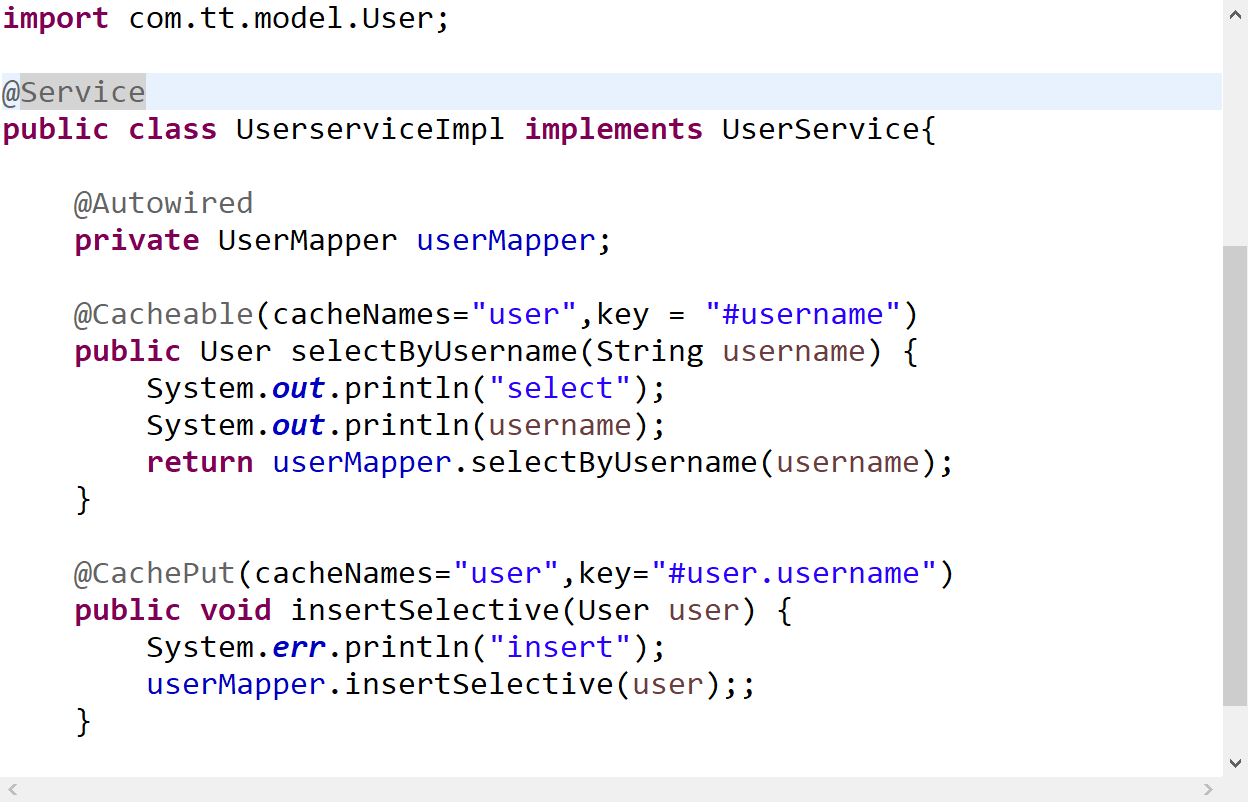
@Cacheable将查询结果缓存到redis中,(key="#p0")指定传入的第一个参数作为redis的key。
@CachePut,指定key,将更新的结果同步到redis中
@CacheEvict,指定key,删除缓存数据,allEntries=true,方法调用后将立即清除缓存
注:仅作为个人学习回顾,见解不到位还请见谅。

 浙公网安备 33010602011771号